
PUBG MOBILE UC Top-Up Complete Guide: UID, Payment, Delivery and Safety

PUBG MOBILE UC top-up is easiest to manage when each step is separated: account details, package choice, payment, order status, delivery, and in-game balance check. Most problems come from mixing those steps together. A payment screen does not always mean delivery is complete. A completed order still needs the correct UID. A limited event can make players rush into duplicate orders before the first result is clear.
The safest route is to decide the UC target before checkout. Royale Pass, crates, collaboration events, shop outfits, vehicle skins, and gun-skin upgrades do not need the same budget. First-time buyers should usually test the flow with a smaller package, while event buyers should check the event end time, reward path, and stop-loss budget before paying.
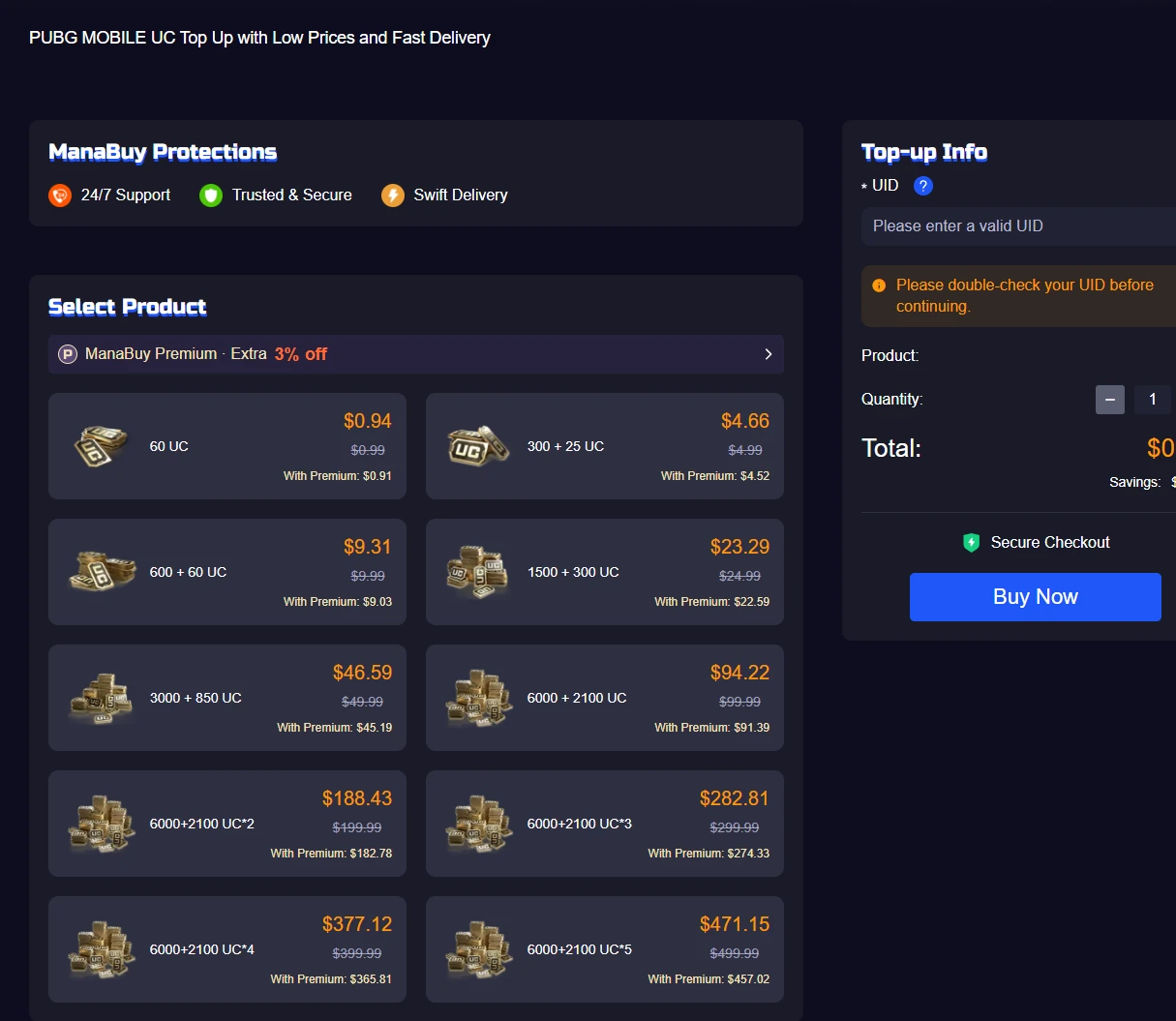
Full UC Top-Up Flow
A clean UC order has six separate checks. Do them in order, especially when the UC is for a Royale Pass, timed collaboration, crate draw, vehicle skin, or gun-skin upgrade. Rushing from package choice to repeated payment is the main reason small issues become larger support cases.
| Step | What to confirm | Why it matters |
|---|---|---|
| 1. Target | Royale Pass, crate, collaboration event, outfit, vehicle skin, gun skin, or account test. | The target decides package size and whether a small test order is better than a large order. |
| 2. UID | Numeric UID from the PUBG MOBILE profile, checked digit by digit. | UID mistakes affect the destination account and are harder to resolve after payment. |
| 3. Region | Region/server display, currency, and package availability. | Region differences can affect which package or checkout option is available. |
| 4. Package | Total UC, bonus UC, checkout amount, and whether the amount matches the reward plan. | A bigger package is not automatically better if the goal only needs a smaller amount. |
| 5. Payment | Payment method, provider result, order time, and final amount. | Pending or failed payment should be resolved before another order is placed. |
| 6. Delivery | Order status, game restart, in-game UC balance, and support evidence if needed. | Delivery checks should happen after payment and order status are clear. |
Before You Top Up PUBG MOBILE UC
UC is useful only when it matches a clear target. A Royale Pass upgrade is predictable because the tier path is visible. A crate or lucky draw is less predictable because rewards may depend on random pulls. A collaboration event may use special tokens, prize paths, or date-limited rewards. Treat those cases differently before buying UC.
Know whether the UC is for Royale Pass, crates, a skin event, a collaboration reward, or a small account test.
Copy the numeric UID from PUBG MOBILE and check any region or server display before checkout.
Confirm payment method, checkout total, event deadline, and whether the order must complete before a reward expires.
UID, Region and Account Safety
PUBG MOBILE top-up depends on the account identifier. That makes the UID the most important detail in the order. A nickname is not enough, a blurred screenshot can be risky, and one wrong digit can turn a simple purchase into a support case.
The PUBG MOBILE UID guide explains where to find the UID and how to avoid nickname-only mistakes. For region and server display differences, check the PUBG MOBILE Region and Server Guide before paying.
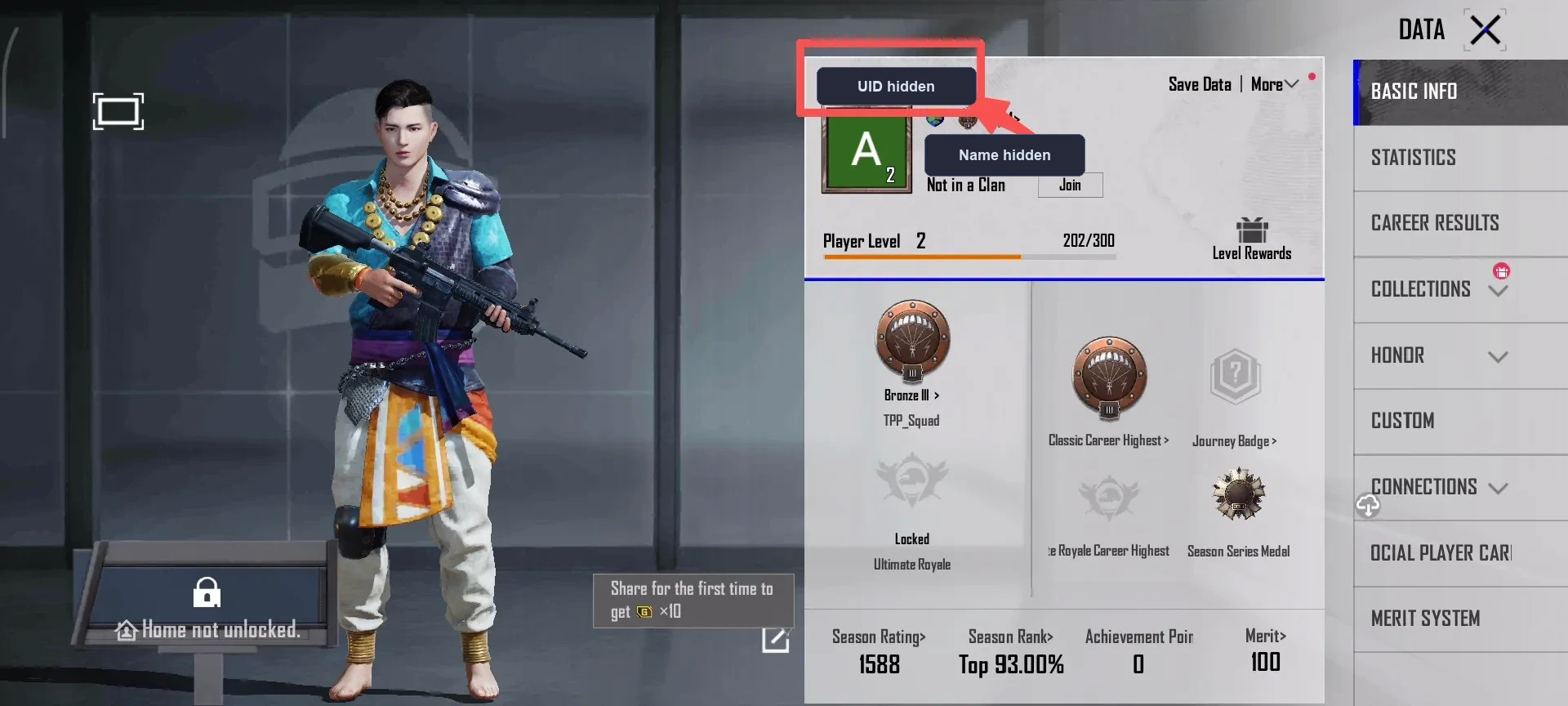
Common UID and Region Mistakes
UID and region mistakes can be harder to fix than a slow payment screen because they affect the destination account. Treat this as the final account check before choosing a package.
| Mistake | Why it matters | Better check |
|---|---|---|
| Using nickname instead of UID | Nicknames can repeat, change, or include symbols that do not identify the account reliably. | Copy the numeric UID from the in-game profile. |
| Reading a blurred screenshot | One unclear digit can send the order into a support investigation. | Type or paste the UID from a clear profile view, then check every digit again. |
| Ignoring region display | Currency, checkout display, and package availability can differ by region. | Check region and server notes before choosing the package. |
Choose the Right UC Package
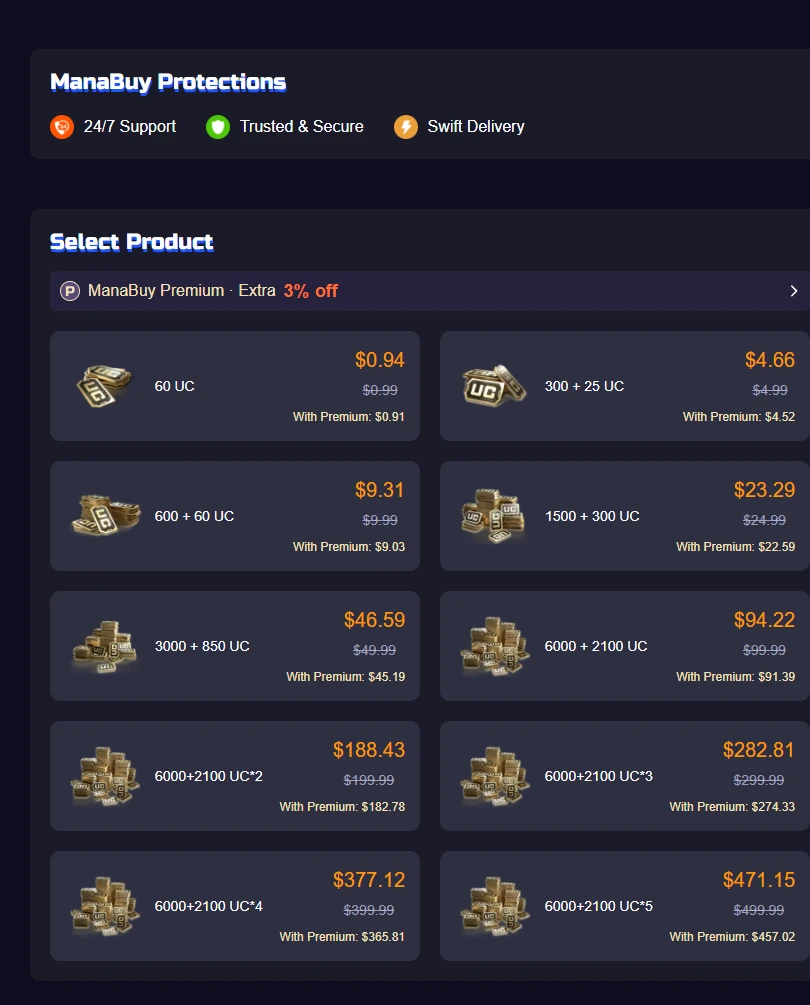
UC package choice should come from the reward target, not from guesswork. A player buying a Royale Pass may need a predictable amount. A crate buyer needs a stop-loss budget. A collaboration-event buyer should check prize paths, draw rules, token requirements, and event dates before deciding how much UC to buy.
| Buying goal | Package logic | Detailed check |
|---|---|---|
| Royale Pass | Choose enough UC for the pass tier you actually plan to unlock. | PUBG Mobile Royale Pass Guide |
| Crates and draws | Set a maximum UC limit before drawing because rewards may be random. | Crate and Lucky Draw UC Budget Guide |
| Events and skins | Check event dates, prize path, reward pool, and whether the item is worth the budget. | PUBG MOBILE UC Budget Plan |
| Package comparison | Compare total UC, bonus UC, checkout total, and currency before paying. | UC Packages and Bonus UC Guide |
After UID, region, reward target, and budget are clear, choose the UC package from the available package list. For a first order, a smaller package can confirm the flow. For a Royale Pass or timed event, choose the package that covers the target without forcing extra random draws.





Package Strategy by Player Type
The same UC package can be a good choice for one player and a poor choice for another. A Royale Pass player values predictable tier rewards. A crate collector needs a hard stop. A collaboration fan may care most about event deadlines and special tokens.
| Player type | Best UC logic | Risk control |
|---|---|---|
| First-time buyer | Start small to confirm UID, payment, and delivery before buying more. | Do not stack orders until the first one is complete and visible in game. |
| Royale Pass buyer | Buy around the pass tier or upgrade path you actually plan to finish. | Check season time left before upgrading late. |
| Event drawer | Set a UC ceiling before opening crates, spins, or lucky draws. | Stop when the budget is reached, even if the target reward has not appeared. |
| Collector | Compare outfit, vehicle, gun-skin, and upgrade-material value before buying. | Avoid buying only because a reward is limited if it does not fit your account goals. |
Payment and Checkout Checks
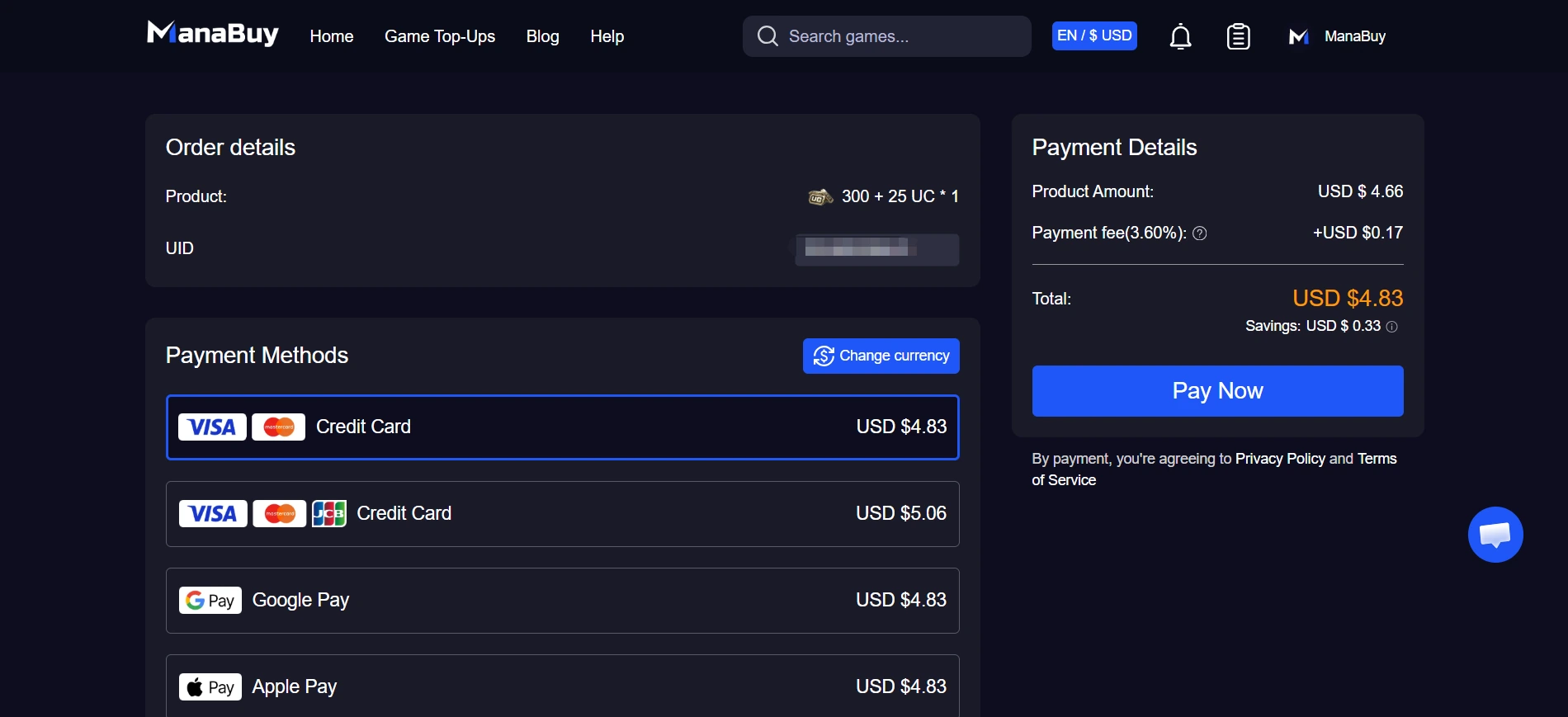
Payment confirmation and UC delivery are connected, but they are not the same step. A checkout screen, wallet screen, card app, or bank record may show payment activity before the top-up order is fully completed. If payment fails, expires, or stays pending, resolve that first instead of placing duplicate orders.
The PUBG MOBILE UC Payment Failed guide covers card, PayPal, wallet, currency, and retry checks. Before contacting support, prepare the payment method, order time, product name, checkout amount, and any visible error message.
Order Status and What It Means
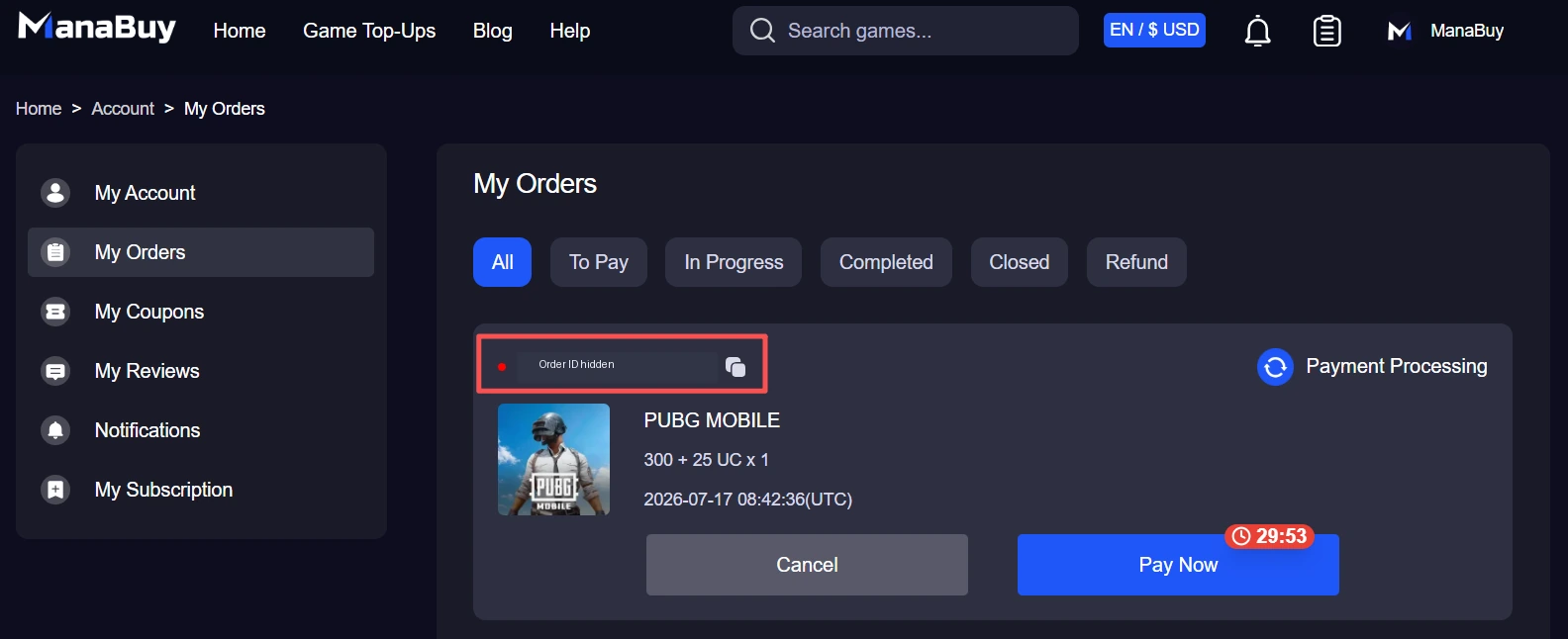
Many support cases become clearer when payment status and order status are separated. A payment can be pending while the order waits. A payment can fail before delivery starts. A completed order can still need a game refresh before UC appears.
| Status signal | Meaning | Next action |
|---|---|---|
| Payment pending | The provider, card, wallet, or bank has not confirmed the payment result yet. | Check the payment app or bank record before retrying. |
| Payment failed | The order may not be ready for delivery because payment did not complete. | Resolve payment first, then start a clean checkout if needed. |
| Order processing | Payment may be confirmed, but delivery is still underway. | Wait and keep the order number. Do not place a duplicate order too quickly. |
| Order completed | The top-up flow says delivery is complete. | Restart PUBG MOBILE, check UC balance, then gather evidence if UC is still missing. |
Delivery Time and Missing UC
After payment succeeds, the order still needs to complete. If the order is still processing, wait and avoid repeating the same purchase too quickly. If the order is completed but UC does not appear in game, restart PUBG MOBILE, check the balance again, and compare the submitted UID with the profile UID.
| Situation | What to do | Avoid |
|---|---|---|
| Payment pending | Check the payment provider, wallet, card app, or bank record first. | Do not assume UC is missing before payment is confirmed. |
| Order processing | Wait for completion and keep the order number visible. | Do not place duplicate orders in a rush. |
| Completed but UC missing | Restart PUBG MOBILE, recheck UC, compare UID, then contact support with evidence. | Do not edit screenshots or hide account/order details needed for verification. |
For a deeper troubleshooting route, use the PUBG MOBILE UC Not Received guide. It explains order status, balance refresh, UID checks, delay cases, and what evidence helps support resolve the case.
Support Evidence Packet
If UC is still missing after a completed order, support can move faster when the case is clean. The goal is to prove four things: which order was placed, which payment was used, which account was submitted, and what the in-game UC balance shows after refresh.
Order number, product name, UC package, order time, and current order status.
Payment method, checkout amount, payment time, and any provider confirmation or error message.
Clear PUBG MOBILE profile screenshot showing UID and a current UC balance screenshot after restarting the game.
First-Time Top-Up Checklist
First-time buyers should keep the first order simple. Choose a smaller package, confirm the UID carefully, use a payment method you can verify, and wait for the order result before buying again. This lowers the risk of duplicate payments and makes any support case easier to trace.
- Open PUBG MOBILE and copy the UID directly from the profile.
- Check whether the reward target needs UC today or can wait.
- Compare package size, bonus UC, and checkout amount.
- Confirm payment method and currency before paying.
- Keep the order number and payment time until UC appears in game.
- Restart the game before reporting missing UC.
Safety and Scam Checks
Be careful with free UC generators, password requests, unrealistically cheap offers, and links that ask for login credentials. A normal top-up should not need your game password. Official in-game events may offer free tasks or rewards, but third-party "generator" claims are a common risk signal.
The PUBG MOBILE Free UC and Scam Check Guide explains safer boundaries around free UC claims, event rewards, password safety, and too-cheap offers.
Which PUBG MOBILE Check Solves Each Problem
Different top-up problems need different checks. UID issues belong before payment. Package and budget questions belong before checkout. Payment failures need provider and retry checks. Missing UC belongs after payment and order status are clear.
| Question | Detailed check | Why |
|---|---|---|
| Where is my UID? | UID guide | Prevents account-entry mistakes before checkout. |
| Which package is better? | UC package guide | Compares package size, bonus UC, and cost logic. |
| Payment failed? | Payment failed guide | Separates declined, pending, expired, and retry cases. |
| UC missing? | UC not received guide | Focuses on delivery status, balance refresh, and support evidence. |
Related Guides for PUBG MOBILE UC
- How to Find Your PUBG MOBILE UID Before Topping Up UC
- PUBG MOBILE UC Packages on ManaBuy
- PUBG MOBILE UC Payment Failed Checks
- PUBG MOBILE UC Not Received Guide
- PUBG MOBILE Free UC and Scam Check Guide
PUBG MOBILE UC Top-Up FAQ
What information do I need for PUBG MOBILE UC top-up?
You usually need the numeric PUBG MOBILE UID and the package you want to buy. Keep login passwords private. If support is needed later, prepare the order number, payment time, product name, UID screenshot, and balance screenshot.
How do I choose the right UC package?
Start with the reward target. Royale Pass, crates, event draws, outfits, and gun-skin upgrades can require different budgets. Compare total UC, bonus UC, checkout price, and your stop-loss limit before paying.
What should I do if payment fails?
Check whether the payment expired, stayed pending, was declined, or was blocked by the provider. Do not retry repeatedly until you understand whether the first payment attempt actually succeeded.
What should I do if UC does not arrive?
First confirm payment and order status. If the order is complete, restart PUBG MOBILE, check UC again, compare the submitted UID, then contact support with order details and clear screenshots.
Should first-time buyers start with a small package?
A smaller first order can be easier to verify. Once UID, payment, and delivery are confirmed, larger UC packages become easier to plan around Royale Pass, events, or skin budgets.
Final Top-Up Check
Do not rush UC orders around events or crates. Confirm the UID, region, package, checkout amount, payment result, and delivery status in that order. If anything looks unclear, pause before buying again. A clean top-up flow is less about speed and more about matching the right UC package to the right account and reward target.


Copyright © FUTURE OUTLOOK TECHNOLOGY LIMITED.Company Registration No.: 77374965 All rights reserved.UNIT 135,1/F.,143 WAI YIP STREET,KWUN TONG HK