


Marvel Rivals Lattice Top Up – Low Prices and Fast Delivery



Select Product






Top-up Instructions
Buy cheap Marvel Rivals Lattice on ManaBuy and top up the account you play on using your UID only. No game account password is required. Choose your Lattice pack, enter your UID, and complete payment to add premium currency to your account.
Marvel Rivals Top-up Information
| Applicable Platform | Windows / PlayStation 5 / Xbox Series X|S |
|---|---|
| Top-up Method | Direct top-up |
| Required Information | Marvel Rivals UID only; no game account password |
| Delivery Time | Usually delivered within 30 seconds to 1 minute after successful payment. Delivery may take longer in exceptional cases. |
UID and Delivery Rules
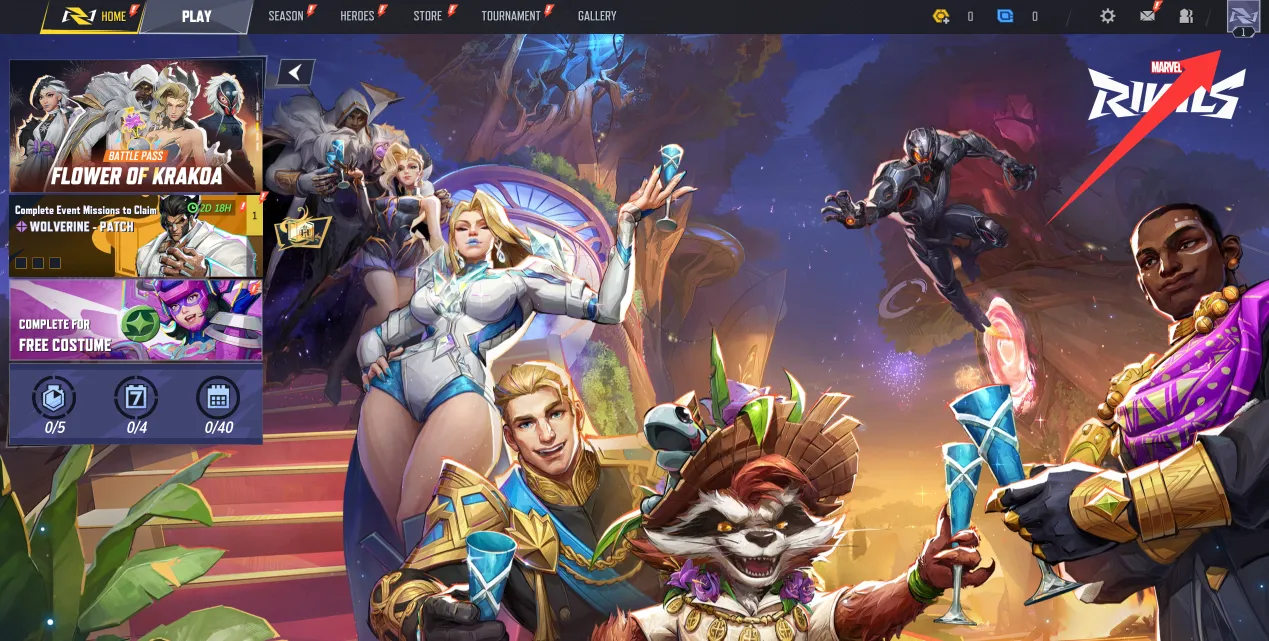
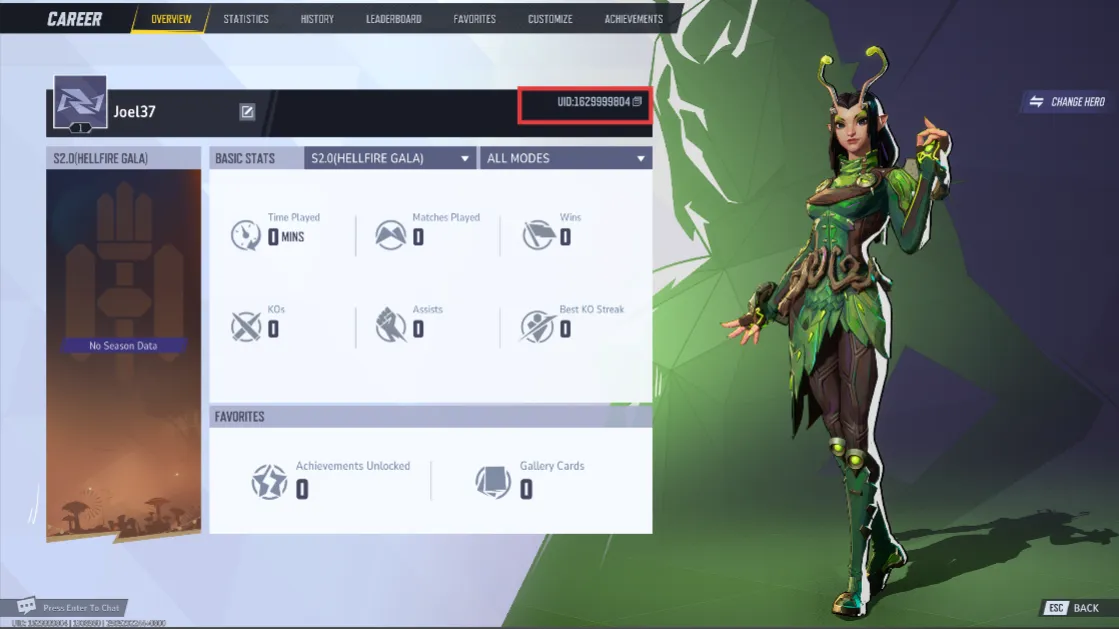
Copy the UID from your in-game profile and check it before payment. Your player name is not a substitute for your UID.
If a top-up fails, ManaBuy will refund the payment to the original payment method. If an order is successfully delivered to another account because an incorrect UID was entered, it cannot be refunded or recovered.
Top-up Guide
How to Top Up Marvel Rivals Lattice on ManaBuy
Follow these steps to buy Lattices for your Marvel Rivals account.
How to Find Your Marvel Rivals UID
Product Description
About Marvel Rivals
Marvel Rivals is a free-to-play, 6v6 team-based shooter that brings Marvel heroes and villains into the same battle. Build a squad of Vanguards, Duelists, and Strategists, combine abilities through Team-Ups, and adapt as destructible environments change the fight. Whether you lead the push or keep teammates alive, your hero choice and coordination shape each match.
For players who want a new look for a favorite hero or rewards from a Luxury Battle Pass, ManaBuy offers an affordable way to recharge Marvel Rivals Lattice. Choose and pay for a Lattice pack on ManaBuy; after the Lattice is delivered to your UID, use it in Marvel Rivals for the eligible cosmetic or Luxury Battle Pass you want. This lets you plan the purchase around what you actually intend to use.
What Is Marvel Rivals Lattice?
Lattice is the gold premium currency in Marvel Rivals. When you buy a Marvel Rivals Lattice pack on ManaBuy, the selected amount is delivered directly to the account linked to your UID. It does not automatically purchase a costume or activate a Battle Pass. Lattice is different from the blue Units used in the cosmetic store and the Chrono Tokens used to redeem Battle Pass rewards.
What Can You Use Lattice For?
Costumes and cosmetic bundles. Exchange Lattice for Units at a 1:1 rate to buy eligible store cosmetics, including costumes, MVP animations, emotes, sprays, and nameplates. These purchases change your appearance, not your hero’s combat stats.
Luxury Battle Pass. Use Lattice to buy an available Luxury Battle Pass in the game. Once purchased, the pass does not expire, so you can continue unlocking its rewards in later seasons.
Battle Pass reward progress. Chrono Tokens redeem pass rewards, and Lattice can be used to obtain additional tokens. Buying the pass and claiming its rewards are separate steps; topping up does not unlock every reward at once.
How Much Lattice Should You Buy?
Start with the item you want. For a cosmetic priced in Units, check your existing Units before calculating the remaining amount. For a Luxury Battle Pass, check its Lattice price and your current Lattice balance. Then choose a pack that covers the shortfall. A smaller top-up may be enough for one purchase; a larger pack makes sense when you already have several purchases planned.
Why Buy Marvel Rivals Lattice on ManaBuy?
Low prices for the purchases you want. ManaBuy offers cheap Marvel Rivals Lattice packs so you can spend less on your next in-game purchase. Compare the available pack prices against the amount you need, whether you are saving for a favorite hero’s costume or buying a Luxury Battle Pass.
Direct delivery with your UID. There is no need to share your game login or password. Your UID identifies the account receiving the Lattice, keeping the top-up process simple. Usually delivered within 30 seconds to 1 minute after successful payment. Delivery may take longer in exceptional cases.
Convenient payment choices. Pay with a credit card, Google Pay, or Apple Pay where available. Payment-method icons appear on the product page; the final amount payable is shown after you select a payment method at checkout. Review that amount before paying.
Help with your order. If you need assistance with payment or delivery, contact ManaBuy’s 24/7 customer support with your order number. The team can help check the order and its delivery status, so you do not have to place a second order just to find out what happened.
More Marvel Rivals Guides
Need help turning hero roles into a balanced six-player lineup? Read our Marvel Rivals team composition guide, then explore more Marvel Rivals guides on ManaBuy.
FAQ
Is it safe to buy Marvel Rivals Lattice on ManaBuy?
Can I Top Up My Marvel Rivals Account from Any Device on ManaBuy?
How long does a Marvel Rivals Lattice top-up take?
Where can I find cheap Marvel Rivals Lattice on ManaBuy?
What should I do if my Lattice has not arrived?
Which payment methods can I use for a Marvel Rivals top-up?
Can I get a refund if I enter the wrong UID?
Can I use this top-up to buy a Marvel Rivals Battle Pass?
Is buying Lattice the same as buying Units?
User Reviews
View All


Related Articles

Marvel Rivals Endgame PvE Guide: 50 Players and Free Captain America Skin
Marvel Rivals October 2026 Events: All Hallows’ Glow, Free Trash King, and Pop & Win






Copyright © FUTURE OUTLOOK TECHNOLOGY LIMITED.Company Registration No.: 77374965 All rights reserved.UNIT 135,1/F.,143 WAI YIP STREET,KWUN TONG HK