
PUBG MOBILE Region and Server Guide for UC Top-Up

Region and server questions matter before a PUBG MOBILE UC top-up because checkout is not only about choosing the biggest package. On ManaBuy, the PUBG MOBILE page can look different by language, currency, package display and local payment options, while the delivery rules stay consistent. If you mix those up, the order can be delayed, the payment method may not show, or the UC may be sent to the wrong UID.
On ManaBuy, PUBG MOBILE UC top-up is built for PUBG MOBILE International Server accounts and uses a UID-based flow. That means you do not need to share your game password. The safer buying habit is simple: confirm your server, copy your PUBG MOBILE UID from the in-game profile, switch ManaBuy to the language and currency you want, then check the final package, price, Premium discount display and payment option before paying.

Quick answer: You do not need a different PUBG MOBILE server for each country or language page. On ManaBuy, the core requirement stays the same: PUBG MOBILE International Server, Android/iOS support, UID required and no game password. What changes is the page and checkout view: selected language, USD/JPY/EUR/BRL price display, Premium savings text and payment methods such as PayPay or Pix. Server and UID decide delivery; language and currency decide what checkout looks like.
PUBG MOBILE Region vs Server: What Actually Changes?
Players often use region, server, currency and language as if they mean the same thing. For top-up, they are different checks. Your PUBG MOBILE server decides whether the UC top-up fits the account. Your UID identifies the exact account that receives UC. ManaBuy language and currency decide how prices and PUBG MOBILE payment methods are displayed. Your payment environment can affect which local wallets, cards or mobile payments are available.
The PUBG MOBILE page supports PUBG MOBILE International Server. If you use a different game version or regional app, do not assume the same UID flow will fit.
The UID is the delivery target. Copy it from your in-game profile and check every digit before checkout, especially when topping up for a friend.
Currency changes how prices are shown and can change which payment methods appear. It does not replace the need for a correct UID.
Cards, wallets and local payment methods may vary by currency, game configuration and device environment. Always judge by the final checkout page.
5 Checks Before You Buy PUBG MOBILE UC
Use this order when you are not sure whether your region, server or payment choice is correct. It keeps the important account checks ahead of the spending decision.
Confirm the supported server.
PUBG MOBILE UC on ManaBuy is for PUBG MOBILE International Server accounts, not every PUBG-branded app or regional version.
Copy your UID.
Open PUBG MOBILE, tap your avatar, and copy the UID directly from the profile screen.
Set language and currency.
Use the ManaBuy language/currency switch before comparing package prices or payment options.
Choose the UC package.
Read the full package name. A package such as 300 + 25 UC means total UC is higher than the base number. For broader planning, compare package sizes in the PUBG MOBILE UC budget guide.
Check final payment.
Only pay after the method you want appears and the final total matches the currency you expect.
ManaBuy PUBG MOBILE Top-Up Info
The key details are straightforward: the flow is UID based, works for Android and iOS players on the supported server, and usually delivers quickly after payment. Treat these details as the purchase checklist, not just page copy.
| Top-up item | What to check | Player tip |
|---|---|---|
| Applicable platform | Android and iOS | You can place the order by account UID, not by logging into the game through ManaBuy. |
| Applicable server | PUBG MOBILE International Server | If you are unsure whether your app version matches, pause before paying and confirm with support. |
| Required information | PUBG MOBILE UID | Do not type from memory. Copy from the profile screen and check the digits again before payment. |
| Delivery time | Typically within minutes, often faster | During peak periods, payment review or game maintenance, allow a little extra time before opening a support ticket. |
| Password needed? | No game password is required | A UID top-up should never ask you to share your PUBG MOBILE login password. |
What Changes Across Country and Region Pages
Different country and language pages are useful because they separate two things players often confuse. They do not create separate PUBG MOBILE server versions; they localize the same top-up flow for different readers, currencies and payment habits. The table below shows when each page is useful, while the next table keeps UC package examples separate so the prices do not read like fixed promises.
| Pubgm Uc Page | Language and currency role | Repeated top-up details | How to use the page |
|---|---|---|---|
| English / USD | English page with USD selected | Android and iOS, PUBG MOBILE International Server, UID required, delivery usually within minutes, Premium extra 3% off shown on package cards. | Use this as the default English reference, but switch currency if the player needs local-country package display. |
| Japanese / JPY | Japanese page with JPY selected | Same UID-based International Server flow, localized Japanese guidance and JPY package display. | Use it when a player needs Japanese language plus JPY package display or Japan-friendly payments such as PayPay. |
| Spanish / EUR German / EUR French / EUR Italian / EUR |
Spanish, German, French or Italian pages with EUR selected | Same supported platform, same International Server requirement, same UID delivery logic and localized top-up steps. | Use the language that matches the player and confirm EUR is the intended currency; these pages are not separate server compatibility signals. |
| Portuguese / BRL | Portuguese page with BRL selected | Same PUBG MOBILE UID flow, Portuguese page text and BRL package display. | Use it when Portuguese language, BRL package display and Pix-style local payment planning matter. |
The practical takeaway is simple: to see UC packages for your own country, switch both the page language and the checkout currency. Language helps you read the page; currency changes the package price display and can affect which payment methods appear. Neither change removes the need to check the PUBG MOBILE International Server note or paste the correct UID.
UC Package Examples for Different Countries and Regions
The UC amounts below are example package displays from ManaBuy PUBG MOBILE pages. They are useful for comparing how the same package names can appear under different language and currency settings. For the latest package list, Premium savings and checkout total, always refer to the live page before paying.
| UC package | English / USD | Japanese / JPY | Spanish, German, French, Italian / EUR | Portuguese / BRL |
|---|---|---|---|---|
 60 UC 60 UC |
$0.90 | ¥147.25 | €0,80 | R$5.21 |
 300 + 25 UC 300 + 25 UC |
$4.41 | ¥717.25 | €3,91 | R$25.50 |
 600 + 60 UC 600 + 60 UC |
$8.78 | ¥1,426.89 | €7,78 | R$50.73 |
 1500 + 300 UC 1500 + 300 UC |
$21.99 | ¥3,570.10 | €19,46 | R$126.96 |
 3000 + 850 UC 3000 + 850 UC |
$44.03 | ¥7,148.75 | €38,97 | R$254.20 |
 6000 + 2100 UC 6000 + 2100 UC |
$88.01 | ¥14,288.00 | €77,89 | R$508.11 |
How Currency Changes Payment Options
Many payment questions are really currency-display questions. If you switch from USD to EUR, JPY, BRL or another local currency, the price presentation and available methods can change. The exact checkout screen can also vary by device and payment environment, so use the table as a planning guide and trust the final checkout page before paying.
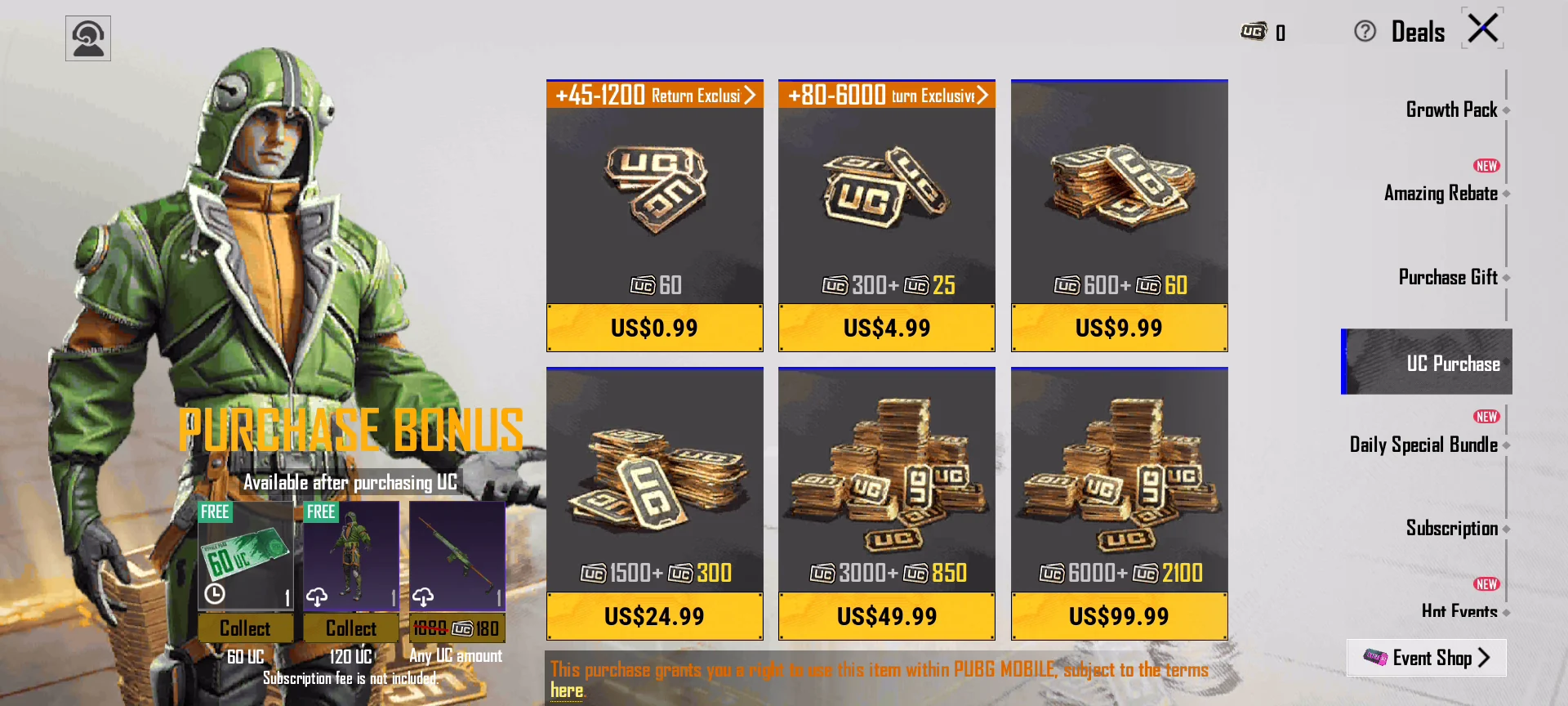
An in-game UC page can show prices such as US$0.99, US$4.99 and US$9.99. Use it as a currency display example, not as a permanent price promise, because packages and bonuses can change.
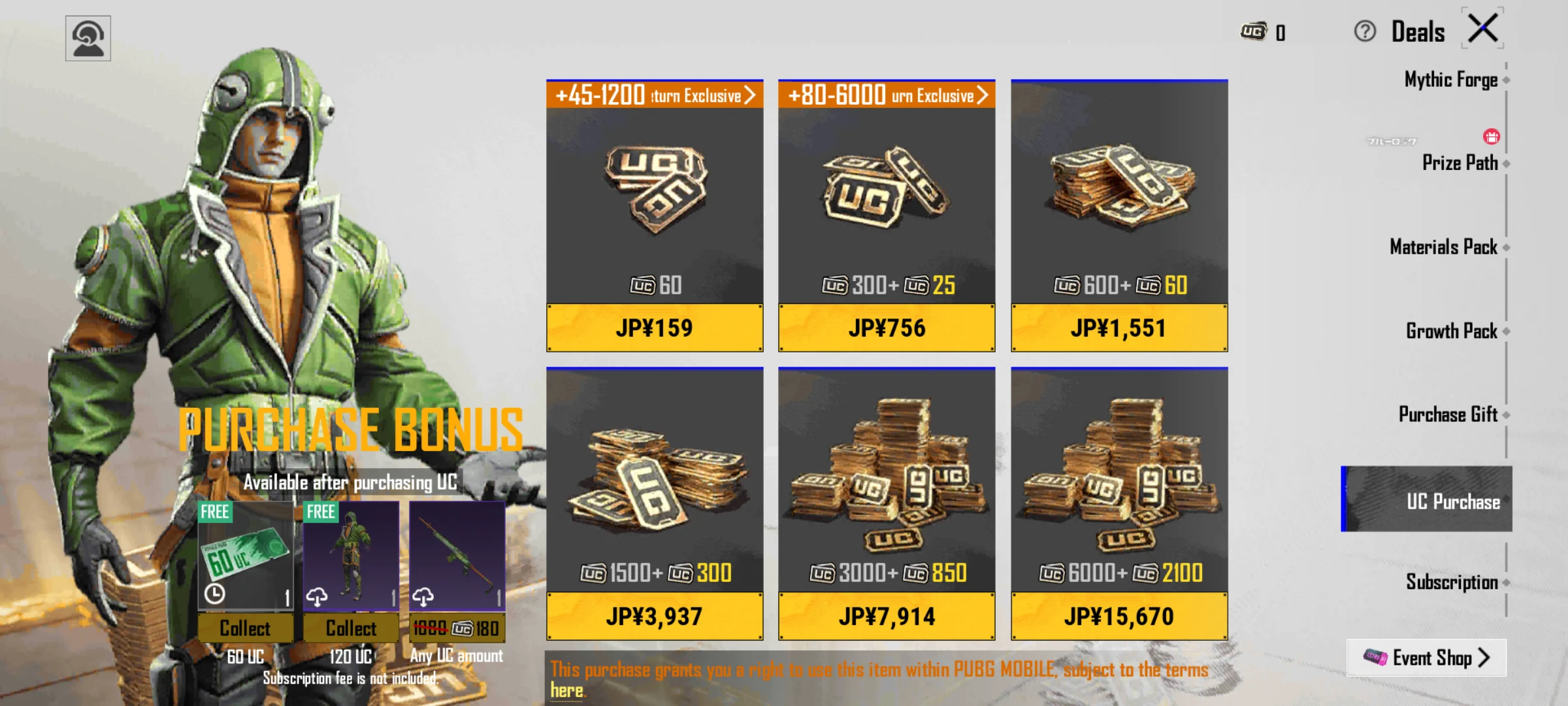
When the checkout currency is JPY, the package screen and final payment list can feel different from the USD page. Use the screenshot as a currency display example, then use the payment table below to compare actual method families.
| Currency | Typical checkout context | Payment methods that may appear |
|---|---|---|
| USD | English / USD checkout |  Visa Visa Mastercard Mastercard JCB JCB Google Pay Google Pay Apple Pay Apple Pay |
| EUR | European checkout | VisaMastercardJCBGoogle PayApple Pay BANCOMAT Pay BANCOMAT Pay iDEAL iDEAL |
| JPY | Japan-friendly checkout |  PayPayVisaMastercardJCBGoogle PayApple Pay PayPayVisaMastercardJCBGoogle PayApple Pay |
| BRL | Brazil-friendly checkout |  PixVisaMastercardJCB PixVisaMastercardJCB |
| IDR / PHP / KRW | Local-wallet checkout options |  DANA DANA OVO OVO GCash GCash BPI BPI Billease Billease Kakao Pay Kakao Pay NAVER Pay NAVER Pay Samsung Pay Samsung Pay |
If your usual payment method disappears after switching currency, try the currency that matches your payment region first. If the method still does not appear, choose another available method or contact support before placing the order.
What UC Is For After the Top-Up
The descriptions across the language pages explain why players top up UC in the first place: UC is PUBG MOBILE's paid currency for premium items and limited-time offers. That matters for region planning because the best package is not always the largest one; it is the package that fits the item you actually want, the currency you can pay with, and the UID account that should receive the UC.
Check the current in-game Royale Pass price first, then choose a UC package that gets close to the required amount without forcing unnecessary extra spending.
UC can be used for outfits, weapon skins, vehicle skins, backpacks, helmets and other cosmetic looks when they are available in the shop or event rotation.
Spins and crates can consume UC quickly. Before buying, set a limit and compare package totals against your planned pulls or bundle target.
If you are topping up for someone else, the spending plan is secondary to the UID check. The UC goes to the account whose UID is entered at checkout.
Region and Server Mistakes That Cause Delays
Most top-up problems are not complicated. They usually come from a mismatch between the account, server fit and checkout expectation.
How To Top Up PUBG MOBILE UC on ManaBuy
The top-up flow is short, but each step has one check that protects the order.
Open the PUBG MOBILE page.
Use the live PUBG MOBILE UC top-up page and set the language/currency you want.
Select the UC amount.
Choose the package that matches your actual goal, not only the lowest cost per UC.
Enter your PUBG MOBILE UID.
Paste the UID, check the digits and make sure it is the target account.
Choose payment and complete checkout.
Review the final total, payment method and order details before paying.
What To Do If UC Does Not Arrive
Most successful UID top-ups arrive quickly, but there are a few normal checks before contacting support. First, confirm the payment succeeded. Then restart PUBG MOBILE and check the UC balance again. If the balance still has not changed, compare the order UID with the UID on your in-game profile. A digit mismatch is more important than the region language you selected.
If the UID is correct and the order still looks delayed, keep the order number ready and contact ManaBuy customer service. Include the target UID, product name, payment status and what you already checked. Clear order details help support identify whether the issue is payment review, delivery queue, game-side delay or an account-detail problem. For a deeper checklist, use the PUBG MOBILE UC not received guide.
Related PUBG MOBILE Guides
- PUBG MOBILE UC Packages on ManaBuy - compare package names, bonus UC and value before choosing a top-up size.
- PUBG MOBILE UC Budget Plan - match UC packages to Royale Pass, events and skins before spending.
- PUBG MOBILE UC Payment Failed? - check card, wallet and payment status issues before paying again.
- How to Top Up PUBG MOBILE UC Safely with UID - review the UID-based checkout flow before your first order.
- PUBG MOBILE Ranked Push Guide - separate gameplay progress from UC spending decisions.
- PUBG MOBILE UC Top Up - check the live page, current currency and payment options.
PUBG MOBILE Region and Server FAQ
Do different ManaBuy language pages mean different PUBG MOBILE servers?
No. Different ManaBuy country and language pages localize the same top-up flow for different readers and currencies. They can change language, currency and checkout context, but delivery still depends on PUBG MOBILE International Server support and the UID entered at checkout.
Which server and delivery details does ManaBuy show?
The ManaBuy PUBG MOBILE page lists PUBG MOBILE International Server as the applicable server and says UC is usually credited within minutes, often faster. If the balance does not update, restart the game, compare the order UID with your in-game UID and contact support with the order number if it still looks delayed.
Why do payment methods change when I switch currency?
Payment methods can vary by selected currency, payment region, device environment and page configuration. For example, USD may show major cards and mobile wallets, JPY may show PayPay, BRL may show Pix, and IDR/PHP/KRW-style checkouts may show local wallet or bank methods.
Do I need my PUBG MOBILE password for UC top-up?
No. The ManaBuy flow is UID based, so you should not share your PUBG MOBILE login password. Enter only the required account identifier shown at checkout and keep your login details private.
Can I top up UC for a friend in another region?
You can top up for a friend if you enter the correct target UID and the account fits the supported PUBG MOBILE product. Ask your friend to copy the UID from the in-game profile before you pay.
Can I rely on the price examples in this guide forever?
No. The USD, JPY, EUR and BRL examples show how the page may display package prices, but package prices, Premium savings, exchange rates and promotions can change. Always confirm the live page and final checkout total before paying.
Final Check
For PUBG MOBILE UC top-up, the safest region rule is simple: server and UID decide delivery, while language, currency and payment region decide what checkout looks like. Confirm the product is for your account, paste the exact UID, choose the currency you want to pay in, and only complete payment when the package and method are clear.



Copyright © FUTURE OUTLOOK TECHNOLOGY LIMITED.Company Registration No.: 77374965 All rights reserved.UNIT 135,1/F.,143 WAI YIP STREET,KWUN TONG HK