
How to Find Your PUBG MOBILE UID Before Topping Up UC

Before buying PUBG MOBILE UC, many players focus on how much UC they need, whether the price is good, or how fast the order will be delivered. But there is one basic detail that is easy to overlook: is your PUBG MOBILE UID correct?
Your UID is an important identifier for your PUBG MOBILE account. When you make a PUBG MOBILE UC top up, the platform usually uses your UID to locate your game account and deliver UC to the right place. If the UID is entered incorrectly, your order may be delayed, require manual checking, or in some cases be sent to the wrong account.
This guide explains what a PUBG MOBILE UID is, how it differs from your in-game nickname, where to find it in the game, and how to continue with your UC top up after confirming your UID.

What Is a PUBG MOBILE UID?
PUBG MOBILE UID is the unique account number linked to your PUBG MOBILE profile. Every PUBG MOBILE account has its own UID, which helps distinguish one player from another. Even if two players use similar nicknames, avatars, or clan names, their UIDs are different.
When topping up UC, the UID helps the system identify the correct game account. Compared with a nickname, a UID is more stable and more suitable for account matching, order checks, and customer support. That is why confirming your UID before placing an order is one of the easiest ways to avoid recharge problems.
How to Find Your PUBG MOBILE UID
Your PUBG MOBILE UID can usually be found on your in-game profile page. The interface may look slightly different depending on your region or version, but the basic path is similar.
Step 1: Open PUBG MOBILE and log in to the correct account
Open PUBG MOBILE and make sure you are logged in to the account you want to top up. If you have switched between guest accounts, social media accounts, email logins, or multiple game accounts on the same device, take a moment to confirm that you are using the right one.
Step 2: Tap your avatar in the top-left corner
After entering the game lobby, tap your player avatar in the top-left corner to open your profile page. This page usually shows your nickname, avatar, level, stats, and account information.
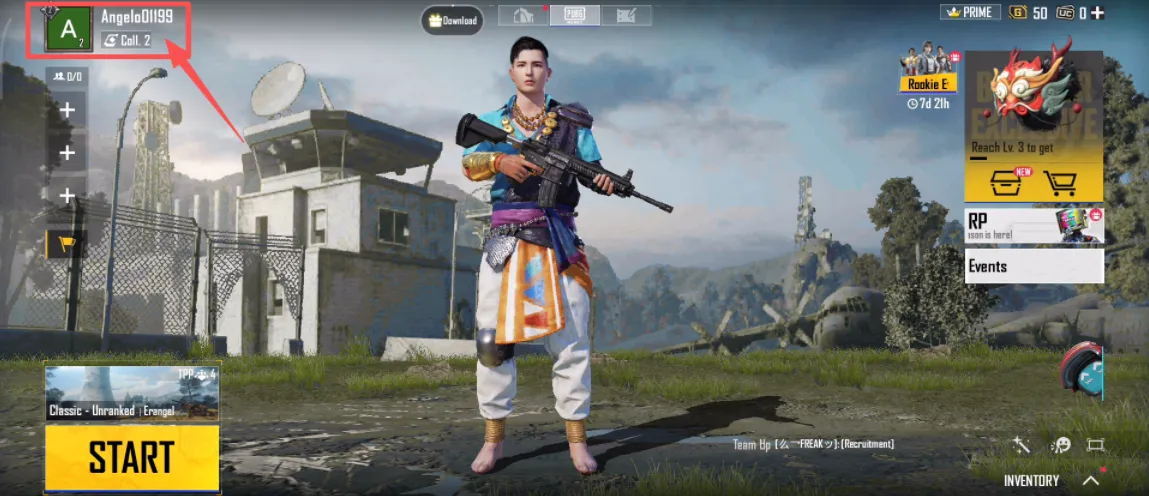
Step 3: Find the UID on your profile page
On the profile page, look for a string of numbers. That number is your PUBG MOBILE UID. It is best to copy it directly if possible, or take a screenshot and check each digit carefully before entering it on the order page.
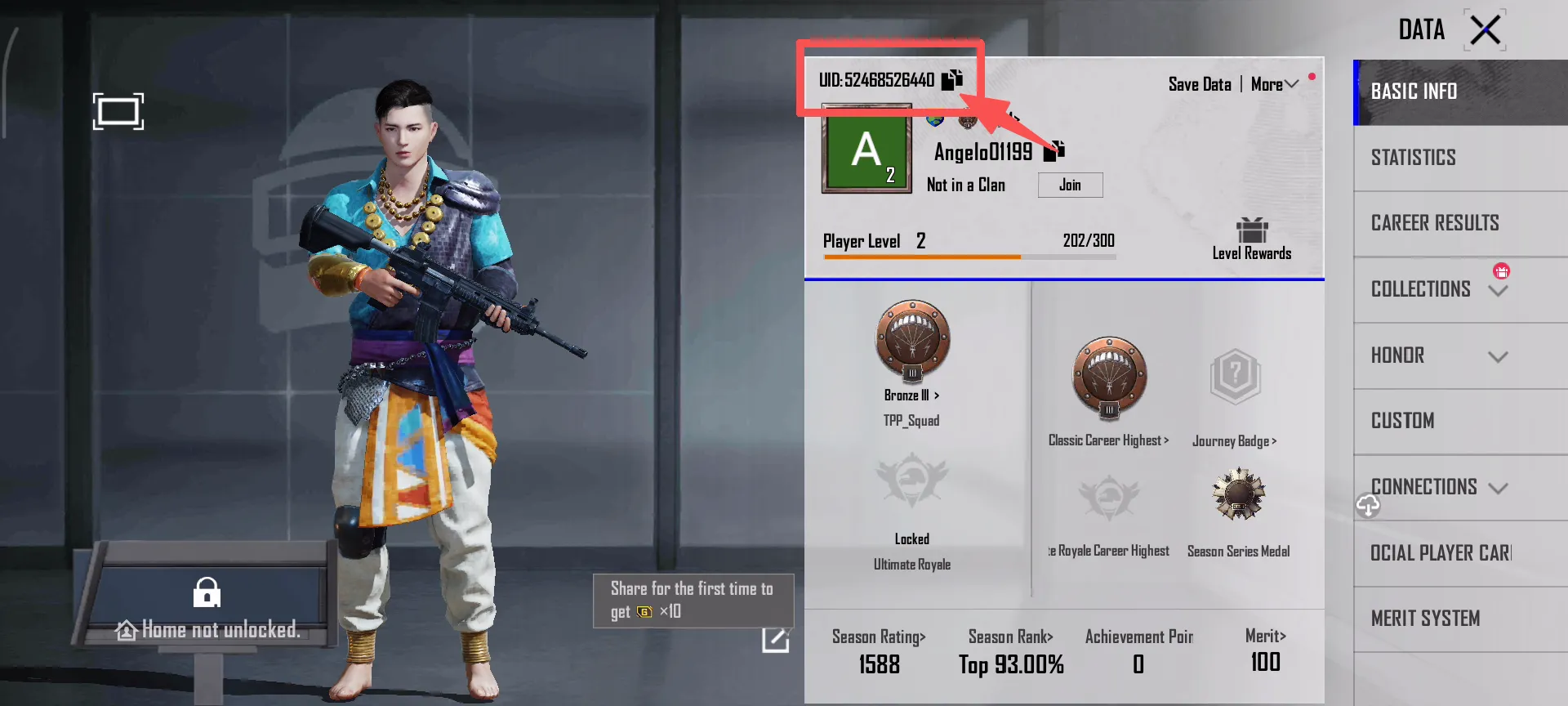
Step 4: Make sure it is the UID, not a nickname or clan name
Some players accidentally enter their nickname, clan name, character name, or another number shown on the screen instead of their UID. To reduce mistakes, only copy your UID from your profile page inside PUBG MOBILE. Avoid using numbers from chat records, friend notes, or unclear screenshots.
PUBG MOBILE UID vs Nickname: What Is the Difference?
Many players confuse their nickname with their UID, but they are used for different purposes.

Your nickname is for display
Your PUBG MOBILE nickname appears in your friend list, team lobby, profile page, and matches. It is the name other players see in the game. A nickname can be changed, and it may look very similar to another player’s name.
Your UID is your unique account number
Your UID is a numeric ID linked to your actual PUBG MOBILE account. Top up platforms rely on UID rather than nickname or avatar because it can identify the account more accurately. With a UID-based top up service like ManaBuy, players usually only need to provide their PUBG MOBILE UID. No game password is required.
If you want to understand why UID-based top up does not usually require a game password, read our PUBG MOBILE UC without login guide.
So, when topping up PUBG MOBILE UC, do not copy only your nickname or guess the account based on the avatar. The safest way is to check your UID directly from your in-game profile page.
What Happens If You Enter the Wrong PUBG MOBILE UID?
If the UID is incorrect, the most common issue is that the order cannot be matched smoothly to the right account. This can slow down delivery and may require customer support to check the order manually.
A more serious case is when the wrong UID belongs to another real player. Since UC is a digital item, once it has been delivered, the situation becomes much harder to handle. Spending a few extra seconds checking your UID before payment is usually much easier than trying to fix the order afterward.
If you realize that you entered the wrong UID, contact ManaBuy customer support as soon as possible. Provide your order number, the correct UID, and any relevant screenshots so the support team can help check the issue more quickly.
What to Do After Finding Your PUBG MOBILE UID
After confirming your PUBG MOBILE UID, you can use it to complete a UID-based PUBG MOBILE UC top up. Before placing an order, make sure the UID belongs to the account you actually want to recharge, and check whether the product page supports your game version or region.
On ManaBuy, PUBG MOBILE UC top up is designed around a UID-based process. This means you only need to provide your PUBG MOBILE UID and do not need to share your game password. After choosing a UC package and completing payment, the UC will be delivered according to the order information.

For a full step-by-step process, read our PUBG MOBILE UC top up guide. It explains how to choose a UC package, enter your UID, complete payment, and check your UC balance after the order is processed.
If your UID is already confirmed, you can go directly to the PUBG MOBILE UC top up page and choose the package you need.
Final Tip: Confirm Your PUBG MOBILE UID Before Buying UC
Your PUBG MOBILE UID is one of the most important details to check before topping up UC. Nicknames can be changed, and avatars may look similar, but the UID is the key information used to identify your account.
Whether you are buying UC for Royale Pass, skins, Lucky Spin, or another limited-time event, open your in-game profile page first and confirm both your UID and account version before placing an order. This can help reduce input mistakes, delivery delays, and order verification issues.
If you have already confirmed your PUBG MOBILE UID, you can continue from the PUBG MOBILE UC top up page on ManaBuy and complete your order with the correct account information.



Copyright © FUTURE OUTLOOK TECHNOLOGY LIMITED.Company Registration No.: 77374965 All rights reserved.UNIT 135,1/F.,143 WAI YIP STREET,KWUN TONG HK