
Do You Need to Log In to Top Up PUBG MOBILE UC?

Many PUBG MOBILE players want to know one thing before buying UC: do you need to log in to your PUBG MOBILE account or provide your password to top up UC?
In most cases, if you use a UID top-up method, you do not need to log in to your PUBG MOBILE account or share your password. You only need to enter the correct PUBG MOBILE UID, choose a UC package, and complete the payment. The order can then be processed based on the UID you provide.
This method is useful for players who do not want to share account details, want a faster PUBG MOBILE UC top up, or want to help a friend recharge UC.

How PUBG MOBILE UID Top Up Works
What Information Do You Need?
When using UID top up, you usually do not need to provide:
- Game account password
- Email verification code
- Phone verification code
- Social media login information
- Third-party account authorization
The most important information you need is the correct PUBG MOBILE UID. UID is used to identify the player account. If the UID is wrong, the UC may not arrive correctly, or it may even be sent to another account.
What Is a PUBG MOBILE UID?
A PUBG MOBILE UID is a unique numeric ID connected to each player account. It is different from your nickname. A nickname can be changed and may look similar to other players’ names, but the UID is used to identify the exact account.
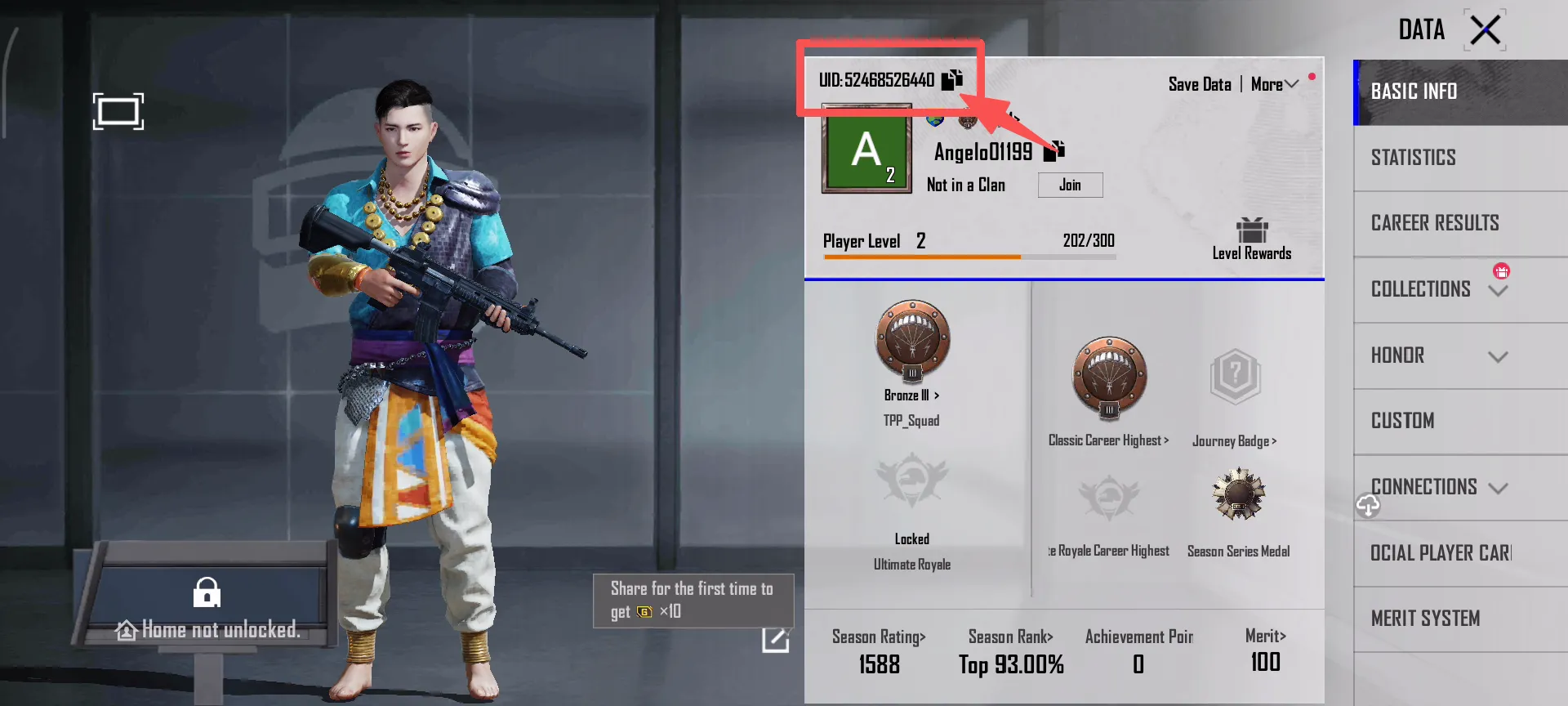
That is why you should not use only your nickname when topping up PUBG MOBILE UC. The nickname can be used as a reference, but the UID is the key information for recharge.
How to Find Your PUBG MOBILE UID
You can find your PUBG MOBILE UID by following these steps:
- Open PUBG MOBILE.
- Go to the main lobby.
- Tap your avatar or profile area in the top-left corner.
- Open your profile page.
- Find the player ID / UID number.
- Check the number carefully before placing an order.
If you are topping up UC for a friend, ask them to send the full UID or a screenshot from the game profile page. Do not rely only on a nickname.
If you want a more detailed walkthrough with screenshots, read our PUBG MOBILE UID guide before placing your order.
Why UID Top Up Is More Convenient
No Account Login Is Required
The biggest advantage of UID top up is that the process is simple. Players do not need to give their account password to a platform, and there is no need for someone else to log in to the account.
For players who want to buy PUBG MOBILE UC, Royale Pass, event items, lucky draw resources, or limited-time bundles, UID top up is usually enough as long as the UID is correct.
Simple Top-Up Process
The basic process is simple:
- Choose a UC package.
- Enter your PUBG MOBILE UID.
- Confirm the order information.
- Complete the payment.
On ManaBuy PUBG MOBILE UC top up, players can choose a UC package, enter the required UID information, and follow the page instructions to complete the order.
For a full step-by-step walkthrough, you can also read our PUBG MOBILE UC top up guide. It explains how to choose a package, enter your UID, complete payment, and check your UC balance after the order is processed.

What to Check Before You Pay
Make Sure the UID Is Correct
UID is one of the most important details in a PUBG MOBILE UC top up order. Before paying, always check whether the UID is complete, whether every number is correct, and whether there are any extra spaces.
You should also make sure you are not entering your nickname instead of your UID.
What Happens If You Enter the Wrong UID?
If the UID is entered incorrectly, it may cause problems such as:
- Slower order processing
- UC not arriving in the account
- Customer support needing to check the order
- UC being sent to the wrong account
- The order failing to complete normally
If you notice that you entered the wrong UID after payment, contact customer support as soon as possible and provide your order number and the UID you submitted.
Delivery Time and Safety
How Long Does PUBG MOBILE UC Take to Arrive?
The delivery time for PUBG MOBILE UC usually depends on whether the UID is correct, whether the payment is successful, and whether the order is being processed normally.
If the UID, UC package, and payment information are all correct, the order is usually processed faster. After payment, you can return to the game and check whether the UC balance has been updated.
If the UC has not arrived after some time, check your order status, confirm that the UID is correct, and refresh or restart the game to check the UC balance again.
Is It Safe to Top Up Without Logging In?
From an account-information point of view, UID top up is more suitable for most players because you do not need to provide your login password, verification code, or third-party account access.
However, safety also depends on whether the platform provides clear order information, customer support, and reminders to check your UID before payment.
When buying PUBG MOBILE UC on ManaBuy, players can select a UC package, enter their UID, and complete the payment according to the page instructions. The key is to make sure the recharge information is accurate before placing the order.
FAQ
Do I need a password to top up PUBG MOBILE UC?
Usually, UID top up does not require your PUBG MOBILE account password. You only need to enter the correct PUBG MOBILE UID.
Can I top up PUBG MOBILE UC with only my nickname?
No, it is not recommended. Nicknames can be changed or duplicated. You should use your PUBG MOBILE UID instead of only entering a nickname.
Can I top up PUBG MOBILE UC for a friend?
Yes. As long as your friend provides the correct PUBG MOBILE UID and you choose the right UC package, you can place the order with their UID.
What should I do if I entered the wrong PUBG MOBILE UID?
If you have not paid yet, correct the UID before placing the order. If you have already paid, contact customer support as soon as possible and provide your order details.
What should I do if my PUBG MOBILE UC has not arrived?
First, check whether the UID is correct, whether the order has been paid successfully, and whether the UC balance has refreshed in the game. If the UC still has not arrived, contact ManaBuy customer support with your order number and UID.
Conclusion
You do not always need to log in to your PUBG MOBILE account to top up UC. For most players, UID top up is a simpler and easier method.
You do not need to provide your account password. You only need to find the correct PUBG MOBILE UID, choose the right UC package, and complete the payment.
The most important thing is to check your UID carefully before payment. Confirming your UID, package, and order details can help reduce delays, failed top ups, or UC being sent to the wrong account.
If you already have the correct UID, you can continue from the PUBG MOBILE UC top up page, choose the package you need, and complete the order without sharing your game password.





Copyright © FUTURE OUTLOOK TECHNOLOGY LIMITED.Company Registration No.: 77374965 All rights reserved.UNIT 135,1/F.,143 WAI YIP STREET,KWUN TONG HK