
PUBG MOBILE UC Not Received? Delivery Time and What to Check

After completing a UC top up on ManaBuy, many PUBG MOBILE players want to know one thing: how long does PUBG MOBILE UC take to arrive, and what should you do if it has not shown up yet?
In most cases, if your PUBG MOBILE UID, UC package, and payment information are correct, the order will enter the normal processing flow. If the UC does not appear immediately, it does not always mean the top up has failed. Delivery time may be affected by payment confirmation, order processing, UID verification, or a delayed in-game balance refresh.
How Long Does PUBG MOBILE UC Usually Take to Arrive?
The delivery time for PUBG MOBILE UC depends mainly on whether the order information is accurate, whether the payment has been completed, and whether the game has refreshed the UC balance.
After payment, you can reopen PUBG MOBILE and check your UC amount again. If the balance has not changed right away, wait for a short time, refresh the game, and then check the order status before placing another order.
Common Reasons Why PUBG MOBILE UC Has Not Arrived
The UID Was Entered Incorrectly
The UID is one of the most important details in a PUBG MOBILE UC top up order. If the UID is missing digits, typed incorrectly, entered in the wrong order, or replaced with a nickname by mistake, the order may not match the correct account.
When UC has not arrived, first compare the UID you submitted with the UID shown on your PUBG MOBILE profile page. Do not rely on your nickname, because a nickname cannot replace your UID.
The Payment Was Not Fully Completed
Sometimes a payment may still be processing, waiting for confirmation, or blocked by a bank, wallet, or payment provider. If the payment status has not synced successfully, the order may not move forward normally.
Check your ManaBuy order status and your payment record, such as bank card, PayPal, e-wallet, or other payment method records.
The Game Balance Has Not Refreshed
In some cases, the order may already be processing or completed, but the UC balance inside PUBG MOBILE has not refreshed yet. Try restarting the game, switching pages, or checking the UC display area again after a short wait.
The Wrong Product or Package Was Selected
If the wrong game page or UC package was selected, the result may not match what you expected. Before payment, make sure you are on the correct PUBG MOBILE UC top up page and that the UC amount is correct.
The Order Needs Additional Review
If the order information is incomplete, the payment confirmation is delayed, or the system needs further verification, the order may take longer to process. In this case, ManaBuy customer support can help check the order with your order number and PUBG MOBILE UID.
What to Check First If PUBG MOBILE UC Has Not Arrived
If your UC does not arrive immediately, do not place another order right away. Check these items first.
1. Check Your Order Status
Confirm that the order has been created and check whether it shows as paid, processing, or completed. If the order is not paid yet, confirm whether the payment was completed successfully.
2. Check Your PUBG MOBILE UID
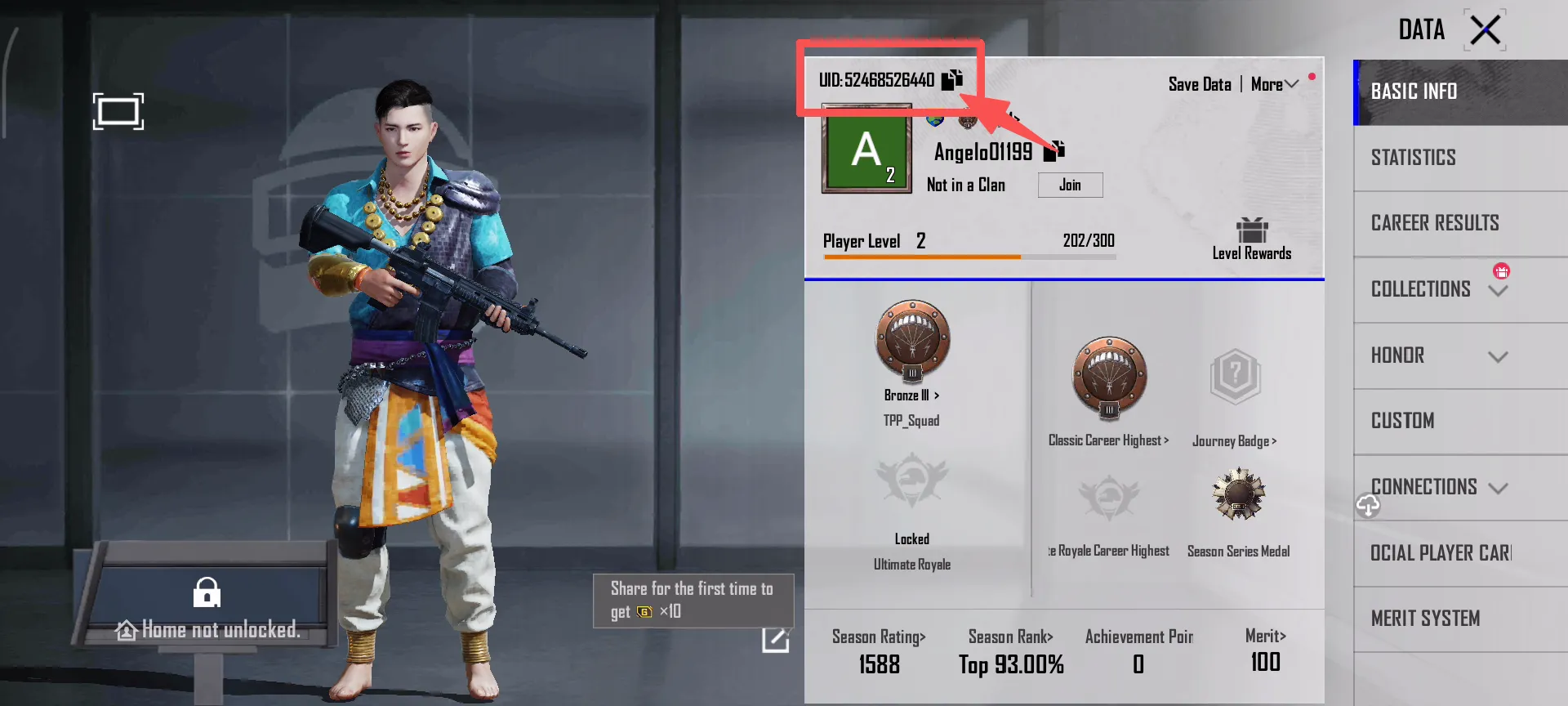
Compare the UID you submitted with the UID shown in your in-game profile. Do not rely on your nickname, because a nickname cannot replace your UID. If you are not sure where to find the correct number, check our PUBG MOBILE UID guide before submitting another order.
- Check whether the UID number is complete.
- Make sure there are no extra spaces.
- Check whether any digits are missing or added.
- Make sure you did not enter a nickname instead of a UID.
- Confirm that you did not enter another account’s UID by mistake.
3. Check the UC Package
Confirm that the UC amount you purchased is the package you intended to buy. If your account already had UC before the order, a small package may not make the balance change obvious at first.
4. Refresh the Game Balance
Reopen PUBG MOBILE, return to the shop or UC display area, and check the balance again. A short display delay can happen even when the order is already being handled.
5. Check Your Payment Record
If the order does not continue processing, check whether the payment was successfully charged through your bank card, PayPal, e-wallet, or other payment method. If the charge failed, was declined, or still looks unclear, review the PUBG MOBILE UC payment failed checklist before trying the same payment again.
What Should You Do If PUBG MOBILE UC Still Has Not Arrived?
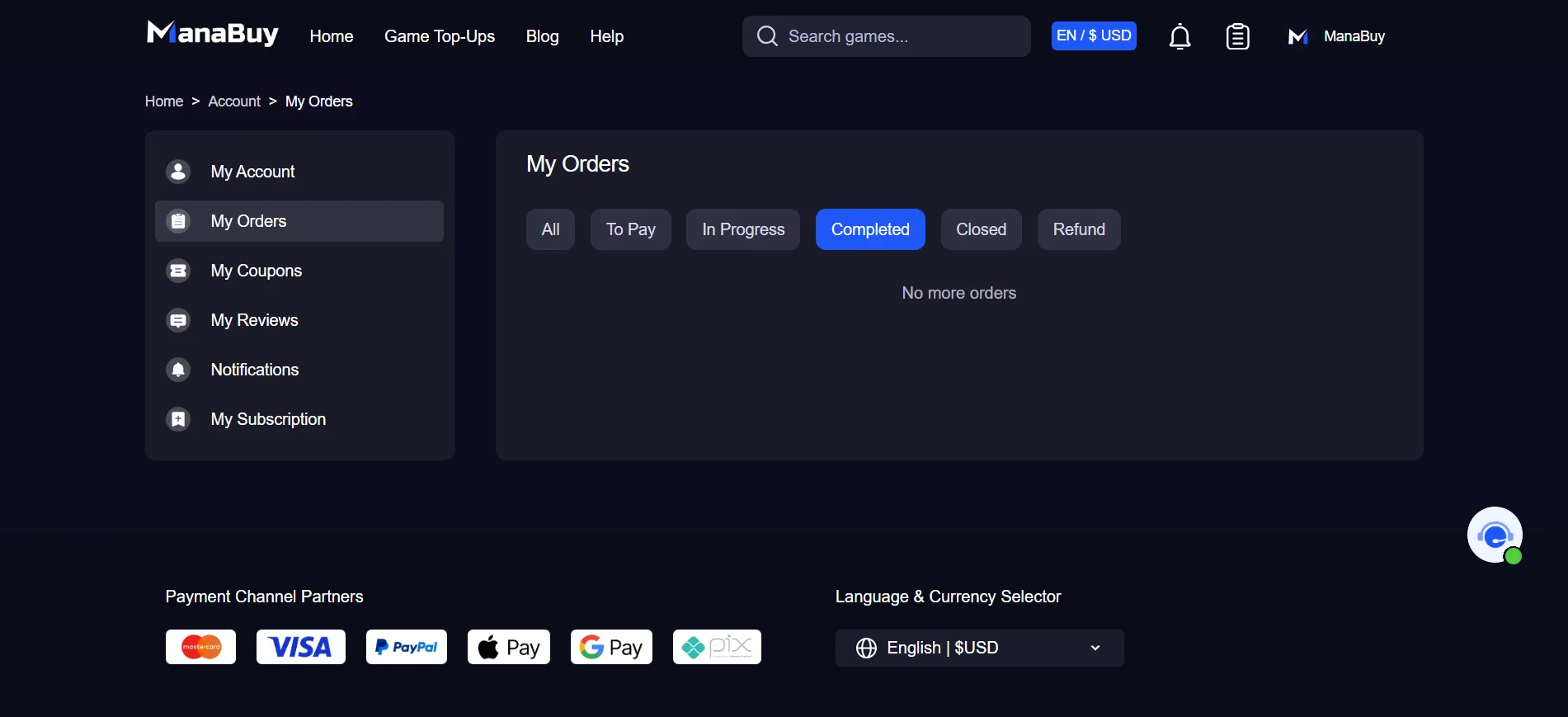
If you have confirmed that the payment was successful but your PUBG MOBILE UC still has not arrived, contact ManaBuy customer support and prepare the following information:
- Order number
- PUBG MOBILE UID
- The UC package you purchased
- Payment time
- Screenshot of the payment status
- Screenshot of your in-game UC balance
These details can help support check whether the issue is related to payment sync, UID information, order processing, or manual review.
If you notice that the UID was entered incorrectly, contact ManaBuy customer support as soon as possible. The earlier you report the issue, the easier it may be to review the order.
How to Reduce PUBG MOBILE UC Delivery Delays
The best way to reduce delays is to check the important details before payment.
Check Your UID Before Placing the Order
Do not enter your UID from memory. Open your PUBG MOBILE profile page and check the number carefully before submitting the order.
Use the Correct PUBG MOBILE Top-Up Page
Before paying, confirm that you are on the correct PUBG MOBILE UC top up page. This helps avoid selecting the wrong game or product.
Choose the Right UC Package
Make sure the UC amount is the package you actually want to buy, especially when several packages have similar prices.
Confirm the Payment Status
If one payment method fails, try another supported option only after checking whether the first payment was charged. Avoid repeating the same payment too many times before confirming the order and transaction status.
Keep Your Order Record
After payment, keep your order number, order page, or payment record. These details are useful if you need help from customer support later.
FAQ
Does PUBG MOBILE UC not arriving mean the top up failed?
Not always. UC may not appear immediately because the order is still processing, the payment status has not synced, the in-game balance has not refreshed, or the UID needs to be checked.
Why is my PUBG MOBILE UC delivery slow?
Common reasons include an incorrect UID, incomplete payment, delayed balance refresh, order review, or selecting the wrong product or UC package.
Should I place another order if my UC has not arrived?
It is not recommended. Check your order status first and contact customer support if needed. Placing another order may create extra orders and make the issue harder to review.
Will entering the wrong PUBG MOBILE UID affect delivery?
Yes. The UID is used to identify the correct account. If the UID is wrong, the UC may not arrive correctly or may be sent to another account.
What should I prepare before contacting customer support?
Prepare your order number, PUBG MOBILE UID, purchased UC package, payment time, payment status screenshot, and a screenshot of your in-game UC balance.
Conclusion
If your PUBG MOBILE UC has not arrived yet, do not rush to place another order. Start by checking your order status, payment status, PUBG MOBILE UID, UC package, and in-game balance.
Most delivery issues are related to UID details, payment confirmation, order processing, or balance refresh delays. Checking the information carefully before payment can help reduce failed top ups, delivery delays, or wrong-account issues.
If the payment has been completed but the UC still has not arrived, contact ManaBuy customer support with your order number and PUBG MOBILE UID so the team can check the order more quickly.


Copyright © FUTURE OUTLOOK TECHNOLOGY LIMITED.Company Registration No.: 77374965 All rights reserved.UNIT 135,1/F.,143 WAI YIP STREET,KWUN TONG HK