
PUBG MOBILE Payment Methods and Fees on ManaBuy in Malaysia

in the latest sample, a 60 UC PUBG MOBILE order displayed at RM3.91 in ManaBuy's Malaysia/MYR checkout with five payment methods: Touch 'n Go eWallet, Boost, Credit Card, Google Pay and Apple Pay. Touch 'n Go and Boost displayed a 2.20% payment fee and a final total of RM4.00. Credit Card, Google Pay and Apple Pay displayed a 3.60% fee and a final total of RM4.06.
These fees are not permanent. Available methods, fee rates, rounding and final totals can change by package, currency, account environment or payment provider. Always check the payment details shown immediately before paying.
Quick answer: For the 60 UC MYR checkout, Touch 'n Go eWallet and Boost had the lowest displayed fee rate at 2.20%. Credit Card, Google Pay and Apple Pay each showed 3.60%. The difference in final cost was RM0.06 for this RM3.91 package. Choose a method based on both the live final total and whether the provider is available and usable for your account.
Verified PUBG MOBILE payment methods in Malaysia
The following methods appeared after selecting MYR, choosing 60 UC and entering a UID to reach the payment-method screen:
| Payment method | Product amount | Displayed fee rate | Displayed fee | Final amount |
|---|---|---|---|---|
| Touch 'n Go eWallet | RM3.91 | 2.20% | RM0.09 | RM4.00 |
| Boost | RM3.91 | 2.20% | RM0.09 | RM4.00 |
| Credit Card | RM3.91 | 3.60% | RM0.15 | RM4.06 |
| Google Pay | RM3.91 | 3.60% | RM0.15 | RM4.06 |
| Apple Pay | RM3.91 | 3.60% | RM0.15 | RM4.06 |
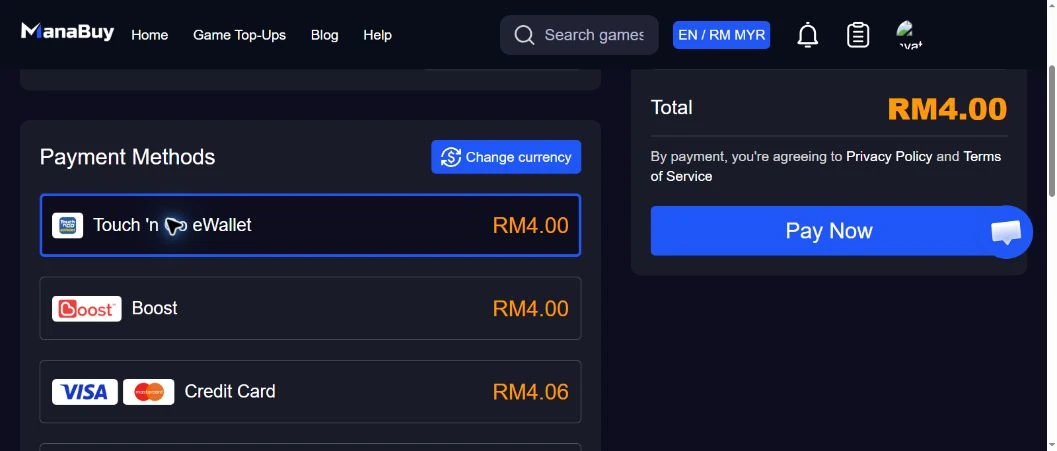
ManaBuy displayed the fee and corresponding total after each payment method was selected.
Which payment method had the lowest fee?
Touch 'n Go eWallet and Boost had the lowest displayed fee for the 60 UC checkout. Both showed a 2.20% rate, RM0.09 fee and RM4.00 final total. The other three methods showed a 3.60% rate, RM0.15 fee and RM4.06 total.
That does not mean one method will always be the cheapest for every PUBG MOBILE UC package. A percentage fee can be rounded when converted into MYR, and checkout rules can change. Compare the displayed final amounts again after selecting the package you actually intend to buy.
How the payment fee changes the final total
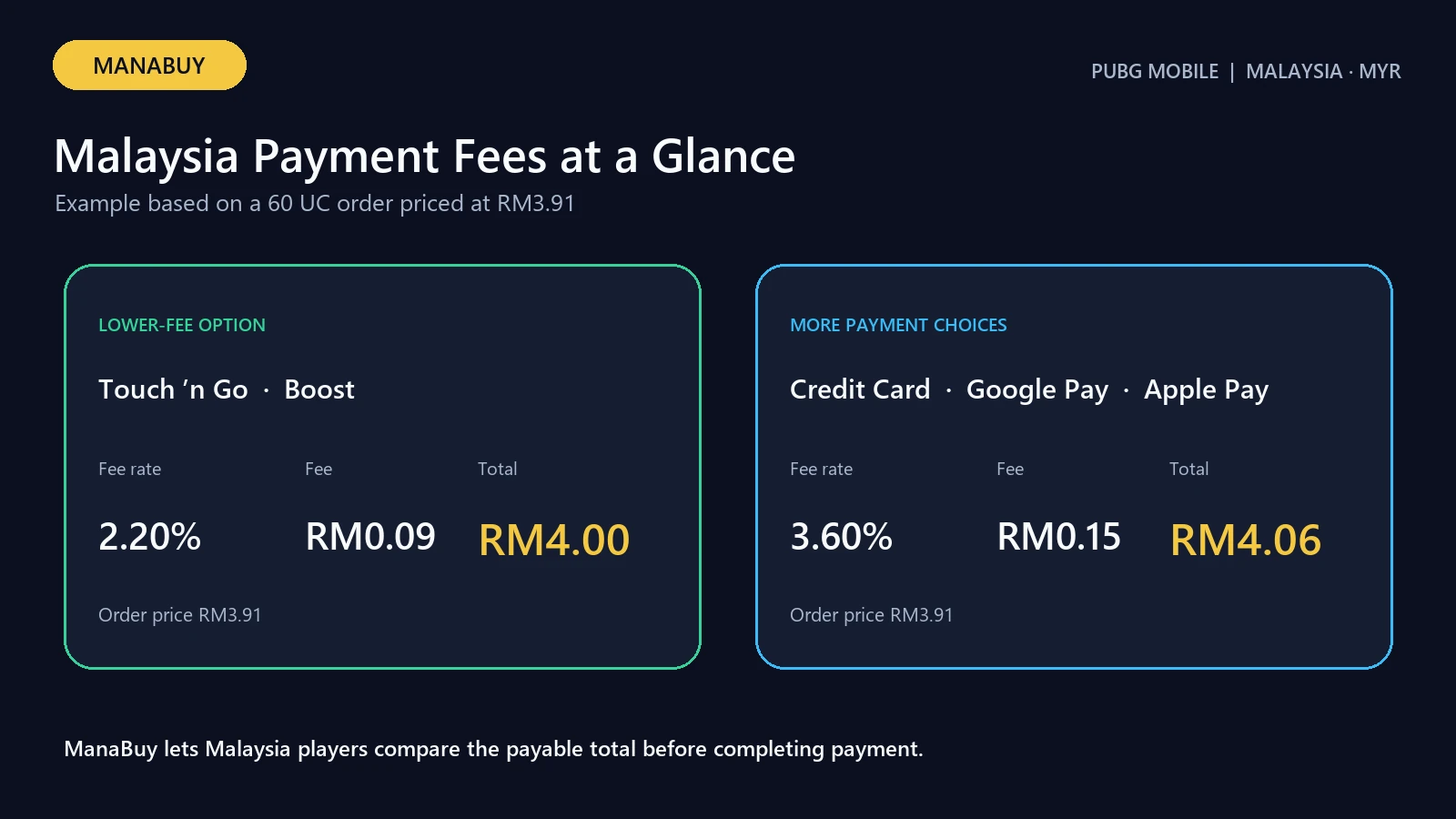
The payment page separates the product amount from the payment fee:
final amount = product amount + displayed payment fee
For Touch 'n Go and Boost:
RM3.91 + RM0.09 = RM4.00
For Credit Card, Google Pay and Apple Pay:
RM3.91 + RM0.15 = RM4.06
Use the displayed checkout fee rather than recalculating from rounded values. The fee rate is applied by the payment flow, while the visible MYR fee and total are the amounts relevant to the purchase decision.
All five totals above use the same 60 UC product and MYR checkout, with only the payment method changed. This makes the methods directly comparable for that package, but it does not prove that every larger package will produce the same rounded fee amount. For another UC package, select each available payment method again and compare its displayed percentage, fee amount and final total.
Touch 'n Go eWallet for PUBG MOBILE UC
Touch 'n Go eWallet appeared as a Malaysia payment option in the MYR checkout. For 60 UC, it showed a 2.20% fee and RM4.00 final total.
Before choosing it, confirm that the checkout still displays Touch 'n Go, that you can access the intended eWallet account and that the final amount matches the ManaBuy payment details. Do not start another payment if the first attempt remains pending.
Boost for PUBG MOBILE UC
Boost showed the same fee as Touch 'n Go: 2.20%, adding RM0.09 to the RM3.91 product amount. The resulting checkout total was RM4.00.
Availability in the latest sample does not guarantee permanent availability. Re-check the MYR payment list for the current order.
Credit Card, Google Pay and Apple Pay
Credit Card, Google Pay and Apple Pay each displayed a 3.60% fee. For the RM3.91 package, each added RM0.15 and produced a final amount of RM4.06.
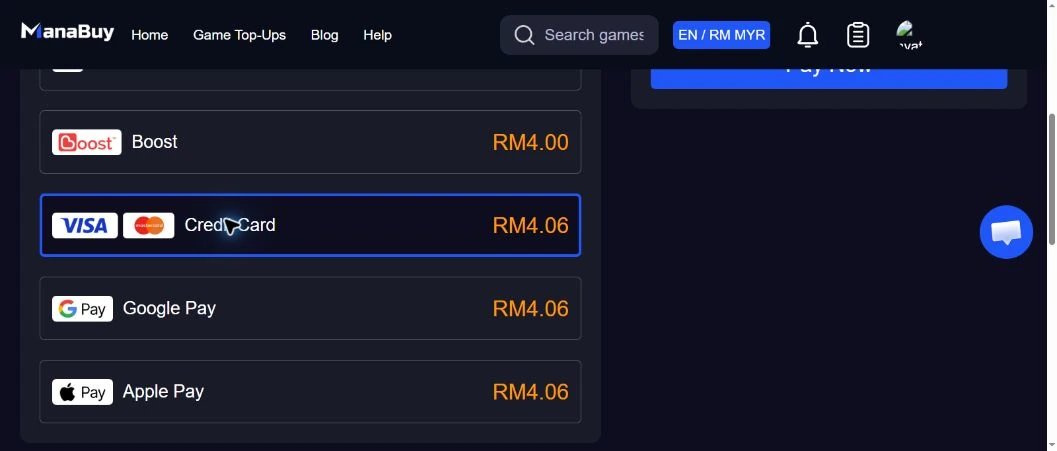
The displayed fee was the same across these three methods for 60 UC, but their provider requirements differ. A card may require bank verification. Google Pay or Apple Pay may depend on device, browser and wallet setup. Seeing a method in the list does not guarantee that a particular card or wallet transaction will be approved.
How to check the live fee before paying
- Open the ManaBuy PUBG MOBILE top-up page in MYR.
- Set the currency to MYR.
- Select the required UC package.
- Enter the PUBG MOBILE UID carefully.
- Continue to the payment-method screen.
- Select each available method to view its fee rate, fee amount and final total.
- Confirm the final amount before using Pay Now.
ManaBuy's PUBG MOBILE listing applies to the International Server and does not require a separate server-selection step. Use the PUBG MOBILE UID guide if you need to locate the correct account identifier.
What to do if a Malaysia payment method fails
First check whether the provider shows a successful charge. Do not immediately repeat the order if the result is pending or unclear. Confirm the selected currency, available balance, provider limits and any bank or wallet approval step.
The existing PUBG MOBILE payment failed guide explains card, wallet and payment-status checks. If a payment was charged but the order did not complete, keep the payment record and order information for ManaBuy support.
How much did payment choice matter in the verified sample?
The difference between the two observed fee groups was 1.40 percentage points. On the 60 UC sample, rounding produced a RM0.06 difference in the final amount: RM4.00 through Touch 'n Go or Boost versus RM4.06 through Credit Card, Google Pay or Apple Pay. That is small in absolute terms for 60 UC but represents two distinct checkout totals for the same product.
| Decision factor | Touch 'n Go / Boost | Card / Google Pay / Apple Pay |
|---|---|---|
| Observed rate for 60 UC | 2.20% | 3.60% |
| Observed fee | RM0.09 | RM0.15 |
| Observed final total | RM4.00 | RM4.06 |
| Practical dependency | Usable Malaysia eWallet account | Supported card, device wallet and issuer approval |
Do not multiply these rates across larger packages and treat the result as a quote. The verified evidence covers one 60 UC checkout. For a larger package, select the actual package and payment method, then record the displayed MYR fee and total.
Payment-method choice by situation
- Lowest observed final total: check Touch 'n Go and Boost first, provided the live checkout still shows them.
- No usable eWallet: compare Credit Card, Google Pay and Apple Pay based on which provider is already set up and can complete issuer verification.
- Desktop purchase: verify whether the mobile-wallet handoff is supported before starting the payment.
- Pending earlier attempt: do not switch method and pay again until the provider record and ManaBuy order status are clear.
- Larger UC purchase: repeat the comparison on the real package because fee amounts and rounding can change.
Evidence to save before contacting support
Keep the order number, selected UC package, UID, MYR product amount, selected method, displayed fee, final total, payment-provider reference and the exact time of the attempt. A screenshot should avoid exposing full card details or wallet credentials. This evidence lets support distinguish a checkout display issue, provider decline, pending payment and paid-but-unmatched order.
FAQ: Malaysia PUBG MOBILE payment methods
Does ManaBuy support Touch 'n Go for PUBG MOBILE UC?
Touch 'n Go eWallet was available in the Malaysia/MYR checkout in the latest sample. The 60 UC order showed a 2.20% payment fee. Re-check availability for the current order.
Does ManaBuy support Boost in Malaysia?
Yes. Boost appeared in the MYR checkout and showed a 2.20% fee for 60 UC.
Can I pay with a credit card?
Credit Card appeared as an option and showed a 3.60% fee for 60 UC. Card approval can still depend on the issuer, payment limits and verification.
Are Google Pay and Apple Pay available?
Both appeared in the MYR checkout. Each showed a 3.60% fee for 60 UC. Device, wallet and linked-card requirements may still affect whether payment succeeds.
Is the package price the final amount?
Not always. The product amount was RM3.91, while the final totals were RM4.00 or RM4.06 after the displayed payment fee.
Which method should a Malaysia player choose?
Compare the live fee and final total, then choose an available method you can complete securely. For the 60 UC checkout in the latest sample, Touch 'n Go and Boost had the lowest displayed fee, but the result may change.
Final payment check
Before paying, verify the PUBG MOBILE UID, MYR currency, UC package, selected payment method, fee and final amount. The checkout view is the final source for current payment availability and cost.
If the chosen method redirects to a bank, card-verification screen or mobile wallet, finish that provider step only when the merchant, amount and currency match the ManaBuy checkout. If the page expires or the result remains unclear, check the provider record and ManaBuy order status before starting another payment.
Continue with:troubleshoot a failed Malaysia payment; check ManaBuy UC prices in MYR; follow the Malaysia top-up route.



Copyright © FUTURE OUTLOOK TECHNOLOGY LIMITED.Company Registration No.: 77374965 All rights reserved.UNIT 135,1/F.,143 WAI YIP STREET,KWUN TONG HK