
Best App to Buy PUBG UC? What to Check Before You Top Up

The best app to buy PUBG UC is not simply the app with the biggest discount banner. A reliable PUBG MOBILE top-up app should help you answer five questions before you pay: am I on the right PUBG MOBILE product, can I see the current UC package clearly, what account information is required, what happens if the order is delayed, and where do I check the final price? ManaBuy is a strong option when you want a mobile-first way to browse PUBG MOBILE UC packages, app coupons, and order support, but the safest purchase still ends on the current ManaBuy PUBG MOBILE product page and checkout flow. Treat every coupon, price, and bonus as live information that must be confirmed at checkout.
What "Best App" Really Means for PUBG UC
Many PUBG UC apps make the same promise: cheap, fast, secure, instant. Those words are not enough. PUBG UC is a paid digital item, so the app needs to reduce purchase risk, not only push you toward payment.
A good PUBG UC app should make the important parts boring and visible. You should not need to guess whether the product is for PUBG MOBILE, whether your region is supported, whether the package includes bonus UC, or whether you are entering a UID, nickname, email, or voucher code. If the app hides those details until after payment, it may feel cheaper at first but create more risk.
For ManaBuy, the stronger angle is not "we are always the cheapest." The stronger angle is that players can use the ManaBuy app to browse game top-ups and then use the PUBG MOBILE product page as the final source of truth for package choice, price, coupon, UID entry, payment, and support.
How PUBG UC Buying Routes Differ
Not every PUBG UC route works the same way. Some players buy directly through the in-game store. Some use official recharge stores. Some buy redeem codes or vouchers. Some use game top-up platforms that ask for a UID and deliver UC to the account. The best route depends on your payment method, region, account confidence, and whether you want app coupons or package deals.
| Route | Best for | Check before paying | Main risk |
|---|---|---|---|
| In-game store | Players who want the simplest native route and already have a working app-store payment method. | Store currency, tax, available payment method, and whether a game promotion is active. | Payment method limits, regional pricing, or missed third-party coupon value. |
| Official recharge store | Players who prioritize official recharge status and region-specific PUBG MOBILE offers. | Region, logged-in account or player ID, package, bonus rules, and final currency. | Some payment methods or promotions may vary by country. |
| Voucher or redeem-code route | Players who need local payment options or want to redeem later. | Voucher validity, refund limits, redeem instructions, and whether the code matches your PUBG MOBILE region. | Wrong redeem page, expired code, non-refundable purchase, or extra redemption steps. |
| ManaBuy app and product page | Players who want mobile browsing, package comparison, app offers when available, UID-based top-up, and support access. | Current package, UID, checkout total, available coupon, payment method, and order status path. | Relying on an old price image instead of the live product page or entering the wrong UID. |
Where the ManaBuy App Helps
The ManaBuy app is most useful at the browsing and decision stage. You can open the app, check popular top-ups, look for PUBG MOBILE, and see whether any account or app offer is currently available. That is convenient when you are already on your phone and want to compare top-up options quickly.
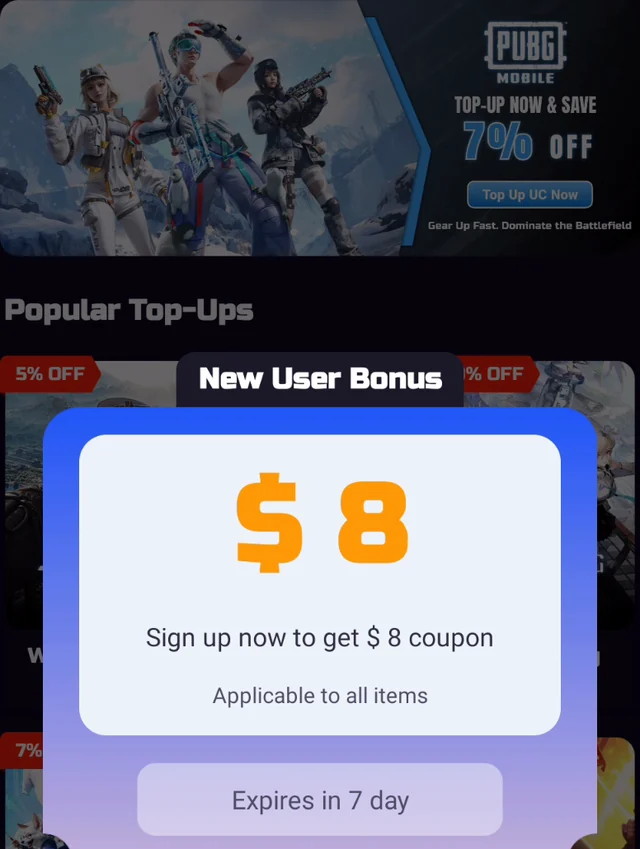
From the ManaBuy App, showing the PUBG MOBILE top-up entry and new-user coupon prompt.
Do not decide from the home banner alone. A coupon prompt or top-up banner can be a useful signal, but it is not the final promise. Before paying, open the actual PUBG MOBILE product page and confirm the current UC package, any coupon eligibility, the final amount, and your account information.
What to Check on the PUBG MOBILE Product Page
The product page is where the top-up decision becomes concrete. On August 6, 2026, the current ManaBuy PUBG MOBILE UC top-up page displayed protection labels, a PUBG MOBILE product title, and selectable UC packages such as 60 UC, 300 + 25 UC, 600 + 60 UC, 1500 + 300 UC, and larger bundles. Those package labels are useful for planning, but the live product page and checkout screen should always be treated as the final source because prices, bonuses, and discounts can change.
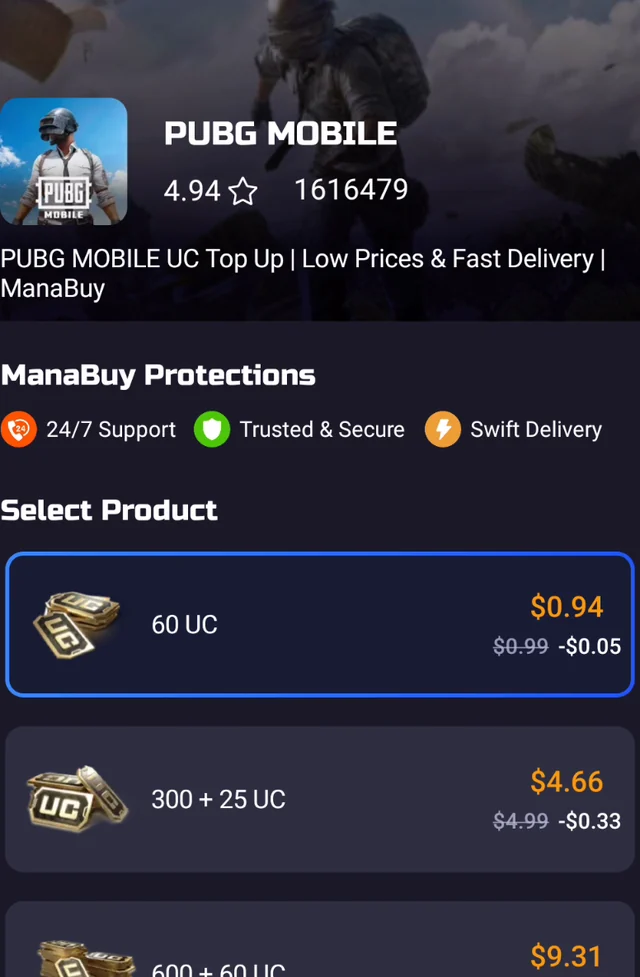
From the ManaBuy App, showing PUBG MOBILE UC package choices and protection labels.
Use the page like a checklist. First, confirm the game is PUBG MOBILE, not another PUBG-related or region-specific product. Next, compare the UC amounts and any bonus UC. Then decide whether the package matches what you actually plan to buy in-game. A small top-up may be enough for a quick item, while Royale Pass, Lucky Spin, crate openings, and limited event cosmetics may need a larger plan.
Top-Up Information Checklist
Before choosing any app to buy PUBG UC, put the delivery and account requirements into one simple checklist. This makes the decision more practical without inventing guarantees that may change.
| Item to check | What it means | Why it matters |
|---|---|---|
| Required account info | For ManaBuy's PUBG MOBILE top-up flow, the key account detail is the PUBG MOBILE UID shown on the product/order flow. | A wrong UID can delay delivery or send the order to the wrong account. |
| Login requirement | UID-based top-up should not require your PUBG MOBILE password. | Avoiding password sharing reduces account-security risk. |
| Region or version | Some UC routes are region-specific or may exclude certain servers. | A region mismatch can cause failed, delayed, or unusable orders. |
| Final price | The checkout total may reflect package price, coupon eligibility, currency, and payment method. | Old saved images cannot prove today's final cost. |
| Order support | You should know where to check order status or contact support after payment. | Support access matters when payment succeeds but UC is delayed. |
How to Choose the Right PUBG UC Package
Start with the in-game goal, not the discount label. If you only need UC for a small purchase, a smaller package keeps spending controlled. If you are planning around Royale Pass, a limited draw, crate openings, or several cosmetics, compare larger packages and bonus UC more carefully.
A practical way to decide is to write down the item or event you want first, then check the UC cost in PUBG MOBILE, then choose the closest package on the current ManaBuy product page. This is slower than tapping the first highlighted offer, but it prevents two common mistakes: buying too little and needing a second payment, or buying too much because a large package looked better on the surface.
Safe Purchase Steps on ManaBuy
Use this flow when you are ready to buy PUBG UC through ManaBuy:
- Open the ManaBuy app or the PUBG MOBILE UC top-up page.
- Confirm that the page is for PUBG MOBILE and review the current UC packages.
- Open PUBG MOBILE and copy your UID from your in-game profile.
- Enter the UID carefully and compare it with your profile before payment.
- Choose the package that matches your in-game plan.
- Review the checkout total, currency, payment method, and any coupon before paying.
- After payment, check your order status and reopen PUBG MOBILE to confirm the UC balance.
If you are not sure where your UID is, read ManaBuy's PUBG MOBILE UID guide before paying. If you want to understand why password sharing is not normally needed for UID-based top-up, the PUBG MOBILE UC without login guide explains the difference between UID and game-account login.
PUBG MOBILE UC Package Recommendations
If you already know the UC amount you need, compare the current PUBG MOBILE UC packages below and choose the one that fits your in-game plan. Check the final price, coupon eligibility, and account details again before payment.

What to Do If UC Does Not Arrive Right Away
Most top-up anxiety starts after payment: the player paid, reopened the game, and does not immediately see the UC balance change. Do not panic first; check the order trail.
Compare the UID submitted in the order with the UID on your PUBG MOBILE profile. Then check whether the payment fully completed, whether the selected product and package were correct, and whether the order status shows processing, failed, refunded, or completed. If the payment is complete but UC is still missing, keep your order number and UID ready for support.
For more detail, use ManaBuy's PUBG MOBILE UC not received guide. If the issue happened during checkout instead, the PUBG MOBILE payment failed guide is the better next step.
Red Flags When Choosing Any PUBG UC App
Even if an app looks cheap, pause if you see these warning signs:
A trustworthy PUBG UC app should make you more confident before payment, not rush you past the details.
When ManaBuy Is the Right Fit
Best fit
You want a mobile-friendly PUBG MOBILE UC route, current package comparison, possible app offers, UID-based top-up, and a direct product page for final confirmation.
Wait first
You do not know your UID, you are unsure which PUBG MOBILE account is active, the checkout currency looks wrong, or you have not confirmed the in-game UC cost.
Best App to Buy PUBG UC FAQ
Is ManaBuy an app for buying PUBG UC?
Yes. ManaBuy has an app experience where players can browse game top-ups, including PUBG MOBILE UC. For final purchase decisions, confirm the current package, coupon, UID field, and checkout total on the PUBG MOBILE top-up product page.
Does ManaBuy need my PUBG MOBILE password?
For ManaBuy's PUBG MOBILE UC top-up flow, the important account detail is your PUBG MOBILE UID. A normal UID-based top-up should not require your PUBG MOBILE password, email code, phone code, or social login details.
Are ManaBuy PUBG UC prices always the same as older images?
No. Older images are useful for understanding the app flow, but package prices, discounts, coupons, premium offers, and payment totals can change. Use the live product page and checkout screen for the current price.
Can I use a coupon when buying PUBG UC?
Use any coupon only if it appears as eligible during the current checkout flow. Coupon amounts, rules, and expiration times can change, so confirm the final total before paying.
What is the safest way to avoid PUBG UC top-up mistakes?
Confirm the page is for PUBG MOBILE, copy your UID from your in-game profile, choose the package after checking your in-game goal, review the checkout total, and keep your order details until the UC appears in your account.
Related ManaBuy PUBG MOBILE Guides
Find Your UID
No Login Top-Up
Delivery Checks
Bottom Line
The best app to buy PUBG UC is the one that makes the purchase easy to verify before money leaves your account. ManaBuy is worth using when you want a mobile-friendly PUBG MOBILE top-up flow, current package comparison, app-side offers when available, UID-based ordering, and support access. The disciplined way to buy is simple: confirm your UID, choose the UC package based on your in-game goal, check the live checkout total, and complete the recharge through the official ManaBuy PUBG MOBILE product flow.




Copyright © FUTURE OUTLOOK TECHNOLOGY LIMITED.Company Registration No.: 77374965 All rights reserved.UNIT 135,1/F.,143 WAI YIP STREET,KWUN TONG HK