
How to Top Up PUBG MOBILE UC in Malaysia with ManaBuy

To top up PUBG MOBILE UC in Malaysia with ManaBuy, open the PUBG MOBILE product page with MYR selected, choose a UC package, enter the PUBG MOBILE UID, review the available Malaysia payment methods and their fees, then confirm the final amount before paying. The listing applies to PUBG MOBILE International Server, which Malaysia players commonly use, and there is no separate server-selection field.
ManaBuy requires the UID for delivery, not the PUBG MOBILE password. A careful top-up starts by checking the in-game UC requirement and copying the UID from the player profile rather than typing it from memory.
Quick answer: Select RM/MYR, choose the smallest package that covers the verified UC target, paste the correct UID, review the payment fee and final total, pay once, and keep the order number until the UC balance is confirmed.

Malaysia PUBG MOBILE top-up route
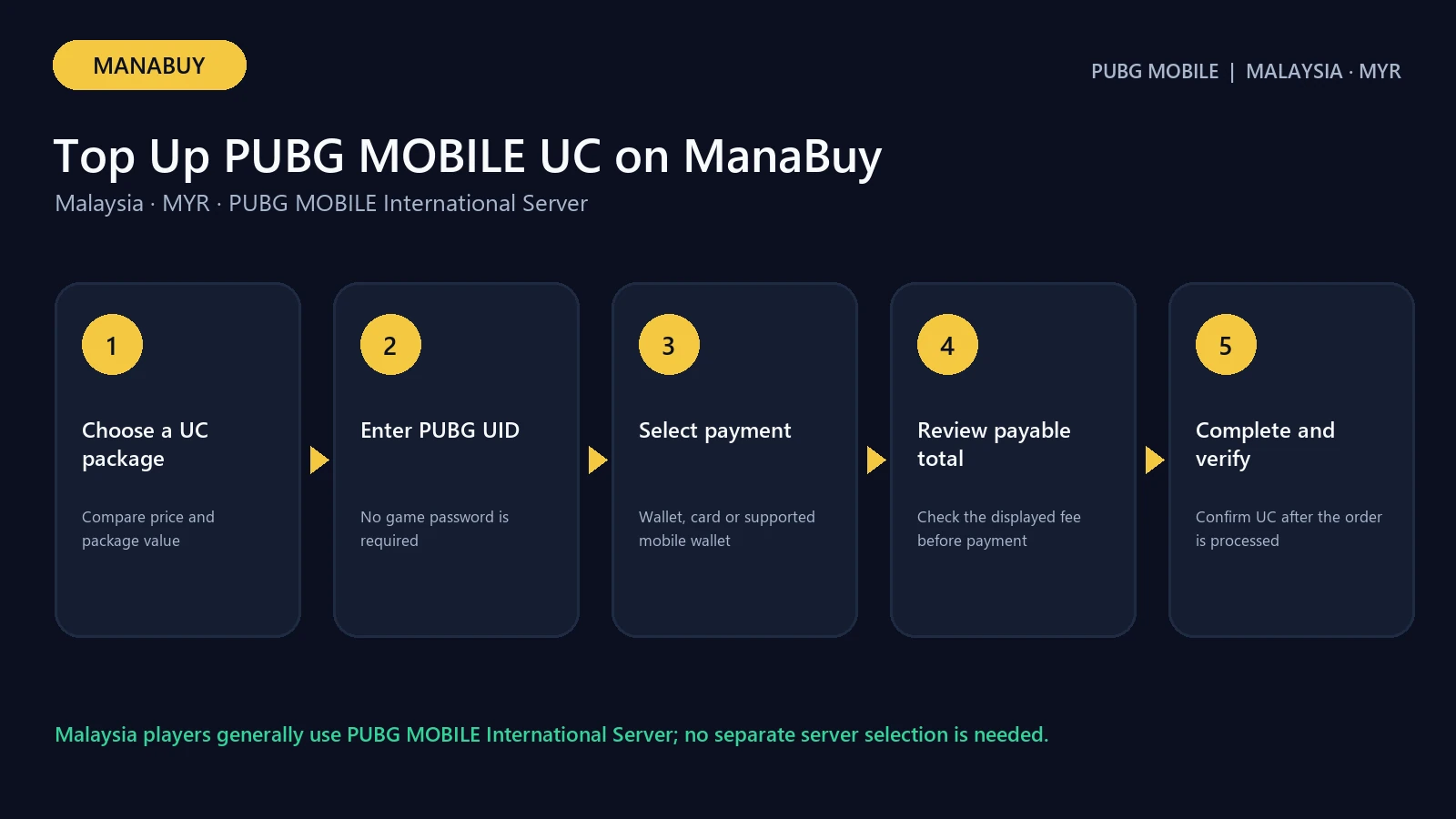
| Step | What to do | What to verify |
|---|---|---|
| 1 | Open the MYR product page | Header shows RM/MYR |
| 2 | Choose a UC package | Base UC, bonus UC and selling price |
| 3 | Enter the PUBG MOBILE UID | Correct account; no password requested |
| 4 | Continue to checkout | Payment method is currently available |
| 5 | review the total | Product amount, fee and final total |
| 6 | Complete payment once | Save the order number and check delivery |
Use the ManaBuy PUBG MOBILE top-up page in MYR as the starting point. Avoid saved SKU or preview links because package availability and prices can change.
Choose the right UC package
Check the current in-game cost of the intended pass, item or draw and subtract the UC already held. Then choose the smallest listed package that covers the remaining need. This keeps the budget tied to a real target.
The Malaysia UC price guide records public selling and official prices, while the package-choice guide compares upfront spend with unit cost. Premium, coupons and internal cost data are not part of those comparisons.
Find and enter the PUBG MOBILE UID
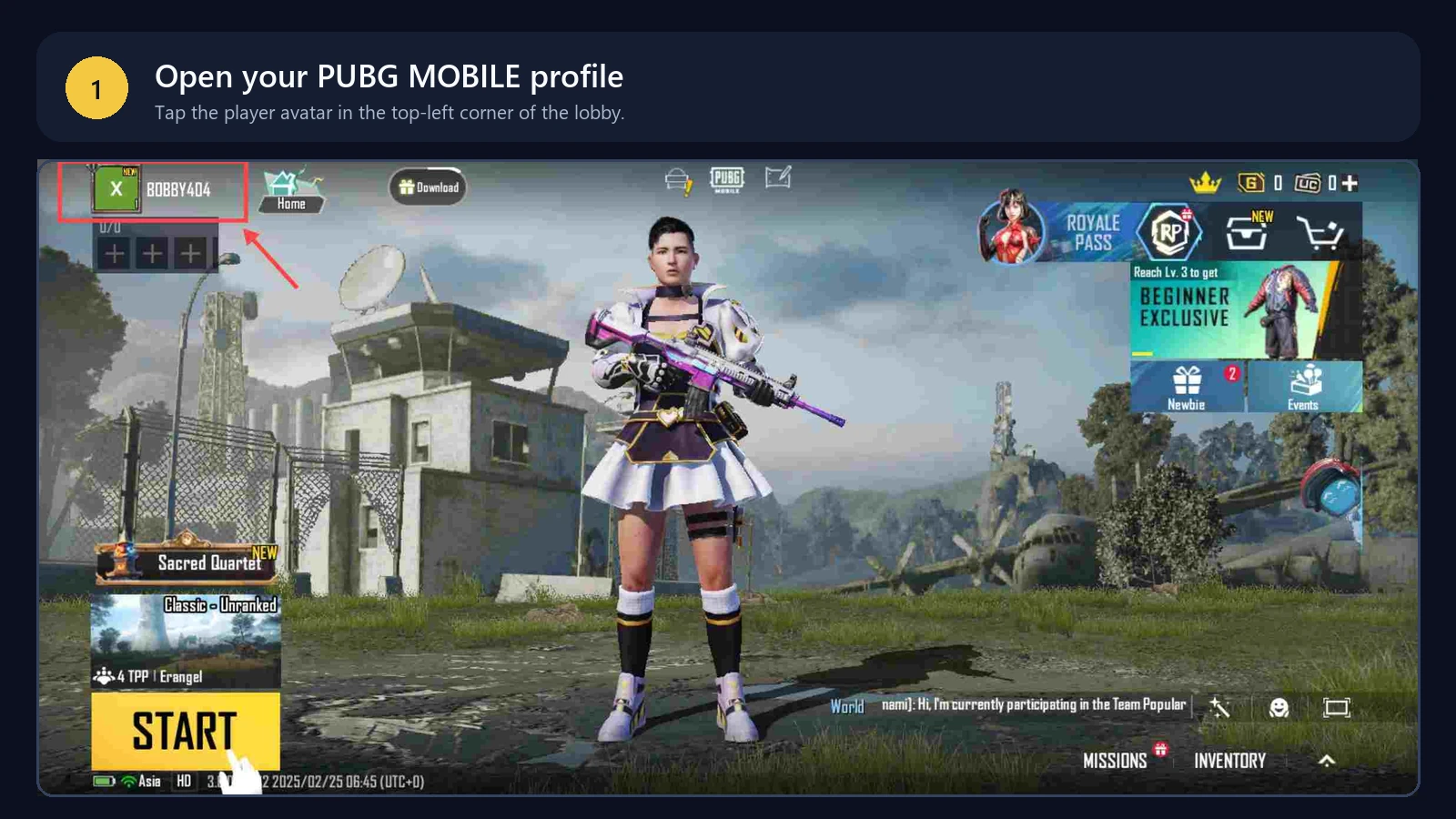
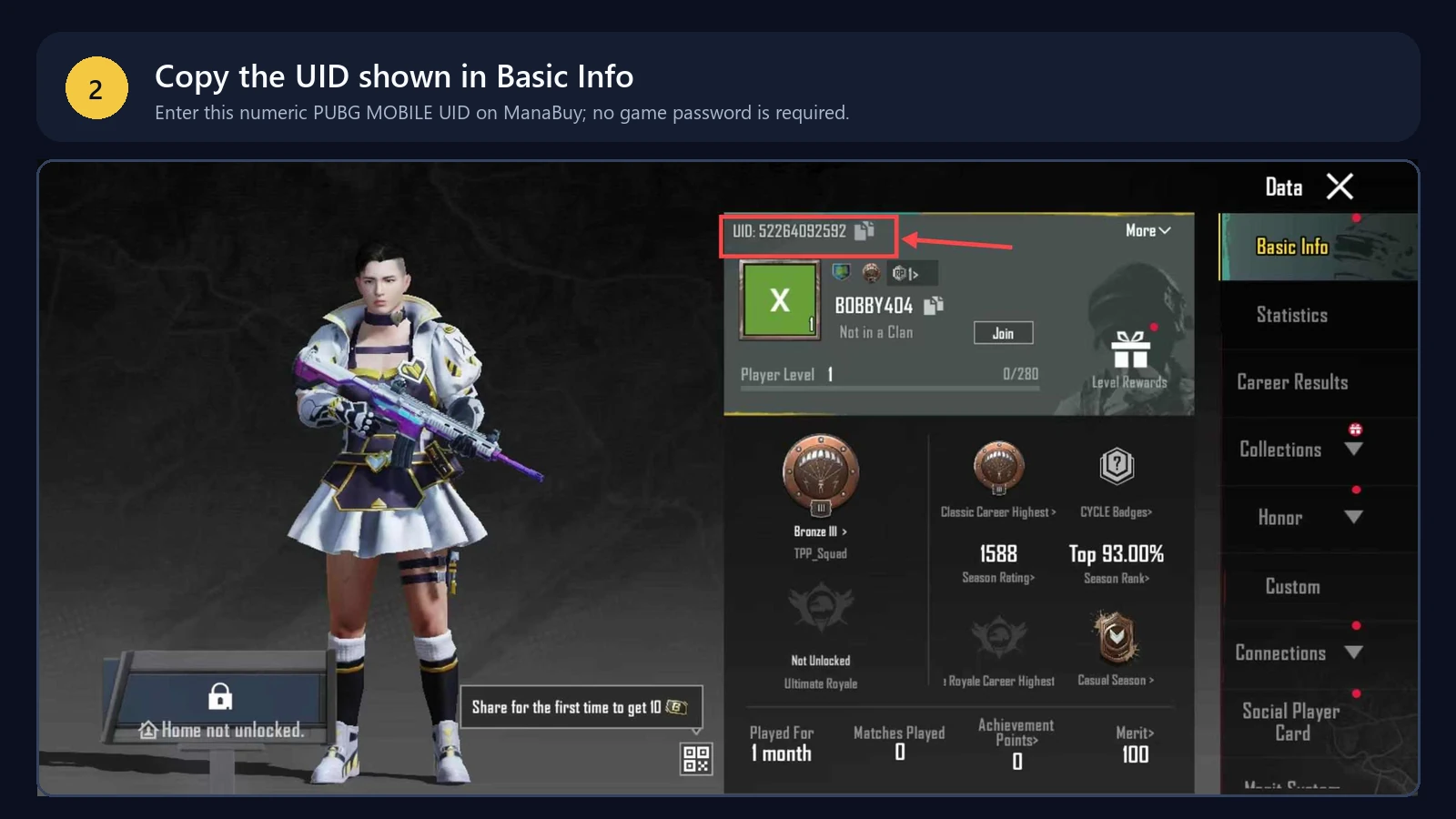
Open PUBG MOBILE and tap the player avatar to reach the profile. Copy the displayed UID carefully.
Paste the UID into ManaBuy and compare it character by character before continuing. Do not enter a nickname in place of the UID. ManaBuy does not ask for a PUBG MOBILE password for this product. For more detail, use the PUBG MOBILE UID guide.
International Server applicability
The ManaBuy listing states that it applies to PUBG MOBILE International Server. There is no separate server-selection step in the checkout. Malaysia players commonly use the International Server, but the buyer should still confirm that the account belongs to the supported PUBG MOBILE version before paying.
Do not describe Malaysia as a separate selectable server. The country and MYR affect the buying context and payment route, while the product applicability remains International Server.
Choose a Malaysia payment method
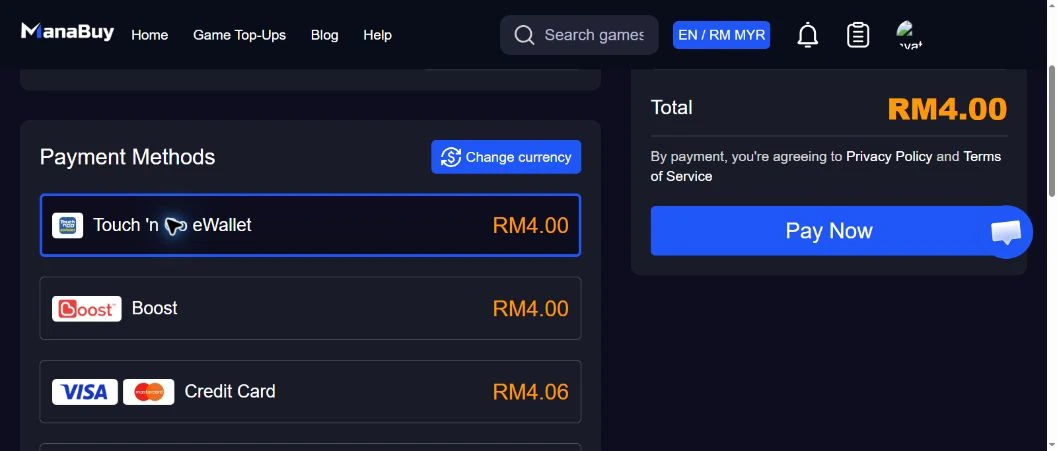
The live MYR checkout can show local wallets and card/mobile-wallet options. Availability and fees can change, so the final checkout display is authoritative. Compare the payment method, displayed fee and total rather than assuming the product-card price is the amount charged.
The Malaysia payment methods and fees guide explains the observed Touch 'n Go, Boost, card, Google Pay and Apple Pay routes. If authorization fails, stop and use the Malaysia payment-failed checklist before retrying.
review before paying
- Header currency is RM/MYR.
- Package label and delivered UC match the intended purchase.
- PUBG MOBILE UID is correct.
- International Server applicability matches the account.
- Payment method is selected intentionally.
- Fee and final total fit the budget.
- No duplicate or processing order already exists.
Only after these checks should payment be submitted. Keep the order number and avoid sharing passwords, card details or verification codes with anyone.
Check delivery after payment
After a successful order, reopen PUBG MOBILE and check the UC balance. ManaBuy describes delivery as typically within minutes, but this is a service statement rather than a guarantee for every transaction.
If UC is not visible, verify payment status, order status and the UID used. Restart the game before placing another order. Follow the PUBG MOBILE delivery guide when a completed order has not appeared in the matching account.
Common UID and package mistakes to avoid
The most important field is the UID. A nickname, clan name, email address or order number cannot replace it. Copy the UID from the profile screen and compare the beginning and ending digits after pasting. If topping up for a friend, ask the friend to send a fresh profile screenshot or copied UID and confirm the account name before payment.
Package labels also deserve a second look. “300 + 25 UC” means 325 delivered UC, while “600 + 60 UC” means 660. Do not compare only the first number or assume every package includes the same bonus percentage. If the target is flexible, the smallest adequate package usually limits unused balance; if the target is fixed, verify that the delivered total actually covers it.
Avoid keeping several checkout tabs open. One tab can retain an older package or currency selection while another shows a newer choice. Build the order from the live MYR product page and review the summary immediately before payment.
Budget for the payment fee
Set the spending limit using the final checkout total, not only the product-card price. For example, the 60 UC sample verified for the Malaysia payment guide showed a RM3.91 product amount, while the final total differed by payment method. That small difference matters when a wallet balance is close to the package price.
A practical budget includes three numbers: the package selling price, the displayed payment fee and the final total. Membership or coupon pricing should be treated separately because eligibility and conditions can change. If the checkout total exceeds the limit, return to the product page and choose a smaller package rather than repeatedly attempting a payment that the wallet or bank cannot authorize.
Understand the order status before taking action
After payment, distinguish payment pending, order processing and order completed. A pending payment may still be waiting for the provider; a processing order may already be in ManaBuy’s delivery flow; a completed order should be checked against the PUBG MOBILE balance and submitted UID.
Do not create a second order merely because the balance has not refreshed immediately. First reopen the game, verify the order record and follow the delivery checks. When contacting support, provide the order number, payment time, amount and the UID used. Never provide a wallet password, card verification code or PUBG MOBILE password.
Three Malaysia top-up scenarios
| Player situation | Package check | Payment check | Main risk to avoid |
|---|---|---|---|
| First low-value test | 60 UC was RM3.91 in the verified listing | Compare the live eWallet and card totals | Using an unchecked UID |
| Known target near 500 UC | 600 + 60 covers 500 with 160 UC surplus | Budget for the final fee, not only RM38.66 card price | Buying 325 UC and remaining short |
| High confirmed UC requirement | Compare + 850 with + | Re-check fees on the actual package | Choosing by unit cost without a spending plan |
What to record at every stage
- Before checkout: PUBG MOBILE UID, current UC balance and required UC.
- At package selection: package label, total delivered UC and public MYR selling price.
- At payment selection: method, displayed fee and final amount.
- After submission: order number, provider reference and exact time.
- After completion: order status and refreshed in-game UC balance.
This short record prevents the most common support problem: knowing that “something failed” without knowing which UID, amount, method or status was involved.
Decision path after payment
If the provider shows a clear decline and no money was deducted, correct the cause before retrying. If the provider shows pending or the balance was deducted, check the matching ManaBuy order before creating another payment. If the order is completed but UC is not visible, reopen PUBG MOBILE, confirm the UID used, and follow the not-received guide. Keep payment failure and delivery delay as separate diagnoses.
Final 30-second review
- MYR is selected.
- The account is on PUBG MOBILE International Server.
- The UID matches the intended account.
- The delivered UC covers the confirmed need.
- The selected method, fee and final total are acceptable.
- No earlier payment for the same purchase remains pending.
FAQ
Can Malaysia players pay in MYR?
Yes. Select MYR on the ManaBuy product page and confirm the header and checkout totals remain in RM.
Do I need a PUBG MOBILE password?
No. The product page lists the PUBG MOBILE UID as the required account field.
Do I need to choose a server?
No separate server-selection step appears. The product applies to PUBG MOBILE International Server.
Is the product-card price the final total?
Not always. A payment-method fee can be added at checkout, so review the final total before paying.
Which UC package should I choose?
Choose the smallest package that covers a confirmed in-game need. Compare unit cost only after setting the budget and target.
What should I do if UC is delayed?
Confirm the order and UID, reopen the game and use the delivery checklist before attempting another purchase.
Bottom line
A safe Malaysia top-up is a short, verifiable sequence: MYR, package, UID, payment method, fee, final total and order status. Check every field once and avoid duplicate payment attempts.



Copyright © FUTURE OUTLOOK TECHNOLOGY LIMITED.Company Registration No.: 77374965 All rights reserved.UNIT 135,1/F.,143 WAI YIP STREET,KWUN TONG HK