
Does PUBG MOBILE Support Controllers? Compatibility and Risk Guide

PUBG MOBILE does not currently document native Bluetooth-controller setup for its Android or iOS client. A controller may pair with the phone at the operating-system level, but that does not mean the game will recognize its sticks and buttons. Avoid apps that translate controller inputs into screen taps unless PUBG MOBILE explicitly approves them, because unsupported external software can create account risk.
Controller Pairing Is Not the Same as Game Support
Three separate steps are often confused:
| Check | What it proves | What it does not prove |
|---|---|---|
| The controller appears in Bluetooth settings | The phone can communicate with the hardware. | PUBG MOBILE accepts its inputs. |
| Buttons work in the phone menu or another game | The controller and operating system are compatible. | PUBG MOBILE has a native controller layout. |
| A mapping app makes buttons move the on-screen controls | Software is translating inputs into touch actions. | The method is approved or safe for the account. |
Native support normally includes an in-game controller menu, recognized buttons and a supported matchmaking rule. If those controls are absent, pairing alone is not enough.
On November 12, 2026, ManaBuy inspected the English global client on an Android device using a USA account on the North America server. Settings → Controls showed mobile touch, HUD, sensitivity and gyroscope options, but no controller/gamepad configuration entry was visible. No physical gamepad was connected during the check, so this confirms the absence of a visible setup menu on that device/build—not the behavior of every controller on every phone.
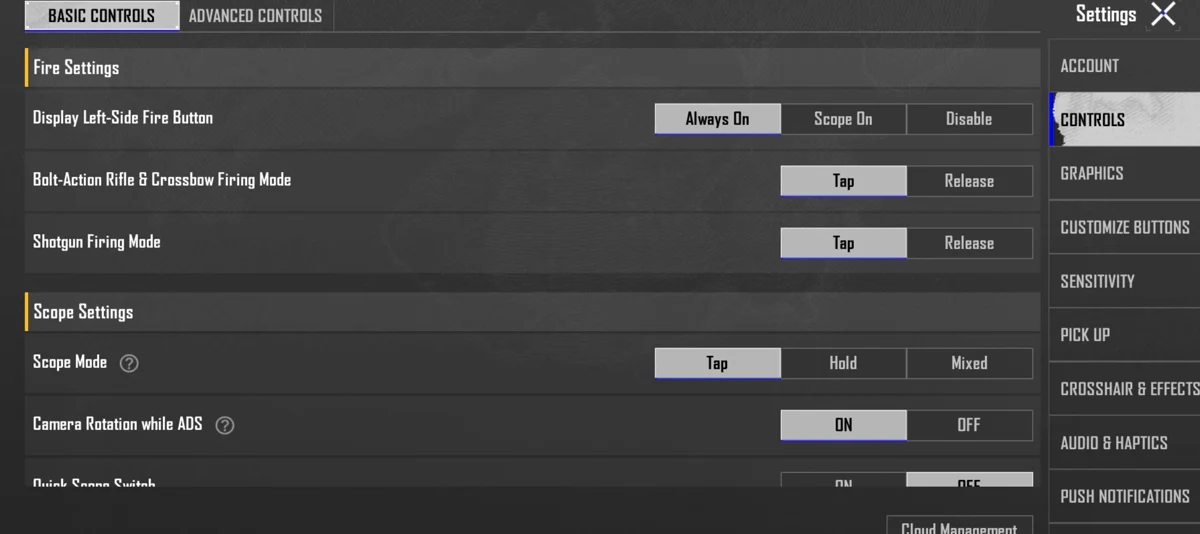
Source: the current PUBG MOBILE English client — this checked Controls screen shows the built-in touch configuration used for the compatibility decision above.
PUBG MOBILE Controller Risk by Input Method
ManaBuy's safest way to compare controller claims is to separate the hardware from the software that makes it work.
| Input method | Practical status | Account-risk decision |
|---|---|---|
| Normal touchscreen HUD | Built into the game. | Safest baseline. |
| Built-in gyroscope | Built into PUBG MOBILE settings. | Safe when used through the game menu. |
| Passive finger sleeve or phone grip | Does not generate game inputs. | Low policy concern; it only changes comfort or friction. |
| Mechanical trigger that physically touches the screen | Simulates a finger press without a mapping app. | Not the same as software mapping, but check current competition or event rules before using it. |
| Bluetooth controller with no mapping software | The phone may pair, while the game ignores most or all inputs. | Do not assume pairing means official support. |
| Controller plus key-mapping or overlay software | Converts controller buttons into screen taps. | Avoid on a valuable account unless PUBG MOBILE explicitly approves the exact method. |
| Emulator input | Separate environment with its own client and matchmaking rules. | Do not use mobile-controller advice as proof that a particular emulator is allowed. Follow current official emulator guidance. |
This table is a risk framework, not a promise that every accessory in one category will behave identically on every device.
Why Third-Party Key Mapping Is the Main Risk
The PUBG MOBILE Help Center warns that an external program on an unsupported device may be detected when it affects game launch or modifies app behavior, and confirmed violations can lead to account action. That warning does not say that every piece of physical hardware automatically causes a ban. It does mean players should not treat an unofficial mapping app as harmless simply because it is popular or sold with a controller.
Use these checks before trying any external-input method:
- Look for an in-game controller menu. A phone-level connection is not enough.
- Check current PUBG MOBILE Help Center wording. Old videos may predate policy or anti-cheat changes.
- Avoid tools that require launching PUBG MOBILE through another app. That is a stronger warning sign than a passive grip or finger sleeve.
- Do not test uncertain software on a valuable account. Cosmetics, rank history and purchases are not worth risking for a control shortcut.
- Ask in-game Customer Service when accessibility is the reason. Describe the exact device and whether it uses mapping software.
The relevant warning is available in the PUBG MOBILE Help Center explanation of unsupported external programs.
Organized Events Can Use Separate Equipment Rules
An organized competition or community event may publish equipment rules that are stricter than ordinary matchmaking. Those rules apply to that named event and should not be treated as a complete consumer policy for every casual match, accessory or accessibility need.
Read the current rules for the exact event before entering. For ordinary play, rely on the current game client and Help Center rather than borrowing a rule from another event or an old creator video.
Safer Ways to Improve PUBG MOBILE Controls
If the reason for wanting a controller is comfort or accuracy, start with features the game already provides.
Rebuild the HUD around your hands
Move fire, scope, crouch, jump and peek controls to positions you can reach without releasing movement. Change one group at a time and save the previous layout before a major edit.
Tune camera, ADS and gyro separately
Camera sensitivity controls tracking before firing. ADS affects drag correction while shooting. Gyroscope turns device tilt into aim movement. Changing all three together makes it difficult to diagnose a bad result. The PUBG MOBILE sensitivity guide includes a repeatable calibration routine.
Use Training Grounds before ranked matches
Test turning, close tracking, recoil correction and scope changes with the same weapon and attachments. Keep the setup for several sessions before deciding it failed.
Practice the fight that exposes the problem
If buttons feel crowded only in buildings, use the PUBG MOBILE CQC guide to test pre-aim, peeking and room-entry actions. If the problem appears only during long sprays, focus on sensitivity and attachment consistency rather than adding more input software.
A Simple Controller Decision Checklist
- Does PUBG MOBILE itself show a controller configuration screen for the device?
- Does the controller work without launching a mapper, overlay or automation app?
- Is the advice based on the current mobile client rather than PUBG: BATTLEGROUNDS, New State or an old video?
- Are you entering a tournament or event with stricter device rules?
- Is the device needed for accessibility, and have you asked in-game support about the exact setup?
If native support is absent and software mapping is required, the safer decision is to stop and use the game's own control options.
Related PUBG MOBILE Guides
PUBG MOBILE Controller Support Questions
Can I use an Xbox controller in PUBG MOBILE?
An Xbox controller can pair with many Android and iOS devices, but pairing does not create a native PUBG MOBILE control profile. Do not install an unapproved mapper merely to force the buttons to work.
Does PUBG MOBILE support PS4 or PS5 controllers?
The phone may recognize a DualShock or DualSense controller, while PUBG MOBILE still lacks a documented native setup for it. Check the current in-game settings and official support before using any workaround.
Can a controller mapping app get my account banned?
PUBG MOBILE warns about unsupported external programs that affect game launch or app behavior. Because mapping apps sit between the controller and the game, they carry more risk than normal touch controls. Avoid them unless the exact method is officially approved.
Are mechanical phone triggers the same as a controller?
No. A passive trigger physically presses part of the touchscreen and normally does not translate Bluetooth inputs through software. Tournament or event rules may still restrict peripherals, so verify the rule for the setting where you plan to play.
What is the safest controller alternative?
Use a custom HUD, the built-in gyroscope and a sensitivity setup calibrated for your device. These options remain inside the game client and can solve many of the comfort and recoil problems that lead players to seek a controller.
Final Decision
Treat PUBG MOBILE as a touch-first game unless the current client and official support explicitly recognize your controller. A device pairing successfully is not enough. If it needs third-party mapping software, stop before putting the account at risk and improve the in-game layout, gyro and sensitivity instead.


Copyright © FUTURE OUTLOOK TECHNOLOGY LIMITED.Company Registration No.: 77374965 All rights reserved.UNIT 135,1/F.,143 WAI YIP STREET,KWUN TONG HK