
PUBG MOBILE Sensitivity and Recoil Guide: Camera, ADS, Gyro and Weapon Setups

PUBG MOBILE Sensitivity and Recoil Guide: Camera, ADS, Gyro and Weapon Setups
PUBG MOBILE recoil control starts with sensitivity, but sensitivity is not a magic "no recoil" code. Camera sensitivity decides how fast your view moves before shooting. ADS sensitivity decides how much your aim moves while firing. Gyro sensitivity lets device tilt help with recoil correction and micro-adjustments. The best setup is the one that keeps your crosshair close to the target when you spray, tap, peek, crouch and switch scopes under pressure.
Use this guide as a tuning framework, not a number to copy blindly. Start with a safe baseline, test one change at a time in training mode, then adjust around your phone size, frame rate, grip style, finger layout, gyro comfort and favorite weapons. If your M416 climbs above the target, lower the spray or raise the right sensitivity area carefully. If your red-dot aim shakes past enemies, reduce it. If long scopes feel slow, adjust scope-specific values instead of changing everything.
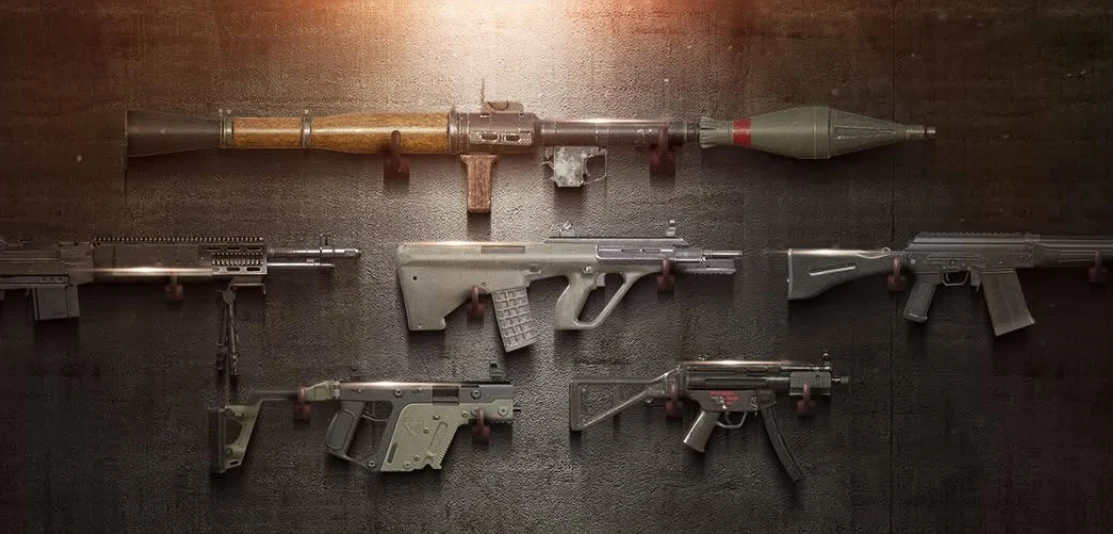
How PUBG MOBILE Sensitivity Works
PUBG MOBILE separates aiming into several settings because players aim in different moments. A quick swipe while scouting is not the same as holding recoil during a 30-bullet spray. A 3x M416 spray is not the same as tapping Mini14 at range. If you change every slider at once, you may fix one problem and create two new ones.
Camera Sensitivity Controls Looking and Tracking
Camera sensitivity affects how fast the camera moves when you drag the screen without firing. It matters when you scan for enemies, track someone crossing open ground, flick between windows, clear rooms and move your crosshair before the first bullet.
High camera sensitivity helps close-range turns and fast target switching, but it can feel jumpy if your thumb or finger movement is not steady. Low camera sensitivity feels controlled for long angles, but it can make you late in stair fights, compound pushes and third-party chaos.
Use camera sensitivity to answer one question: can I place my crosshair on the enemy before I start shooting?
ADS Sensitivity Controls Recoil While Shooting
ADS sensitivity affects aim movement when you hold the fire button while aiming down sights. This is where recoil control becomes obvious. If ADS is too low, your gun climbs and you cannot pull down fast enough. If ADS is too high, your spray zigzags or drops below the target.
ADS is especially important for M416, AUG, SCAR-L, M762, UMP45 and DP-28 sprays. It also matters for scope sprays, because 3x and 4x recoil can feel very different from red-dot recoil even with the same weapon.
Use ADS sensitivity to answer one question: can I keep bullets on the body after the first five shots?
Gyroscope Sensitivity Adds Tilt Control
Gyroscope sensitivity lets you move aim by tilting your device. Many advanced players use gyro because it allows fine recoil correction without dragging the screen as much. It can help with red-dot sprays, 3x AR sprays, DMR tapping and sniper micro-adjustments.
Gyro is powerful, but it is also personal. If your hands shake, your phone is heavy, your screen is small or you play while moving around, very high gyro can make aim unstable. Start lower than highlight videos suggest, then raise values only after your aim stays calm.
Use gyro sensitivity to answer one question: can I correct recoil smoothly without fighting my own device movement?
Best Starting Sensitivity Ranges for PUBG MOBILE
There is no universal best sensitivity. A four-finger gyro player on a high-refresh phone will not use the same setup as a two-thumb non-gyro player. The ranges below are safe starting points for testing. They are not final recommendations, and they should not be pasted into every account without training.
| Scope | Camera | ADS | Gyro | Best use |
|---|---|---|---|---|
| TPP / FPP no scope | 100-150 | 90-130 | 220-350 | Room clears, hip-fire tracking and fast turns |
| Red dot / holo | 45-75 | 45-70 | 220-350 | M416, UMP45, AUG and close-to-mid sprays |
| 2x scope | 35-60 | 35-55 | 200-300 | Short mid-range sprays and moving targets |
| 3x scope | 25-45 | 25-40 | 160-260 | Controlled AR sprays and DMR follow-up shots |
| 4x scope | 18-35 | 18-30 | 120-220 | Short sprays, DMR tapping and slower target tracking |
| 6x / 8x scope | 8-25 | 8-20 | 50-140 | Sniper corrections, DMR taps and long-range scouting |
How to Find Sensitivity Settings in PUBG MOBILE
From the lobby, tap the gear icon to open Settings, then go to Sensitivity. You will usually see separate areas for Camera, ADS and Gyroscope settings. If your game version shows a different layout, look under Controls or Customize first, then return to Sensitivity for the sliders.
Before changing anything, take a screenshot of your current settings or save them to a cloud layout if your account supports it. This gives you a rollback point if a new setup feels worse. After editing a value, enter Training Grounds or Cheer Park and test the same weapon, scope and distance before changing another slider.
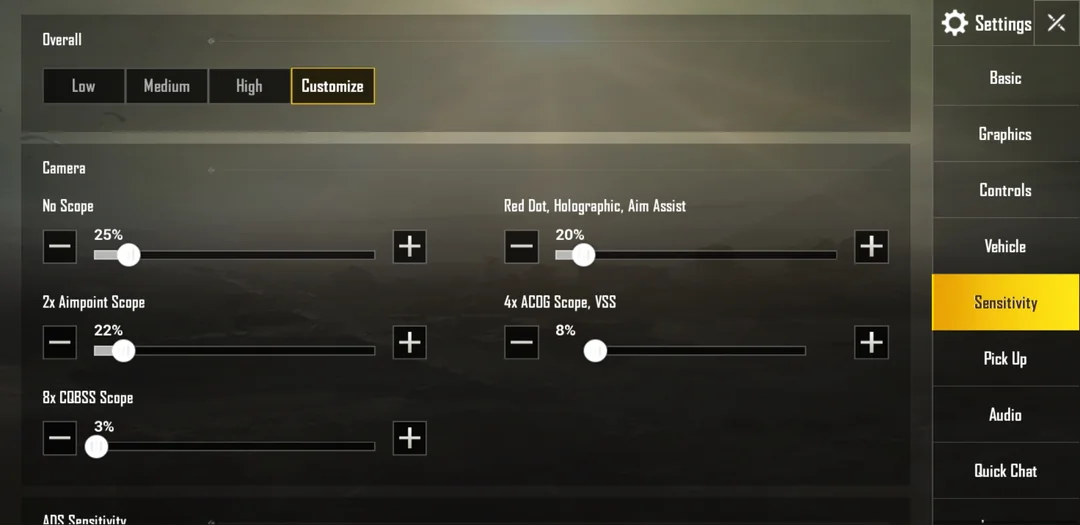
How to Read These Numbers
If you are a non-gyro player, focus on camera and ADS first. If you use gyro only for scope-on recoil, keep no-scope gyro comfortable and raise red-dot or 3x gyro slowly. If you are a full-gyro player, you can use higher gyro values, but your camera and ADS still need to feel natural for peeking, tracking and panic fights.
Change sensitivity in small steps. A 3-5 point change is usually enough to feel the difference. Huge jumps can make your aim worse for several matches because your muscle memory has no time to adapt.
Camera Sensitivity Setup
Camera settings should make target acquisition feel natural. Before firing, you should be able to swipe from one doorway to another, track a sprinting enemy and stop your crosshair near the chest or head without overcorrecting.
Close-Range Camera Test
Go to training mode and stand near a wall, doorway or target lane. Swipe left and right as if clearing a compound. Your crosshair should stop near the target without needing a second corrective swipe.
If your crosshair stops short, raise no-scope and red-dot camera sensitivity slightly. If it jumps past the target, lower it. Do not test this while spraying; this is only for looking and pre-aiming.
Scope Camera Test
For 3x, 4x, 6x and 8x scopes, aim at a moving target or move your aim between two distant points. Long-scope camera sensitivity should feel slower and calmer than red-dot sensitivity. If your 6x scope feels like it is sliding across the map, lower it. If you cannot follow a moving player, raise it a little.
TPP vs FPP Camera Feel
Third-person players often need enough camera speed to check corners, rooftops and side angles. FPP players may prefer steadier camera values because the view is already tighter. If you play both modes, do not force one setting to feel perfect everywhere. Test the mode you care about most for ranked.
ADS Sensitivity Setup for Recoil
ADS is where many players over-tune. They lose one spray, raise every ADS setting, then wonder why the next fight feels shaky. ADS should be tuned by weapon, scope and distance.
The 30-Bullet Spray Test
Pick M416 with a red dot, then spray 30 bullets at a medium target. Do not crouch for the first test. Watch the bullet pattern:
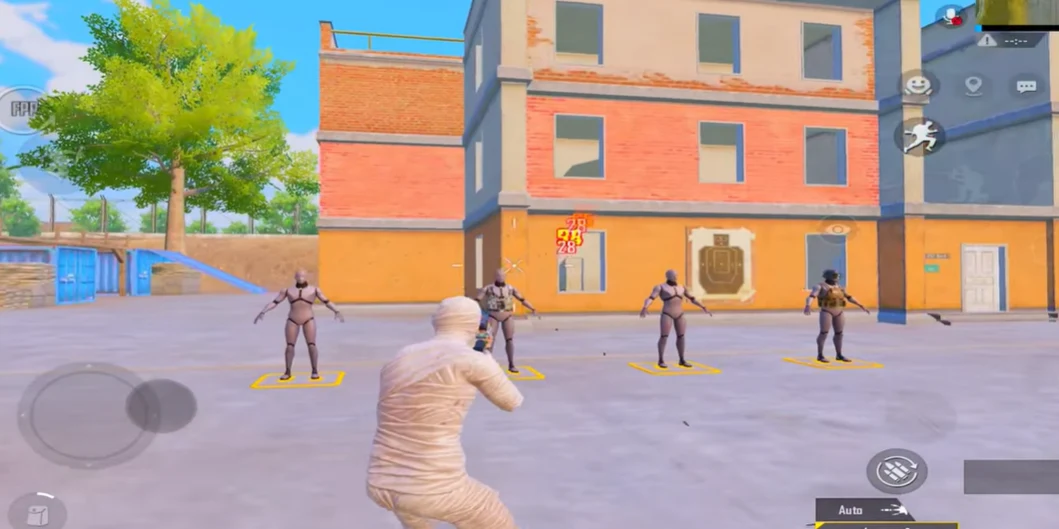
- If the pattern climbs above the target, your pull-down control is too weak for that ADS value.
- If the pattern drops below the target, your ADS or pull-down movement is too strong.
- If the pattern swings left and right, the issue may be grip, thumb pressure, gyro shake or overcorrection.
- If the first 10 bullets are good but the last 20 fail, practice shorter bursts before changing settings.
After that, repeat with crouch, then repeat with 2x and 3x. Do not judge a setting from one lucky spray.
Red Dot and 2x ADS
Red dot and 2x are your practical ranked settings. Most AR and SMG fights happen here. These scopes should be fast enough for recoil correction but not so fast that every finger movement throws your aim sideways.
If you use M416, AUG, UMP45 or SCAR-L often, make red dot and 2x feel stable before touching 4x or 6x. Stable close-to-mid recoil wins more real fights than a flashy long-scope spray that only works in training mode.
3x and 4x ADS
3x and 4x are harder because magnification makes recoil feel larger. Treat full-auto 4x sprays as a special skill, not the default. For most players, short bursts or controlled sprays are safer.
If your 3x M416 climbs, increase ADS slightly or add gyro correction. If your 4x spray jumps sideways, lower ADS or stop trying to hold full auto for too long. Scope sprays are useful, but they should not replace DMR tapping when the distance is too long.
Gyro Setup for Stable Aim
Gyro can make PUBG MOBILE recoil control feel smoother, especially on AR sprays and DMR taps. It also exposes shaky habits. If your hands move too much, high gyro will punish you immediately.
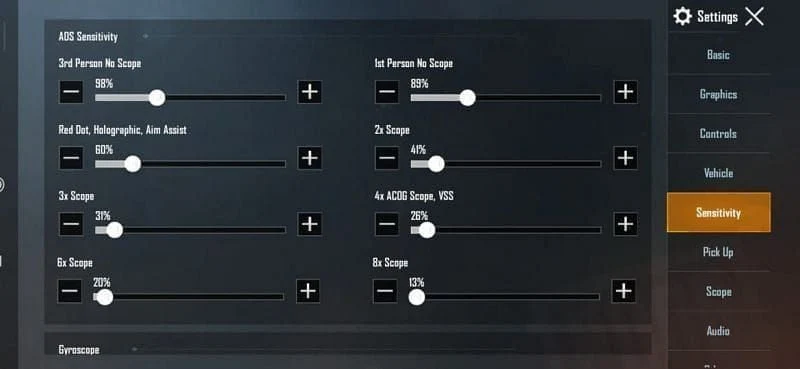
Start With Scope-On Gyro
If you are new to gyro, start with scope-on gyro instead of always-on gyro. This lets you use tilt control while aiming, but keeps normal movement less chaotic. Practice red-dot M416 sprays first, then 2x, then 3x.
Raise gyro only when you can keep your phone stable between shots. If your aim trembles before firing, the setting is too high or your grip is not ready.
Use Gyro for Fine Correction, Not Panic Pulling
Good gyro does not mean throwing the phone downward every time the gun kicks. Use gyro for small corrections while your finger handles bigger movement. Think of gyro as the fine brush, not the whole painting.
For DMRs such as Mini14 and SLR, gyro can help you place the second and third tap quickly. For snipers, lower gyro can help tiny corrections before the shot. For shotguns and SMGs, gyro matters less than crosshair placement and movement timing.
When Gyro Is Not Worth Forcing
Some players do not like gyro, and that is fine. If your device is heavy, your hands are unsteady, or your play space makes tilt uncomfortable, use non-gyro controls and focus on ADS, attachments and burst discipline. A comfortable setup beats a famous sensitivity code you cannot control.
Training Routine: Build Recoil Control Step by Step
Training mode only helps if you train the same problems you lose to in real matches. Do not stand still spraying one wall forever. Add distance, movement, scope changes and pressure.
10-Minute Daily Recoil Drill
Use this short routine before ranked:
| Minute | Drill | Goal |
|---|---|---|
| 1-2 | Red-dot M416 or AUG sprays at close range | Warm up pull-down movement and crosshair reset |
| 3-4 | 2x sprays at medium targets | Keep the first 15-20 bullets on target |
| 5-6 | 3x short sprays, then reset | Learn when to stop holding full auto |
| 7-8 | Mini14 or SLR taps on moving targets | Control follow-up shots without rushing |
| 9-10 | Peek, crouch and spray from cover | Connect sensitivity with real fight movement |
Change Only One Setting Per Session
If your red-dot spray is bad, do not change red dot camera, red dot ADS, gyro, layout, grip and weapon attachments at the same time. Change one thing, test again, and write down the result. This makes your setup improve instead of drifting randomly.
Practice Miss Recovery
Many players train only perfect sprays. Real fights are messy. Practice missing the first bullets, resetting your aim and switching to burst fire. If you can recover from a bad first second, your sensitivity is probably usable.
Weapon Examples and Setup Notes
Sensitivity becomes clearer when you test real weapons. A stable value for UMP45 may feel too slow for M762. A clean M416 spray does not mean your 4x Beryl spray will suddenly behave.
| Spreadsheet focus | Useful examples | What it means for sensitivity | Setup note |
|---|---|---|---|
| Damage and armor columns | Snipers, DMRs and high-damage ARs | High damage rewards accurate first shots, so lower long-scope sensitivity can be better than fast movement. | Use calmer 4x, 6x and 8x values for AWM, M24, SLR and Mini14 style fights. |
| Rate of fire / RPM | M416, AUG, Groza, Vector and UMP45 | Fast weapons punish shaky ADS because bullets leave the barrel quickly during small aim mistakes. | Tune red dot and 2x ADS first, then add gyro only if the spray still climbs. |
| Bullet speed | Mini14, Mk14, M416 and long-range rifles | Faster bullets make tracking feel cleaner, but they still need steady scope movement at range. | Use moving-target drills before raising camera sensitivity for DMR taps. |
| Time-to-kill context | ARs, SMGs, LMGs and shotguns | A strong theoretical TTK only matters if your sensitivity lets you keep shots on target. | If a gun looks strong on paper but feels unstable, shorten bursts before changing every slider. |
For weapon-stat context, use community resources carefully. The PUBG MOBILE weapon spreadsheet shared by TheBushka community is useful for comparing damage, bullet speed, rate of fire and time-to-kill style numbers, but sensitivity still has to be tested on your own device because recoil control depends on input, scope, grip and distance.
M416 and AUG: Stable AR Baselines
M416 and AUG are the best baseline weapons for sensitivity testing because they are stable enough to reveal your control problems without being too punishing. Start with red dot, 2x and 3x. If these weapons still climb hard, your ADS, gyro or pull-down habit needs work before you judge harder weapons.
Use M416 to build your default ranked spray. Use AUG to test whether your settings remain stable with a premium AR feel. If both work, your core sensitivity is probably close.
M762 and Groza: High Recoil Pressure
M762 and Groza can hit hard, but they punish sloppy sensitivity. If you raise ADS only to control M762, easier ARs may become too twitchy. Keep a separate mental rule: high-recoil weapons may need shorter bursts, closer fight distances, crouch timing and better attachments, not just higher sensitivity.
If M762 feels wild, test it with red dot first. Do not force 3x or 4x full-auto until your close-range spray is reliable.
UMP45 and Vector: CQC Control
UMP45 is forgiving and useful for players still tuning sensitivity. Vector is faster and can feel strong in close fights, but magazine timing and tracking matter. For SMGs, camera sensitivity often matters as much as ADS because close-range targets move across your screen quickly.
If you lose CQC because enemies run past your crosshair, raise no-scope or red-dot camera slightly. If you lose because your spray shakes, lower ADS or practice calmer tracking.
Mini14, SLR and Snipers: Long-Range Discipline
DMRs and snipers need lower, steadier scope control. Mini14 is forgiving for tapping; SLR hits harder but kicks more. Snipers need calm camera movement before the shot more than high sensitivity after the shot.
If long-range fights feel bad, do not immediately increase all scope values. First check whether you are tapping too fast, standing exposed, or trying to spray at a distance where a DMR would be cleaner.
Common Sensitivity and Recoil Mistakes
Most bad recoil settings come from changing too much too quickly. The goal is not to look like another player's highlight clip. The goal is to win more ordinary fights.
Copying Sensitivity Codes Without Testing
Sensitivity codes can be useful as a starting point, but they are not proof that the setup fits your hands. Device size, refresh rate, graphics settings, control layout, finger count and gyro comfort all change the result. Copy a code only if you are ready to test and adjust it.
Using One Setting for Every Scope
Close-range scopes need faster movement. Long scopes need precision. If 8x sensitivity feels like red dot sensitivity, long-range aim will become unstable. If red dot feels like 8x, CQC tracking will feel slow. Scope-specific tuning exists for a reason.
Confusing Recoil With Bad Fight Choice
Sometimes recoil is not the main problem. If you spray an AR across open ground at a moving enemy 200 meters away, the issue may be weapon choice. Use a DMR, reposition, or tap instead of blaming sensitivity.
Ignoring Attachments
Grips, compensators, stocks and magazines affect how a gun feels. Do not tune sensitivity only with a perfect full-build weapon if your ranked fights often happen before you find every attachment. Test both basic and full setups.
Changing Settings After Every Death
One lost fight does not prove your sensitivity is wrong. Deaths come from timing, cover, positioning, audio, utility, ping, team pressure and panic. Change settings after repeated patterns, not after one frustrating spray.
Related ManaBuy PUBG MOBILE Guides
Use these ManaBuy guides with this sensitivity setup so your aim practice connects to real ranked decisions:
- PUBG MOBILE Weapon Tier List 2026 - compare which weapons reward stable sprays, CQC pressure or long-range tapping.
- PUBG MOBILE Weapon Ranking and Best Guns Guide for Beginners - choose easier weapons while you are still building recoil control.
- PUBG MOBILE Chicken Dinner Beginner Guide - combine better aim with safer rotations, cover use and endgame habits.
- PUBG MOBILE UC Package Guide - plan UC around passes, cosmetics and events without mixing spending decisions into gameplay practice.
PUBG MOBILE Sensitivity FAQ
Final Takeaway
PUBG MOBILE sensitivity should make your aim predictable. Camera settings help you find targets, ADS settings help you hold sprays, and gyro settings help with fine correction if your device control is steady. Start with safe ranges, test one setting at a time, and build around the weapons you actually use in ranked. Better recoil control is not one secret number. It is a setup you can repeat under pressure.



Copyright © FUTURE OUTLOOK TECHNOLOGY LIMITED.Company Registration No.: 77374965 All rights reserved.UNIT 135,1/F.,143 WAI YIP STREET,KWUN TONG HK