
PUBG MOBILE UC Package Guide: Choose the Right UC for Your Budget

For many PUBG MOBILE players, UC is more than just a top-up currency. It is used for Royale Pass, skins, bundles, crates, Lucky Spin, limited-time event items, and other paid content in the game. The real question is not only where to buy UC, but also how to choose the right PUBG MOBILE UC package based on what you actually want to buy.
This evergreen guide explains how to choose a suitable PUBG MOBILE UC package according to different in-game spending scenarios. The in-game screenshots in this article are used only as reference examples. Actual event names, rewards, prices, bonus UC, and UC requirements may change with future PUBG MOBILE updates. Always check the latest in-game page and the current ManaBuy PUBG MOBILE UC top-up page before placing an order.

Why Choosing the Right PUBG MOBILE UC Package Matters
Different PUBG MOBILE items require different UC budgets. A player who only needs a small balance top-up does not need the same package as someone preparing for Lucky Spin, crates, or a long event cycle. In the same way, a player buying Royale Pass may need a more stable amount of UC than a player who only wants one small bundle.
Some UC packages may also include bonus UC, depending on the current product page and available offers. That is why players should not choose a package only because it is the cheapest or the largest. The right PUBG MOBILE UC package depends on your purchase goal, your current UC balance, and how much you plan to spend in the game.
Small UC Packages: Best for Light Spending and First-Time Top-Ups
Good for Testing the Top-Up Process
If this is your first time buying PUBG MOBILE UC on ManaBuy, a small UC package can be a practical starting point. It lets you check the UID entry process, order steps, available payment methods, and delivery experience without starting with a high budget.
Good for Small UC Gaps
Sometimes, players only need a small amount of UC to complete a purchase. For example, you may be slightly short of UC for a small bundle, a limited item, an event entry, or a discount offer. In this case, a small UC package is more flexible than buying a larger amount that you may not need right away.
Not Always Ideal for Frequent Spending
Small packages are useful for light spending, but they may not be the best choice if you regularly buy Royale Pass, skins, or event items. If you always choose the lowest package, you may repeatedly run into the same problem: being just a little short of UC and needing another top-up.
Mid-Range UC Packages: Better for Royale Pass, Skins, and Regular Spending
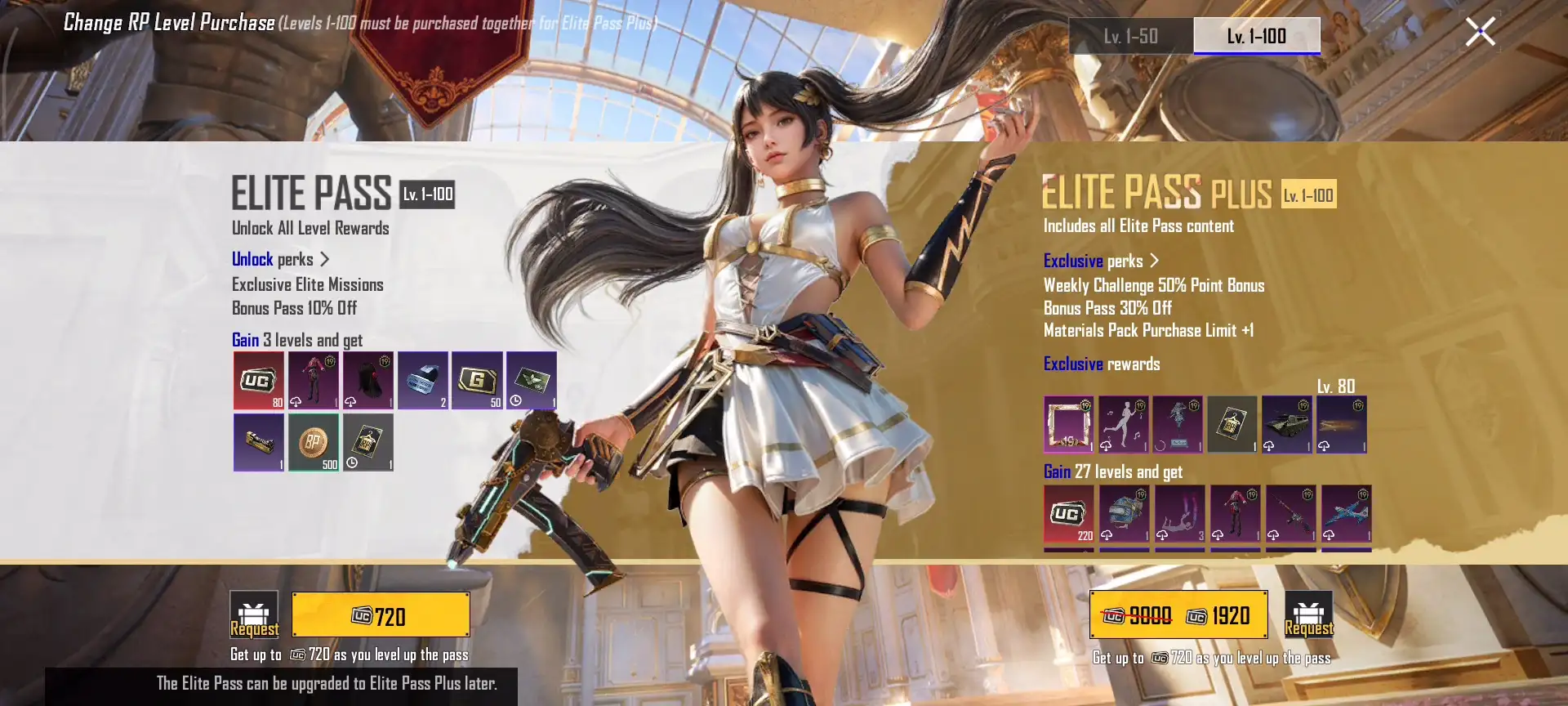
Royale Pass screenshots are shown as examples only. Pass levels, rewards, prices, and UC requirements may change by season. Always check the current Royale Pass page in PUBG MOBILE before choosing a UC package.
Better for Royale Pass Planning
Royale Pass is one of the most common PUBG MOBILE UC spending scenarios. Compared with small one-time top-ups, a mid-range UC package is usually easier to plan around Royale Pass because the spending goal is clearer and more stable. Players can check the current Royale Pass page in the game and then choose a UC package that fits the displayed requirement.
If you are mainly buying UC for Royale Pass, check the current in-game pass price first. You can also read our PUBG MOBILE Royale Pass UC guide to compare pass tiers, UC needs, and whether a mid-range package is enough for your plan.
Useful for Skins, Bundles, and Daily Event Purchases
If you often buy skins, outfit bundles, weapon finishes, or event items, a mid-range UC package can be a balanced option. It is not as heavy as a large package, but it may give you more flexibility than a very small top-up. This is especially helpful when you want to keep some extra UC for small price gaps or upcoming limited-time items.
Good for Players Who Do Not Want Frequent Top-Ups
For regular players, mid-range packages are often easier to manage. They suit players who want to control their budget but do not want to place a new order every time a new shop item or small event appears.
Large UC Packages: Better for Lucky Spin, Crates, and Long-Term Players
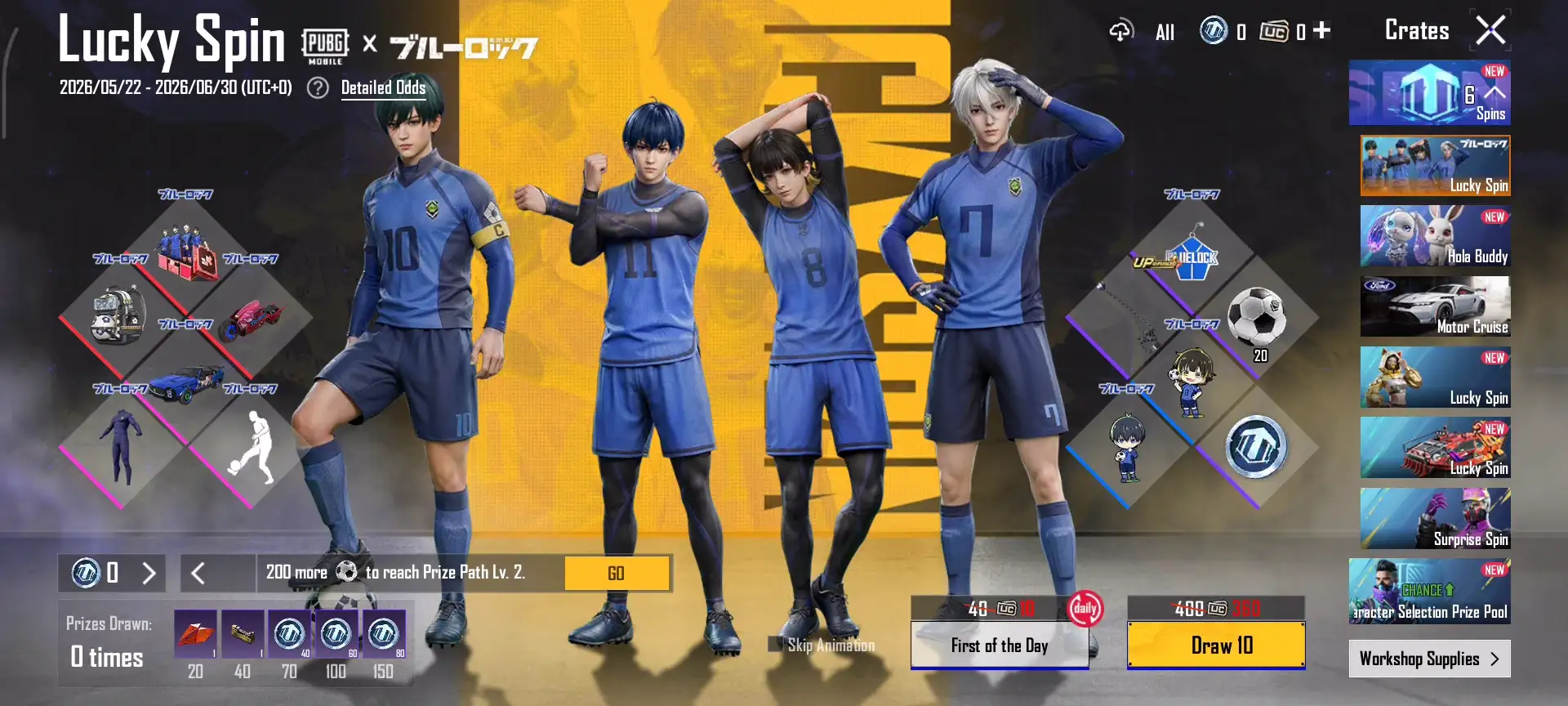
Lucky Spin, crates, draw prices, event periods, and rewards are shown for reference only. Actual UC costs may vary by event, region, and game update.
Better for Draw-Based Content
Lucky Spin, crates, and draw-based events can consume UC in a less predictable way. Sometimes a player may get the desired reward quickly, while other times more attempts may be needed. If you already plan to participate in this type of content, a larger UC budget may be more convenient than repeating several small top-ups.
Useful for Limited-Time Events and Multiple Purchases
Some limited-time PUBG MOBILE events may include skins, weapon cosmetics, upgrade materials, exchange items, crates, and draw mechanics at the same time. If you plan to stay active throughout an event period, a larger UC package may help reduce repeated top-ups and make your budget easier to manage.
Not Necessary for Every Player
A large UC package is not always the best choice. If you only want one small item or you play casually, buying more UC than you need may not be useful. Large UC packages are better for long-term players or event-focused players, not for every spending situation.
PUBG MOBILE Item Type and UC Package Suggestion
The table below gives a simple way to match common PUBG MOBILE spending goals with suitable UC package types. These suggestions are for planning only. Actual UC costs, package availability, prices, bonus UC, and event requirements may vary depending on the current in-game shop, event rules, and the ManaBuy product page.
The UC ranges below are based on example package types shown on ManaBuy and are for reference only. Package availability, prices, discounts, and bonus UC may change over time.
| Player Goal | Suggested UC Package |
Example UC Range |
Why It Fits |
|---|---|---|---|
| First-time top up | Small UC package | 60 UC to 300 + 25 UC | Lower budget and easier to test the top-up process. |
| Small UC balance gap | Small UC package | 60 UC to 300 + 25 UC | Useful when you only need a little more UC for a small item. |
| Royale Pass | Mid-range UC package | 600 + 60 UC to 1500 + 300 UC | More stable for pass planning and possible extra UC balance. |
| Regular skins or bundles | Mid-range or large UC package | 600 + 60 UC to 3000 + 850 UC | Depends on the item price and your current UC balance. |
| Lucky Spin or crates | Larger UC budget | 1500 + 300 UC to 6000 + 2100 UC | Draw-based content can consume UC unpredictably. |
| Limited-time events | Mid-range to large UC package | 1500 + 300 UC to 6000 + 2100 UC | Events may include bundles, draws, exchange items, or upgrade materials. |
| Long-term spending | Large UC package | 3000 + 850 UC to 6000 + 2100 UC | Can reduce repeated top-ups for active players. |
How to Avoid Buying Too Little or Too Much UC
Check the In-Game Item Price First
Before choosing a UC package, open the PUBG MOBILE shop, Royale Pass page, Lucky Spin page, crate page, or event page and check the current UC requirement. Since event prices and rewards may change, the latest in-game display should always be your main reference.
Do Not Only Choose the Cheapest Package
The lowest package may be enough for a small item or first-time test, but it may not be practical for regular spending. If you plan to buy Royale Pass, skins, bundles, or event items, choosing only the smallest package every time may lead to repeated top-ups.
Set a Limit for Lucky Spin and Crates
Draw-based content can be exciting, but it can also consume UC quickly. Before joining Lucky Spin or crates, set a clear UC budget first. This helps you avoid adding more UC just because you feel close to the next reward.
Check Your UID and Package Before Payment
After choosing a UC package, always confirm your PUBG MOBILE UID, package amount, quantity, and order total before payment. Choosing the wrong package or entering the wrong UID may cause order issues or delay the top-up process.
How to Choose a PUBG MOBILE UC Package on ManaBuy
On the ManaBuy PUBG MOBILE UC top up page, players can choose from different UC package options based on their budget and in-game goal. Light spenders or first-time buyers can start with a smaller package. Players planning for Royale Pass or regular skins may prefer a mid-range package. Players preparing for Lucky Spin, crates, limited-time events, or long-term spending can consider a larger package based on their budget.
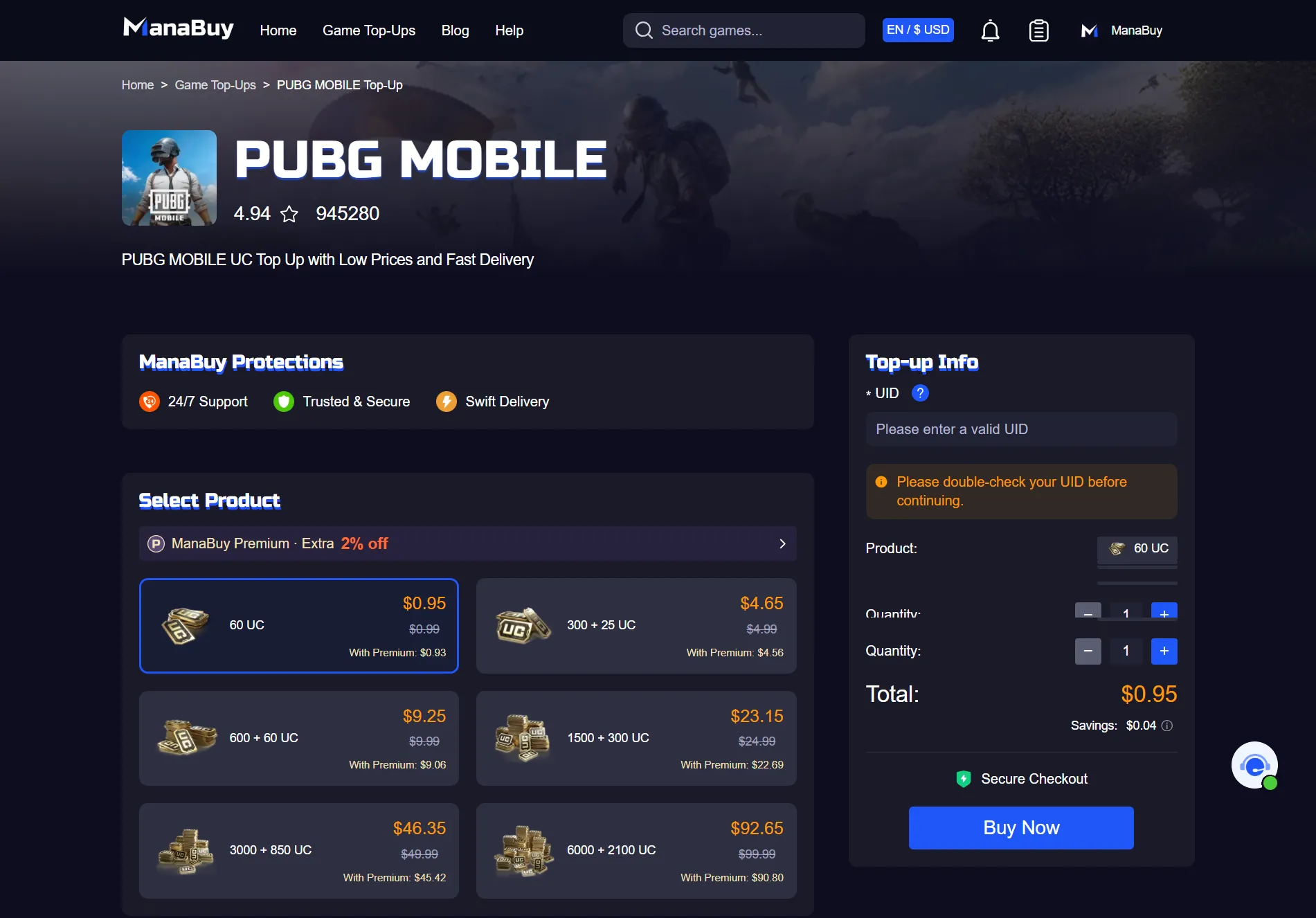
Before placing an order, check the current UC requirement in PUBG MOBILE and compare it with the package shown on ManaBuy. Package availability, prices, discounts, and bonus UC may change over time, so the final decision should be based on the current product page and your real spending goal.
Payment options may also vary by country and currency. If you want to check what checkout methods may be available, you can review ManaBuy's payment methods by country and currency guide before ordering.
FAQ About PUBG MOBILE UC Packages
What is the best PUBG MOBILE UC package for beginners?
A small UC package is usually better for beginners because it is easier to test the top-up process, payment method, UID entry, and delivery experience with a lower budget.
Which UC package is better for Royale Pass?
A mid-range UC package is usually more suitable for Royale Pass because it offers a more stable amount of UC for pass planning and may leave some extra balance for small purchases.
Should I choose a mid-range or large UC package for skins and bundles?
It depends on the item price and how much UC you already have. Regular skins or small bundles may only need a mid-range package, while premium skins, multiple bundles, or event-related items may require a larger budget.
How much UC should I prepare for Lucky Spin or crates?
Lucky Spin and crates are draw-based, so the UC cost is not always predictable. Set a budget first, then choose a package that matches that limit instead of adding UC without a plan.
Is a larger PUBG MOBILE UC package always better?
No. A larger package can be useful for long-term players or event-focused spending, but it is not always necessary for casual players or small purchases.
Can I top up PUBG MOBILE UC without login?
If the platform supports UID-based top up, players usually only need their PUBG MOBILE UID and do not need to provide their game account password. Always check your UID carefully before payment.
Final Thoughts
The key to choosing a PUBG MOBILE UC package is not simply buying the cheapest or largest option. The better approach is to first decide what you want to buy in the game. Small UC packages are better for first-time top-ups and small balance gaps. Mid-range UC packages are more suitable for Royale Pass, skins, and regular spending. Large UC packages are better for Lucky Spin, crates, limited-time events, and long-term players.
This guide is designed to help players choose a more suitable UC package based on different PUBG MOBILE paid items and spending goals. Since game events, rewards, prices, and UC requirements may change, always check the latest PUBG MOBILE in-game page and the current ManaBuy product page before completing your order.



Copyright © FUTURE OUTLOOK TECHNOLOGY LIMITED.Company Registration No.: 77374965 All rights reserved.UNIT 135,1/F.,143 WAI YIP STREET,KWUN TONG HK