
How to Find Your MLBB User ID and Zone ID for Diamond Top Up

Status check: Reviewed July 27, 2026: Diamond packages, Weekly Diamond Pass details, payment methods, delivery timing, and shop labels can vary by region, checkout method, and MLBB update. Confirm the live ManaBuy product page and in-game display before purchase.
For many Mobile Legends: Bang Bang players, Diamonds are an important part of the game experience. They can be used for skins, events, bundles, passes, and other in-game items. However, not every player wants to spend more than necessary, so many users look for a more affordable and convenient way to complete an MLBB diamond top up. ManaBuy provides a simple way to top up MLBB diamonds, but before placing an order, there is one important thing to check first: your MLBB User ID and Zone ID.
Your User ID and Zone ID are used to identify your Mobile Legends account and make sure the Diamonds are delivered to the correct player. If either number is entered incorrectly, your order may be delayed, fail to process, or in some cases be sent to the wrong account. This guide explains what the Mobile Legends User ID and Mobile Legends Zone ID mean, where to find them, and what to check before completing your MLBB Diamonds purchase. If you also need a broader beginner overview, you can read this MLBB Diamonds top up guide after checking your account details.
What Are MLBB User ID and Zone ID?
Your MLBB User ID is the unique identification number of your Mobile Legends: Bang Bang account. It is usually a longer string of numbers. Your Mobile Legends Zone ID is the server or region number linked to that account, and it usually appears in brackets after your User ID.
Many new players get confused because these two numbers are often displayed together. For example, your profile may show something like this:
123456789 (1234)
In this example, 123456789 is your Mobile Legends User ID, while 1234 inside the brackets is your Mobile Legends Zone ID. When you top up MLBB Diamonds, these two numbers usually need to be entered separately. Do not copy the brackets, and do not switch the order of the two numbers.
Why Does an MLBB Diamond Top Up Need User ID and Zone ID?
Mobile Legends: Bang Bang has players across many regions and servers. The User ID helps identify your game account, while the Zone ID helps confirm the server area connected to that account. Together, they allow the top-up system to locate the correct player more accurately.
This is also why many MLBB Diamond recharge platforms do not need your game password. Instead of logging into your account, you only need to provide the required account information: your MLBB User ID and Zone ID. This makes the process simpler, but it also means the numbers you enter must be correct.
In many delayed or failed recharge cases, the problem is not the payment itself. The issue often comes from an incorrect Zone ID, a missing Zone ID, or a User ID and Zone ID being mixed together. That is why checking your information before payment is one of the most important steps in any MLBB diamond top up. If this is your first order, this first-time MLBB top up checklist can help you review User ID, Zone ID, package choice, payment method, final amount, and order records before checkout.
How to Find Your MLBB User ID and Zone ID
Step 1: Open Mobile Legends: Bang Bang
Open the MLBB app and make sure you are logged into the account you want to recharge. If you use more than one account, double-check that you are viewing the correct one before copying any information.
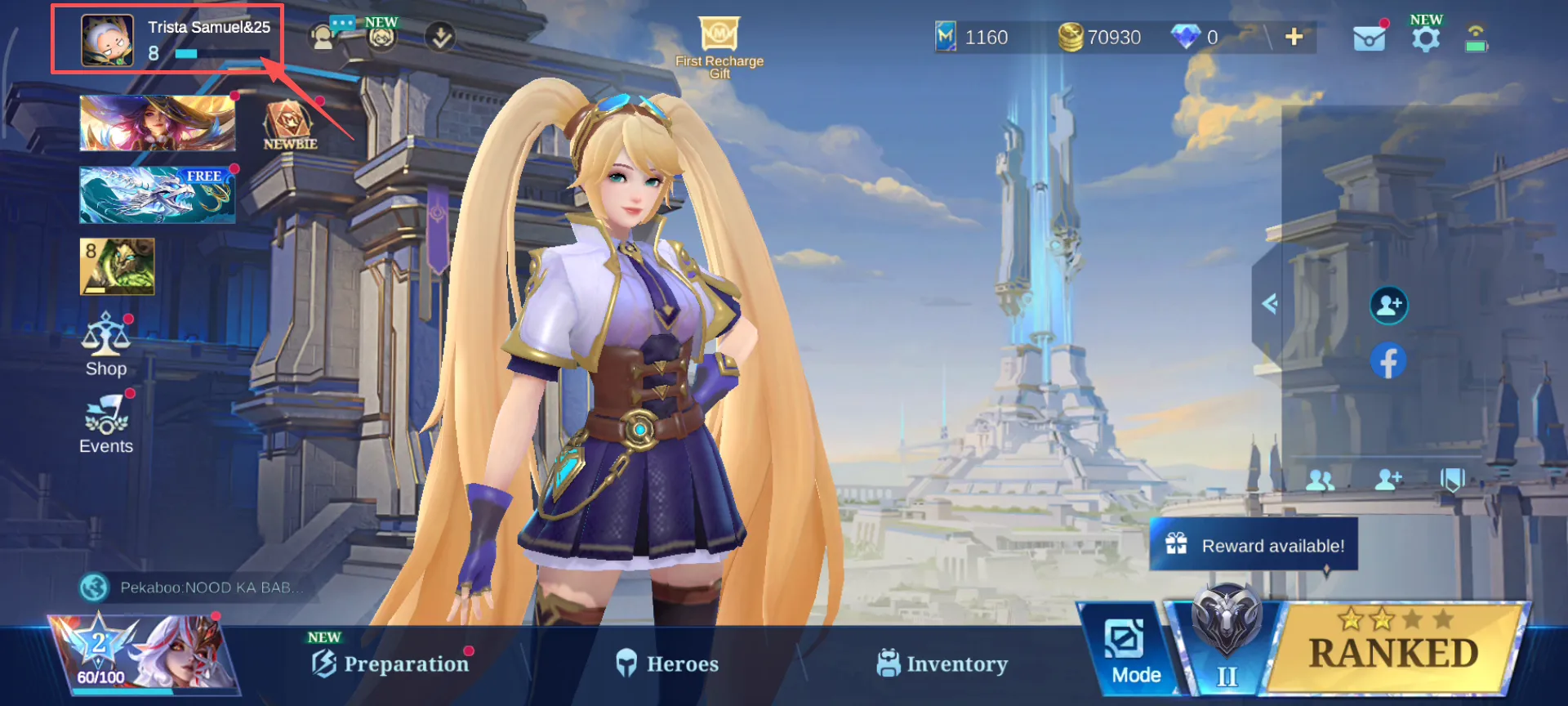
Step 2: Tap Your Profile Avatar
On the main lobby screen, tap your avatar in the upper-left corner. This will open your profile page, where you can see your nickname, avatar, level, and account information.
Step 3: Check the Number Below Your Profile
On your profile page, you should see a number format similar to this:
User ID: 123456789 (1234)
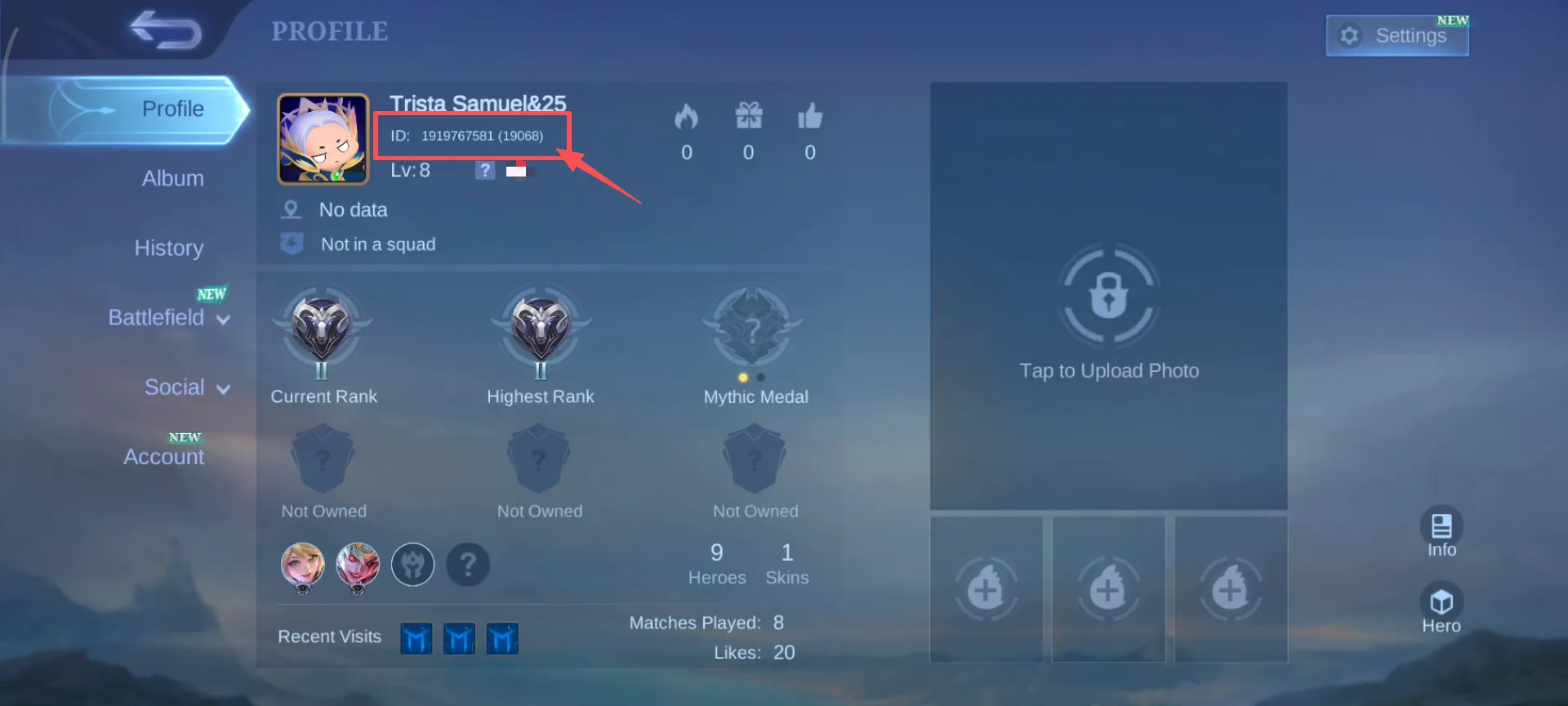
The long number outside the brackets is your Mobile Legends User ID. The number inside the brackets is your Mobile Legends Zone ID. If the top-up page has separate fields for User ID and Zone ID, enter them into the correct boxes separately.
What to Check Before Entering Your MLBB User ID and Zone ID
Do Not Copy the Brackets
If the recharge page asks for your Zone ID in a separate field, you usually only need to enter the number inside the brackets. For example, if your Zone ID is shown as (1234), you should enter 1234, not the brackets.
Do Not Switch User ID and Zone ID
Your User ID is usually longer, while your Zone ID is usually shorter. If you see a long number followed by a shorter number in brackets, the long number is normally the User ID, and the bracketed number is the Zone ID. Before payment, compare both fields with your in-game profile again.
Save a Screenshot Before You Top Up
If you are not sure whether you copied the numbers correctly, take a screenshot of your MLBB profile page first. This can help you fill in the information more carefully. It can also be useful if you need to contact customer support about your order later.
How to Top Up MLBB Diamonds on ManaBuy
Once you have confirmed your MLBB User ID and Zone ID, you can go to the ManaBuy MLBB diamond top up page and choose the Diamonds package you want.
The process is straightforward. Select your Diamond package, enter your User ID and Zone ID, review the order details, and choose an available payment method at checkout. After the payment is completed, the order will be processed based on the account information you submitted. If you are unsure which checkout option to use, this MLBB payment methods guide explains cards, PayPal, Apple Pay, Google Pay, local wallets, and region-based payment options.
Because this top-up method uses your User ID and Zone ID, you do not need to share your MLBB password when placing an order on ManaBuy.
Before confirming your order on ManaBuy, check three things carefully:
- Make sure the Diamonds package is correct.
- Make sure your User ID matches your in-game profile.
- Make sure your Zone ID is the number inside the brackets.
Taking a few extra seconds to review these details can help reduce order delays and make the whole MLBB top-up experience smoother. If you are comparing different package choices or planning around a limited event budget, this guide on how to buy MLBB Diamonds with better value may also help you choose a package more carefully.
What Happens If You Enter the Wrong User ID or Zone ID?
If your User ID or Zone ID is incorrect, the system may not be able to match your account properly. This can cause the order to be delayed, fail, or be sent to the wrong account. In some cases, once Diamonds have been delivered to the wrong account, the transaction may not be easy to reverse.
That is why you should not rely on memory when you top up MLBB diamonds. Always check your profile page directly before entering the numbers. If you notice a mistake right after placing an order, contact ManaBuy support as soon as possible and provide your order number, correct User ID, and correct Zone ID.
If your payment succeeded but the Diamonds are not showing yet, avoid placing another order immediately. This MLBB Diamonds delivery time guide explains what to check for delayed orders, pending status, or Diamonds not received issues.
Final Tips Before Your MLBB Diamond Top Up
For players who want a fast and smooth MLBB diamond top up, the most important step is not just payment. It is making sure your account information is correct before the order is submitted. Your MLBB User ID and Zone ID determine where the Diamonds will be delivered, so you should always check them directly from your Mobile Legends: Bang Bang profile page before buying.
Before you complete your order on ManaBuy, confirm the long User ID and the shorter Zone ID inside the brackets, then enter them into the correct fields on the top-up page. By checking these details in advance, you can reduce the risk of wrong information, order delays, or failed delivery. Whether you are preparing for a new skin, a limited-time event, a Weekly Diamond Pass, or your next in-game purchase, a clear account check is the best first step before topping up MLBB Diamonds.




Copyright © FUTURE OUTLOOK TECHNOLOGY LIMITED.Company Registration No.: 77374965 All rights reserved.UNIT 135,1/F.,143 WAI YIP STREET,KWUN TONG HK