
First-Time MLBB Top Up Checklist: What to Check Before Buying Diamonds

Status check: Reviewed July 27, 2026: Diamond packages, Weekly Diamond Pass details, payment methods, delivery timing, and shop labels can vary by region, checkout method, and MLBB update. Confirm the live ManaBuy product page and in-game display before purchase.
For players topping up Mobile Legends: Bang Bang Diamonds for the first time, the most common issues are usually not about the basic steps. They often come from missing small checks before payment: whether your User ID and Zone ID are correct, whether the Diamonds package matches your goal, whether your payment method is available, whether the final amount is clear, and whether a platform asks for your game password.
This first-time MLBB top up checklist helps beginners review the key points before placing an order. Whether you want to buy skins, Starlight, a Weekly Diamond Pass, or event rewards, checking these details first can reduce common errors and delivery delays. If you want a broader overview of Diamonds, packages, payment, and delivery, you can also read this MLBB Diamonds top up guide.
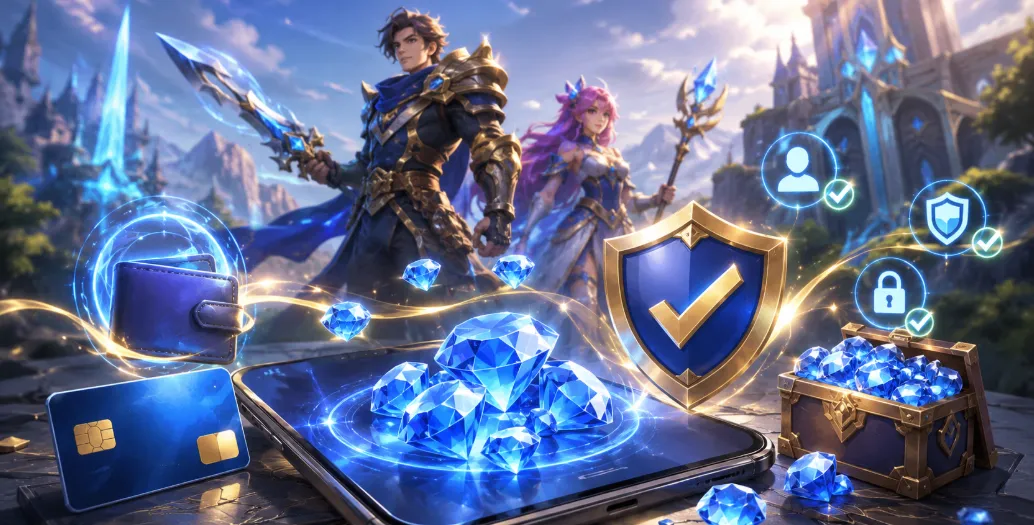
Why Check Before Your First MLBB Top Up on ManaBuy?
New players may enter the wrong Zone ID, choose the wrong Diamonds package, close the payment page too early, or place another order when Diamonds have not appeared yet. Most of these problems can be avoided by checking your account information, package, payment option, and final amount before submitting the order.
Checklist 1: Confirm Your MLBB User ID and Zone ID
The User ID and Zone ID are used to identify your Mobile Legends: Bang Bang account. You can find them by opening the game, tapping your avatar in the top-left corner, and checking your profile page. A typical format looks like 123456789(1234). The long number outside the brackets is the User ID, and the number inside the brackets is the Zone ID.
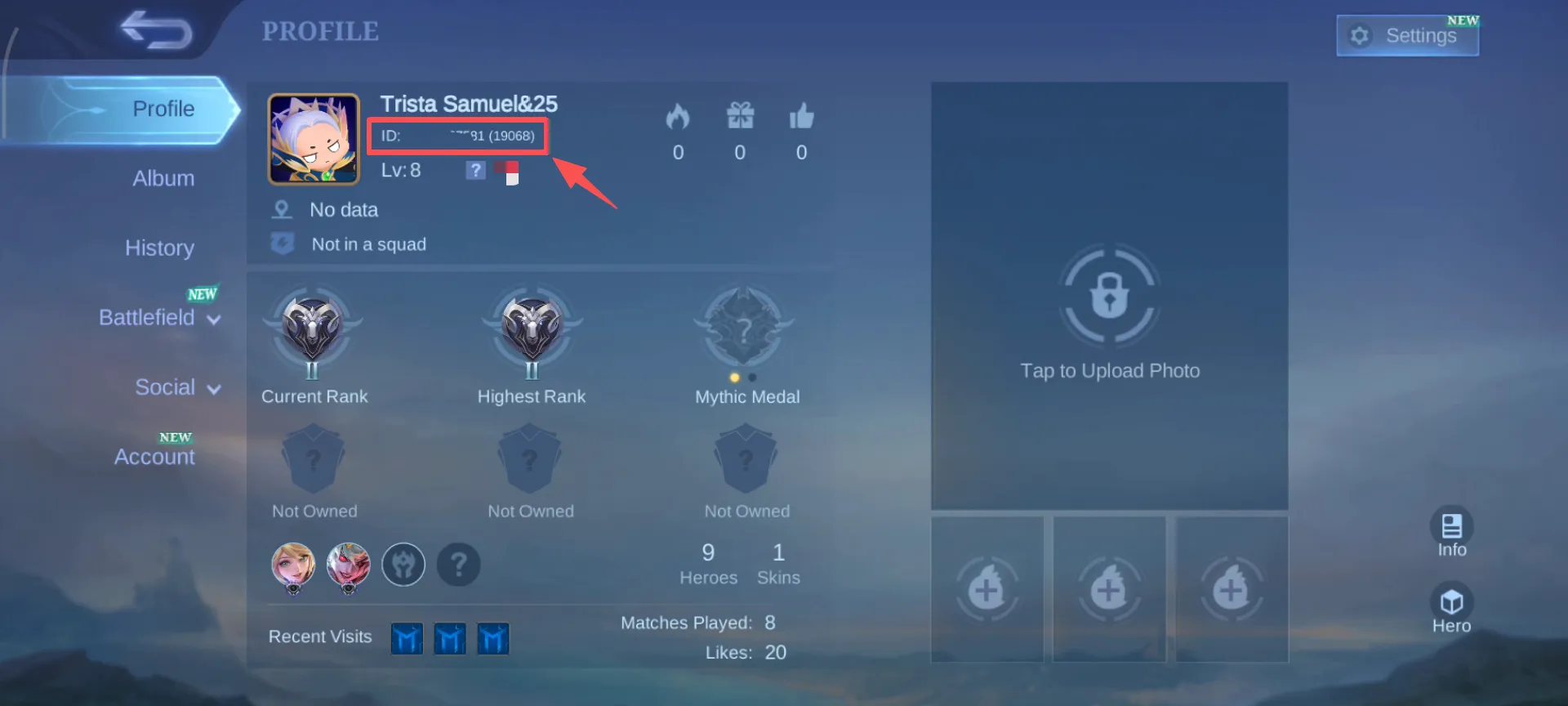
On ManaBuy, these details are required for MLBB Diamonds top up. For your first order, check the numbers directly in the game instead of relying on memory. Incorrect account details may delay delivery or require additional order checking. If you need a more detailed walkthrough, follow this guide on how to find your MLBB User ID and Zone ID before checkout.
Checklist 2: Choose the Right Diamonds Package
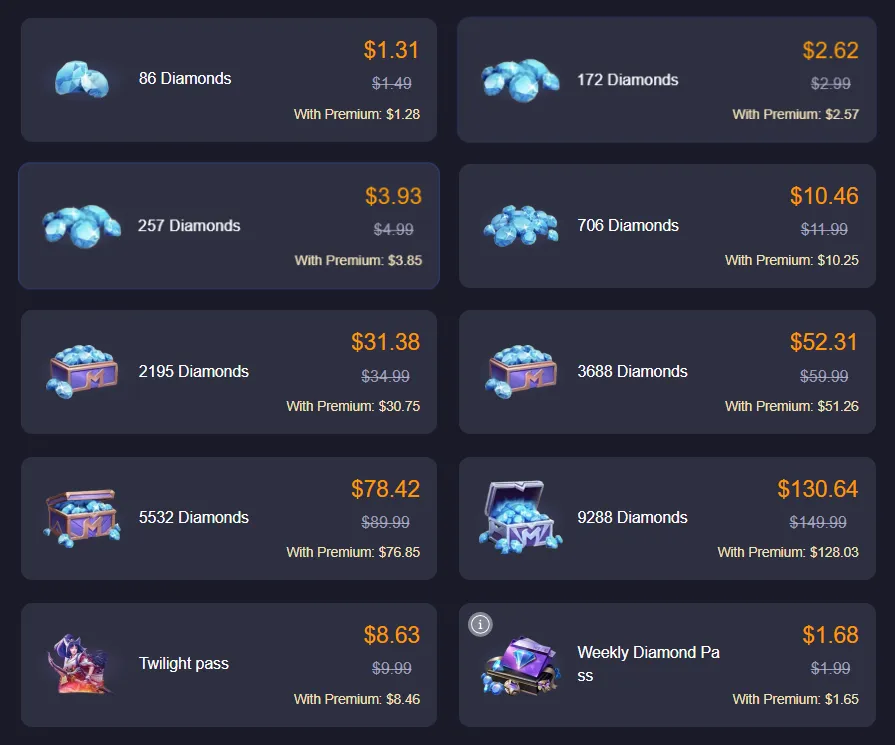
Small Balance Top-Up
If you only need a few Diamonds to complete a purchase, a smaller package is usually enough and can help avoid leaving too much unused balance.
Buying Skins or Bundles
If you want a specific skin, Starlight item, or bundle, check the in-game Diamonds cost first. Then choose a package that matches your target instead of buying randomly.
Participating in Events
For events with draws, recharge milestones, or limited-time offers, set a MLBB Diamonds budget before purchasing. This helps you avoid spending more than planned during repeated draws. If you want to compare budget, package value, and safe purchase habits, this guide on how to buy MLBB Diamonds with better value can help you plan more carefully.
Long-Term Accumulation
The Weekly Diamond Pass is suitable for regular players who want to collect rewards steadily over time. If you only need a one-time purchase, a normal Diamonds package may be more direct. If you are comparing pass-style rewards with one-time Diamonds packages, this MLBB Weekly Diamond Pass guide explains when the pass may fit long-term players better.
Checklist 3: Review Payment Methods Before Checkout
ManaBuy payment options may vary by currency, region, device, and checkout environment. Common methods may include Visa, Mastercard, JCB, PayPal, Apple Pay, Google Pay, and selected local wallets or regional payment methods.
Depending on your region and currency, you may also see options such as PayPay, Pix, DANA, OVO, GCash, Kakao Pay, NAVER Pay, Samsung Pay, TrueMoney, LINE Pay, Touch ’n Go eWallet, GrabPay, or ShopeePay. The final available options are the ones shown on the checkout page.
For a first-time MLBB top up, choose a payment method you already trust and understand. This can make it easier to confirm whether the payment was successful. For a deeper breakdown of cards, PayPal, Apple Pay, Google Pay, local wallets, and region-based checkout options, read the MLBB payment methods guide.
Checklist 4: Confirm Final Amount and Currency
Before submitting payment, check the selected currency, final amount, and package details. This is especially important when paying with a local wallet, bank card, PayPal, Apple Pay, or Google Pay, because payment availability and final checkout details may vary by region.
If the checkout page shows any additional message, review it before continuing. Confirming the amount first can help avoid confusion after payment is completed.
Checklist 5: Make Sure No Game Password Is Required
A standard safe MLBB Diamonds top up only requires your User ID and Zone ID. You do not need to provide your Mobile Legends: Bang Bang account password.
If a platform asks for your game login password, requests a private transfer, or cannot provide a clear order record, be cautious. Protecting your account information is more important than chasing a short-term discount.
Checklist 6: Keep Order Information After Payment
After payment, keep your order number, payment time, and account details. If Diamonds do not appear immediately, do not place another order right away. First, check whether payment succeeded, whether the order status looks normal, and whether the User ID and Zone ID are correct.
If the Diamonds still have not arrived after a reasonable wait, contact ManaBuy support and provide your order number. For MLBB Diamonds not received issues, the order number is usually the fastest way to check the case. You can also read the MLBB Diamonds delivery time guide for delayed orders, pending status, or Diamonds not showing in the game.
First-Time MLBB Top Up Common Mistakes
- Entering the User ID and Zone ID incorrectly.
- Omitting the Zone ID inside the brackets.
- Paying before confirming the Diamonds package.
- Not checking the final amount and currency.
- Closing the payment page before confirmation.
- Placing another order when Diamonds have not appeared yet.
- Providing your account password to an unverified source.
First-Time MLBB Top Up FAQ
What do I need before my first MLBB top up?
Prepare the correct User ID and Zone ID, choose the Diamonds package you want, select a supported payment method, and verify the final amount before paying.
Where can I find my MLBB User ID and Zone ID?
Open Mobile Legends: Bang Bang, tap your avatar in the top-left corner, and check your profile page. The number outside the brackets is your User ID, and the number inside the brackets is your Zone ID.
Do I need to provide my Mobile Legends password?
No. A normal MLBB Diamonds top up only requires your User ID and Zone ID. You do not need to provide your Mobile Legends: Bang Bang password.
Which Diamonds package should beginners choose?
If you only need a small balance top-up, choose a smaller package. If you are buying skins or joining events, check the in-game cost first and choose a package that fits your goal.
Can I use PayPal, Apple Pay, Google Pay, or local wallets?
Payment methods vary by currency, region, device, and checkout environment. Check the ManaBuy checkout page to see whether PayPal, Apple Pay, Google Pay, local wallets, or other regional payment methods are available for your order.
How long does MLBB Diamonds top up take?
If your User ID and Zone ID are correct and payment is successful, the order is usually processed within a short time. Actual delivery may still depend on payment confirmation, order processing, and in-game balance refresh.
Can I top up MLBB Diamonds for another player?
Yes. You can top up for another player if you enter that player’s correct User ID and Zone ID. Always double-check the details before payment.
Summary
For a first-time MLBB Diamonds top up, the most important checks are simple: confirm your User ID and Zone ID, choose the right package, verify the final amount, use a trusted payment method, and keep your order information after payment.
Following this checklist can make your first Mobile Legends: Bang Bang top up smoother and reduce common beginner mistakes such as wrong account details, payment confusion, repeated orders, or delayed delivery questions.




Copyright © FUTURE OUTLOOK TECHNOLOGY LIMITED.Company Registration No.: 77374965 All rights reserved.UNIT 135,1/F.,143 WAI YIP STREET,KWUN TONG HK