
MLBB Payment Methods Guide: How to Pay for Mobile Legends Diamonds

Status check: Reviewed July 27, 2026: Diamond packages, Weekly Diamond Pass details, payment methods, delivery timing, and shop labels can vary by region, checkout method, and MLBB update. Confirm the live ManaBuy product page and in-game display before purchase.
For many Mobile Legends: Bang Bang players, payment convenience matters just as much as price when buying Diamonds. Before placing an order, players often want to know whether they can pay with a bank card, PayPal, Apple Pay, Google Pay, or a local wallet they already use.
This MLBB payment methods guide explains how payment options work on ManaBuy, why available methods may vary by currency or region, what to check before paying, and what to do if a payment fails or the Diamonds do not appear right away. If you need a full overview before choosing a payment method, you can also read this MLBB Diamonds top up guide.
What Payment Methods Can You Use for MLBB Diamonds?
When purchasing Diamonds on ManaBuy, the available payment methods may depend on your selected currency, region, device, and checkout environment. Common options may include Visa, Mastercard, JCB, PayPal, Apple Pay, Google Pay, and selected local wallets or regional payment methods.
The safest way to confirm what you can use is to check the payment options shown on the checkout page. Some players may see global card options, while others may also see local payment choices depending on their currency and location.
Why Payment Options May Vary by Currency or Region
Sometimes one player can see a certain wallet or payment method, while another cannot. This usually does not mean there is a problem with the order. Payment availability is often affected by the currency selected at checkout, regional payment support, device settings, browser environment, and payment channel availability.
For example, Apple Pay and Google Pay may depend on your device and wallet setup. Some local wallets only appear for specific currencies or regions. Because of this, the final payment options should always be based on what ManaBuy shows during checkout.
Common Payment Options for Mobile Legends Diamonds on ManaBuy
Credit or Debit Cards
Bank cards are one of the most common ways to pay for online game top ups. Many players use Visa, Mastercard, or JCB when buying Mobile Legends Diamonds, especially if they prefer a familiar global payment method.
If a card payment does not go through, check the card balance, bank risk control, 3D Secure verification, billing details, and network connection before trying again.
PayPal
Many users specifically search for can I pay for MLBB Diamonds with PayPal. If PayPal appears on the checkout page, you can choose it to complete your payment. It is a convenient option for players who already use PayPal for online purchases.
If PayPal is not visible, it may be related to the selected currency, region, or payment channel. In that case, choose another available method shown at checkout.
Apple Pay and Google Pay
For mobile users, MLBB top up with Apple Pay or MLBB top up with Google Pay can make checkout faster. These options are especially useful when you want to complete payment on a phone without manually entering card details.
If they do not appear, check whether your device, browser, and wallet settings support them. Availability still depends on the checkout environment.
Local Wallets and Regional Payment Methods
Local payment methods are important for players who prefer paying in a familiar way. Depending on currency and availability, users may see options such as PayPay for JPY, Pix for BRL, DANA or OVO for IDR, GCash for PHP, and Kakao Pay, NAVER Pay, or Samsung Pay for KRW.
Other regional methods may also appear, such as TrueMoney, LINE Pay, Touch ’n Go eWallet, Boost, GrabPay, ShopeePay, Easypaisa, or JazzCash. The exact list depends on what is supported for your checkout session.
How to Choose the Best Payment Method for MLBB Top Up
If You Prefer a Global Payment Method
If you want a familiar option that works across many online purchases, start with bank cards or PayPal when available. These methods are easy for many players to understand and are suitable for regular Mobile Legends Diamonds top up orders.
If You Pay Mostly on Mobile
If you usually buy game items on your phone, Apple Pay, Google Pay, or local wallets may be more convenient. They can reduce manual input and make the checkout process quicker.
If You Want a Local Payment Experience
If local currency and regional payment habits matter to you, check whether ManaBuy displays a wallet or local method for your currency. This can make payment feel more familiar and may reduce confusion during checkout.
How to Pay for MLBB Diamonds on ManaBuy
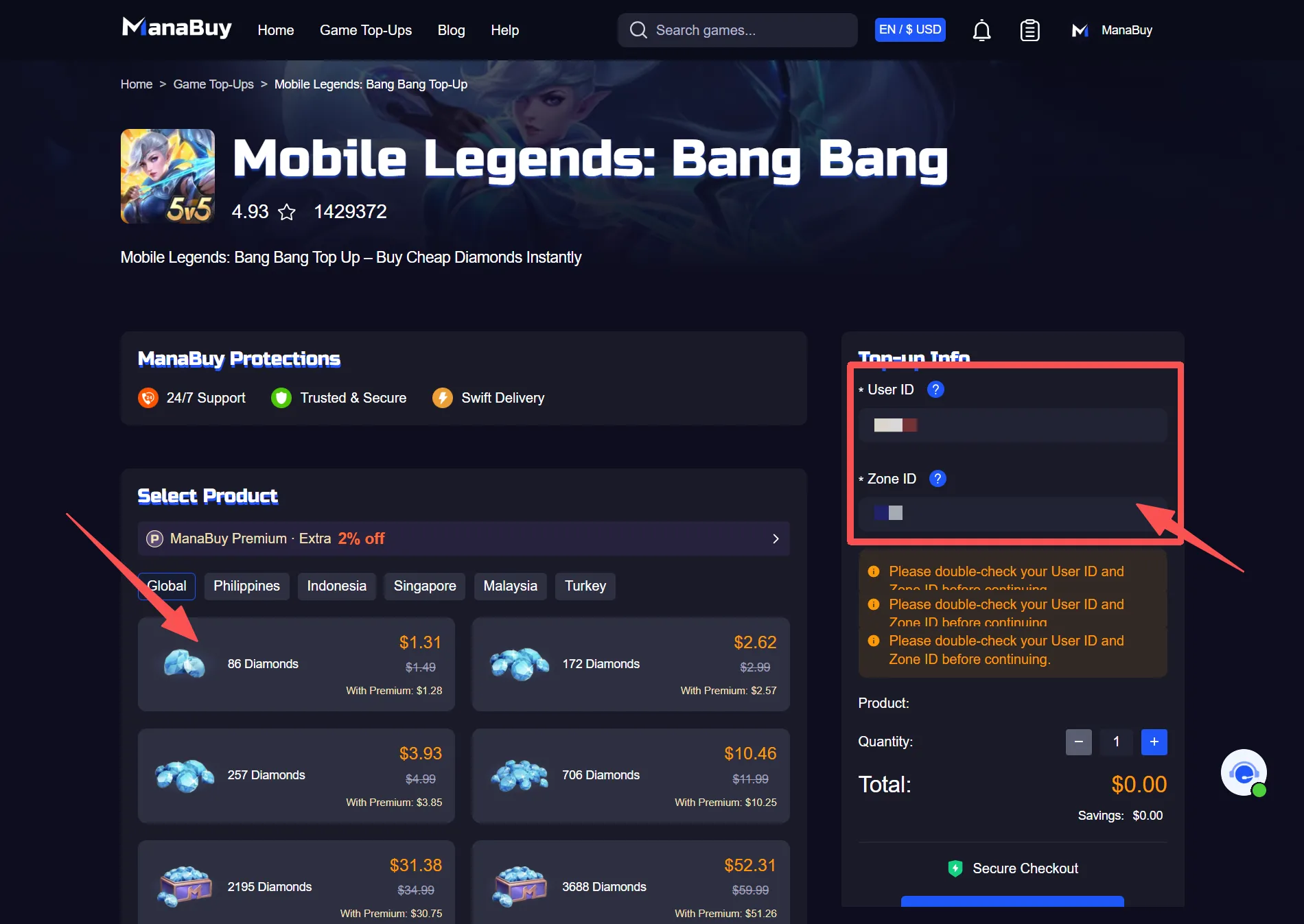
- Go to the ManaBuy MLBB Diamonds top up page.
- Select the Diamonds package or Weekly Diamond Pass you want to buy.
- Enter the correct User ID and Zone ID.
- Check the package, quantity, account details, and final amount.
- Choose an available payment method on the checkout page.
- Complete payment and wait for the order to process.
After payment, it is better to wait for a clear success message before leaving the page. Closing the checkout page too early may make the payment status harder to confirm.
If this is your first order, this first-time MLBB top up checklist can help you review User ID, Zone ID, package choice, payment method, final amount, and order records before checkout.
What Should You Check Before Paying?
User ID and Zone ID
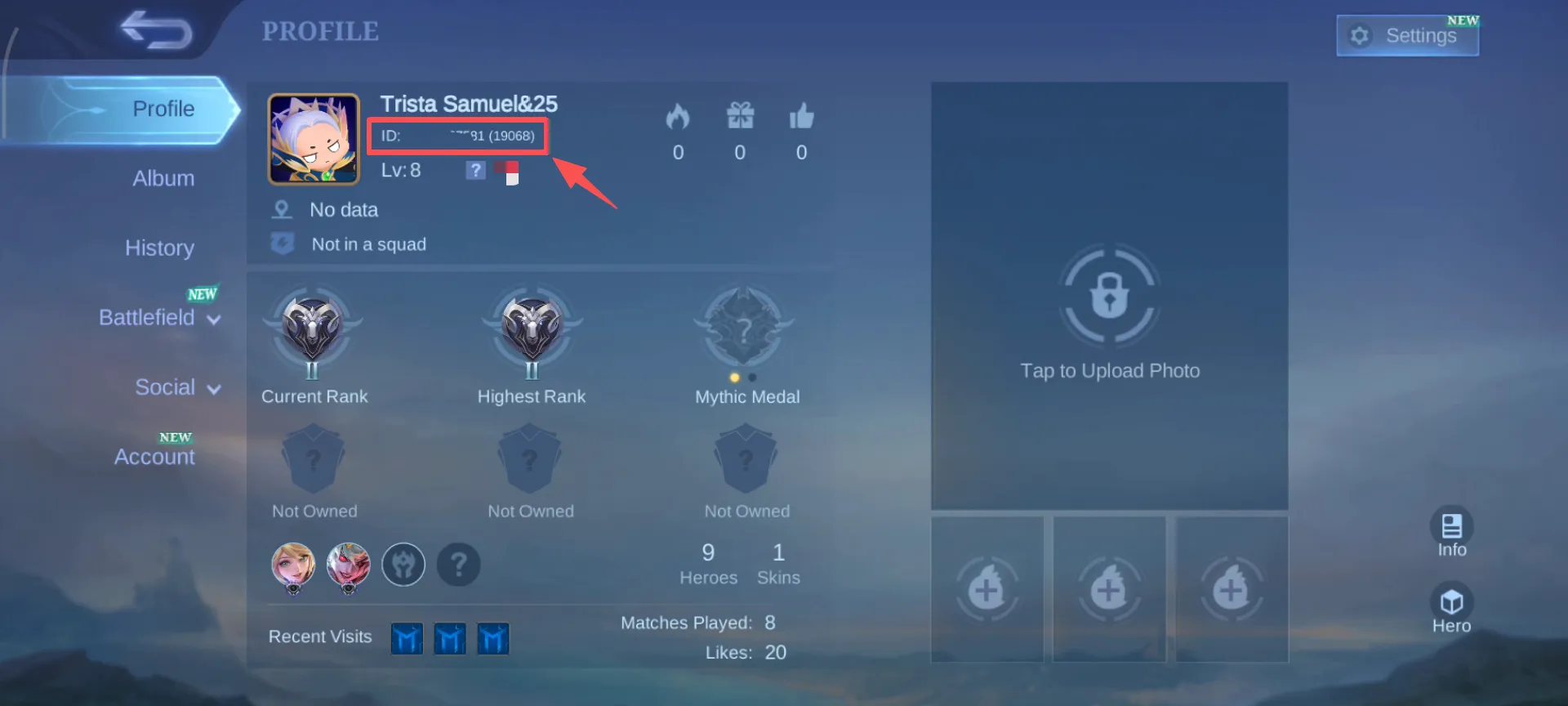
ManaBuy’s MLBB recharge process does not require your Mobile Legends password, but the User ID and Zone ID must be correct. If these details are wrong, the payment may succeed while the delivery still needs additional checking. If you are not sure where to find these numbers, follow this guide on how to find your MLBB User ID and Zone ID before placing your order.
Diamonds Package
Before checkout, confirm whether you are buying regular Diamonds, a Weekly Diamond Pass, or another related product. Choosing the wrong item can affect how the purchase is delivered or used in the game. If you are comparing pass-style rewards with one-time Diamonds packages, this MLBB Weekly Diamond Pass guide can help you understand which option fits your play style.
Currency and Final Amount
Review the selected currency, order amount, and any payment page information before confirming. This helps avoid confusion after the transaction is completed.
Payment Success Message
Whether you pay by card, PayPal, Apple Pay, Google Pay, or a local wallet, wait until the page confirms that the payment was successful. If the page is closed halfway, the order status may take longer to update.
Why Did My MLBB Payment Fail?
MLBB payment failed issues can happen for several reasons. Common causes include insufficient card balance, bank risk control, failed 3D Secure verification, incomplete PayPal or wallet confirmation, unstable network connection, closing the payment page too early, or using a payment method that does not support the selected currency.
If a payment fails, do not submit the same order repeatedly before checking the reason. Review your payment tool, network, currency selection, and page message first. You can also try another available method or contact ManaBuy support if you are unsure whether an order was created.
What If Payment Succeeded but Diamonds Did Not Arrive?
If the payment was successful but the Diamonds are not visible in Mobile Legends: Bang Bang yet, avoid placing another order immediately. First, check your order status, payment record, and account details, then refresh the game balance.
If the issue remains after waiting for a while, contact ManaBuy support with your order number. For cases like MLBB Diamonds not received, the order number, payment time, and account information can help the team check the situation faster. You can also read the MLBB Diamonds delivery time guide for delayed orders, pending status, or Diamonds not showing in the game.
Is It Safe to Pay for Mobile Legends Diamonds on ManaBuy?
ManaBuy’s Mobile Legends: Bang Bang top up process usually only requires the User ID and Zone ID shown in the game. You do not need to provide your Mobile Legends account password, which helps reduce account login risk.
Players can choose from the payment options shown at checkout and keep the order record after purchase. If support is needed later, the order information can be used to check the transaction more efficiently.
If you are also comparing prices, packages, and safe checkout habits, this guide on how to buy MLBB Diamonds with better value can help you plan your purchase more carefully.
MLBB Payment Methods FAQ
Can I pay for MLBB Diamonds with PayPal?
Yes, if PayPal appears on the ManaBuy checkout page. Availability may depend on your selected currency, region, and payment channel.
Can I use Apple Pay or Google Pay for MLBB top up?
You can use Apple Pay or Google Pay when your device supports it and the option is shown at checkout. If it does not appear, check your wallet setup or choose another available method.
Why can’t I see a certain payment method?
Payment methods may vary by currency, region, device, browser, and payment channel. The available options are the ones displayed during checkout.
Can I pay for MLBB Diamonds in local currency?
Some currencies may support local payment methods such as PayPay, Pix, DANA, GCash, Kakao Pay, or other regional options. Check the payment page for the exact methods available to you.
What should I do if my MLBB payment fails?
Check your card or wallet status, network connection, 3D Secure verification, payment page message, and selected currency. Avoid repeated submissions until you understand the cause.
Do I need to provide my Mobile Legends password when paying?
No. ManaBuy’s MLBB Diamonds top up usually requires only your User ID and Zone ID. You do not need to provide your Mobile Legends: Bang Bang account password.
Does payment success mean Diamonds arrive immediately?
Payment success means the order can move into processing, but delivery may still depend on account information, order handling, and in-game balance refresh.
Final Thoughts
MLBB payment methods on ManaBuy may vary by currency, region, device, and checkout environment. Common options can include cards, PayPal, Apple Pay, Google Pay, and selected local wallets. Before paying, make sure your account details, package, currency, and final amount are correct.
If you are ready to buy Diamonds for Mobile Legends: Bang Bang, visit ManaBuy’s MLBB Diamonds top up page, choose the package and payment method that fit your needs, and complete checkout after checking your order details.





Copyright © FUTURE OUTLOOK TECHNOLOGY LIMITED.Company Registration No.: 77374965 All rights reserved.UNIT 135,1/F.,143 WAI YIP STREET,KWUN TONG HK