
MLBB Diamonds Top Up Complete Guide: User ID, Zone ID, Payment and Delivery

Status check: Reviewed July 27, 2026: Diamond packages, Weekly Diamond Pass details, payment methods, delivery timing, and shop labels can vary by region, checkout method, and MLBB update. Confirm the live ManaBuy product page and in-game display before purchase.
MLBB Diamonds top up on ManaBuy is a User ID and Zone ID workflow, so the most important part is not the button you click first. It is making sure the account numbers, server option, package, payment method, and order status all match before you pay.
This guide is written for players who want one clear place to check the whole flow: where to find User ID and Zone ID, how to choose a Diamonds package or Weekly Diamond Pass, what payment methods may appear, how delivery status works, and what to do if Diamonds are delayed.
Quick Answer: How MLBB Diamonds Top Up Works on ManaBuy
Quick answer: To top up MLBB Diamonds on ManaBuy, choose the correct server or region option, select a Diamonds package or Weekly Diamond Pass, enter your MLBB User ID and Zone ID, then complete checkout. ManaBuy does not need your MLBB password. Payment methods depend on your currency, region, device and checkout page. Delivery is usually fast after payment is completed, but if Diamonds are delayed, check ManaBuy order status first and contact support if a completed order is still missing in game.

What You Need Before Buying MLBB Diamonds
Before you start a Mobile Legends: Bang Bang top up, prepare three things:
- Your correct MLBB User ID.
- Your correct MLBB Zone ID.
- The server or region option that matches the product page selection available for your account.
You do not need to provide your game password. A normal MLBB Diamonds top up through ManaBuy is based on the account identifier shown inside the game. That is why the User ID and Zone ID check is the most important step in the order.
You should also decide what you are buying before checkout. ManaBuy may show multiple server or region options and multiple product choices, such as different Diamond amounts and Weekly Diamond Pass. The exact package list, price, discount, currency, and savings can change by server, region, currency, and current product page settings. Always use the live product page as the final source before placing an order.
Pre-Top-Up Checklist
| Check Item | What To Confirm | Why It Matters |
|---|---|---|
| Server or region | Choose the correct option shown on ManaBuy | Product availability and delivery rules may vary |
| User ID | Numbers outside the brackets on your profile | This identifies the target account |
| Zone ID | Numbers inside the brackets on your profile | This helps route the top up correctly |
| Product type | Diamonds package or Weekly Diamond Pass | Pass rules are different from direct Diamonds |
| Payment currency | Currency selected at checkout | Available payment methods depend on currency and checkout |
| Order amount | Final price after discount or coupon | Prevents payment confusion |
| First purchase | Consider a small test order first | Helpful for new ManaBuy users |
How to Find Your MLBB User ID and Zone ID
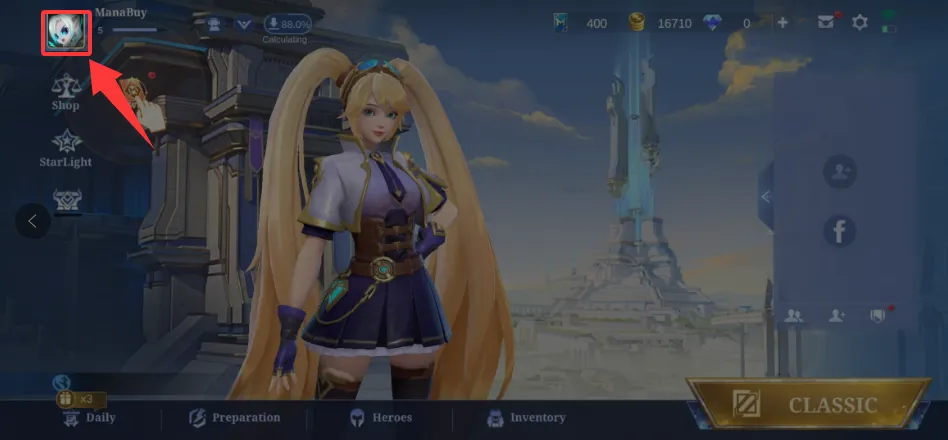
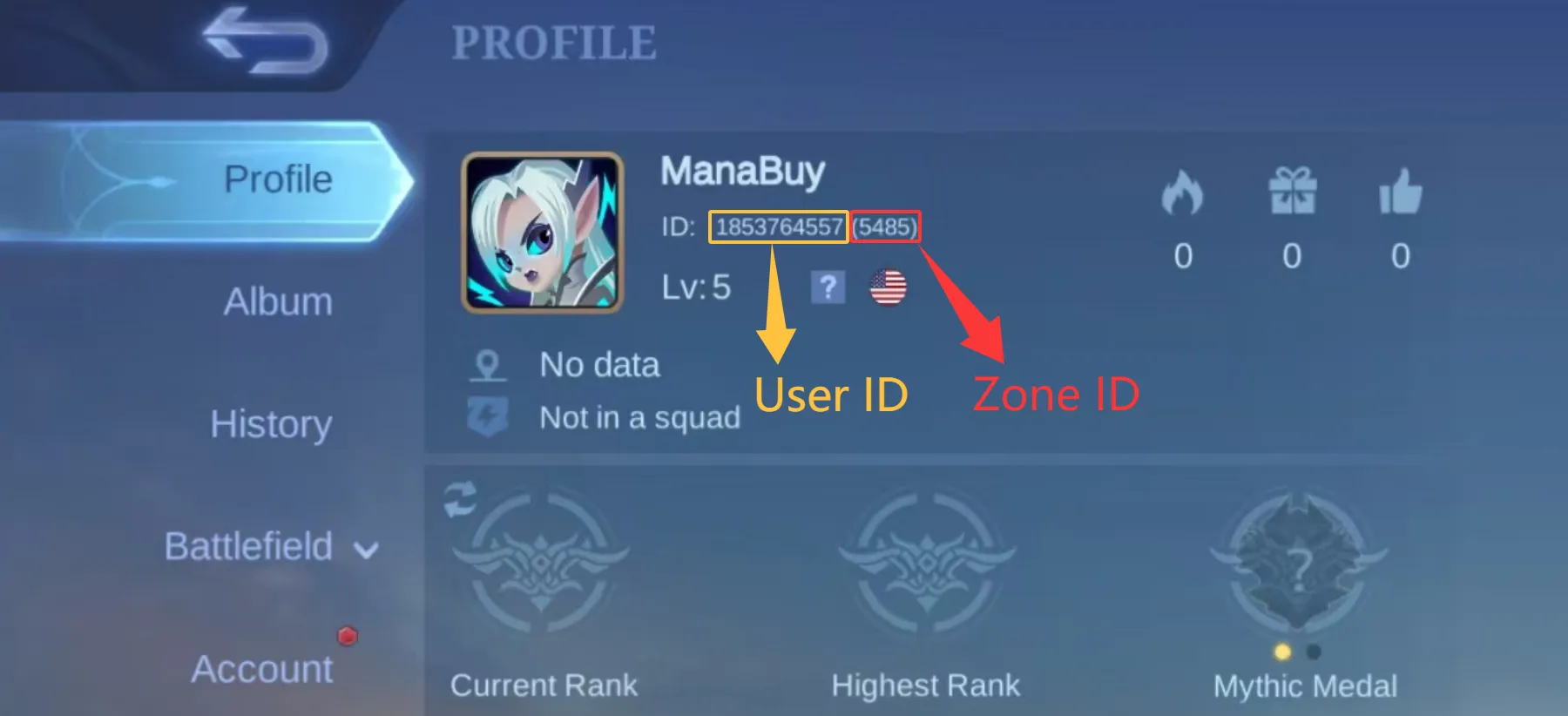
Your User ID and Zone ID are shown inside Mobile Legends: Bang Bang on your player profile. ManaBuy also explains this process on the MLBB product page, but it is worth checking slowly before every order.
- Log in to Mobile Legends: Bang Bang.
- Tap your avatar in the top left corner to open your player profile.
- Look at the ID line on the profile screen.
- The User ID is the number outside the brackets.
- The Zone ID is the number inside the brackets.
For example, if your profile shows:
1853764557 (5485)
Then:
- User ID:
1853764557 - Zone ID:
5485
Do not guess either number. Do not copy only part of the ID. Do not use a nickname, email address, phone number, account login, or friend name instead of the User ID and Zone ID. ManaBuy sends the order based on the information you enter. If the submitted User ID or Zone ID is wrong, the order may be delivered to the wrong target information and refund or reissue is not supported for user-entered incorrect details.
Step-by-Step: How to Top Up MLBB Diamonds on ManaBuy
The normal MLBB Diamonds top-up flow is simple, but each step matters.
Step 1: Open the Mobile Legends: Bang Bang Top-Up Page
Go to the ManaBuy MLBB product page:
Mobile Legends: Bang Bang Top-Up Page
Check the language and currency on the site before choosing a product. Currency can affect which payment methods appear later in checkout.
Step 2: Choose the Correct Server or Region Option
The MLBB top-up page shows the server or region options currently supported on ManaBuy. Choose the option that matches your intended account and product. Do not assume that every package works for every server. The live product page is the source that shows what is currently available.
Step 3: Select a Diamonds Package or Weekly Diamond Pass
Choose the product you want to buy. Common options may include different Diamond amounts and Weekly Diamond Pass. The exact package names, Diamond counts, price, original price, discount, and premium price are shown on the product page.
If you are buying for the first time, it is usually safer to start with a smaller package to confirm the process, delivery, and account information. If you have used ManaBuy successfully before and you are preparing for a larger event, skin draw, or pass purchase, a bigger package may make more sense depending on the savings shown for that SKU.
Step 4: Enter User ID and Zone ID
Enter the User ID and Zone ID exactly as they appear in your MLBB profile. Check the numbers again before payment.
This is the step where most avoidable mistakes happen. A single wrong digit can cause problems. If you are topping up for a friend, ask them to send a clear screenshot of their profile and confirm both numbers before you place the order.
Step 5: Complete Payment
Click Buy Now and proceed to checkout. ManaBuy payment methods vary by currency, region, device, selected game, and checkout environment. The payment methods guide separates options into international bank cards, digital wallets or platform wallets, and localized payment channels.
For many users, checkout may show card options such as Visa, Mastercard, or JCB. Some checkout environments may show wallet options such as PayPal, Apple Pay, or Google Pay. Local examples in ManaBuy's payment guide include PayPay for JPY, Pix for BRL, DANA or OVO for IDR, Touch 'n Go eWallet or Boost for MYR, GCash, BPI, or Billease for PHP, TrueMoney or LINE Pay for THB, Samsung Pay, Kakao Pay, or NAVER Pay for KRW, ShopeePay or GrabPay for SGD, and Easypaisa or JazzCash for PKR.
For a full overview, see:
ManaBuy Payment Methods by Country and Currency
Treat those names as examples, not promises for every MLBB order. Do not assume that another user in another country will see the same payment options as you. The payment methods displayed at checkout are the methods available for your current order.
Step 6: Wait for Delivery
After payment is completed, wait for the order to be processed. MLBB Diamonds top up is usually fast and often finishes within seconds or a few minutes, but delivery time may vary by server and game-side processing.
If the order is not yet marked completed on ManaBuy, the product has not finished delivery. If the order is marked completed but the Diamonds do not appear in your account, refresh the game, recheck the User ID and Zone ID you submitted, then contact support with the order number.
MLBB Diamonds Packages, Discounts and First Recharge Rewards
 Small test orderUseful for first-time User ID and Zone ID checks.
 Regular packageFits monthly skin, bundle or event planning.
 Large packageBetter for returning users with a clear event budget.
 Weekly Diamond PassCheck the 70-day remaining duration rule before buying again.
ManaBuy displays the current MLBB Diamonds products and prices on the live product page. Because product availability and prices can change, this guide should not replace the checkout page. Use the table below as a decision framework rather than a fixed price list.
| Buyer Type | Suggested Product Logic | What To Check |
|---|---|---|
| First-time ManaBuy user | Start with a smaller Diamonds package | Confirm User ID, Zone ID, payment and delivery |
| Regular player | Choose the package that fits monthly spending | Compare savings shown on each SKU |
| Event participant | Estimate event cost before buying | Avoid buying too little or overspending on draw events |
| Weekly player | Consider Weekly Diamond Pass if it fits your plan | Check pass duration rules before buying again |
| Skin collector | Compare direct Diamonds and event budget | Check whether the event has guaranteed rewards or RNG |
ManaBuy product prices may already include discounts compared with the original price shown on the page. Some accounts may also be able to use coupons or premium pricing if available. Always check the final checkout amount before payment.
First recharge rewards can also depend on MLBB game rules. If your account has never recharged through the game or another platform before, a first recharge reward may apply according to the current in-game rule. ManaBuy does not independently define the in-game reward content. Check the game event and account status before assuming a specific reward.
Weekly Diamond Pass: What To Know Before Buying
Weekly Diamond Pass is different from buying a direct Diamonds package. It usually follows the same rules as the in-game Weekly Diamond Pass. One important rule is duration stacking:
If your remaining Weekly Diamond Pass duration is 70 days or more, you cannot purchase another Weekly Diamond Pass.
This means you should check your current pass duration before trying to buy another pass. If you already have a long remaining duration, choose direct Diamonds or wait until your pass duration is low enough to buy again.
Weekly Diamond Pass can be useful for players who log in regularly and want steady value over time. Direct Diamonds may be better if you need currency immediately for an event, skin draw, limited bundle, or urgent purchase. The right choice depends on your goal.
| Goal | Better Option | Reason |
|---|---|---|
| You want immediate Diamonds for an event | Direct Diamonds package | The balance is credited directly after delivery |
| You want steady value over time | Weekly Diamond Pass | Useful if you log in regularly |
| You already have 70+ days remaining | Direct Diamonds or wait | Another Weekly Diamond Pass cannot be purchased |
| You are testing ManaBuy for the first time | Small Diamonds package | Easier to verify details and delivery |
| You are planning multiple event draws | Larger package if savings fit | Check event budget and SKU savings first |
Payment Methods and Checkout Checks
ManaBuy payment options are not identical for every user. The payment methods article explains that checkout options depend on the game you select, the currency, the region, and your device environment. That is why MLBB buyers should check the actual checkout page instead of assuming that a payment method from another country, currency, or device will appear for them.
At a high level, ManaBuy payment options can include three groups:
| Payment group | Examples from ManaBuy's payment guide | What to check before paying |
|---|---|---|
| International cards | Visa, Mastercard, JCB | Make sure the card supports the selected currency and the payment has not been blocked by the issuer |
| Wallet or platform payment | PayPal, Apple Pay, Google Pay, where shown by checkout | Confirm the wallet appears for your selected currency, device and checkout environment |
| Local payment channels | Examples include iDEAL or BANCOMAT Pay for EUR, PayPay for JPY, Pix for BRL, DANA or OVO for IDR, Touch 'n Go eWallet or Boost for MYR, GCash or BPI for PHP, TrueMoney or LINE Pay for THB, Kakao Pay or NAVER Pay for KRW, ShopeePay or GrabPay for SGD, and Easypaisa or JazzCash for PKR | Use the local option only when it is visible on the current checkout page |
The exact options you see are the options available for your checkout environment. If you do not see the method you expected, check whether your selected currency, region, game, or device environment is different from what you normally use.
Before paying, review:
- Product name.
- Server or region option.
- User ID.
- Zone ID.
- Currency.
- Final price.
- Coupon or premium discount if used.
- Payment method.
If a payment fails, do not immediately repeat the same payment many times. Check whether the first attempt created an order, whether your bank or wallet blocked the payment, whether the currency is supported by your method, and whether another payment option appears at checkout.
Delivery Time and Order Status
MLBB Diamonds top up is usually delivered quickly. In many normal cases, delivery can finish within seconds, and most completed orders should appear within a few minutes. However, delivery speed can vary by server, game-side processing, temporary queue, or payment completion.
The most important thing is to separate payment status from delivery status.
| Situation | What It Means | What To Do |
|---|---|---|
| Payment not completed | The order may not be ready for delivery | Finish payment or check payment status |
| Order not marked completed | ManaBuy has not finished delivery | Wait and monitor the order status |
| Order completed, Diamonds not visible | Game balance may not have refreshed, or account info may need checking | Refresh game, recheck User ID and Zone ID, then contact support |
| User ID or Zone ID was wrong | Order may have been sent based on submitted details | Contact support, but refund/reissue is not supported for user-entered incorrect information |
| Weekly Pass cannot be bought | Remaining duration may be 70 days or more | Wait or choose another product |
If the order status is not completed, do not assume the Diamonds are missing. Wait until the order status updates. If the status is completed and the account still does not show the purchased product, collect your order information before contacting support.
What To Do If MLBB Diamonds Are Missing
If your Diamonds do not appear after payment, follow this order:
- Check your ManaBuy order status.
- Confirm whether the status shows completed.
- Refresh Mobile Legends: Bang Bang and check your Diamond balance again.
- Compare the submitted User ID and Zone ID with your in-game profile.
- Check whether you selected the correct server or region option.
- Prepare your order number.
- Contact ManaBuy customer support.
When contacting support, provide clear information:
- ManaBuy order number.
- Product purchased.
- Payment time.
- User ID and Zone ID submitted in the order.
- Screenshot of your MLBB profile showing User ID and Zone ID.
- Screenshot of your current Diamond balance if needed.
ManaBuy processes MLBB top-up orders based on the information submitted by the user. If the order is completed according to the User ID and Zone ID entered, refund or reissue is not supported for incorrect user-entered account details. This is why the ID check before payment is so important.
First-Time Buyer Checklist
If this is your first MLBB top up on ManaBuy, use this checklist before payment.
| Step | Check |
|---|---|
| 1 | Choose the correct MLBB product page and server option |
| 2 | Open your MLBB profile and copy User ID and Zone ID carefully |
| 3 | Confirm the User ID is outside brackets and Zone ID is inside brackets |
| 4 | Choose a small package if you want to test the process first |
| 5 | Check whether you are buying direct Diamonds or Weekly Diamond Pass |
| 6 | Review final price, currency, coupon and payment method |
| 7 | Save your order number after payment |
| 8 | Wait for order completion before opening a support case |
| 9 | If completed but not visible, refresh the game and recheck submitted ID |
Starting small is not required, but it is a practical choice for first-time users. Once you know your User ID, Zone ID, payment method, and delivery process are correct, you can choose larger packages when they fit your event or skin budget.
Common Mistakes To Avoid
Mistake 1: Entering the Wrong Zone ID
Some players copy the User ID but forget the Zone ID or type the bracket number incorrectly. Both numbers matter.
Mistake 2: Choosing the Wrong Server or Region Option
Use the server or region options shown on ManaBuy's product page. Do not choose a region only because it looks cheaper or familiar.
Mistake 3: Assuming All Payment Methods Are Available Everywhere
Payment methods vary by currency and checkout. If a method is not visible, it may not be available for that order.
Mistake 4: Trying To Buy Weekly Diamond Pass With Too Much Remaining Duration
If your remaining Weekly Diamond Pass duration is 70 days or more, you cannot purchase another Weekly Diamond Pass.
Mistake 5: Repeating Orders Immediately During a Delay
If an order is delayed, check the order status first. Do not repeatedly place the same order before understanding whether the first order is still processing.
Mistake 6: Expecting Refund or Reissue After Wrong Account Details
Top-up orders are delivered according to the submitted User ID and Zone ID. Incorrect user-entered information is not supported for refund or reissue.
Related MLBB Guides
Use these pages to continue the buying path:
- Mobile Legends: Bang Bang Top-Up Product Page
- ManaBuy Payment Methods by Country and Currency
- MLBB Weekly Diamond Pass Guide
- How Long Does MLBB Diamonds Top Up Take
- Cheap MLBB Diamonds Guide
- MLBB User ID and Zone ID Guide
- First-Time MLBB Top-Up Checklist
FAQ
Do I need my MLBB account password to top up on ManaBuy?
No. For MLBB Diamonds top up, ManaBuy only needs the User ID and Zone ID shown in your Mobile Legends: Bang Bang profile. Do not share your game password for a normal top-up order.
Where can I find my MLBB User ID and Zone ID?
Log in to MLBB, tap your avatar in the top left corner, and open your player profile. Your User ID is the number outside the brackets. Your Zone ID is the number inside the brackets.
Can I get a refund if I entered the wrong User ID or Zone ID?
Refund or reissue is not supported for incorrect user-entered account information. ManaBuy processes the order based on the User ID and Zone ID submitted by the user.
How fast is MLBB Diamonds delivery on ManaBuy?
Delivery is usually fast and often completes within seconds or a few minutes after payment completion. Actual speed can vary by server, payment status, and game-side processing.
What should I do if my order is not completed yet?
Wait for the order status to update. If the order has not been marked completed, the delivery process may still be in progress.
What if the order is completed but I do not see Diamonds?
Refresh the game, check your Diamond balance again, and compare the submitted User ID and Zone ID with your in-game profile. If the details are correct and the issue remains, contact support with your order number.
Are there bonus Diamonds or first recharge rewards?
Bonus Diamonds and first recharge rewards follow the current MLBB game rules. If your account qualifies for a first recharge reward according to the game, it may apply based on the game-side rule. Always check the current in-game condition before assuming a specific reward.
Which payment methods can I use?
Available methods depend on currency, region, selected game, device, and checkout display. ManaBuy's payment guide lists international card examples such as Visa, Mastercard, and JCB, wallet or platform options such as PayPal, Apple Pay, and Google Pay where available, and local examples such as PayPay, Pix, DANA, OVO, GCash, TrueMoney, Kakao Pay, ShopeePay, GrabPay, Easypaisa, and JazzCash. The final answer is always the method list shown on your own checkout page.
Does ManaBuy support Weekly Diamond Pass?
Yes, Weekly Diamond Pass can be available on the MLBB product page. The pass follows game rules. If your remaining Weekly Diamond Pass duration is 70 days or more, you cannot purchase another Weekly Diamond Pass.
Does ManaBuy offer discounts or coupons?
ManaBuy may show discounted prices, premium prices, savings, or coupons depending on the product page and account conditions. Check the final checkout price before payment.
Should new users buy a small package first?
It is a good practical choice. A small first purchase helps you verify the User ID, Zone ID, payment method, and delivery process before buying a larger package.
Should regular users buy larger packages?
Regular users may choose larger packages when the savings and event budget make sense. Before buying, check whether you need direct Diamonds, Weekly Diamond Pass, or Diamonds for a specific event.

Choose the correct server option, enter User ID and Zone ID, then check payment and delivery status before placing another order.

How to Buy Cheap MLBB Diamonds with Better Value
2026-05-27 17:09:16
First-Time MLBB Top Up Checklist: What to Check Before Buying Diamonds
2026-05-28 13:55:42

How Long Does MLBB Diamonds Top Up Take?
2026-05-26 17:33:38
MLBB Payment Methods Guide: How to Pay for Mobile Legends Diamonds
2026-05-27 10:29:04


Copyright © FUTURE OUTLOOK TECHNOLOGY LIMITED.Company Registration No.: 77374965 All rights reserved.UNIT 135,1/F.,143 WAI YIP STREET,KWUN TONG HK