
MLBB Diamonds Not Received Guide: What to Check Before Contacting Support

Status check: Reviewed July 27, 2026: Diamond packages, Weekly Diamond Pass details, payment methods, delivery timing, and shop labels can vary by region, checkout method, and MLBB update. Confirm the live ManaBuy product page and in-game display before purchase.
When MLBB Diamonds do not show up after a top up, the safest move is to slow down and separate three things: whether payment succeeded, whether the order has completed, and whether the Diamonds are visible inside Mobile Legends: Bang Bang. A delay does not always mean the order failed. Payment confirmation, User ID and Zone ID mistakes, order review, server selection, and game balance refresh can all make the result look unclear for a while.
Use the checks below before placing another order. Start with ManaBuy order status, then compare the submitted User ID and Zone ID with your in-game profile, refresh the game, and prepare a clear support packet if the completed order still does not appear. This keeps the case easier to trace and lowers the risk of duplicate payments.
Check Whether Payment Actually Succeeded
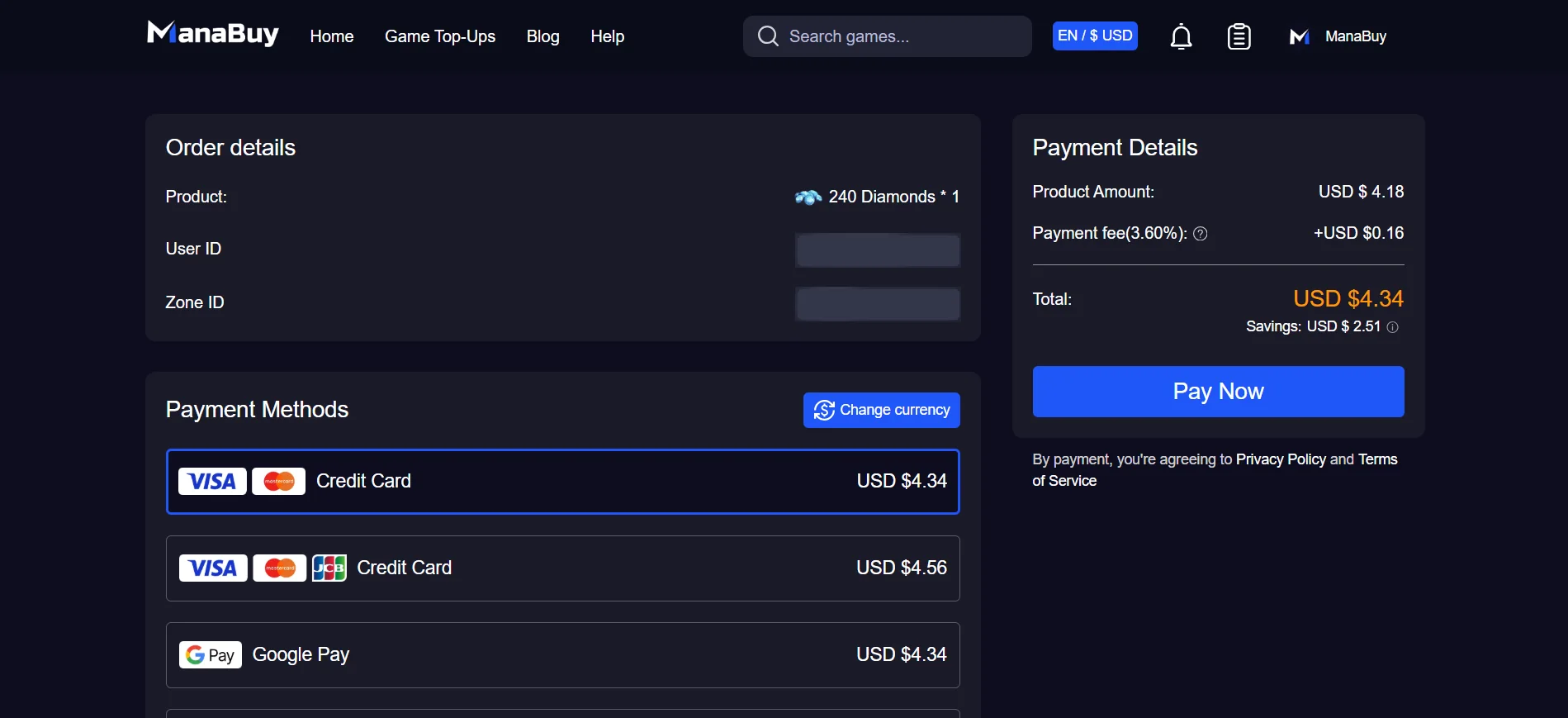
Payment success and Diamond delivery are related, but they are not the same step. A checkout screen, wallet redirect, card verification page, or local payment app can look finished before the payment provider fully confirms the charge. If the payment has not been confirmed, the order may not be ready for delivery yet.
Start with the payment result you can verify. Check the payment page, wallet history, card app, bank notification, email receipt, or ManaBuy order record. If the payment failed, expired, or stayed pending, do not treat the Diamonds as missing yet. Finish or resolve the payment first.
Check Your ManaBuy Order Status
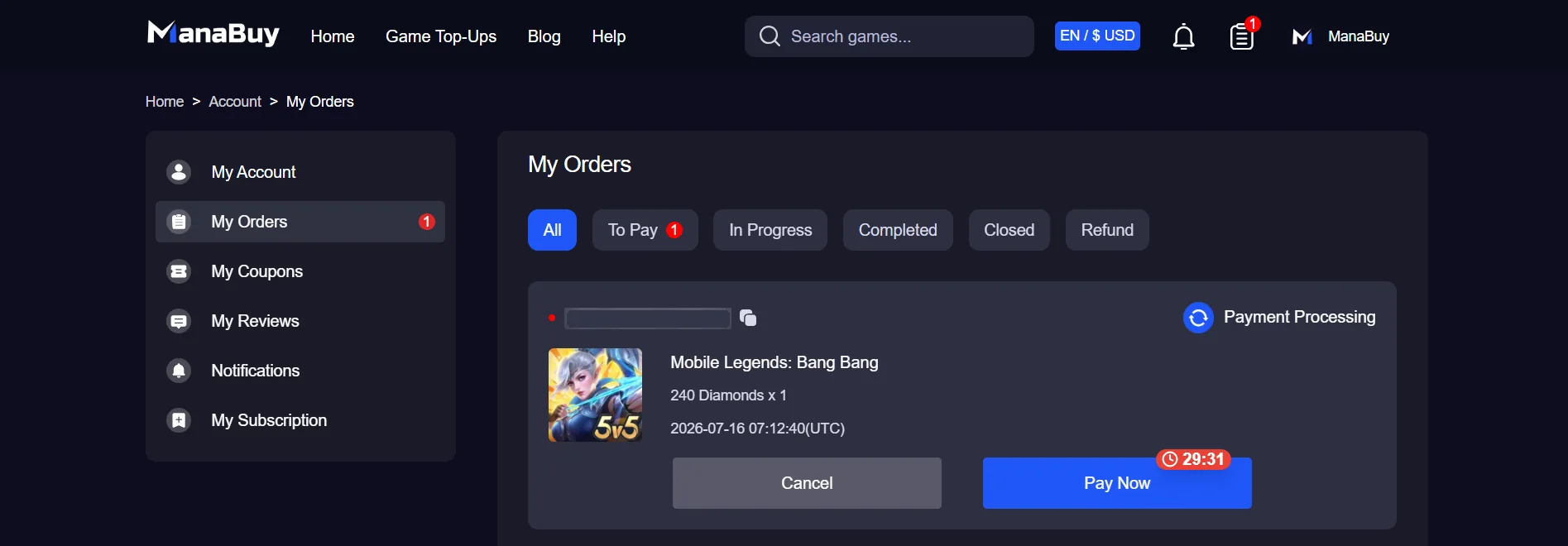
After payment, look at the order status in your ManaBuy account. The status helps you decide whether you should wait, refresh the game, or contact support. If the order has not completed, the product may still be waiting for payment confirmation, account information review, or delivery processing.
| What you see | What it usually means | Best next step |
|---|---|---|
| Payment not completed | The order may not be ready for delivery. | Check the payment page, wallet, card app or payment notification. |
| Order processing | ManaBuy may still be confirming account details or delivery. | Wait, monitor the status, and avoid placing a second order immediately. |
| Order completed, Diamonds missing | The game balance may not have refreshed, or the submitted account details need checking. | Restart MLBB, compare User ID and Zone ID, then contact support with order details. |
| Wrong User ID or Zone ID found | The order may have been routed using the submitted information. | Contact support quickly with the order number and correct profile details. |
Refresh MLBB Before Reporting Missing Diamonds
Sometimes the order has completed, but the in-game balance has not updated on the screen you are viewing. Before opening a support case, restart Mobile Legends: Bang Bang and check the account again. You can also switch between the lobby, shop, event page, and profile area to force the balance to refresh.
Make sure you are checking the same MLBB account that you used for the order. If you play on multiple accounts, log into the exact account whose User ID and Zone ID were submitted. A successful top up will not appear on a different account just because it is on the same device.
Compare the User ID and Zone ID
MLBB top up on ManaBuy uses the User ID and Zone ID shown inside Mobile Legends: Bang Bang. The User ID is the longer number outside the brackets, while the Zone ID is the number inside the brackets. If the profile shows a format like 123456789 (1234), the User ID is 123456789 and the Zone ID is 1234.
Open your MLBB profile and compare both numbers with the information submitted in the order. Do not compare only the nickname, avatar, email, phone number, or login account. Nicknames can change and are not the delivery identifier. One wrong digit in the User ID or Zone ID can make the order much harder to check.
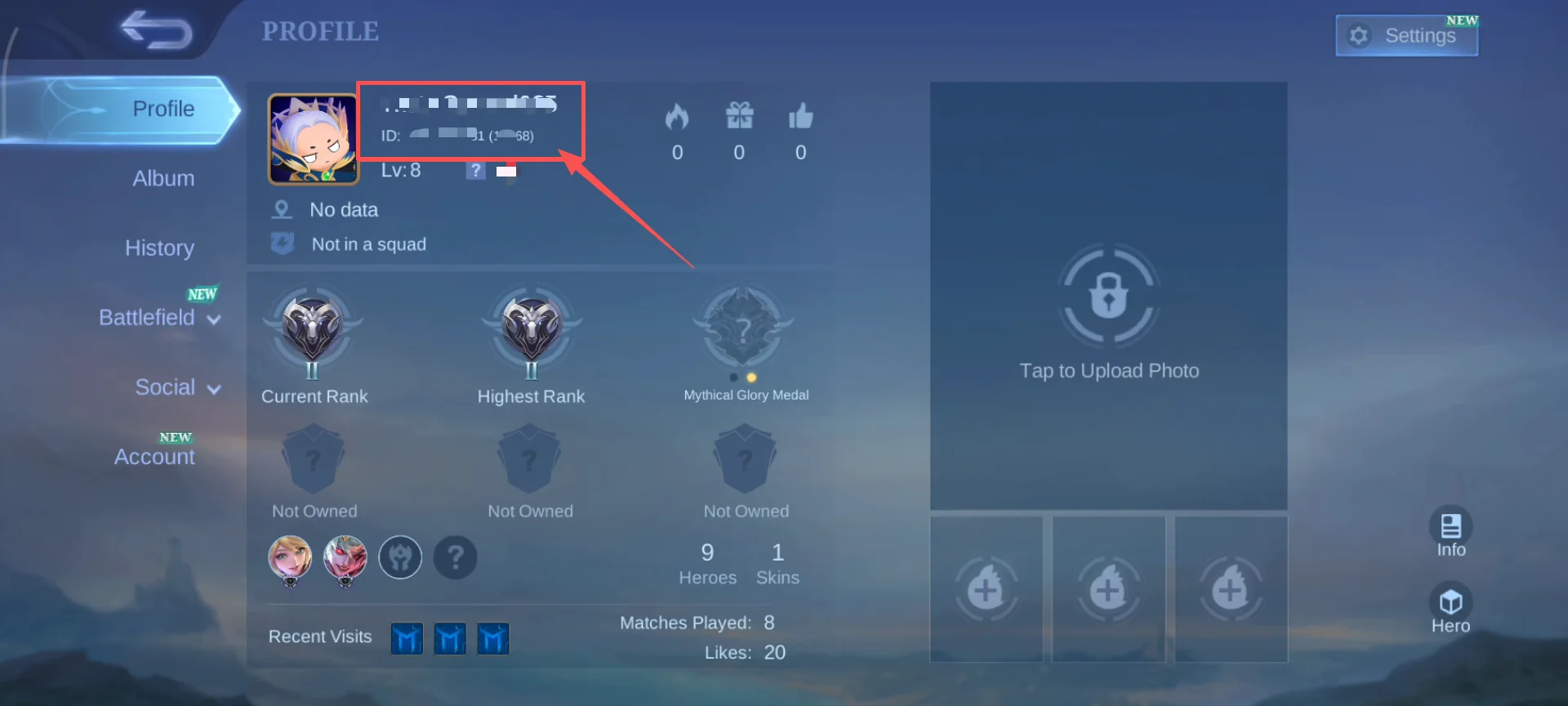
If you are not fully sure how to read the profile numbers, use the MLBB User ID and Zone ID guide before contacting support or placing another order.
Check Server, Region and Product Choice
The MLBB product page can show different server or region options, such as Global, Philippines, Indonesia, Singapore, Malaysia or Turkey. Product availability, package list and delivery rules can vary by selectable option. If Diamonds are missing after a completed order, check whether the product option selected on ManaBuy matches the MLBB account and purchase target you intended.
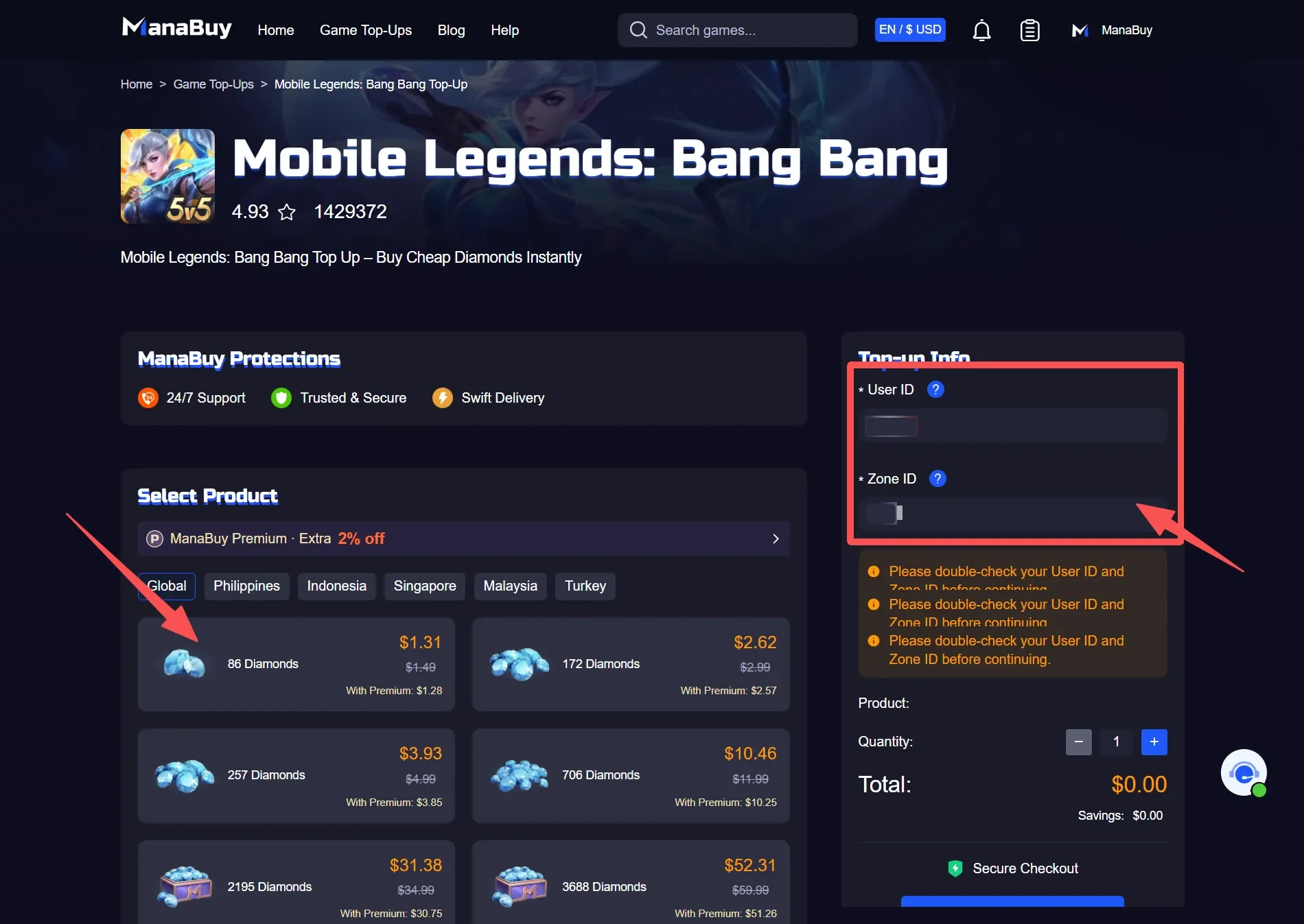
Also confirm that the order was for the correct product type. Direct Diamonds and Weekly Diamond Pass are different purchase choices. If you expected direct Diamonds but bought a pass, or if you already had a pass duration rule blocking another pass purchase, the result may not look like a normal Diamond balance increase.
Prepare Information Before Contacting Support
If payment is successful, the ManaBuy order is completed, the game has been refreshed, and the submitted User ID and Zone ID still match your profile, prepare a clean support packet. Clear information helps support check the case faster and avoids several rounds of follow-up.
| Information | Why support needs it |
|---|---|
| ManaBuy order number | The fastest way to locate the transaction. |
| Payment time and method | Helps separate payment confirmation issues from delivery issues. |
| Product purchased | Confirms whether the order was Diamonds, Weekly Diamond Pass, or another MLBB product. |
| Submitted User ID and Zone ID | Shows exactly where the order was intended to go. |
| MLBB profile screenshot | Lets support compare the profile numbers with the submitted order details. |
| Current Diamond balance screenshot | Shows what you are seeing after refresh. |
What Not to Do When Diamonds Are Missing
Missing Diamonds can feel stressful, especially if you were trying to join an event, buy a skin, or claim a timed reward. Still, some reactions make the case harder to solve.
How to Reduce MLBB Top-Up Problems Next Time
Most preventable MLBB top-up issues happen before payment. Build a small habit: open your MLBB profile, copy the User ID and Zone ID directly, choose the product page and region carefully, review the payment method and final amount, then save the order number after checkout.
For first-time buyers, a small order can be a practical way to test the account details, payment method and delivery flow before buying a larger package for an event or skin draw. If you are planning around a timed event, check the in-game cost first, decide the exact Diamond target, and avoid buying in a rush right before the event ends.

Related MLBB Top-Up Guides
- MLBB Diamonds Top Up Complete Guide
- How to Find Your MLBB User ID and Zone ID
- MLBB Payment Methods Guide
- MLBB Diamonds Delivery Time Guide
- First-Time MLBB Top Up Checklist
MLBB Diamonds Not Received FAQ
Why are my MLBB Diamonds not showing after payment?
Common reasons include payment still confirming, the order still processing, the game balance not refreshing, a User ID or Zone ID mismatch, or a selected product option that does not match what you expected. Check payment, order status and profile details before opening a support case.
Should I buy MLBB Diamonds again if the first order is delayed?
It is better not to buy again immediately. First confirm whether the first payment succeeded and whether the order is still processing. A duplicate order can create multiple charges and make the missing-Diamonds case harder to trace.
What if I entered the wrong User ID or Zone ID?
Save the order number and contact support as soon as possible with the submitted details and the correct MLBB profile information. Support may be limited if the order was processed using incorrect user-entered account details, so checking both numbers before payment is the best protection.
Does ManaBuy need my Mobile Legends password to check missing Diamonds?
No. A normal MLBB top-up flow uses User ID and Zone ID, not your game login password. Keep your password private and provide order information, payment time, submitted account details and screenshots when support needs to review the case.
What screenshots should I prepare for support?
Prepare a screenshot of the ManaBuy order, your MLBB profile showing User ID and Zone ID, and your current Diamond balance after refreshing the game. Keep screenshots clear and unedited so support can compare the order details quickly.
How can I avoid missing-Diamonds issues next time?
Copy User ID and Zone ID directly from the live MLBB profile, choose the correct product and region option, review payment currency and final amount, save the order number, and avoid placing orders in a hurry right before an event deadline.
Final Check
If MLBB Diamonds are still missing after all checks, the best next step is a clear support request, not a rushed second purchase. Confirm payment, check order status, refresh Mobile Legends: Bang Bang, compare User ID and Zone ID, and send the support packet with your order number. The more precise the information is, the easier it is to understand where the top-up flow stopped.


Copyright © FUTURE OUTLOOK TECHNOLOGY LIMITED.Company Registration No.: 77374965 All rights reserved.UNIT 135,1/F.,143 WAI YIP STREET,KWUN TONG HK