
Quick answer: Match the top-up route to the exact Racing Master regional build before paying. NetEase uses distinct official recharge URLs for SEA and LATAM, and its 2026 Europe/North America/Middle East/North Africa release is another regional service. Confirm the selected region, server and User ID from the account that owns your garage. ManaBuy currently shows SEA and LATAM tabs, but its instruction block also says “Global Server,” so treat that label conflict as a reason to verify support before checkout.
“Racing Master” is not one interchangeable purchase destination. NetEase has released the game in different markets over time, with separate official sites, app routes and charge centers. A valid User ID proves that an account exists; it does not by itself prove that a SEA, LATAM or another regional product can deliver to it.
This guide avoids temporary prices and package promises. Gem amounts, cards, passes, bonuses, payment methods and availability can change by region and account. Use the live game, official regional page, seller tab and final checkout for the transaction you are making.
SEA, LATAM and Global are separate purchase routes
The official SEA recharge page is identified as Racing Master SEA and asks for both a server and User ID. The official LATAM game site has its own Charge Center link, which opens a different NetEase Pay URL using the Racing Master LA identifier. NetEase also announced a separate May 2026 release for Europe, North America, the Middle East and North Africa.
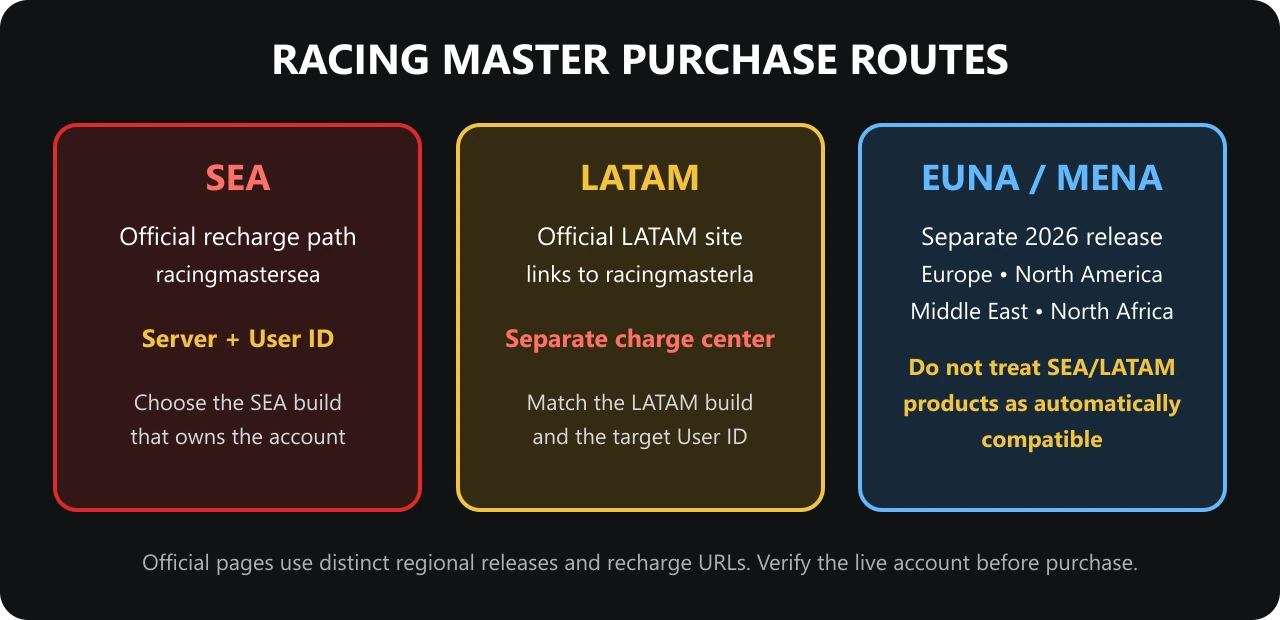
The service map is built from official NetEase release and charge-center URLs; it is not a promise of compatibility between regions.
These official routes establish a safe rule: choose the storefront that names the same regional service as the account. Do not assume that a product called “Global” automatically covers SEA or LATAM, and do not assume that being physically located in a market changes the build that already holds your progress.
| Route | Official evidence | Before purchase |
|---|---|---|
| SEA | NetEase Pay exposes a dedicated `racingmastersea` page with server and User ID fields. | Confirm the account is on the SEA build and select the matching server. |
| LATAM | The official Racing Master LATAM site links to a distinct `racingmasterla` charge center. | Confirm the LATAM build and target User ID before choosing a package. |
| Europe / North America / Middle East / North Africa | NetEase announced a separate regional release in May 2026 with its own download route. | Do not use a SEA or LATAM product unless the seller explicitly states compatibility. |
| Other regional builds | Availability depends on official local releases and store packages. | Use the official regional site or app listing that owns the account, then find a matching purchase route. |
How to identify the build that owns your garage
Your country, language and currency are useful clues, but they are not enough. Players can travel, change app-store regions or install a different regional package. Use evidence from the account that already contains the cars, progress and User ID.
- Open the exact app you normally play. Do not install another regional build only to compare a package price.
- Check the official app or website route. Look for SEA, LATAM, or the Europe/North America/MENA release connected to that client.
- Open the profile. Record the User ID exactly as displayed and check any server or region label.
- Match the seller tab. The selected product region must name the same service as the account.
- Stop on ambiguous labels. If a page shows one region tab but calls the server something else, ask the seller to confirm compatibility before paying.
Find and copy the Racing Master User ID
The current ManaBuy product instructions show a two-step path: tap the player avatar from the main lobby, then copy the ID displayed in the profile panel. The example image masks part of the ID; your order must use the complete number from your own account.
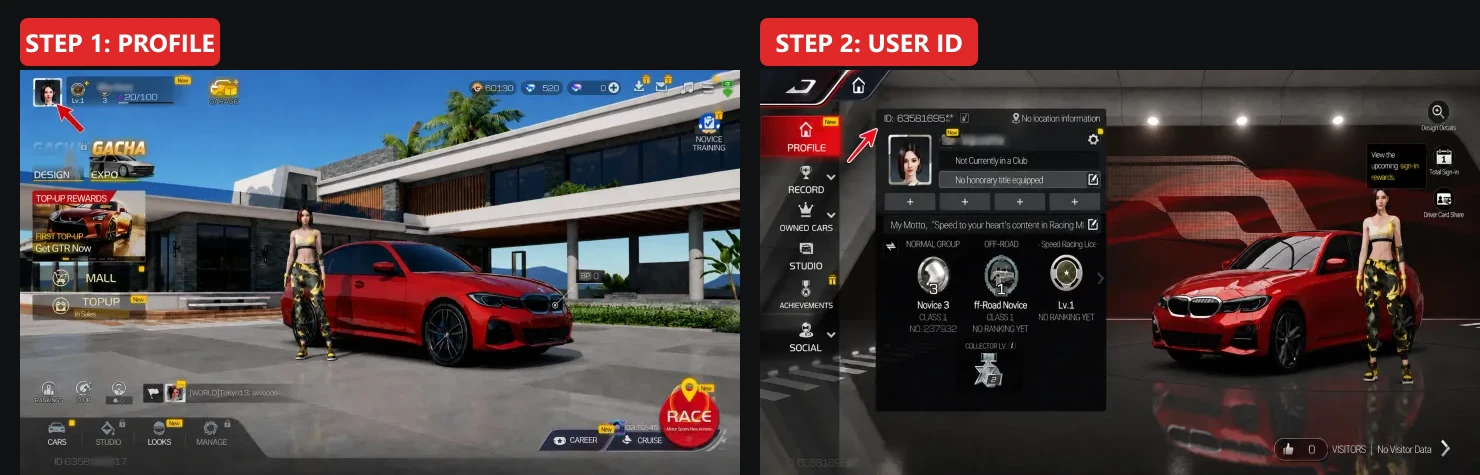
The two current product-help images are combined only to show the exact profile path; they are not proof of a regional server.
Copy and paste the User ID when possible. If you must type it, compare the full value twice. A player name, club name or visible nickname is not a substitute unless the order form explicitly requests it. Also keep the region selection separate from the ID: the same numeric format can exist in more than one service.
Check the server as well as the User ID
The official SEA charge center asks users to choose a server before entering the User ID. That is strong evidence that the account target is not determined by the number alone. If a seller asks only for UID, the selected regional product or tab may be doing the server routing behind the scenes.
Keep a private screenshot of the profile and order selection until delivery is verified. Do not post the full receipt, payment details or account recovery information in public channels.
Match Gems, cards and passes to the live account
Racing Master purchase pages can include Gems, cards, passes, funds and event-linked packs. The names and bonuses may not remain identical across regions or seasons. The official SEA charge center also states that a first-top-up bonus can be shared across top-up platforms, so completing it once may remove eligibility elsewhere.
Before paying, open the target account and compare the exact product type—not just the price. A Gem denomination is different from a Weekly Card, Monthly Card, Master Pass or upgrade. Do not use an old screenshot as proof that the package is still active or that a bonus will repeat.
| Check | What to compare | Common mistake |
|---|---|---|
| Region tab | SEA, LATAM or the exact supported release. | Leaving the wrong tab selected because the package names look similar. |
| Product type | Gems, card, pass, fund, pack or upgrade. | Choosing an upgrade without owning the base product, or confusing a card with Gems. |
| Displayed contents | Current amount, bonus and eligibility shown live. | Relying on a cached price or old first-top-up bonus. |
| Target profile | User ID and server tied to the intended garage. | Submitting a nickname or an ID copied from another regional account. |
| Order record | Order number, amount, time and selected region. | Paying again before the first order has a final status. |
What ManaBuy currently asks for
The live ManaBuy Racing Master page currently presents SEA and LATAM product tabs and says direct top-up requires a UID. The instruction block also labels the applicable server as Global Server. Because those labels do not fully align, do not infer that every displayed package works across every Racing Master release.
What to do when Gems do not appear
Start by checking the order stage. “Payment failed,” “processing,” “completed to another region” and “completed but the balance has not refreshed” are different problems.
- Confirm whether the payment completed. Check the store order and payment-provider record.
- Confirm the selected region. Compare SEA or LATAM against the actual game build.
- Confirm the target User ID and server. Open the profile again instead of trusting memory.
- Restart the game once. Reopen the same account and check the relevant Gems, card or pass.
- Use the responsible support route. For a ManaBuy order, contact ManaBuy through the existing order. For an official NetEase charge-center purchase, keep the official receipt and use that service’s support path.
Do not place a duplicate order while the first order is processing or being investigated. If the wrong ID or region was submitted, contact support immediately; do not assume a delivered digital item can be moved between accounts.
Avoid three expensive region mistakes
- Using “Global” as a universal label. NetEase has separate releases and charge centers. A generic word on a seller page is not enough evidence of compatibility.
- Copying an ID without its regional context. UID and server or product tab must be checked together.
- Expecting the first-top-up bonus twice. The official SEA charge center says the first-top-up bonus is shared across top-up platforms.

Related Racing Master and payment guides
Racing Master top-up FAQ
Can I use a Racing Master SEA top-up on a LATAM account?
Do not assume you can. NetEase uses distinct SEA and LATAM charge-center URLs. Choose the regional route that matches the build holding your garage.
Is Racing Master Global the same as SEA or LATAM?
No universal compatibility is established. NetEase launched a separate Europe, North America, Middle East and North Africa release in 2026, while SEA and LATAM have their own official routes.
Where do I find my Racing Master User ID?
Open the main lobby, tap the player avatar, then copy the ID shown in the profile panel. Use the complete value from your own account.
Do I need my Racing Master password for ManaBuy?
The current ManaBuy Racing Master page says direct top-up requires UID only. Do not provide a password or verification code unless the live order method has clearly changed.
Why are my Gems or pass not showing?
Check payment status, selected region, server, User ID and product type, then restart the same game build once. Contact the store that processed the order and do not pay again while it is under review.
Is ManaBuy an official Racing Master charge center?
No. ManaBuy is a third-party top-up service. NetEase’s official SEA and LATAM charge centers are separate, so their products and support processes should not be treated as identical.
Official references
- NetEase Pay: Racing Master SEA charge center
- Racing Master official LATAM launch page and Charge Center
- NetEase Pay: Racing Master LATAM charge center
- NetEase Games: Europe, North America, Middle East and North Africa release
Regional routes, products, bonuses, prices and payment methods can change. Recheck the live game, official service and checkout before every transaction.