
PUBG MOBILE Payload Guide: Wings of Steel Jet and Mecha Tips

Payload: Wings of Steel turns a normal Erangel-style fight into combined-arms combat. The main mistake is treating the Fighter Jet as the only objective. A squad that sends everyone to the same runway can lose ground loot, recall coverage and the match before the aircraft matters.
How to Find Payload: Wings of Steel
The current client path is:
- Open the mode selector from the lobby.
- Choose
Unranked. - Open the
Othertab. - Select
Payload: Wings of Steel. - Download the mode resource when prompted.
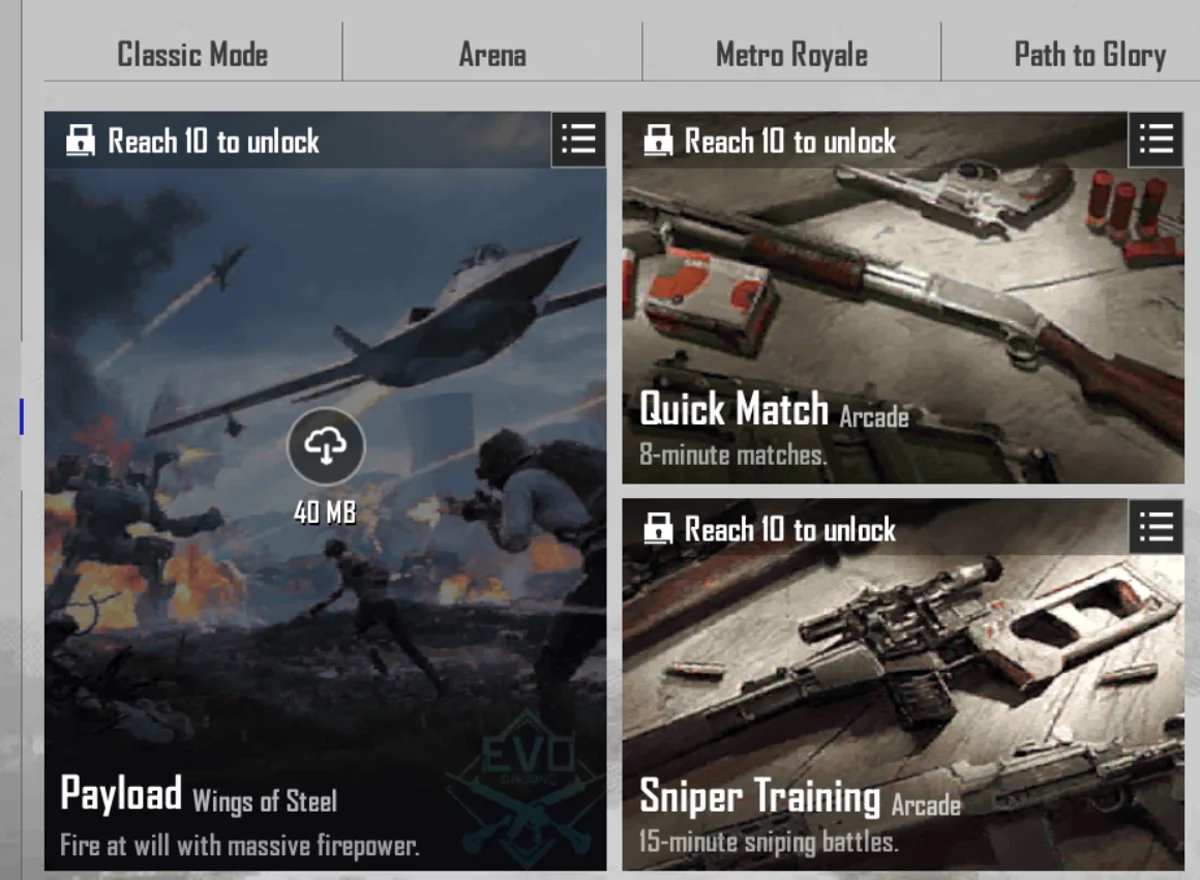
Source: the current PUBG MOBILE English client — this mode selector shows the checked access path, Wings of Steel label, level gate and download prompt.
The inspected level-3 account showed Reach 10 to unlock, so new accounts may need to level up before entering. Availability, resource size and access requirements can change with a client update.
Current Wings of Steel vs Older Payload Guides
Older Payload 2.0 documentation lists armed helicopters, armed ground vehicles, bases, Super Weapon Crates, communication towers and heavy tools such as the M202, AT4-A and UAV terminal. The current client uses the name Payload: Wings of Steel, and its visible introduction focuses on the Fighter Jet and Mecha.
Do not assume every older vehicle, weapon or fixed location remains unchanged. The checked account could not enter the level-10 match, so this guide treats the older systems as legacy context and limits current tactical advice to the access path and Jet/Mecha mechanics visible in the current client. Check the live mode screen before following an old location map. The older feature set remains documented on PUBG MOBILE's Payload 2.0 page.
Choose a Squad Plan Before the Drop
| Role | First objective | What to avoid | Switch condition |
|---|---|---|---|
| Jet pilot | Reach a viable runway and take off without damaging the aircraft | Repeatedly landing on a runway already controlled by a full squad | Enemy owns the runway or the jet cannot launch safely |
| Jet passenger/support | Watch threats, call the flight route and coordinate the ground team | Treating the second seat as a free sightseeing slot | Ground squad loses recall or anti-air coverage |
| Mecha crew | Use mobility and multiple seats to pressure ground vehicles and exposed positions | Sending all four players into one vehicle with no outside information | Enemy anti-vehicle fire has a clean angle or the route becomes confined |
| Anti-vehicle player | Secure guided/explosive weapons and cover the vehicle route | Firing every rocket at the first target and entering the final circle empty | Aircraft or Mecha becomes the immediate wipe threat |
| Recall/ground anchor | Preserve a recovery route, normal weapons and information | Following the jet so far that eliminated teammates cannot recover | The squad is stable and recall is no longer the priority |
One player may cover two roles in a small squad. The important rule is that someone remains responsible for recovery and ground information.
Fighter Jet: What the Current Client Confirms
The in-client introduction describes the Fighter Jet as a two-seat fixed-wing aircraft that appears on certain runways. It carries:
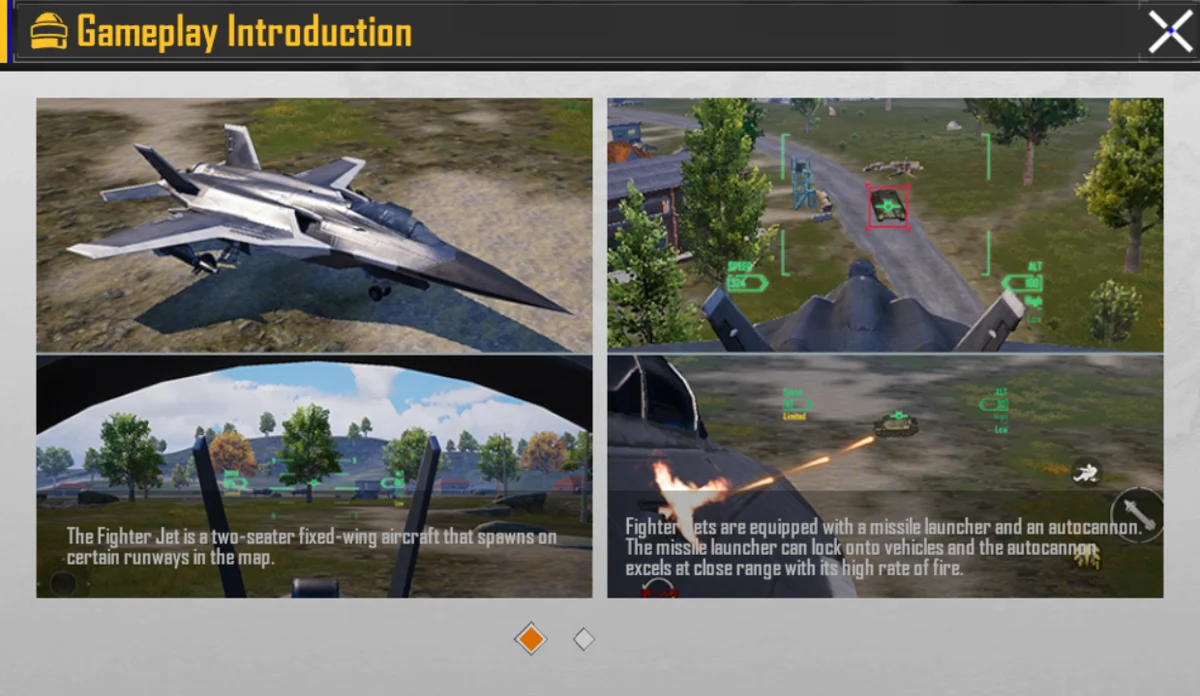
Source: PUBG MOBILE's in-client Payload introduction — this panel supports the jet seat count, runway wording and weapon-role explanation.
- a missile launcher that can lock onto vehicles;
- an autocannon designed for closer-range attacks;
- a missile-warning system;
- decoy flares that can break missile tracking.
The client does not promise one jet at every old location. Treat runway locations as possible objectives, not guaranteed spawns.
Use the missile warning, not panic flares
Save the flare until the warning shows an active lock. Releasing it too early can leave the jet exposed during the next attack. After the flare, change the flight line instead of continuing straight through the same anti-air angle.
Do not force a lost runway
If another squad lands first and controls the aircraft, switch immediately:
- move away from the open runway;
- secure a normal weapon and vehicle cover;
- prepare anti-air or guided fire;
- keep one player available for recall/recovery;
- attack the jet when its route becomes predictable rather than chasing it in the open.
This converts a failed vehicle contest into a counterplay route instead of four early deaths.
Mecha: Build a Crew, Not a Crowd
The current client describes the Mecha as a four-seat vehicle. It can launch a missile bombardment, chase fast vehicles with missiles and give the co-pilot a machine gun.
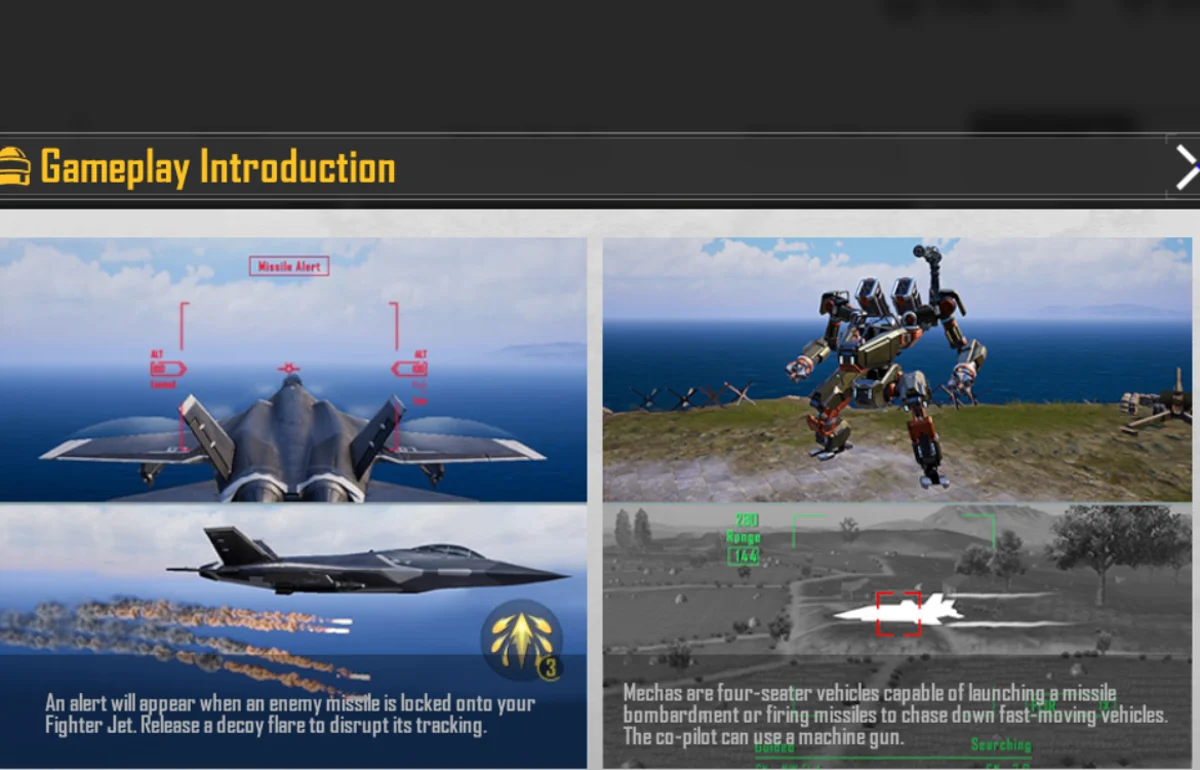
Source: PUBG MOBILE's in-client Payload introduction — this panel shows the lock warning and flare countermeasure alongside the Mecha's documented crew and weapon roles.
Use the seats as separate jobs:
- Driver: keeps cover, vehicle condition and escape terrain in view.
- Missile role: targets vehicles or a named ground position; avoid wasting the attack on scattered enemies.
- Machine gun role: protects the Mecha from nearby players while the heavy weapon tracks larger targets.
- Observer/support: calls threats, dismount routes and whether the squad should abandon the vehicle.
Do not keep the whole squad inside after the Mecha becomes an obvious focus target. A dismounted player can hold an exit, cover an escape route or preserve a recall option.
The Ground Plan Still Wins Matches
Payload vehicles are powerful, but the final objective still needs normal battle-royale decisions: cover, ammunition, healing, zone timing and teammate recovery.
Use this priority order when the opening becomes chaotic:
- keep at least one player alive with a usable ground loadout;
- preserve recall or recovery options;
- secure one anti-vehicle answer;
- take a special vehicle only when the approach is favorable;
- leave a damaged vehicle before it turns into a squad wipe.
The PUBG MOBILE maps and landing guide helps with cover and rotation logic, while the PUBG MOBILE CQC guide is more useful than vehicle advice when the fight moves into buildings.
Community-Observed Failure: The Jet Rush Splits Teams
A recent player discussion describes teammates abandoning the squad to contest a jet, dying early and leaving before recall. That report is a community observation, not an official rule, but it exposes a clear planning failure the squad can prevent.
ManaBuy's stop line is simple: if the jet contest would remove every player from ground loot and recall coverage, only the assigned air crew continues. The rest of the squad switches to ground weapons and counterplay.
Common Payload Mistakes
- Copying an old fixed-location map and assuming every aircraft will spawn there.
- Sending all four players to the same runway.
- Using the flare before a missile lock is active.
- Flying straight after breaking one lock.
- Entering a Mecha without assigning driver, weapon and observer roles.
- Staying inside a smoking vehicle because it still has ammunition.
- Chasing vehicle kills while the squad loses recall and zone position.
- Repeating a failed runway contest instead of switching to anti-air.
Related PUBG MOBILE Guides
Payload Questions
Where is Payload mode in PUBG MOBILE?
On the checked global client, open Unranked, select Other, then choose Payload: Wings of Steel.
What level unlocks Payload?
The North America account checked on November 12, 2026 showed Reach 10 to unlock. Recheck after major updates because access requirements can change.
Where does the Fighter Jet spawn?
The client says it appears on certain runways. Do not treat an old location list as a guaranteed current spawn map.
How do you avoid lock-on missiles in the Fighter Jet?
Wait for the missile warning, deploy a decoy flare and change the flight line. An early flare followed by straight flight wastes the defensive window.
How many players fit in the Mecha?
The current gameplay introduction describes the Mecha as a four-seat vehicle and identifies a co-pilot machine gun alongside missile attacks.
Final Payload Rule
Choose the role before choosing the vehicle. Contest the jet only with an air crew, keep ground and recall coverage alive, and switch to anti-vehicle counterplay as soon as the runway is lost. Wings of Steel rewards vehicle control, but it punishes squads that turn one aircraft into their entire plan.



Copyright © FUTURE OUTLOOK TECHNOLOGY LIMITED.Company Registration No.: 77374965 All rights reserved.UNIT 135,1/F.,143 WAI YIP STREET,KWUN TONG HK