
Delta Force Top-Up Problems: UID, Payment Failed and Coins Not Received

A failed Delta Force top-up is easier to solve when you separate payment status from delivery status. “Payment failed,” “payment pending,” “paid but no Coins” and “Coins sent to the wrong UID” require different evidence and different next steps. Repeating the same checkout can turn one problem into duplicate charges.
Quick answer: stop repeated payment attempts, confirm whether money was actually captured, verify the UID and Global/Garena version, then contact the store used for the order with one complete evidence set. Never send a game password or one-time login code for a UID top-up.

Before troubleshooting: identify the order state
| What you see | What it normally means | First action |
|---|---|---|
| Payment failed | The payment was declined or the checkout session did not complete | Check bank notice, 3-D Secure and payment method before trying again |
| Payment pending | The provider has not finalized capture | Do not create repeated orders; wait for the pending status to resolve |
| Paid / successful, no Coins | Payment completed but delivery or account matching needs checking | Verify the receiving UID, relaunch the game and save the receipt |
| Wrong UID entered | The order may be targeting another character | Stop before payment if possible; contact support immediately if already paid |
| Wrong product version | A Global product was selected for a Garena account, or vice versa | Do not retry until the account version is confirmed |
Delta Force payment failed
- Read the exact decline message. A bank decline, 3-D Secure timeout and unsupported payment method are different failures.
- Check that the card or wallet supports the checkout currency and online game purchases.
- Confirm billing details and available balance.
- Close expired checkout tabs and start one clean session.
- If money was captured despite a failed page, do not pay again. Save the bank line and contact the store.
A declined attempt does not require changing the UID. Editing account information while diagnosing payment can create a second problem.
Payment succeeded but Delta Coins did not arrive
ManaBuy states that successful Delta Force orders are usually delivered in about 10 seconds to one minute, with longer handling possible in exceptions. When the normal window has passed:
- Confirm the order shows paid or successful, not pending.
- Open the Delta Force profile and compare the full UID with the order.
- Confirm the account is Global, not Garena.
- Restart the client and check the balance on the same character.
- Capture the current balance and profile UID without cropping out the identifying context.
- Send the order ID, payment time, amount and receipt to the store used for the order.
Where to find the Delta Force UID
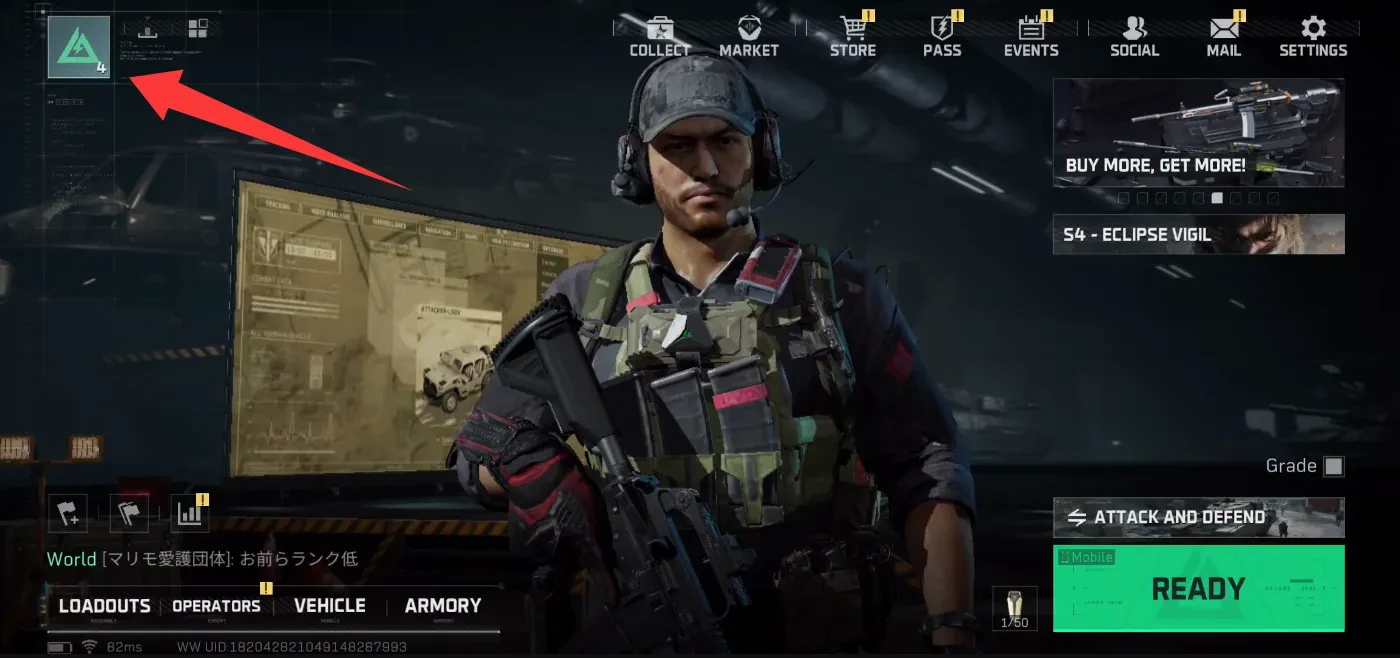
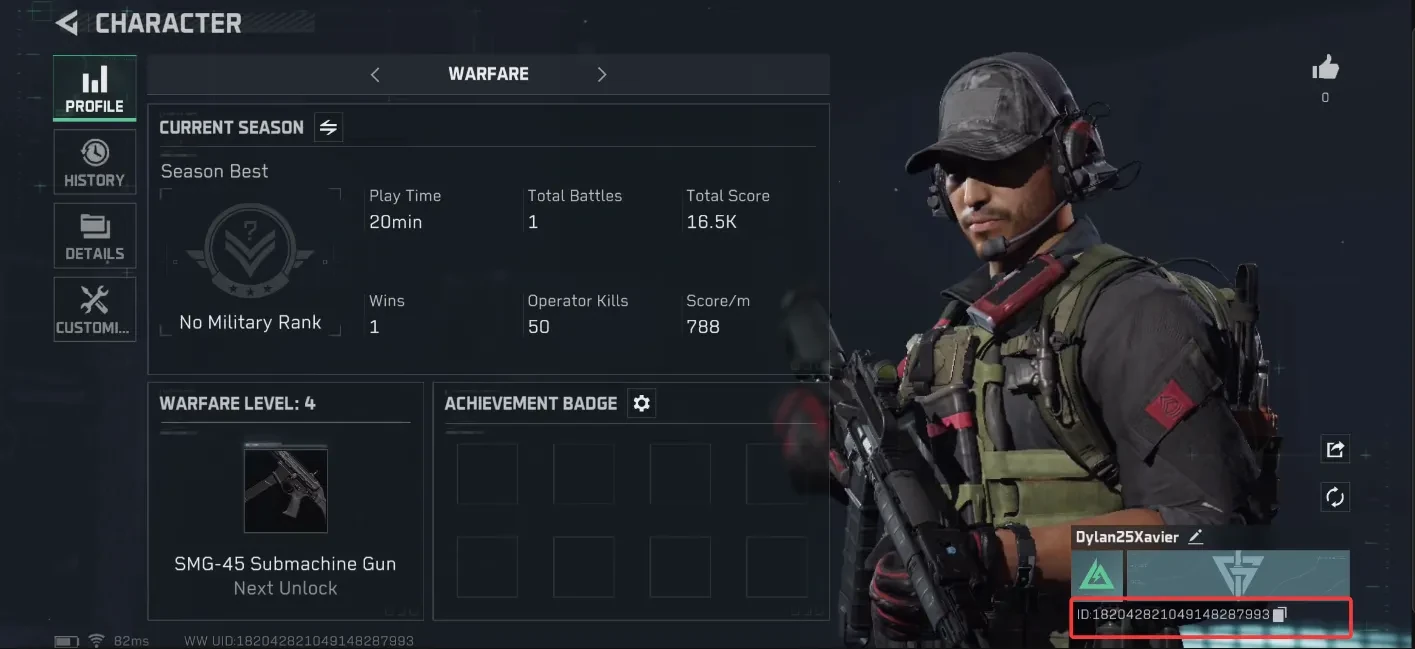
Open the player profile from the game lobby and copy the numeric UID. Do not use the visible nickname as a substitute; names can change and are not the delivery key.
What happens if the UID is wrong?
Correct the UID before payment whenever possible. The ManaBuy product notice states that a successful top-up sent to the wrong account cannot be refunded or recovered. If the order fails, the payment is returned to the original method under the product's stated process.
If the order was paid but is still undelivered, contact support before making another attempt. Provide the UID entered on the order and the correct UID as two clearly labeled fields.
Global vs Garena check
The ManaBuy Delta Force page covered here supports Delta Force International / Global and excludes Garena. The safest check is the publisher/login route used by the account. If you are unsure, stop before checkout and compare the account with the Global-versus-Garena guide.
Do not test by purchasing the smallest pack. A successful delivery to an unintended account version or UID can be harder to reverse than a failed order.
What to send support
| Evidence | Why it matters | How to prepare it |
|---|---|---|
| Order ID | Lets the store find the transaction | Copy it from the confirmation page or email |
| Payment status and receipt | Shows whether funds were captured | Include amount, currency, time and provider reference |
| UID used on the order | Shows the intended delivery target | Copy the complete number; do not mask the middle digits |
| Current profile UID | Confirms the account being checked | Use a profile screenshot with the UID visible |
| Current coin balance | Shows the reported delivery gap | Use a fresh in-game screenshot |
| Product version | Separates Global from Garena | State the launcher/publisher and login route |
Account safety during a top-up problem
- A UID top-up does not require a game password, email password or one-time login code.
- Use the support channel of the store that accepted payment.
- Do not post receipts, full payment details or UID screenshots in public comments.
- Keep one support case with complete evidence instead of opening several partial cases.
- Do not accept “manual delivery” requests that require remote access to the device.
Need Delta Coins?
Confirm the Global, non-Garena version, copy the UID, and choose the smallest package that covers the verified shortage.
Related Delta Force guides
Delta Force top-up problems FAQ
Why did my Delta Force payment fail?
Common causes include a bank decline, 3-D Secure timeout, insufficient balance, unsupported currency or an expired checkout session. Read the exact message and avoid rapid repeat attempts.
How long do Delta Coins take to arrive?
ManaBuy states that successful orders are usually delivered in about 10 seconds to one minute, though exceptional orders can take longer.
What should I do if I paid but received no Delta Coins?
Verify the order status, UID, account version and in-game balance, then contact the store used for the order with the order ID and receipt.
Can a Delta Force top-up to the wrong UID be refunded?
The ManaBuy product notice says a successful delivery to the wrong account cannot be refunded or recovered. Check every digit before payment.
Does Delta Force top-up need my password?
No. A standard UID direct top-up uses the numeric UID and does not require the game password or login verification code.
Can I use the Global top-up page for Garena Delta Force?
No. The product covered here supports the Global, non-Garena version.
Who should I contact for a missing official-store purchase?
Contact the official store used for that transaction. ManaBuy support can investigate ManaBuy orders, but it cannot trace an order placed with a different store.
Final recommendation
Match the fix to the order state. A payment failure needs checkout and bank checks; a successful payment without Coins needs UID, version and delivery evidence; a wrong UID needs immediate support contact. One complete case is faster to investigate than several retries.
Delta Force Beginner Guide: Why Game Understanding Matters More Than Aim
2026-03-23 15:58:44
Delta Force Best Low-Cost Weapons: Cost-Effective Loadouts for Budget Players
2026-07-30 10:48:40
Delta Force Best Operators for Reorientation: Operations vs. Warfare
2026-03-23 17:14:36
Delta Force Best Weapons Tier List for Season 11: Operations vs. Warfare
2026-03-23 18:42:10


Copyright © FUTURE OUTLOOK TECHNOLOGY LIMITED.Company Registration No.: 77374965 All rights reserved.UNIT 135,1/F.,143 WAI YIP STREET,KWUN TONG HK