
Quick answer: ManaBuy offers Dark War Survival Login Top-up for supported packs and keeps the required account fields, payment, order record and support path connected in one workflow. Confirm the email account, Server ID, Character Nickname, UID and current pack screenshot before checkout. Dawn Badges are a separate in-game payment item: they are delivered to one UID and must be exchanged for an eligible pack before qualifying VIP points are added. Match the route and target account before paying.
Most Dark War Survival top-up mistakes happen when three separate states are treated as one: payment completed, virtual currency delivered and the intended pack redeemed. Dawn Badges make those states especially important because they are bound to the selected UID and still need an in-game exchange.
This guide explains the stable workflow. Package names, discounts, bonus rates, events, payment methods and seller inventory can change. Recheck the live payment center, the in-game Shop and the order page before every transaction.
Start with the result you want: ManaBuy pack or Dawn Badges
For a supported in-game pack, the current ManaBuy page uses Login Top-up. The order collects the account and character details needed to open the correct profile and identify the exact product. Payment, delivery status and help remain connected to the same ManaBuy order.
If you specifically want a Dawn Badge balance, the game's payment center delivers Badges to the UID logged in there. You then open the in-game Shop and exchange them for an eligible pack, weekly pass, monthly pass or battle pass. A ManaBuy pack order and a Dawn Badge balance are different results, so choose by the item you actually want.
| Check | ManaBuy Login Top-up | Dawn Badge route |
|---|---|---|
| Best fit | A currently supported pack shown on the ManaBuy page. | A Dawn Badge balance to spend later in the in-game Shop. |
| Identity step | Enter the requested email account, verification, Server ID, nickname, UID and pack screenshot through the paid order workflow. | Log into the payment center and verify the displayed UID before payment. |
| What arrives | The supported pack selected for the specified account is fulfilled. | Dawn Badges are added to the logged-in UID. |
| Next action | Follow the order status, then sign in and verify the intended result. | Exchange the Badges for the intended pack or pass in the game. |
| VIP points | Depend on the actual pack and live in-game rules. | Website payment alone grants none; qualifying points follow the in-game exchange. |
| Help path | Use the existing ManaBuy order and its support channel. | Use the payment-center or game support route. |
Why players use ManaBuy for Dark War Survival top-up
ManaBuy puts the supported Dark War Survival options, account requirements, checkout and order follow-up in one place. The current product page also adapts available payment methods to the selected currency and shows the exact information needed for Login Top-up before the order is processed.
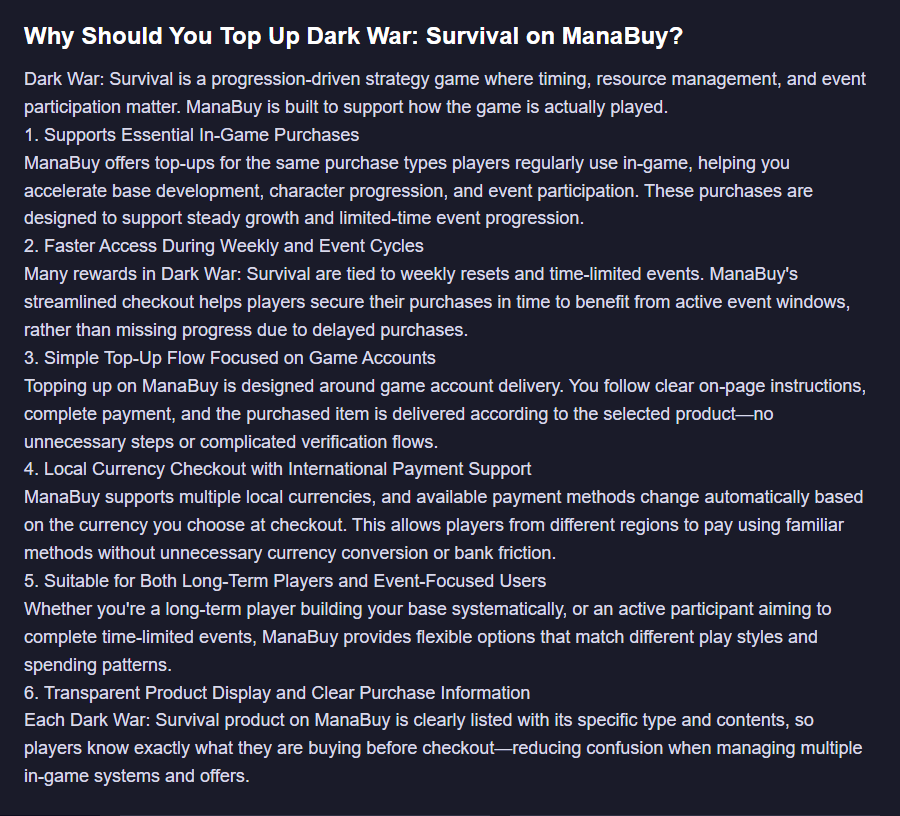
The current ManaBuy product page explains its account-focused flow, local-currency checkout and clear purchase information for Dark War Survival.
What Dawn Badges are used for
The official payment center describes Dawn Badges as a virtual in-game item. They can be exchanged for packs, weekly passes, monthly passes or battle passes. They are not a cash balance, and they are not meant to be sent from one character to another.
Think of the purchase as a two-stage process. First, the official center adds Badges to one UID. Second, that account spends the Badges in the game. If you only finish the first stage, the balance may be visible, but the pack has not yet been redeemed.
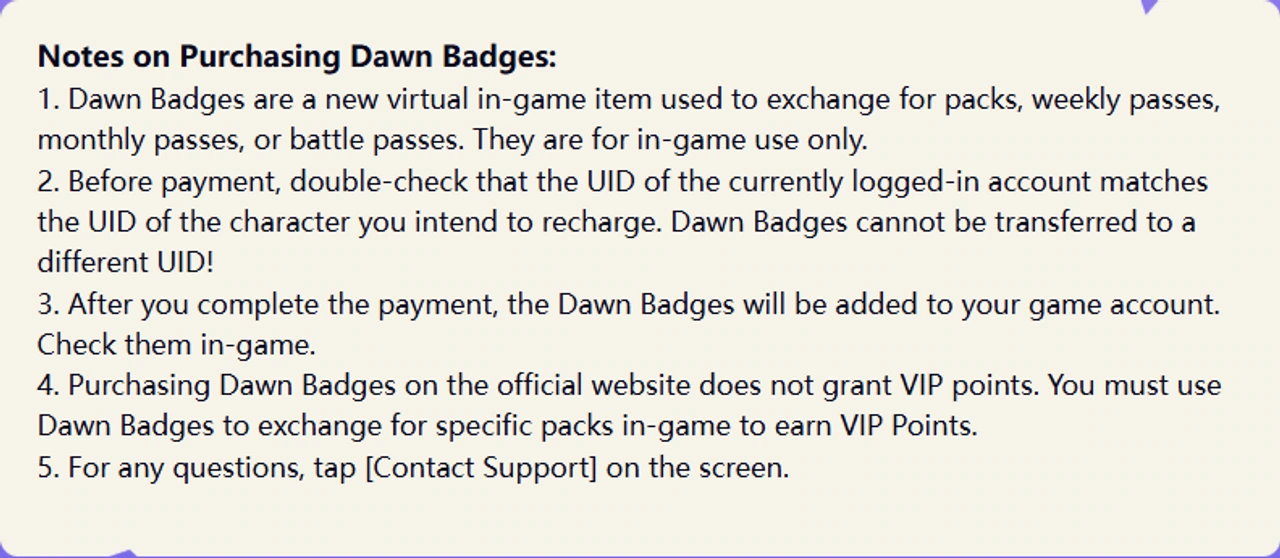
The current official notes explicitly separate Badge delivery from in-game exchange and warn that the balance cannot be transferred to a different UID.
Why the UID must be correct before payment
The official rule is direct: Dawn Badges cannot be transferred to another UID. The important check is therefore not only whether you can log in, but whether the UID displayed in the payment center is the same UID as the character you intend to fund.
This matters if you use multiple characters, switch accounts on one device, play on more than one server or previously logged into a friend's profile. A familiar nickname is useful, but the numeric UID is the stronger identifier. Compare it character by character before selecting a Badge amount.
How to exchange Dawn Badges for a pack or pass
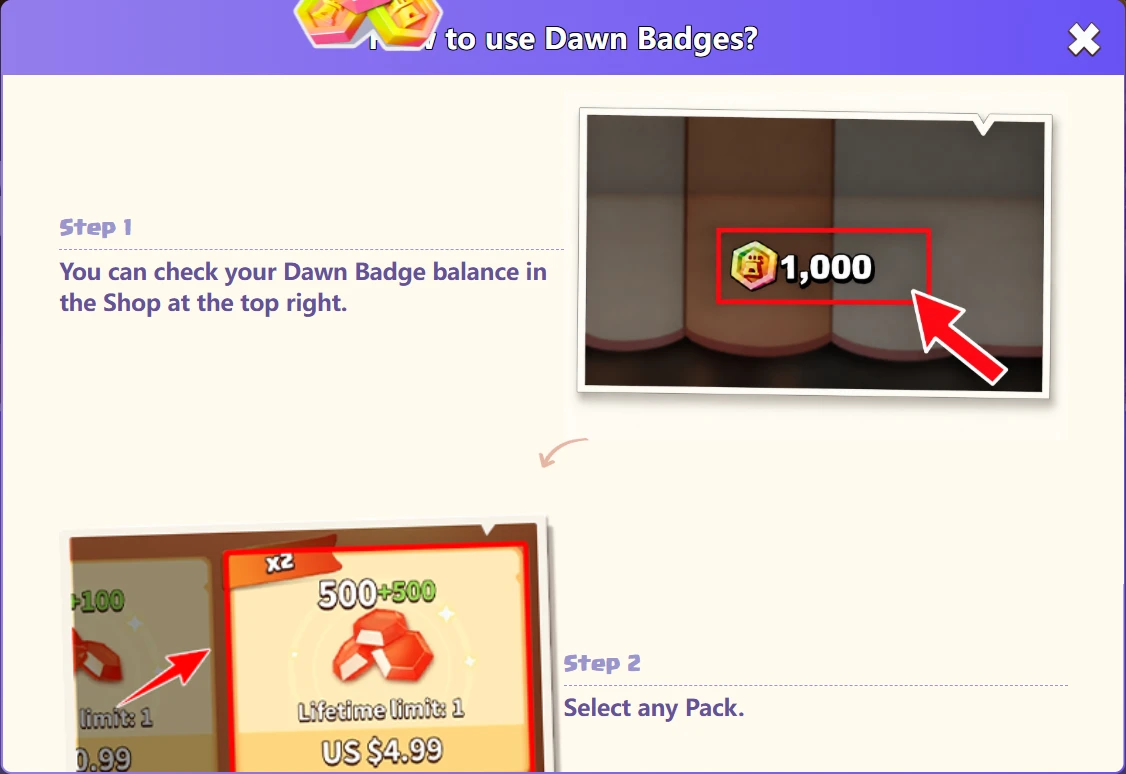
The official interface shows where the Dawn Badge balance appears and that the next step is selecting a pack in the Shop.
A player-recorded 2026 interface also shows a pack detail pop-up with separate paid and free Dawn Badge balances. This is useful UI context, but the live screen on your own account remains decisive because labels, offers and balance rules can change by language or version.
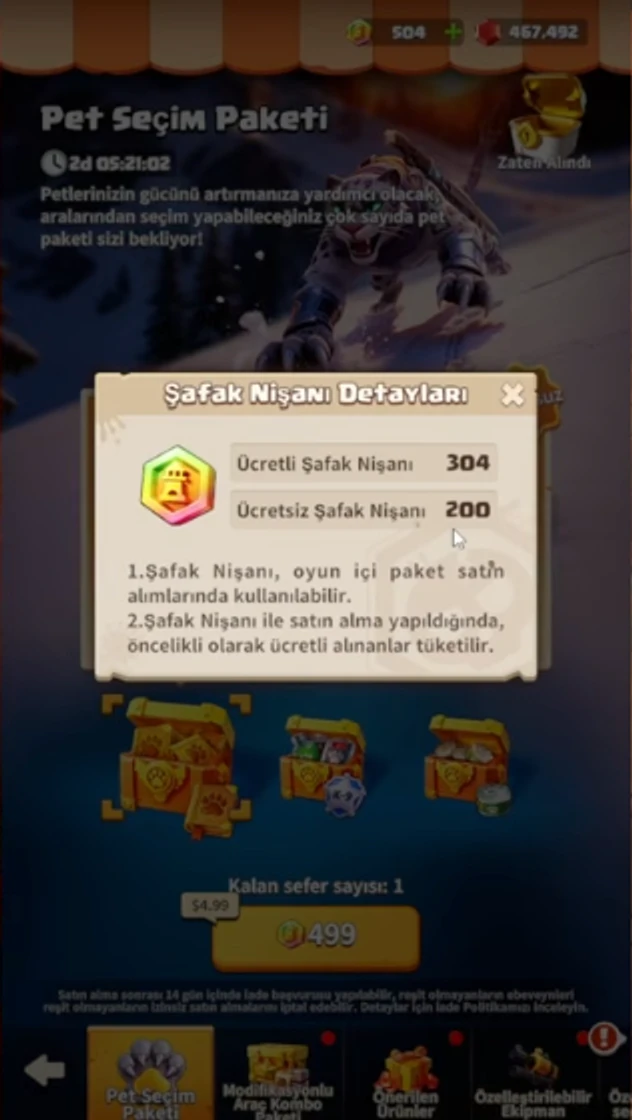
Player example from the DarkWarSurvival YouTube channel, published August 29, 2026, captured at 00:55. Only the game interface is retained; the frame is used to show how a real pack screen can present Dawn Badge balances.
When Dawn Badges grant VIP points
Buying Dawn Badges on the official website does not grant VIP points. The payment center says you must use the Badges to exchange for a specific pack in the game. The VIP points follow that qualifying exchange, not the website receipt by itself.
The same timing applies to other purchase-related events in the official instructions: unused Badges do not count. If an event reward matters, open the event on the target UID, read its eligibility and deadline, confirm the pack qualifies, buy the needed Badges, complete the in-game exchange and then check progress.
Find your Server ID, UID and Character Nickname
The current ManaBuy help images show the same account-check sequence you can use for your own records:
- Tap the avatar in the top-left corner of the game screen.
- On the Survivor Profile, note the Server ID shown on the State row and open Account.
- In the Account panel, copy the numeric ID as the UID and copy the Survivor name as the Character Nickname.
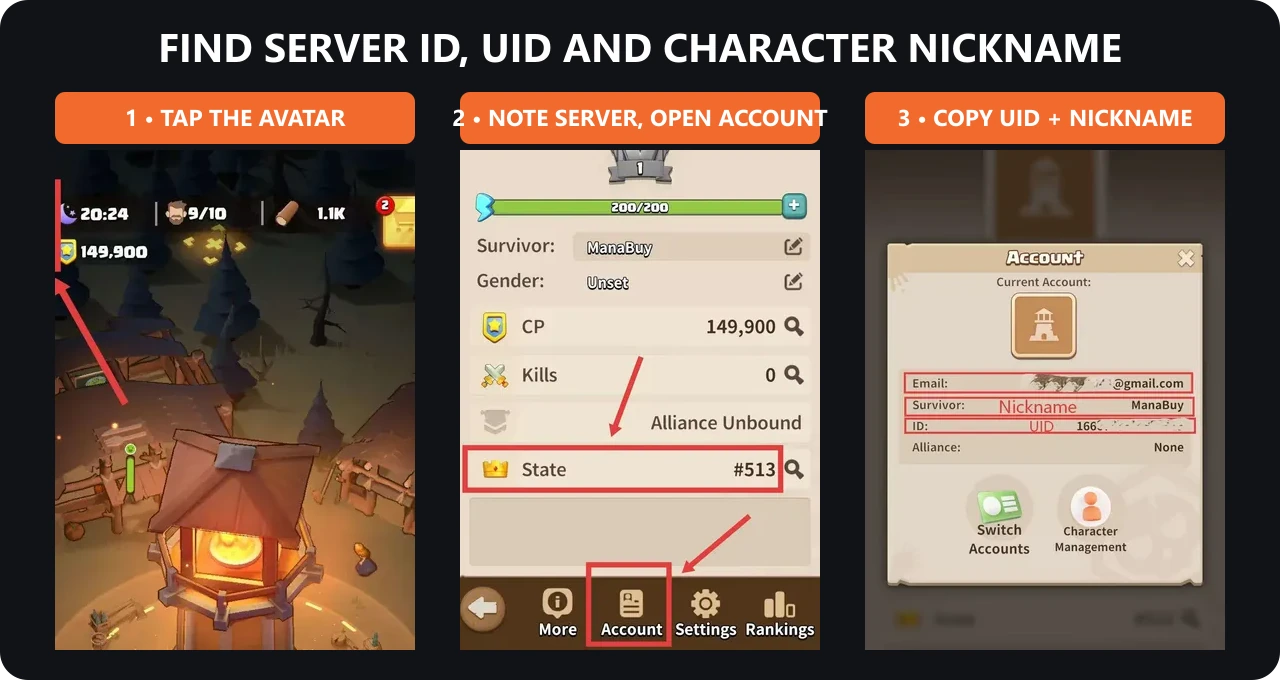
The three panels are built from the exact current help screenshots on the ManaBuy Dark War Survival product page. The example account details are masked.
Enter the values exactly. Do not add the `#` sign unless the form asks for it, and do not substitute a profile number from another server. If you switch characters after taking the screenshot, repeat the check.
How ManaBuy Login Top-up works
The live ManaBuy page lists Mobile on the International Server and requests Email Account, Email verification code, Server ID, Character Nickname, UID and a screenshot of the gift pack. Enter the available profile fields after payment; the page says support requests the email verification code after the order is placed.
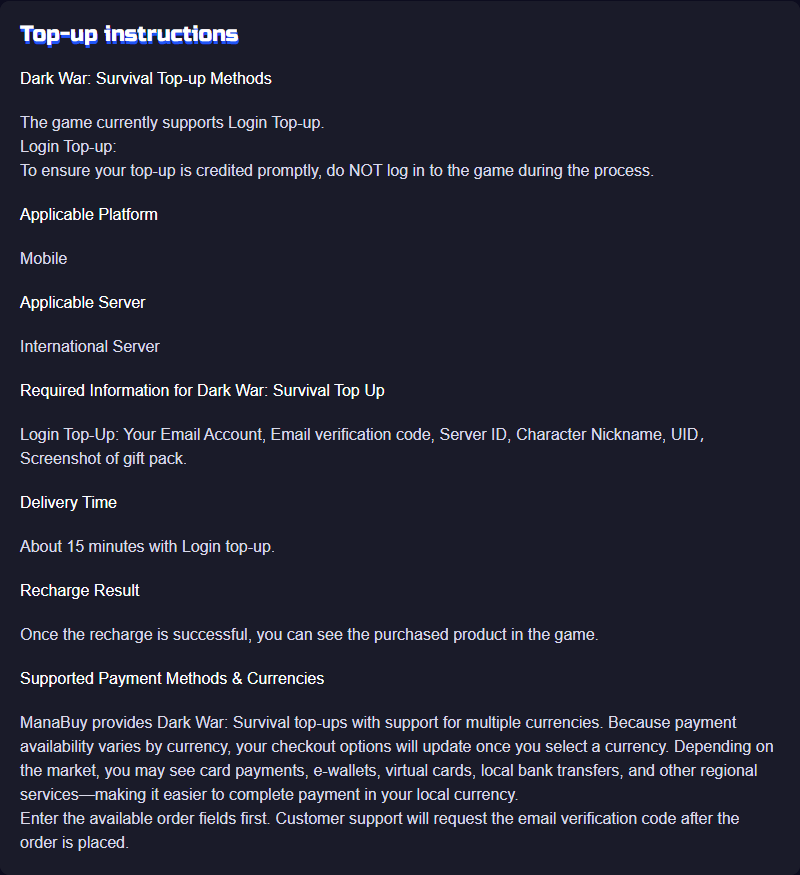
The current ManaBuy instructions show the applicable platform and server, required profile fields, currency-aware checkout and when the verification code is requested.
Use one consistent set of character details throughout the order. Keep the game closed while processing, stay available for the requested verification step, then sign in after completion and check the target UID and selected pack. Keep passwords and verification codes inside the intended paid-order workflow.
Match a denomination to the correct in-game pack
ManaBuy currently includes denomination-style options such as “Any ... Pack.” The number helps match a supported value; it is not a complete list of the items inside the pack. The product page tells buyers to open the desired in-game product, take a screenshot and submit it through the order workflow.
Use a fresh screenshot from the target UID. Include the pack name, contents and value when they are visible, but keep unrelated personal or payment information out of the image. If the live pack does not match the available denomination, stop and confirm support rather than selecting a nearby value.
| Before-payment check | What to compare | Stop if |
|---|---|---|
| Route | ManaBuy Login Top-up or a Dawn Badge balance. | You expect one route to deliver the other route's product. |
| Account | Email account, Server ID, nickname and UID. | Any field points to a different character or server. |
| Product | Pack or pass name, contents, value, limit and duration. | You are relying on an old screenshot or similar artwork. |
| Badge balance | Required amount versus the live balance shown in the Shop. | The balance is lower than the exchange requirement. |
| VIP or event goal | The live pack's eligibility and the event deadline. | You expect unused Badges or a receipt alone to count. |
| Order state | Created, paid, processing, completed or failed. | The first order is unresolved and you are about to pay again. |
What to do when Dawn Badges do not appear
Start by identifying the route that processed the payment. An official payment-center order and a ManaBuy Login Top-up have different records and support owners.
- Check the payment status. Pending or failed payment is not completed delivery.
- Open the same UID. Compare the in-game UID with the one used in the official center or order form.
- For an official order, check the Badge balance. Do not look only for the pack, because the pack still requires an exchange.
- Refresh once. Close and reopen the game or sign out and back into the correct account. Do not create another payment while the first result is unclear.
- Contact the responsible support route. Keep the receipt, UID, time, payment status and a current balance screenshot ready.
If the payment was made for the wrong UID, contact official support immediately. The published rule says Badges cannot be transferred, so do not promise yourself that a manual move or refund will be available.
What to do when a ManaBuy pack is delayed
Open the existing ManaBuy order and read its current state. Keep the account available for the requested verification step, but do not log into the game during processing. After the order is marked complete, sign in and verify the target UID, pack, pass or balance.
If the result is missing or different, send support the order number, target UID, Server ID, Character Nickname and the same pack screenshot used for the order. Do not publish the email verification code, password or recovery details in a screenshot, and do not place a duplicate order while support is checking the first one.
Dark War Survival top-up checklist

Related Dark War Survival and payment guides
Dark War Survival Dawn Badges FAQ
What are Dawn Badges in Dark War Survival?
Dawn Badges are virtual in-game items sold through the official payment center. After delivery to the logged-in UID, they can be exchanged in game for eligible packs, weekly passes, monthly passes or battle passes.
Can Dawn Badges be transferred to another UID?
No. The current official purchase notes say Dawn Badges cannot be transferred to a different UID. Check the displayed UID against the intended character before payment.
Do Dawn Badge purchases give VIP points immediately?
No. The official website purchase alone gives no VIP points. You must exchange the Badges for a qualifying pack inside the game before the related VIP points are added.
Why did my Dawn Badge exchange fail?
The official instructions say an exchange fails when the Badge balance is lower than the required amount. Recheck the live pack requirement and your balance, and make sure you are on the intended UID.
Why use ManaBuy for Dark War Survival top-up?
ManaBuy shows current supported options, lists the required account and pack fields before processing, adapts checkout methods to the selected currency and keeps payment, delivery status and support connected to one order.
What should I do if my Dark War purchase is missing?
Check payment status, route and UID first. For an official order, check the Badge balance before looking for the pack. Then contact the service that processed the existing order instead of paying again.
Sources and further help
- ManaBuy: Dark War Survival Login Top-up options and instructions
- Dark War Survival payment center and Dawn Badge instructions
- ManaBuy: Dark War Survival beginner guide
Products, pack contents, VIP or event eligibility, discounts, payment methods and delivery conditions can change. Verify the target UID, live game and responsible checkout before every purchase.