
For Clash Royale, ManaBuy currently supports Login Top-Up using your official Supercell ID account.
When you top up Gems or in-game passes through ManaBuy, our team will log into your account via the official Supercell ID login flow
(such as Email/Google/Facebook) and purchase the in-game product at the same price tier as the product you selected on ManaBuy.
EN / $ USD
Clash Royale
4.94
504
Top Up Clash Royale - Cheap Gems for Sale



Select Product
ManaBuy Premium · Extra 3% off
Diamond Pass
$11.34
$11.99
With Premium: $11.00
1200 Gems
$9.45
$9.99
With Premium: $9.17

2500 Gems
$18.90
$19.99
With Premium: $18.33

6500 Gems
$47.25
$49.99
With Premium: $45.83
14000 Gems
$94.50
$99.99
With Premium: $91.66
Top-up Instructions
Clash Royale Top-up Methods
Tip: Clash Royale requires Supercell ID login for purchases. Please ensure your Supercell ID is linked before placing an order to avoid login issues.
Applicable Platform
Clash Royale is available on:
• Android
• iOS
• Android
• iOS
Applicable Server
Global servers
Required Information for Clash Royale Top-Up
Because ManaBuy uses Login Top-Up, our team needs to access your game account once to complete the recharge.
To ensure a smooth and accurate top-up, please provide:
• Supercell ID email
• Email Verification Code
• Player Nickname
• Email Verification Code
• Player Nickname
All login is performed only via the official Supercell ID login flow, and only for the purpose of finishing your order.
After the recharge is completed, we log out and clear the login record. For your security, we recommend changing your password after the transaction.
Delivery Time
Typically around 15-30 minutes with Login Top-Up (may vary during peak periods or verification checks).
Clash Royale Recharge Result
If you purchased a certain Gems package (e.g., 5000 Gems), it can be redeemed at the same price tier inside the official Clash Royale store.
Simply log into your game after top-up is confirmed and review your Gems balance.
Clash Royale First Top-Up Bonus
Make your first in-game top-up in Clash Royale to unlock any available First Purchase rewards. Rewards are granted once per account and are based on the game's first-purchase rules.
Please refer to the in-game first-purchase information for exact rewards, as regional/server versions may vary.
Top-up Guide
Top-up Procedures
Step1
Select the Clash Royale product (e.g., Gems pack or Diamond Pass) you want to purchase on ManaBuy, place an order, and complete the payment.
Step2
In your order details, choose Login Top-Up, then fill in your Supercell ID account information (Supercell email, verification code and Player nickname).
Step3
Once the recharge is completed,your order status on ManaBuy will be updated to “Completed”. After your order status becomes “Completed”, you can log into Clash Royale at any time to check your Gems balance or Pass activation.
Tip:
Do not log into the game while we are processing to avoid conflicts. Once the recharge is completed, our staff will log out of your account and clear the login record.
How to Link Your Supercell ID in Clash Royale
To link your Clash Royale account to Supercell ID (required for Clash Royale Top Up)
1. Open Clash Royale and tap the menu button (usually top right).
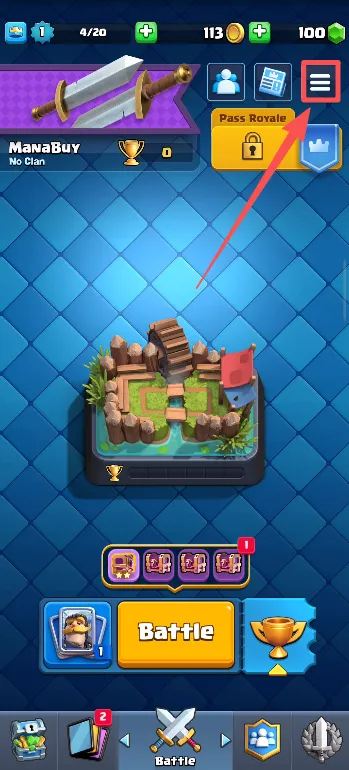
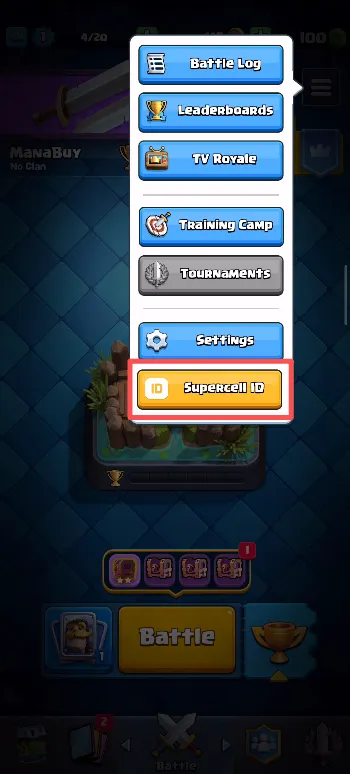
2. Tap the “Supercell ID” button. Log in or create a Supercell ID if you haven’t done so.
3. Follow prompts to confirm your email and verification code (Supercell will send a code to your email).
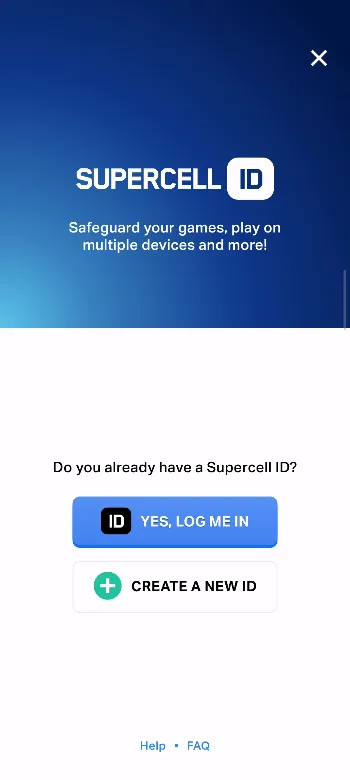
Once linked, your account progress is secured and you can recover it across devices.
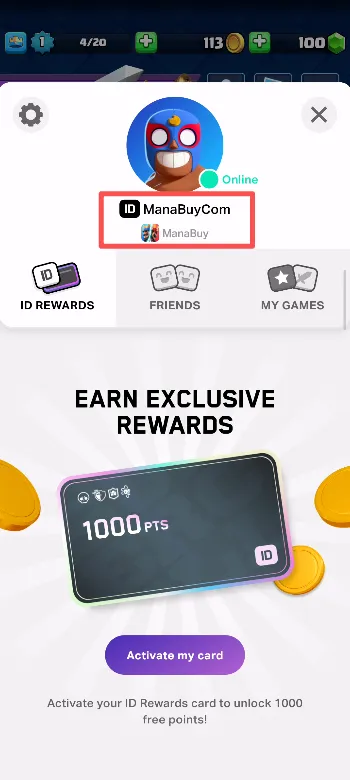
How to Find Your Player Nickname in Clash Royale?
1. Log in to Clash Royale, tap the menu button.
2. Tap the “Supercell ID” button. Log in or create a Supercell ID if you haven’t done so.
3. On the profile page you will usually see your Player Nickname.
Product Description
About Clash Royale
Clash Royale is a competitive mobile strategy game developed by Supercell that blends real-time card battles and MOBA-style gameplay in short, intense matches. It’s one of the most popular multiplayer strategy titles worldwide.
What Are Gems in Clash Royale?
Gems are the premium currency in Clash Royale. Players can use Gems to purchase in-game items such as Pass Royale (including the premium Diamond Pass), chests, emotes, and more. Gems are typically acquired via in-game purchase or as rewards from certain events and rewards tracks.
What Is the Diamond Pass?
The Diamond Pass is a premium seasonal progress track that provides enhanced rewards throughout the season, including exclusive cosmetics, Gems, and other bonuses compared to the free rewards track.
Why Should You Top Up Clash Royale on ManaBuy?
• Competitive Value & Convenience
ManaBuy aims to deliver better value on Clash Royale Gems and Passes through flexible pricing and efficient processing.
• Secure Login Top-Up Flow
All login top-up is done via official Supercell ID flows, and accounts are logged out and cleared after processing.
• 24/7 Support
Our multilingual customer support team can assist you if you’re unsure which product to choose or if you encounter issues.
ManaBuy aims to deliver better value on Clash Royale Gems and Passes through flexible pricing and efficient processing.
• Secure Login Top-Up Flow
All login top-up is done via official Supercell ID flows, and accounts are logged out and cleared after processing.
• 24/7 Support
Our multilingual customer support team can assist you if you’re unsure which product to choose or if you encounter issues.
How to Download Clash Royale?
Clash Royale is a free-to-play game that players can download from the official mobile app stores. On Android devices, it’s available for free on Google Play with optional in-game purchases available directly in the game. On Apple devices (iPhone, iPad, iPadOS), it is available at no cost through the Apple App Store.


FAQ
What is Login-Based Top-Up on ManaBuy ?
login-based top up is ManaBuy's game recharge service requiring account details for team to log in and recharge game accounts using favorable exchange rates, securing lower prices and extra rewards. Post-transaction, user info is canceled to prioritize privacy protection.
Is ManaBuy Safe for Recharging & Buying Gems ?
Recharging or buying Gems on ManaBuy is completely safe. We use secure payment gateways and industry-standard encryption to protect transactions and customer data. ManaBuy works with verified suppliers and official channels, ensuring quick and reliable purchases. Thousands of gamers trust ManaBuy for fast delivery and customer support. Our 24/7 support team is available for any issues. You can recharge with confidence on ManaBuy for games like Genshin Impact, Free Fire, and others.
Can I Top Up Clash Royale Without Linking a Supercell ID ?
No, this game requires ogin-based top up. Supercell ID also allows you to easily recover your account if you change devices or lose access to your current account. So, you need to link your Supercell ID to top up Clash Royale. Before you can top up, you need to link your Supercell ID. If you haven't linked a Supercell ID yet, we recommend that you create one and link it to your account to ensure smooth and secure transactions. If you need help linking your Supercell ID, you can find detailed instructions in the top-up guide above.
What to Do If Gems are Not Credited to My Account After I Top Up on ManaBuy ?
If your Gems aren’t showing up after a top-up, follow these steps:
• Verify your account details: Ensure that your Supercell ID was entered correctly during the top-up process.
• Wait a few minutes: In most cases, Gems are delivered instantly, but delays can occur due to system processing. Please wait 15-30 minutes and check again.
• Check your game balance and mailbox: Sometimes Gems are added silently without notification. Refresh the game or check your mailbox for updates.
• Check your order status: Log into your ManaBuy account and verify the payment status of your order.
• Contact customer support: If the Gems still haven’t been credited, contact ManaBuy support with your order number for assistance. Our team is available 24/7 to resolve the issue quickly.
• Verify your account details: Ensure that your Supercell ID was entered correctly during the top-up process.
• Wait a few minutes: In most cases, Gems are delivered instantly, but delays can occur due to system processing. Please wait 15-30 minutes and check again.
• Check your game balance and mailbox: Sometimes Gems are added silently without notification. Refresh the game or check your mailbox for updates.
• Check your order status: Log into your ManaBuy account and verify the payment status of your order.
• Contact customer support: If the Gems still haven’t been credited, contact ManaBuy support with your order number for assistance. Our team is available 24/7 to resolve the issue quickly.
User Reviews
View All4.9
2227 Reviews
5
4
3
2
1
Newest
Most helpful

plumliamrx
Oct 10, 2026
Purchased:
Diamond Pass
A clean layout, well laid out, no drama. I could see what was happening at every step.
0 people found this review helpful
Helpful (0)

lily410
Oct 9, 2026
Purchased:
Diamond Pass
Honestly, Worth it, quick confirmation, nothing odd
0 people found this review helpful
Helpful (0)

tesscozycast
Oct 9, 2026
Purchased:
Diamond Pass
good overall value, easy checkout, just worked. I did not have to stop and figure anything out.
0 people found this review helpful
Helpful (0)

rioneon9
Oct 9, 2026
Purchased:
Diamond Pass
No trouble paying, easy to complete, no problems. The whole thing was simple to follow on mobile.
0 people found this review helpful
Helpful (0)

codyplumdesk
Oct 9, 2026
Purchased:
Diamond Pass
Solid value, a smooth finish, just worked.
0 people found this review helpful
Helpful (0)
Show More
Related Articles
View All
Clash Royale 10th Anniversary Event Guide: Best Rewards and Priorities
Mar 26, 2026
Clash Royale’s 10th Anniversary Season brings together the Album Event, Retro Royale Global Tournament, Community Event, Crown Chases, Clan Voyage, and new Hero content in one packed celebration. This guide explains which rewards matter most, what players should prioritize first, and how to plan resources more efficiently during the anniversary season.
Clash Royale Heroes Update: How to Choose Your First Hero
Mar 26, 2026
Clash Royale’s 2026 Heroes Update changes Hero progression from a random system into a more strategic one. With Hero Coins replacing Hero Fragments and players now able to choose their first Hero more directly, this guide explains which Hero directions are worth prioritizing based on playstyle, deck needs, and long-term resource planning.



About ManaBuy


Copyright © FUTURE OUTLOOK TECHNOLOGY LIMITED.Company Registration No.: 77374965 All rights reserved.UNIT 135,1/F.,143 WAI YIP STREET,KWUN TONG HK