
Where Winds Meet Cross-Progression: Link Accounts Without Starting Over

Reviewed October 9, 2026 · Based on current official account-linking, mobile and Xbox guidance.
Where Winds Meet supports shared progress across major platforms, but shared progress is not created by simply installing the game twice. The account-linking order matters, especially when an existing character is moving to a new device.
Quick answer: Link the new platform to the account that already owns your character before you create a different character on the new platform. If both platform accounts already contain separate characters, the normal linking flow cannot combine them.
Cross-Play and Cross-Progression Are Different
Cross-play describes players on different platforms entering compatible multiplayer content. Cross-progression describes one character and its progress being available after you sign in through another linked platform. One feature does not prove that the correct account is open.
The official guides cover Steam, Epic Games, the official PC launcher, PlayStation, mobile and, in later guidance, Xbox. Platform availability can expand, but the safe account rule remains the same: start from the account that owns the progress you want to keep.
The One Rule to Follow Before Using a New Platform
If you already have a character, do not create a fresh character on the new platform as a test. First sign in to the existing account and link the new platform through the account center or the in-game User Center path described by the official guide.
Choose the Correct Starting Situation
| Your situation | What to do | What to avoid |
|---|---|---|
| Existing character, unused new platform | Open the existing account and link the new platform before creating a character there. | Do not press through a fresh-character flow to “see if it works.” |
| Both accounts already have characters | Stop and contact official support with both account details. | Do not expect the characters, purchases or progress to merge. |
| Mobile account moving to PC or console | Use the same bound account or complete the link first, then verify the character after login. | Do not use the device name as proof that the same character is open. |
| Existing account moving to Xbox | Official guidance recommends linking the existing account to Xbox before the first Xbox character is created. | Do not create an independent Xbox character first. |
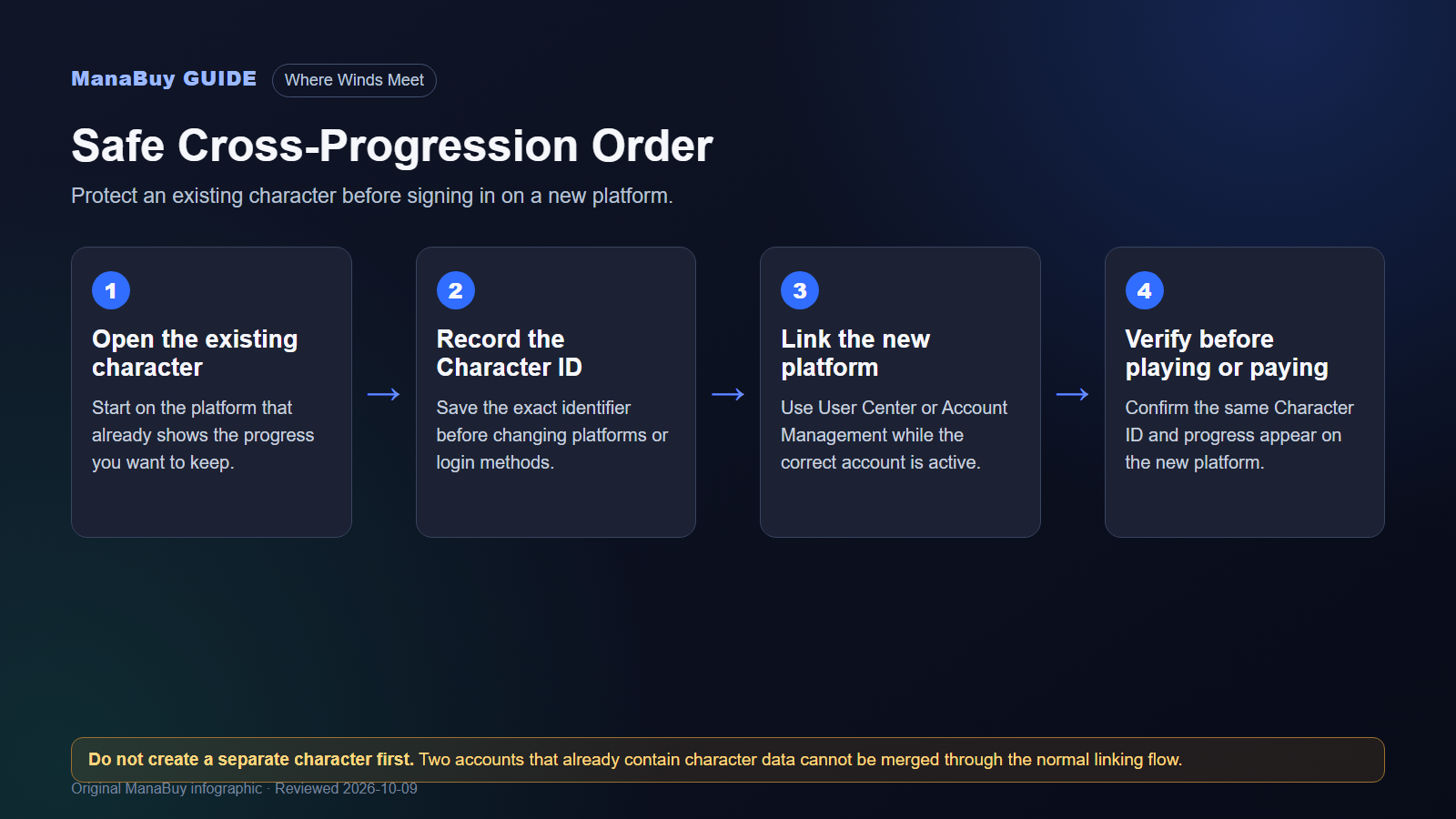
General Account-Linking Flow
Confirm the character name, progress and Character ID before changing anything.
The official PC and console guide uses the title screen or Settings → Other → User Center path.
Complete the platform authorization while the correct existing character is active.
Use the newly linked login and confirm the same character appears.
The same character should show the same identifier. Stop if the ID or progress differs.
How to Verify the Right Character Opened
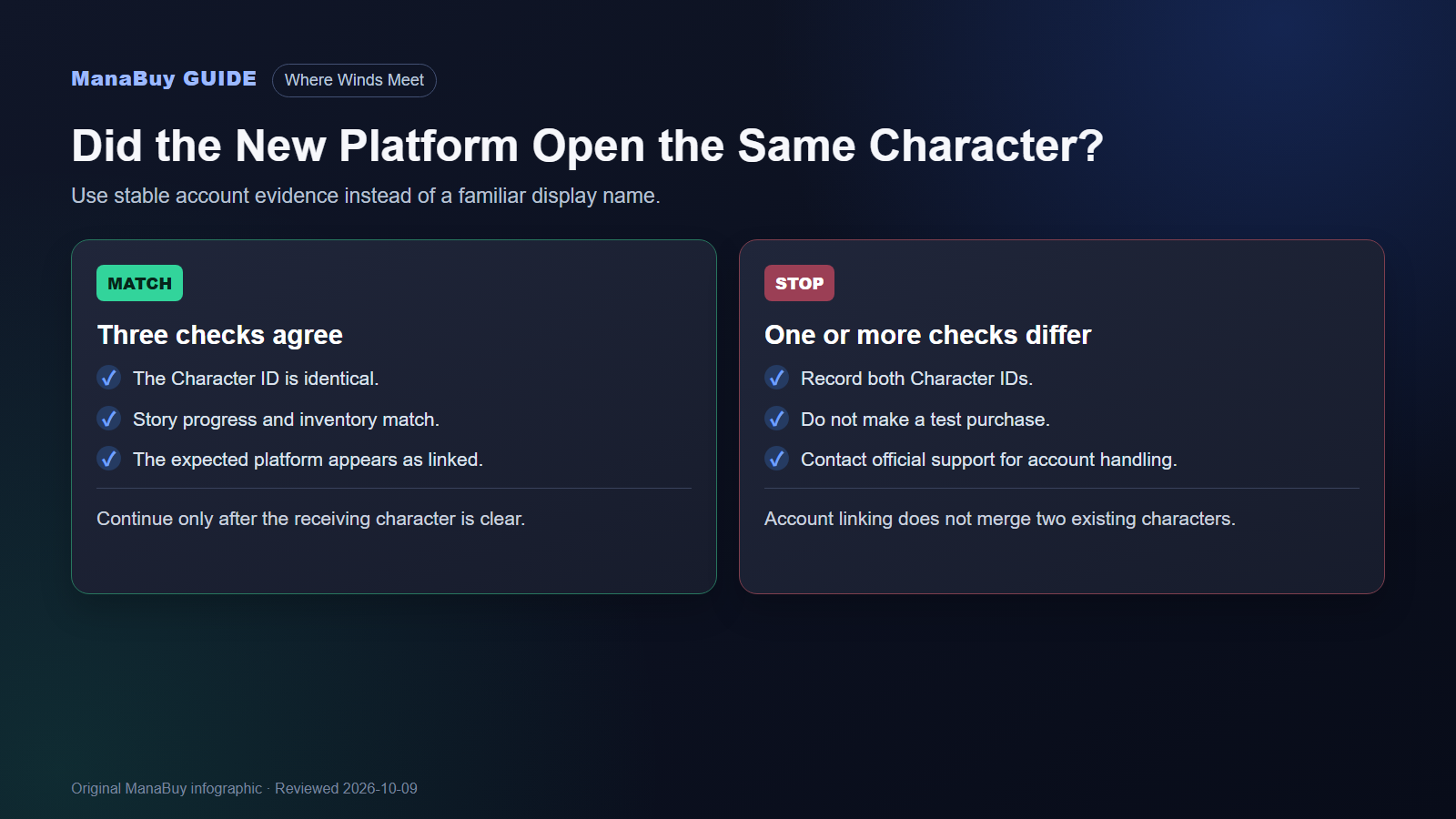
A familiar display name is not enough when more than one login method has been used. Record the Character ID from the original account, then compare it after the new platform is linked. Also check story progress, inventory and account-binding status.
Character ID matches
This is the strongest quick check that the same receiving character is open.
Progress matches
Quest state, unlocked areas and inventory should be consistent with the original account.
Region matches
Cross-progression does not transfer a character between different server regions.
What to Do If You Already Created a Separate Character
Do not keep trying random bindings. Capture the Character IDs and platform logins involved, then contact official Where Winds Meet support. The official guidance says account unlinking or removing conflicting character data requires support handling; it is not a normal self-service merge.
Until the account is resolved, avoid making a purchase on either uncertain character. A top-up is routed to the Character ID entered in the order, not to whichever platform you intended in your head.
Character ID Checks Before a ManaBuy Top-Up
Once the account is settled, compare the purchase types before choosing an amount. The Echo Beads, Monthly Pass and Battle Pass guide separates the options by goal, login habits and the current reward screen.
ManaBuy's Where Winds Meet product uses the receiving Character ID. Select the product, enter the ID copied from the correct character, review the checkout total and complete payment. You do not need to provide a game password.
Delivery is usually completed within a few minutes after successful payment, although exceptional cases can take longer. Failed top-ups are refunded to the original payment method. Successful delivery to the entered Character ID cannot be recalled or moved, so resolve any account-linking doubt first.
Open Where Winds Meet Top Up on ManaBuyFrequently Asked Questions
Does Where Winds Meet support cross-progression?
Yes. Official guides support shared character progress across linked platform accounts, including PC storefronts, PlayStation, mobile and Xbox guidance. Link before creating a separate character on the new platform.
Can two existing Where Winds Meet characters be merged?
No normal merge flow is provided. If both accounts already contain separate characters, contact official support instead of attempting more bindings.
Does premium currency follow the linked character?
The official Xbox FAQ says purchases and premium currency are shared with the same bound account across supported platforms, but not between different server regions. Verify the same Character ID first.
Which ID should I use for a ManaBuy top-up?
Use the Character ID shown on the exact character that should receive the purchase. Do not use a Steam name, PSN name, email address or platform username as a substitute.
Research basis: Official Where Winds Meet Cross-Progression Account Linking Guide, Mobile Launch FAQ and Xbox Launch FAQ. Platform menus may change, so the current client and official support remain authoritative.



Copyright © FUTURE OUTLOOK TECHNOLOGY LIMITED.Company Registration No.: 77374965 All rights reserved.UNIT 135,1/F.,143 WAI YIP STREET,KWUN TONG HK