
Quick answer: Rise of Kingdoms Flux Scrips and a login top-up are not the same purchase. Lilith's official Store adds purchased Flux Scrips to the game account used on the official site; you then spend the matching Scrip tier inside the game to obtain a bundle. The official page also says the purchase counts toward eligible in-game purchase events only after the Scrips are used in game. ManaBuy currently offers a separate third-party Login Top-up that asks for login method, account, password, character name and server. Choose one route deliberately, match the correct character and kingdom, and never treat a price label as proof of bundle contents.
A Rise of Kingdoms account can hold more than one character, and those characters can belong to different kingdoms. That makes account identity part of the purchase, not a formality. A successful payment tied to the wrong character, server or pack can still produce the wrong result.
This guide focuses on the stable decision rules. Store catalogs, pack names, discounts, payment methods and final amounts can change. Recheck the live official store, the target character's in-game shop and the seller order form before each transaction.
Flux Scrips and login top-up are different purchase routes
Lilith labels its Rise of Kingdoms store as Official and asks the player to log into a game account on the Lilith Store domain. The store describes Flux Scrips as in-game items that are added to that account and can be exchanged for bundles of the corresponding value inside Rise of Kingdoms.

The official Rise of Kingdoms storefront identifies the GLOBAL service, displays the Official label and asks for a game-account login. The crop excludes temporary prices and promotions.
ManaBuy's current Rise of Kingdoms page uses a different model. It is a third-party Login Top-up: after payment, the buyer supplies the requested login and character information so the order can be fulfilled on the target account. A Flux Scrip bought through the official store and an “Any ... Pack” fulfilled by a login service should not be treated as interchangeable products.
| Check | Lilith Store Flux Scrip route | ManaBuy Login Top-up route |
|---|---|---|
| Operator | Lilith's official payment center. | ManaBuy, a third-party top-up service. |
| Account step | Log into the game account on the official Lilith Store. | Provide the login method and requested credentials through the paid order workflow. |
| What arrives | Flux Scrips are added to the logged-in game account. | The selected denomination-style pack is fulfilled for the specified character and server. |
| Next action | Spend the matching Scrip tier inside the game to obtain the intended bundle. | Wait until the order is complete, then sign in and verify the intended pack or balance. |
| Purchase-event credit | The official page says Scrips must be used in game before the purchase counts toward eligible in-game purchase events. | Depends on the actual in-game purchase completed during fulfillment and the live event rules. |
| Support route | Use Lilith Store or game support with the official receipt. | Use the existing ManaBuy order and its support channel; do not place a duplicate order first. |
What Flux Scrips are in Rise of Kingdoms
Flux Scrips are not a second name for Gems. The official store presents multiple Scrip tiers, and each tier represents purchasing power for a corresponding in-game bundle. The item first reaches the logged-in account; the player then uses it inside Rise of Kingdoms.
That two-stage design matters. “The Scrip is visible” and “the bundle has been redeemed” are different states. If you wanted a specific bundle, verify its live in-game price and contents before selecting the Scrip tier. Do not rely on an old screenshot, a familiar price point or a bundle name seen on another character.
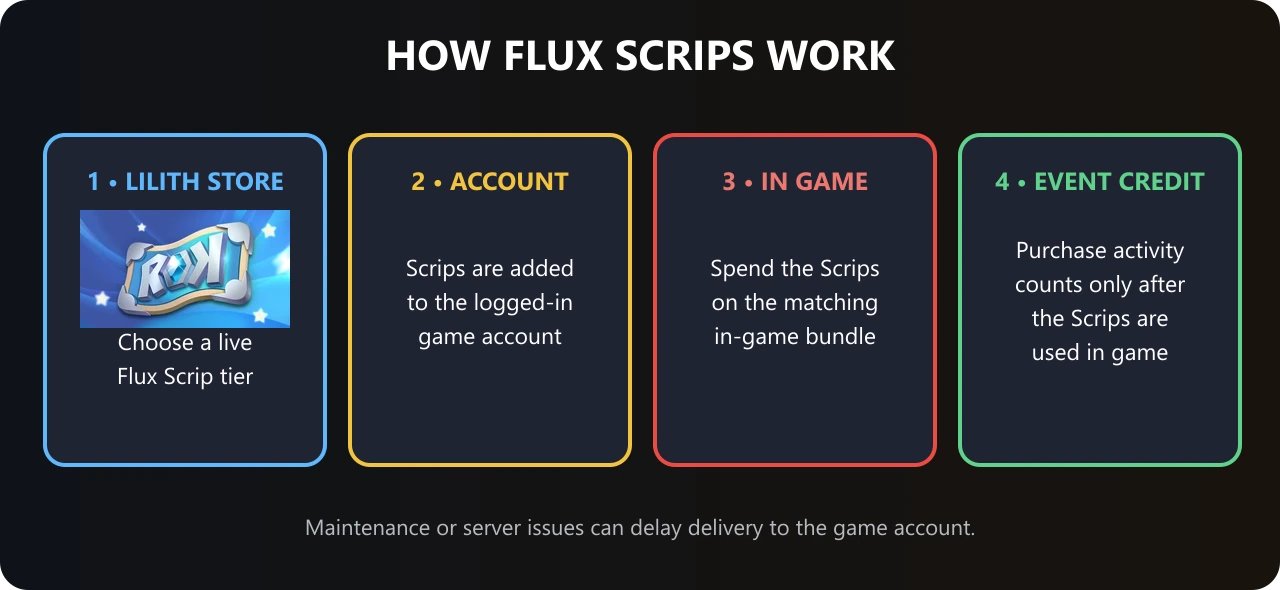
This flow summarizes the official Store rules. It does not promise that a particular Scrip tier, bundle or promotion will remain available.
How Flux Scrips work after payment
When Flux Scrips count toward purchase events
The official Store makes a specific distinction: buying Flux Scrips on the website does not by itself count toward an in-game event that rewards purchases. The Scrips must be used inside Rise of Kingdoms. The store uses Gem Rush as an example, but that example does not mean a particular event is active for every account or date.
Use this sequence whenever an event reward matters: open the event on the target character, read the eligible-purchase wording, buy the matching Scrip tier, confirm delivery, spend it on the intended bundle and then check the event progress. If the event is close to ending, do not assume a website receipt alone will satisfy the requirement.
Confirm the account, character and kingdom first
The login method identifies an account, but the purchase target may be one character within that account. Record the character name and kingdom/server together. If you maintain farms, restart in another kingdom or share a device, reopen the intended city before paying.
Do not infer the server from the account email or device. One login can hold characters in different kingdoms. A screenshot of the intended profile and bundle can help you verify your own entry, but keep it private and exclude payment or recovery details.
What ManaBuy Login Top-up currently requires
The live ManaBuy Rise of Kingdoms page lists five required information groups: Login Method, Account, Password, Character Name and Server. It also tells buyers to stay available for login approval or a verification code, avoid entering the game while processing is under way and verify the delivered balance or item after completion.
This route gives a third party temporary access to the game account. Decide with that credential exposure in mind. If you choose it, use only the real ManaBuy order page, never send a password or verification code through an unrelated chat, keep a unique password, and change the shared password after the order is complete.
Match an “Any Pack” option to the live bundle
ManaBuy currently presents denomination-style options such as “Any ... Pack.” The number in that label is a matching value, not a complete description of the items. Two bundles with similar prices can contain different resources, commander materials, subscriptions, event items or purchase limits.
Before payment, open the target bundle and record the exact value and contents. If the order form offers only a denomination, confirm that the service can purchase the intended bundle for the specified character. Do not use a denomination to request a different product whose live price merely looks close.
| Before-payment check | What to compare | Stop if |
|---|---|---|
| Route | Official Flux Scrip or third-party Login Top-up. | You expect one route to deliver the other route's product. |
| Account identity | Login method, target character and kingdom/server. | The displayed city is not the one you intend to fund. |
| Product type | Flux Scrip, Flux Coin, Gem-related item, pass, subscription or named bundle. | The names or item types do not match exactly. |
| Value | The live in-game value and the selected Store or seller option. | You are matching from an old screenshot or a nearby denomination. |
| Contents and limits | Items, quantity, purchase limit, duration and eligibility. | The order page cannot confirm the intended bundle. |
| Order state | Created, paid, processing, completed or failed. | The first order is unresolved and you are about to pay again. |
Do not confuse Scrips, Coins, Gems and packs
The official store can list more than one type of product. A Flux Scrip is used to exchange for a corresponding in-game bundle. A Flux Coin product is labeled differently. Gems, passes and named packs have their own functions and may appear through other in-game or seller routes. Similar art does not make these items interchangeable.
- Flux Scrip: an official-store item that must be used in game for the matching bundle.
- Flux Coin: a separately labeled product; do not assume it follows the Scrip exchange rule.
- Gem or resource bundle: check the live bundle contents and event eligibility on the target character.
- “Any Pack” denomination: a seller option that still needs to be matched to an actual in-game product.
What to do when a purchase does not appear
First identify which route processed the order. The official store and ManaBuy have different receipts, account checks and support owners.
- Check payment and order status. A pending or failed payment is not the same as a completed delivery.
- Reopen the same account and character. Confirm the login method, governor name and kingdom/server.
- For official Flux Scrips, check the Scrip balance before the bundle. The Scrip can arrive before you spend it. If it is missing during maintenance or a server issue, log out and back in once.
- For ManaBuy, wait for the existing order to finish. Do not enter the game during processing if the order instructions tell you not to.
- Use the responsible support route. Contact Lilith for an official Store order or ManaBuy through the existing third-party order. Keep the receipt and avoid a duplicate payment.
If an order was submitted for the wrong character or server, contact the responsible support channel immediately. Do not assume a digital purchase can be transferred or refunded after delivery; the applicable service policy and actual order state control the outcome.
A safer Rise of Kingdoms top-up checklist
- Use the correct domain. Check the full Lilith Store or ManaBuy address before entering account details.
- Choose the route before comparing price. Official Scrip delivery and third-party login fulfillment solve different tasks.
- Match the active character. Account, governor and kingdom/server must point to the same city.
- Read the live product. Match item type, value, contents, limits and duration rather than artwork alone.
- Protect credentials. Keep passwords and verification codes inside the intended workflow, and change a shared password after login fulfillment.
- Preserve one order record. Follow the existing order until it reaches a final state instead of paying again.

Related Rise of Kingdoms and payment guides
Rise of Kingdoms top-up FAQ
What is a Flux Scrip in Rise of Kingdoms?
A Flux Scrip is an item sold through Lilith's official Store and added to the logged-in game account. You then use the matching Scrip tier inside Rise of Kingdoms to exchange for an eligible bundle.
Does buying Flux Scrips count toward a purchase event?
Not by itself. Lilith's official page says the Scrips must be used in game before the purchase can count toward an eligible in-game purchase event. Always check the live event rules and deadline.
Are Flux Scrips the same as Gems or Flux Coins?
No. The official store labels Flux Scrips, Flux Coins and other products separately. Read the live item name and description, and do not assume similar artwork or value makes them interchangeable.
What information does ManaBuy ask for?
The current ManaBuy Login Top-up page lists login method, account, password, character name and server. It may also require login approval or a verification code through the intended order workflow.
Can I log in while a ManaBuy order is processing?
The current product instructions say not to enter the game while Login Top-up is being processed. Stay available for approval, wait for the final order status, then sign in and verify the intended result.
What should I do if my Rise of Kingdoms purchase is missing?
Check payment status, route, account, character and server first. For official Scrips, check the Scrip balance and log out and back in once. Then contact the service that processed the existing order instead of paying again.
Official and live references
- Lilith Store: Rise of Kingdoms GLOBAL official payment center
- ManaBuy: Rise of Kingdoms Login Top-up product page
- ManaBuy: Rise of Kingdoms beginner guide
Products, bundle contents, event eligibility, discounts, payment methods and delivery conditions can change. Verify the target account, live game and responsible checkout before every purchase.