
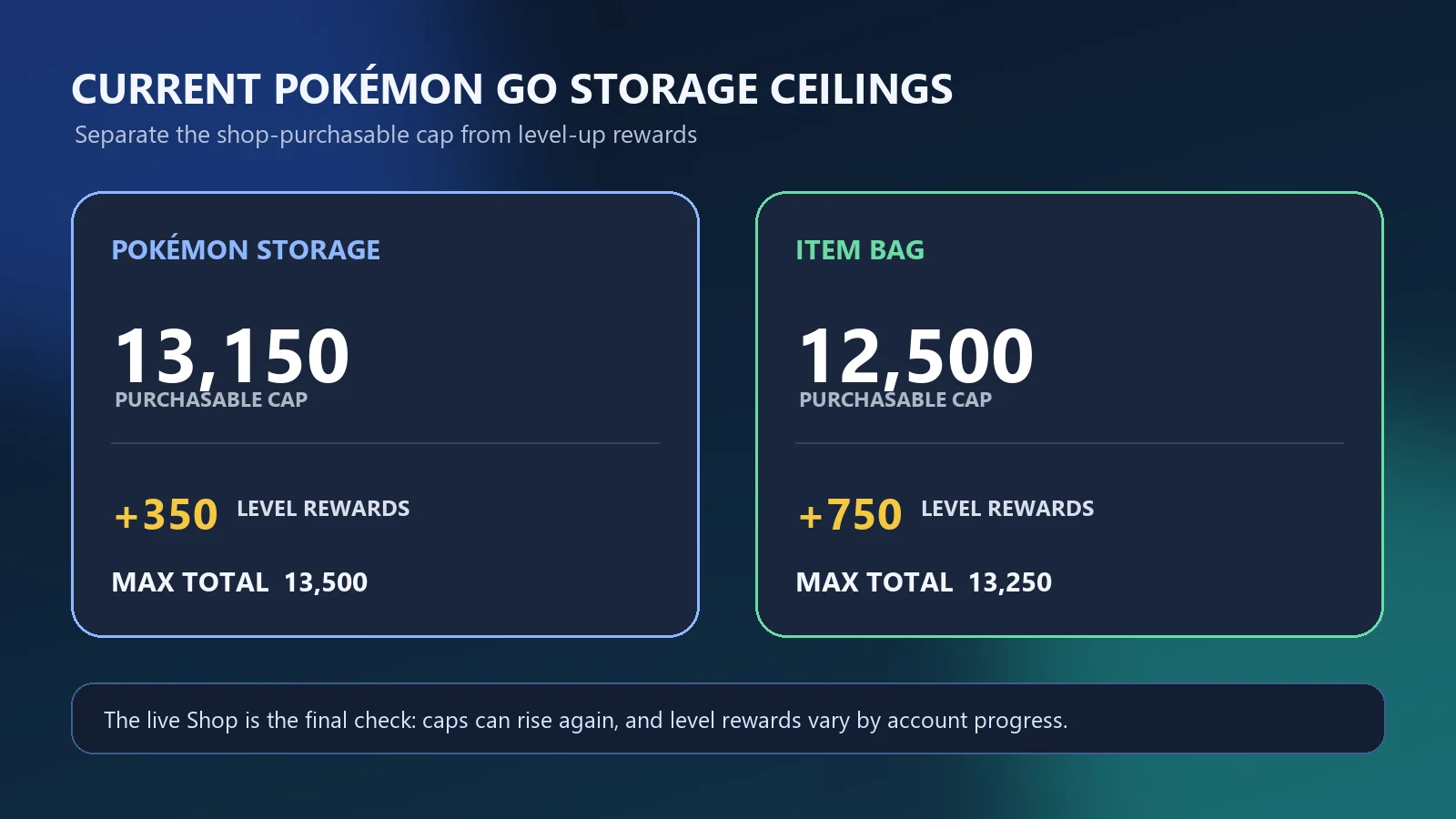
The current purchasable ceiling is reported at 13,150 Pokémon Storage and 12,500 Item Bag spaces. Storage earned from Trainer levels can sit above those Shop limits, taking a fully rewarded account to 13,500 Pokémon and 13,250 items. That difference is why two players can both be “maxed” but show different totals.
Each standard Pokémon Storage or Item Bag upgrade adds 50 permanent spaces for 200 PokéCoins. The useful question is not whether more space is good; it is whether another cleanup fixes the problem, or the same counter keeps stopping catches, hatches or PokéStop spins.
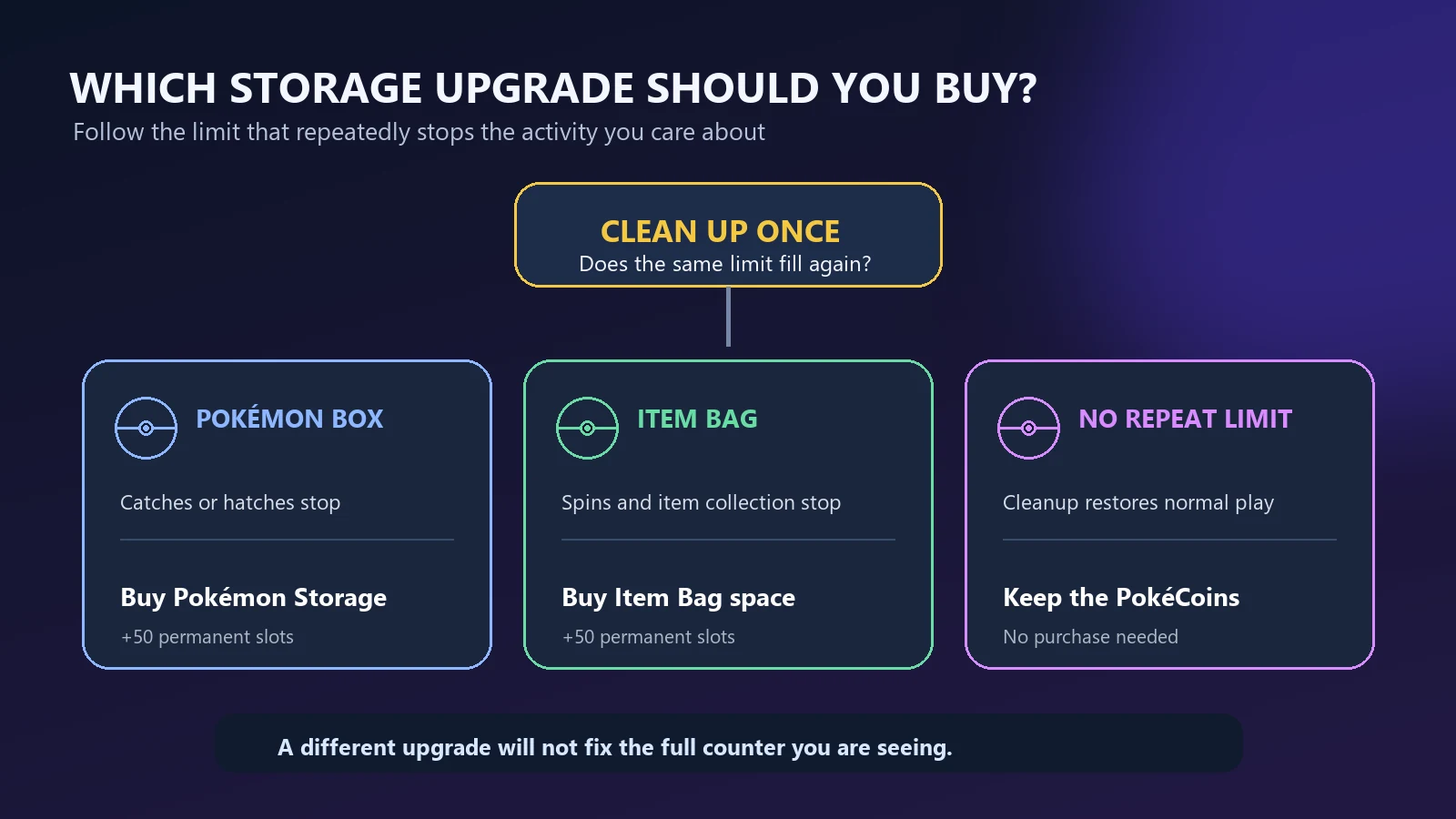
Quick answer: Clean the full counter once, protect Pokémon or items you actually use, and watch what fills again. Buy Pokémon Storage if collection space repeatedly blocks catches or hatches. Buy Item Bag space if item collection repeatedly stops. One upgrade costs 200 PokéCoins and adds 50 permanent spaces; it does not expand the other counter.
What is the current max storage in Pokémon GO?
Pokémon GO now has two layers of capacity. The Shop lets an account purchase Pokémon Storage up to 13,150 and Item Bag space up to 12,500. Trainer-level rewards are separate permanent increases, so an account that has earned every current storage reward can reach a reported total of 13,500 Pokémon and 13,250 items.
Use the number shown on your own account as the final answer. Storage ceilings are raised periodically, and level rewards depend on your progress. An older guide may also show a lower total because it was written before a later cap increase.
Why can storage exceed the Shop cap?
The level-80 progression added storage rewards for Pokémon, items, Gifts and Postcards. Official Pokémon GO guidance says these rewarded increases can push an account above existing purchase limits. They do not reduce the value of earlier upgrades; they add permanent capacity on top of what the account already had.
Before buying space near a level milestone, check the level reward screen. If capacity is coming soon and the current problem is temporary, a cleanup may bridge the gap without spending coins.
How do Pokémon GO storage upgrades work?
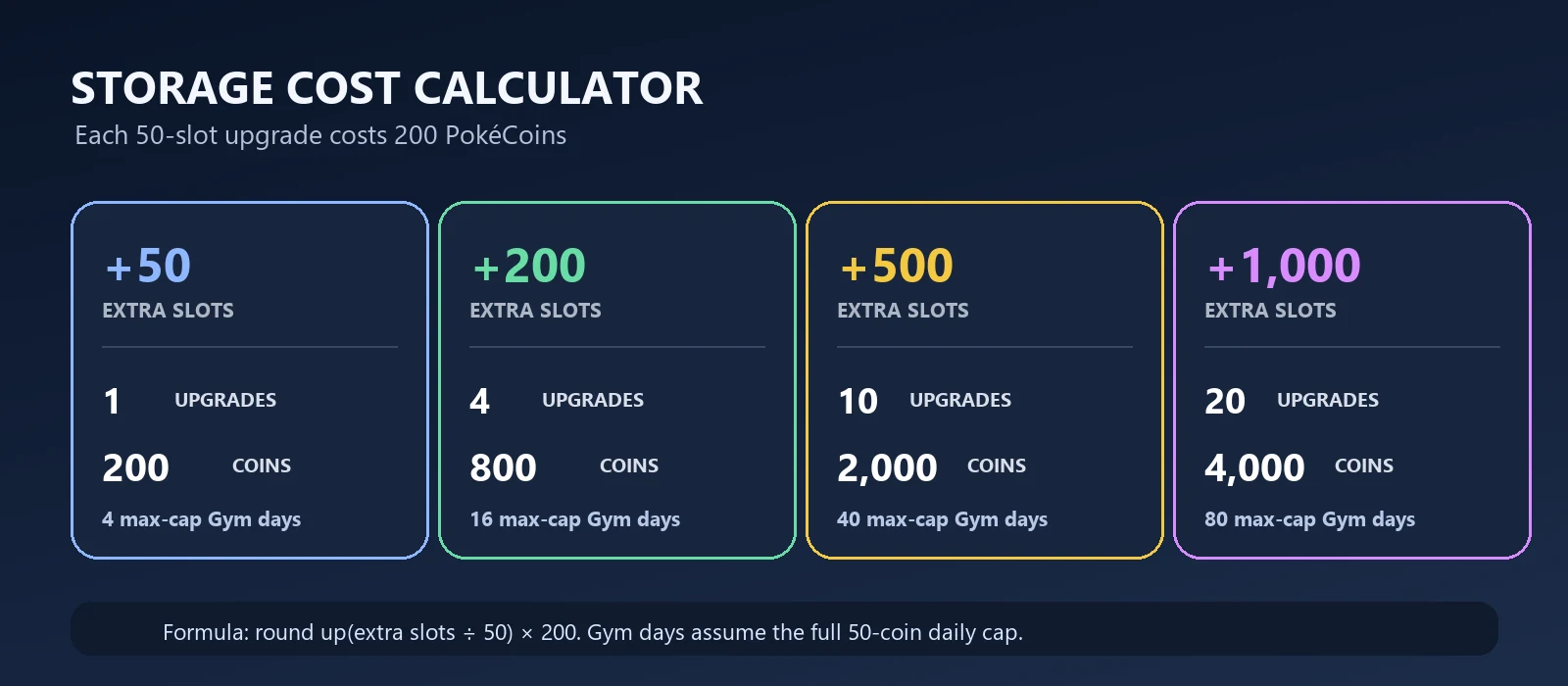
Pokémon Storage and the Item Bag are separate counters. A Pokémon Storage Upgrade immediately adds 50 places for caught and hatched Pokémon. An Item Bag Upgrade adds 50 places for items. Both are permanent account capacity, and each has a standard reference value of 200 PokéCoins.
At the standard price, capacity costs four PokéCoins per slot. One upgrade equals four days at the maximum 50-coin Gym payout, but that is only a best-case earning comparison. A player who averages 25 Gym coins per day needs about eight earning days for the same upgrade.
Which storage upgrade should you buy first?
Buy the upgrade for the activity that is actually being interrupted. The orange dot on the main menu can indicate either full Pokémon Storage or a full Item Bag. Open the menu and confirm which counter reached its limit before spending.
Storage and Item Bag space do not substitute for each other
An Item Bag upgrade will not let you keep another Pokémon. A Pokémon Storage upgrade will not create room for Poké Balls, healing items or passes. Buying the wrong one is a permanent purchase, but it leaves the current blocker unchanged.
How much Pokémon Storage do you actually need?
Plan for the number of catches you expect between cleanup windows—not only the number you expect to keep. You still need space to catch, appraise, tag and compare before transferring anything.
Example: you expect roughly 260 catches before the next break and have 80 open slots. The shortfall is 180, so four upgrades create 200 spaces and cost 800 PokéCoins. If a careful cleanup creates another 150 slots first, only one upgrade is needed. The cleanup saved 600 coins without reducing the event buffer.
For ordinary play, use your own recent session instead of copying another Trainer's target. Auto-catch users, shiny collectors, PvP players and frequent traders consume capacity differently. The right amount is the smallest buffer that lets the next session finish without rushed transfers.
How to clean Pokémon Storage without losing valuable catches
Transferring a Pokémon is irreversible. Do not start with one giant “safe delete” string: a low appraisal can still be a useful Great League or Ultra League candidate, and a duplicate can have trade, background, costume or legacy-move value. Use several review passes instead.
Useful search terms for a storage audit
The official search system supports saved terms, exclusions and combined filters. These short searches are safer building blocks than a universal transfer string:

How to clean a full Item Bag before expanding it
A full Item Bag stops normal item collection from PokéStops, Gyms and many rewards. Start with the items that exceed your actual routine. Use healing items on damaged teams, feed surplus Berries when useful, and compare Poké Ball stock with the way you catch. Raiders need a different balance from players who mainly walk and spin.
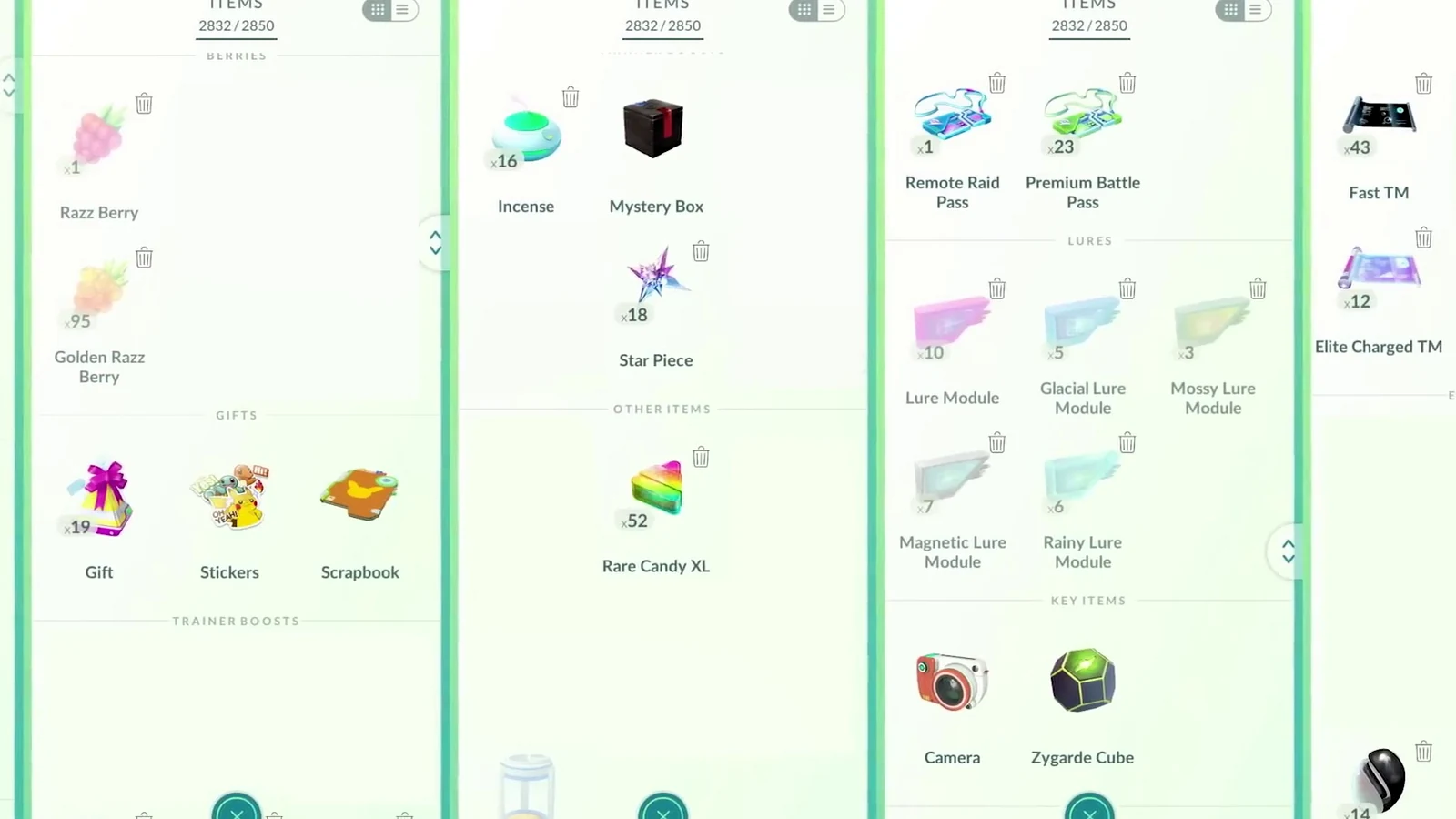
Rare Candy, TMs, passes and evolution items deserve a plan before removal. Gifts and Stickers do not count toward the normal Item Bag maximum, so clearing those will not solve a full-bag warning. If a practical cleanup still leaves the bag full every session, an Item Bag Upgrade is solving a repeated problem rather than preserving unused stock.
When is buying storage worth the PokéCoins?
Storage is a permanent upgrade, so its value compounds across future events. It is worth buying when a known cleanup routine no longer creates enough headroom, or when the cost of rushed sorting is higher than the coins. It is weaker value when the full counter is caused by obvious duplicates or items you do not use.
Use the Pokémon GO PokéCoins guide to compare the storage target with your realistic Gym income. If the next session starts before free coins can cover the shortfall, buy only the amount required by the capacity calculation rather than trying to reach the maximum.
Pokémon GO storage FAQ
What is the max Pokémon Storage right now?
The current reported Shop-purchasable ceiling is 13,150 Pokémon. Level-up storage rewards can raise a fully rewarded account to 13,500. Check the live counter because future cap increases can make older totals obsolete.
What is the max Item Bag size?
The current reported purchasable ceiling is 12,500 items. All current level rewards can take the total to 13,250, which is why max totals can differ between accounts.
How much does a storage upgrade cost?
A standard Pokémon Storage or Item Bag upgrade costs 200 PokéCoins and adds 50 permanent spaces. That is four PokéCoins per slot.
Why do some guides show a lower maximum?
Pokémon GO raises storage ceilings over time. Guides can also mix up the Shop cap with the higher total after level rewards. Compare the publication context, then use the upgrade availability shown on your own account.
Does Pokémon Storage add Egg slots?
No. Pokémon Storage holds caught and hatched Pokémon, while Egg storage has its own slots. You still need open Pokémon capacity for catches and hatches, but buying Pokémon Storage does not create another Egg slot.
Should a new player max storage immediately?
No. Expand in 50-slot steps after the same limit survives a cleanup. Reaching the maximum is not the goal; maintaining enough headroom for the next catch or item-collection session is.
Choose capacity, not clutter
The best storage purchase removes a repeated interruption. Protect rare or useful Pokémon, clean by category, measure the remaining shortfall and buy the smallest number of 50-slot upgrades that covers the next session. If cleanup solves the problem, the better storage decision is to keep the PokéCoins.
Continue to the ManaBuy Pokémon GO hub for more planning guides.
Sources: Upgrade size and standard value use the official item reference and Shop values. Level-reward behavior comes from the official 2025 leveling update announcement. Transfer and search cautions use the official transfer and inventory search guidance. Current ceiling totals were cross-checked against the latest storage-cap report; the live Shop remains the final authority. Gameplay interface frames were adapted from Poké Daxi's storage-prep walkthrough.