Chain Attacks look simple in Zenless Zone Zero: stun an enemy, land the right hit, then choose a teammate. The confusing part starts when Manual Mode is enabled, the prompt stops appearing, or you try to give the same damage dealer two Chain Attacks in one stun window. This guide separates those mechanics and shows exactly what to check.
Quick answer: A standard Chain Attack can trigger when you have at least two Agents, the enemy is Stunned, and a hit with a Heavy Attack effect connects. In Auto Mode, an eligible hit opens the Chain Attack prompt automatically. In Manual Mode, tapping an eligible Basic or Special Attack can still open the prompt, while holding the input can suppress it. To use the same DPS Chain Attack twice, players usually trigger the first one against a boss, cancel the remaining sequence, switch to another Agent, land another eligible Heavy Attack, and select the DPS again.
How Do Chain Attacks Work in ZZZ?
Every enemy has a Daze meter below its HP. Attacks add Daze, and once the meter reaches 100%, the enemy enters the Stunned state. A Stunned target cannot act normally and takes increased damage according to the Stun DMG Multiplier shown near the meter.
Stunning the enemy is only the first condition. With two or more Agents in the squad, you must then hit the Stunned target with an attack that has a Heavy Attack effect. When the conditions are met, the Chain Attack selection appears for a short time. Choose one of the available Agents before the timer expires, or cancel the sequence if continuing the current rotation is better.
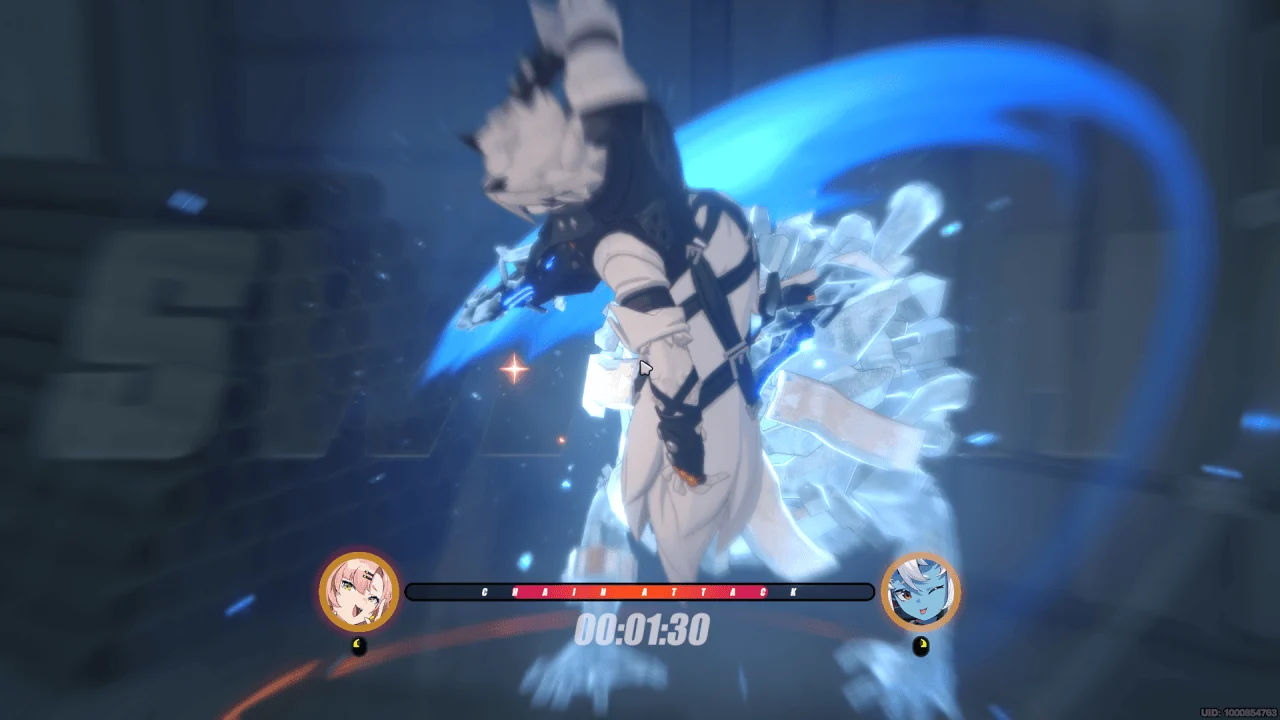
Do not assume that every Basic Attack hit is a Heavy Attack. The final hit of many Basic Attack strings can qualify, and Dodge Counters, Special Attacks, EX Special Attacks, Assist Follow-Ups, Chain Attacks, or Ultimates may also have a Heavy Attack effect. The exact qualifying move depends on the Agent’s kit. When in doubt, check the move description or test it on a Stunned target.
How many Chain Attacks can one stun trigger?
| Enemy type | Standard consecutive Agent Chain Attacks | What this means in practice |
|---|---|---|
| Normal enemy | 1 | The sequence ends quickly. Use the Agent whose Chain Attack gives the most immediate value. |
| Elite enemy | 2 | You can pass through two Agent Chain Attacks, subject to squad size and the available selections. |
| Boss enemy | 3 | The longer sequence creates room for planned ordering and advanced cancel-and-retrigger techniques. |
| Bangboo | Does not consume the standard Agent count | If an eligible Bangboo Chain Attack is available, selecting it adds its attack without using one of the normal Agent Chain opportunities. |
Auto Mode vs Manual Chain Attack Mode
Open Options → Other → Chain Attack Mode to switch between Auto Mode and Manual Mode. Manual Mode does not give you a separate “press this button to Chain Attack” command. Instead, it changes whether certain eligible attacks immediately open the Chain Attack prompt.
| Mode | What happens | Best for | Main drawback |
|---|---|---|---|
| Auto Mode | An eligible Heavy Attack that hits a Stunned enemy normally opens the Chain Attack prompt. | New players, casual combat, and teams that want to use most available Chain Attacks. | A prompt can interrupt a combo or appear before the player wants to begin the sequence. |
| Manual Mode | A tap can still trigger the prompt, while holding an eligible Basic or Special/EX input can suppress it. | Players who want to delay the prompt, preserve a combo, control buff timing, or set up an advanced stun rotation. | Hold-based Agent actions can make the input feel awkward, and an accidental hold may explain why the prompt never appears. |

Auto Mode is not an “AI chooses the best Agent” setting. You still select the next Agent when the prompt appears. The mode only affects how readily the prompt is opened by qualifying attacks.
How to Use Manual Chain Attack in ZZZ
Manual Mode is easiest to understand as a way to delay a Chain Attack, not as a new attack button. Use this basic test before trying a full rotation:
Some Heavy Attack effects come from Dodge Counters, Assist Follow-Ups, Chain Attacks, or Ultimates rather than a Basic or Special input. Manual Mode’s hold behavior does not give identical control over every possible move. If the prompt still opens, it may be the move type—not a broken setting.
How to Cancel a Chain Attack Sequence
Once the Chain Attack selection is open, the interface shows a cancel command alongside the available Agent choices. Use that command to end the current Chain Attack sequence. The exact button depends on your platform and control layout, so follow the on-screen prompt instead of memorizing a PC or controller button from another player’s setup.
Canceling is useful when the next Chain Attack would consume too much of the stun window, apply a buff at the wrong time, or prevent you from returning to the Agent you want on field. It is not automatically a damage gain. A canceled sequence also gives up an available Chain opportunity, so the choice only makes sense when your follow-up action is worth more.
Consider canceling when…
Your next planned action needs the current Agent on field; you are setting up a second DPS Chain on a boss; or a long, low-value animation would consume the useful part of the stun.
Do not cancel blindly when…
The next Chain Attack supplies an important buff, debuff, Anomaly buildup, energy interaction, or strong damage that your rotation expects.
How to Do a Double Chain Attack
A “Double Chain Attack” usually means using the same damage dealer’s Chain Attack twice during one boss stun. It is a player-developed rotation technique, not a separate menu option. The method works by ending the first sequence early and using another eligible Heavy Attack to open the remaining Chain opportunity.

Why Is My Chain Attack Not Triggering?
| What you see | Likely cause | What to test |
|---|---|---|
| The enemy looks close to stunned, but no prompt appears. | Daze has not reached 100%, or the Stunned state already ended. | Watch the Daze meter and its color instead of estimating from the animation. |
| The enemy is Stunned, but your hit does nothing. | The hit does not have a Heavy Attack effect. | Try a known qualifying final Basic hit, Special/EX attack, or Dodge Counter. |
| The same move works in Auto but not Manual. | You may be holding Basic or Special/EX through impact. | Tap cleanly once, then compare it with a deliberate hold using the same move. |
| The second Chain prompt never returns. | The sequence has no opportunity left, the target is not a boss, or the stun window expired. | Practice on a boss and re-trigger sooner with a confirmed Heavy Attack. |
| Bangboo never appears as a choice. | The selected Bangboo may lack a Chain Attack, its conditions may not be met, or it may be unavailable. | Check that Bangboo’s skill page and team conditions before the fight. |
| The prompt appears when you wanted to keep attacking. | The move is a Heavy Attack, or Manual suppression does not apply to that action. | Cancel the sequence or change which move reaches the Stunned target first. |
How to Choose Your Chain Attack Order
The best Chain order is not simply “Support first, DPS last” for every team. Start by asking what each Agent’s Chain Attack does: direct damage, buff or debuff application, Anomaly buildup, resource generation, or a shortcut into another part of the Agent’s kit. Then decide which Agent should be active when the Chain sequence ends.
For a straightforward Stun–Support–Attack team, a common goal is to apply the support effect before the main damage window and finish with the damage dealer ready to continue attacking. But some teams want the support to enter through Quick Assist instead, some Agents have long Chain animations, and some damage dealers gain resources from their own Chain Attack. Read the actual skill descriptions before copying a generic order.
Team placement also changes which Agents appear on the left and right of a Chain prompt. Keep a consistent squad order while practicing. That reduces selection mistakes and makes it easier to repeat the same rotation under a short timer.
When Manual Mode Is Actually Worth Using
Manual Mode is valuable when you already know the rotation you want and Auto Mode interrupts it. It can help preserve a hold combo, delay a support effect until the right moment, skip an inefficient Chain animation, or set up a boss double Chain. Those are specific benefits—not a universal upgrade.
If you are still learning which attacks carry a Heavy Attack effect, Auto Mode is usually easier. It gives clearer feedback whenever a valid trigger connects. Switch to Manual Mode after you can reproduce the same stun rotation consistently; otherwise, the setting can hide the prompt without teaching you why.
Special Agent Mechanics Are Not the Standard Rule
Some Agents can produce Chain-Attack-like results through their own kit. Evelyn, for example, can trigger an additional Chain Attack after meeting her personal resource conditions. That is an Agent mechanic, not proof that every character can manually launch a Chain Attack at any time.
This distinction matters when reading combo videos. A rotation featuring Evelyn, Astra Yao, or another Agent with unique Chain interactions may be correct for that team but impossible to copy with a standard squad. Separate the universal system—Daze, Stun, Heavy Attack, selection—from character-specific rules.
ZZZ Chain Attack FAQ
Why does Manual Chain Attack Mode feel like it does not work?
Manual Mode is often misunderstood as a new trigger button. It mainly lets you suppress prompts by holding an eligible Basic or Special/EX input. If you keep holding through impact, the missing prompt may be the intended Manual Mode behavior. Test the same move with one clean tap.
Where is the Manual Chain Attack setting?
Open Options, select Other, and find Chain Attack Mode. Choose Auto Mode for automatic prompts from eligible hits or Manual Mode for more control over whether certain Basic and Special/EX attacks open the prompt.
Can I cancel a Chain Attack after choosing an Agent?
You can cancel the remaining sequence when the next selection prompt appears. Follow the cancel command shown on your interface because the button differs across keyboard, controller, and mobile layouts.
Why can I do three Chain Attacks on some enemies but only one on others?
The standard sequence length depends on enemy class. Normal enemies allow one consecutive Agent Chain Attack, Elites allow two, and Bosses allow three. Squad size and special Agent mechanics can change what you actually see.
Does a Bangboo Chain Attack use one of my Agent Chain Attacks?
No. Official HoYoLAB mechanic guides state that a Bangboo Chain Attack does not consume the current round’s standard Agent Chain Attack count. The Bangboo still needs to have a Chain Attack and meet its own availability conditions.
Does a Double Chain Attack always increase damage?
No. It gives the same DPS another Chain Attack, but canceling also costs time and skips part of the normal sequence. The result depends on the team’s buffs, animations, resources, and remaining stun duration. Test the full rotation against the same target.
Sources
The standard trigger rules, enemy Chain counts, Bangboo count behavior, Manual Mode, and Chain cancel function come from official Zenless Zone Zero/HoYoLAB material. Manual hold behavior and the boss double-Chain sequence are labeled as execution techniques and cross-checked with current player demonstrations and third-party guides.
Should You Use Manual Chain Attacks?
Stay with Auto Mode if you want reliable prompts and are still learning which attacks qualify. Use Manual Mode when you can name the exact prompt you want to delay and the exact action you want to perform instead. For most players, that means learning one stable Auto rotation first, then testing Manual Mode on a boss until the cancel-and-retrigger timing feels repeatable.
Chain Attack execution comes from understanding Daze, Heavy Attack effects, team order, and timing. Practice one repeatable rotation first; add cancel-and-retrigger techniques only when they solve a specific problem in that rotation.