
How to Top Up MLBB Diamonds in Malaysia with ManaBuy

Malaysia players can top up MLBB Diamonds on ManaBuy by selecting the Malaysia product route, keeping MYR visible, choosing a Diamond package, and entering the User ID and Zone ID from the in-game profile. No MLBB password is required for a normal direct top-up.
Quick answer: Open the ManaBuy MLBB page, select Malaysia, confirm MYR, choose the package, enter User ID and Zone ID as numbers only, review the live payment method and final total, then complete one payment. The Zone ID determines the server, so there is no separate server-selection step.
Before you start
- Open the MLBB account that should receive the Diamonds.
- Prepare the User ID and Zone ID from the profile page.
- Know the Diamond amount needed for the intended purchase.
- Use a payment method shown by the live MYR checkout.
Step 1: Select Malaysia and MYR
Open the ManaBuy MLBB product page, select Malaysia from the region options, and confirm the prices are shown in RM/MYR. The currency parameter helps open the page in MYR, but the Malaysia package list should still be selected visibly before choosing a SKU.
Step 2: Choose the Diamond package
The Malaysia list starts with 28 Diamonds at RM2.12 and includes mid-range and large packages. Use the price pillar for the full table, or the package guide when deciding between a precise small top-up and a larger package with lower unit cost.
| Package | ManaBuy price | Displayed official price | Price gap |
|---|---|---|---|
 28 Diamonds 28 Diamonds | RM2.12 | RM3.70 | RM1.58 (42.7%) |
 70 Diamonds 70 Diamonds | RM5.28 | RM8.68 | RM3.40 (39.2%) |
 168 Diamonds 168 Diamonds | RM11.63 | RM20.72 | RM9.09 (43.9%) |
 429 Diamonds 429 Diamonds | RM31.68 | RM50.20 | RM18.52 (36.9%) |
 716 Diamonds 716 Diamonds | RM52.81 | RM83.41 | RM30.60 (36.7%) |
 1145 Diamonds 1145 Diamonds | RM84.53 | RM131.99 | RM47.46 (36.0%) |
 2976 Diamonds 2976 Diamonds | RM211.28 | RM308.43 | RM97.15 (31.5%) |
Step 3: Find User ID and Zone ID
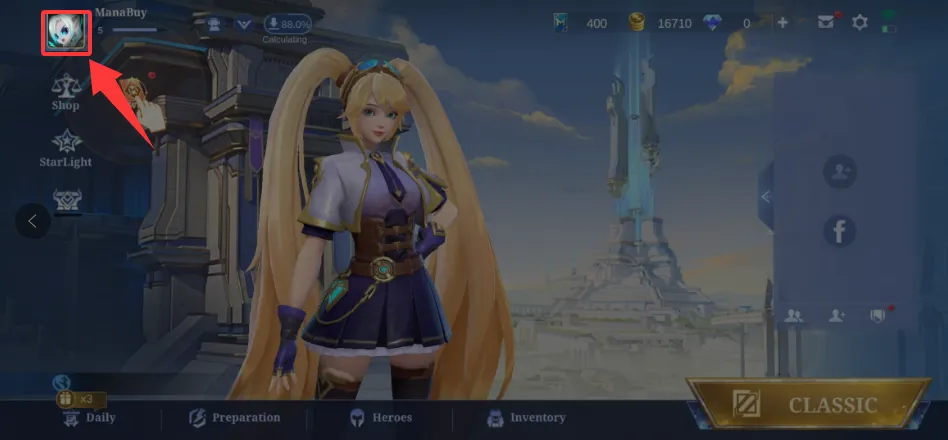
Open the profile. Tap the avatar in the upper-left area of the MLBB lobby.
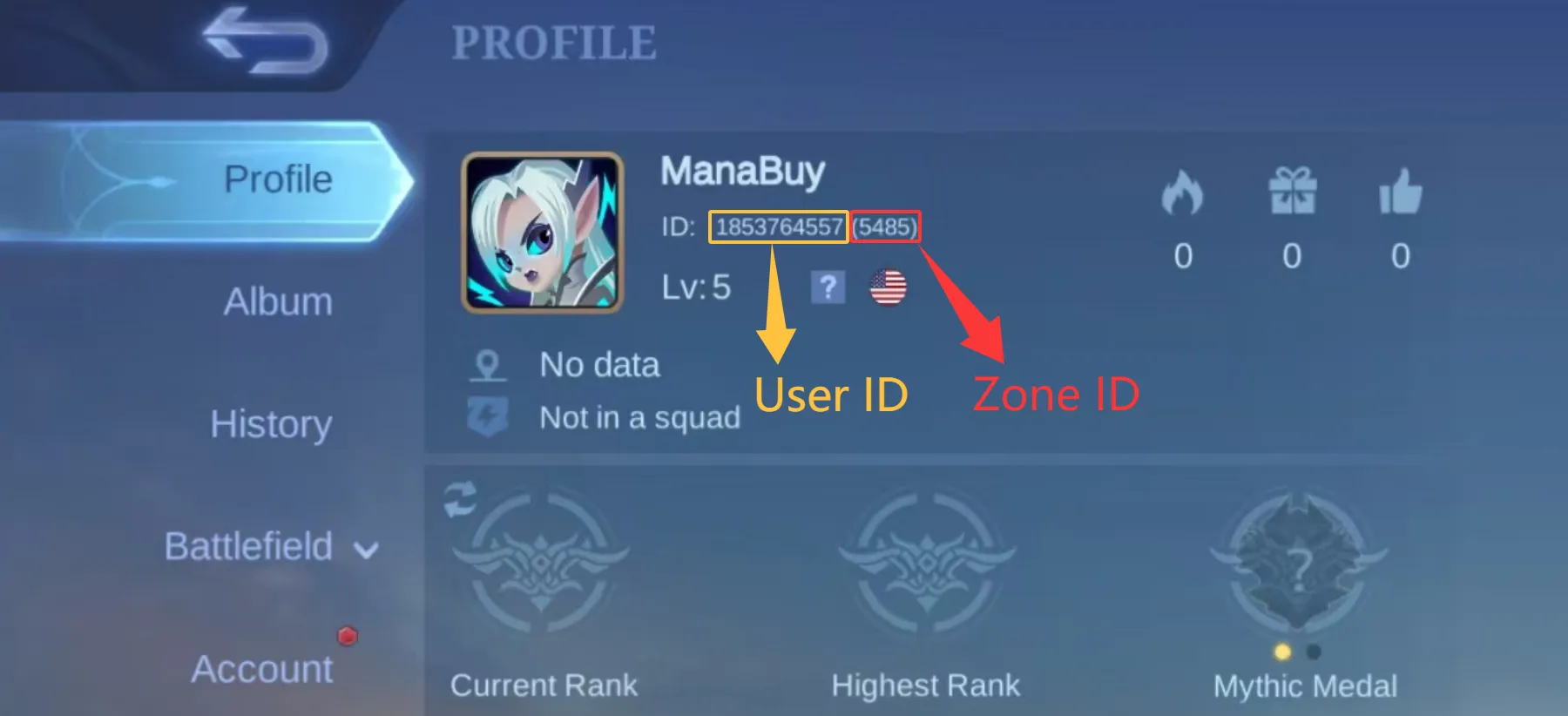
Read both numbers. User ID is outside the brackets; Zone ID is inside the brackets.
Enter numbers only and do not include the brackets. If the profile shows 1853764557 (5485), enter 1853764557 as User ID and 5485 as Zone ID. The dedicated account-ID guide explains this reusable step in more detail.
Step 4: Review the account fields
Check every digit before opening payment. ManaBuy uses these identifiers to deliver the top-up and does not need the MLBB password. A nickname, email address or phone number is not a replacement for User ID and Zone ID.
Step 5: Review payment and final total
Checkout shows the payment methods currently available for the MYR transaction. Compare the package amount, any displayed fee and the final total. Complete the provider verification once. If the page redirects to a bank or wallet, allow the return flow to finish before refreshing or opening another checkout.
Step 6: Save the order and check delivery
Save the ManaBuy order number after payment. The product page says orders are typically credited within minutes, but processing can vary. Check the order status and refresh the game before placing another order. If an order is complete and Diamonds are still absent, use the existing MLBB not-received guide rather than repeating payment.
How to confirm the right Malaysia package before paying
Do not rely only on the package image. Read the Diamond quantity and MYR price together, then compare the same row with the intended in-game purchase. ManaBuy's displayed official price helps show the visible price advantage, while the selling price is the starting amount used for the order. If the player needs only a small gap filled, a lower-priced package can be the more disciplined choice even when a larger SKU has a lower unit cost.
For a planned larger purchase, open the cost-per-100 guide and compare the first two packages that cover the target. This turns the top-up walkthrough into a buying decision instead of a mechanical payment sequence.
Common Malaysia top-up mistakes
| Mistake | What it changes | Better check |
|---|---|---|
| Leaving another region selected | Package list may not match the Malaysia route | Select Malaysia visibly and confirm MYR |
| Switching User ID and Zone ID | Account identification can fail | Long number outside brackets; shorter number inside |
| Choosing only by the lowest price | Package may not cover the intended Diamond gap | Calculate the shortage before selecting |
| Ignoring the final total | Wallet or card balance may be insufficient | Read any fee and final MYR total |
| Paying again during processing | Can create a duplicate order | Check order status first |
Three Malaysia top-up scenarios
Low-commitment first order
A player testing the route can start with 28 Diamonds at RM2.12. In the verified MYR checkout, the final total was RM2.17 with Touch 'n Go eWallet or Boost and RM2.20 with Credit Card, Google Pay or Apple Pay. The important check is not only the small amount: confirm Malaysia, the two account fields and the final total before authorizing.
Planned mid-range order
A player who needs roughly 400 Diamonds can compare 429 Diamonds at RM31.68 with smaller-package combinations. One 429-Diamond order keeps account entry, payment and delivery under one order number. A combination can look cheaper on product cards, but every checkout total must be added before deciding.
Need is close to 1,000 Diamonds
1084 Diamonds at RM80.26 is the first single package that covers a 1,000-Diamond gap. The 1145-Diamond package costs RM84.53, so the extra 61 Diamonds require RM4.27 more. That is a concrete choice based on required balance, not a generic instruction to buy bigger.
What to record at each top-up checkpoint
| Checkpoint | Confirm | Why it matters | Evidence to keep |
|---|---|---|---|
| Product page | Malaysia, MYR and Diamond package | Prevents a route or package mismatch | Package name and public selling price |
| Account entry | User ID outside brackets; Zone ID inside brackets | The Zone ID determines the server | A private copy of the in-game profile |
| Checkout | Method, fee and final MYR total | The balance must cover the final total | Non-sensitive checkout details |
| After payment | Provider result and ManaBuy order status | Separates payment problems from delivery processing | Order number and transaction reference |
| After delivery | Correct account and updated Diamond balance | Confirms the order reached the intended MLBB account | Order status; use the not-received guide if needed |
How to react to the order status
No charge and no ManaBuy order: correct the package, account or payment issue, then make one controlled retry. An order is processing: do not place a replacement order; allow the current status to resolve. The provider shows a charge but no ManaBuy order appears: keep the non-sensitive provider reference and contact support.
The ManaBuy order is complete but Diamonds are not visible: refresh MLBB, confirm the receiving User ID and Zone ID, then use the existing not-received guide. This is a delivery check, not a reason to pay again. Keeping payment and delivery troubleshooting separate is the safest way to avoid duplicate orders.
One-order versus multi-order top-up
A multi-order combination can occasionally have a lower sum of product-card prices, but it repeats the risky parts of the process: account entry, payment authorization, fee review and delivery confirmation. One package is normally the cleaner route when it covers the target and the price difference is small.
If a combination is materially cheaper, calculate every component before starting and retain each order number. Do not use the 28-Diamond fee as a formula for the other packages. Open the real checkout for each intended order and compare the complete MYR totals.
FAQ
Do Malaysia players choose an MLBB server?
No separate server selector is needed on this route. The Zone ID identifies the server linked to the account.
Do I need my MLBB password?
No. A normal direct top-up uses User ID and Zone ID. Do not submit the game password.
Can I buy Weekly Diamond Pass instead?
Yes when the pass suits the intended use and the account meets its rules. It is different from receiving the full amount as an instant Diamond package.
What if the payment fails?
Check the first attempt, final total, provider verification and order status before retrying. The Malaysia payment-failed guide provides the decision sequence.
Complete the User ID and Zone ID top-up carefully
- ManaBuy MLBB Diamond Prices in Malaysia: MYR Package Guide — Continue with the Malaysia-specific buying path.
- MLBB Payment Methods and Fees in Malaysia on ManaBuy — Continue with the Malaysia-specific buying path.
- MLBB Payment Failed on ManaBuy in Malaysia: What to Check — Continue with the Malaysia-specific buying path.
- How to find MLBB User ID and Zone ID — Use the reusable account-ID guide when the profile numbers are unclear.
Ready to top up? Select Malaysia on the product page, keep MYR visible, and review the package and final checkout total before paying.



Copyright © FUTURE OUTLOOK TECHNOLOGY LIMITED.Company Registration No.: 77374965 All rights reserved.UNIT 135,1/F.,143 WAI YIP STREET,KWUN TONG HK