
Marvel Rivals Payment Methods and Fees in Malaysia on ManaBuy

ManaBuy gives Malaysia Marvel Rivals players five payment choices in the verified 100 Lattice MYR checkout: Touch 'n Go eWallet, Boost, Credit Card, Google Pay and Apple Pay. The two eWallet options produced the lowest final total for this package, while the card and device-wallet routes offered alternatives for players who prefer their existing card setup.
Quick answer: For 100 Lattice priced at RM3.99, Touch 'n Go eWallet and Boost showed a 2.20% fee of RM0.09 and a RM4.08 final total. Credit Card, Google Pay and Apple Pay showed a 3.60% fee of RM0.15 and a RM4.14 final total. Compare the final MYR total shown for the package you actually select before authorizing payment.
Marvel Rivals payment methods and fees in Malaysia
Every row below starts from the same 100 Lattice product amount of RM3.99. Keeping the package, country and currency identical makes the method totals directly comparable.
| Payment method | Fee rate | Fee | Final total |
|---|---|---|---|
| Touch 'n Go eWallet | 2.20% | RM0.09 | RM4.08 |
| Boost | 2.20% | RM0.09 | RM4.08 |
| Credit Card | 3.60% | RM0.15 | RM4.14 |
| Google Pay | 3.60% | RM0.15 | RM4.14 |
| Apple Pay | 3.60% | RM0.15 | RM4.14 |
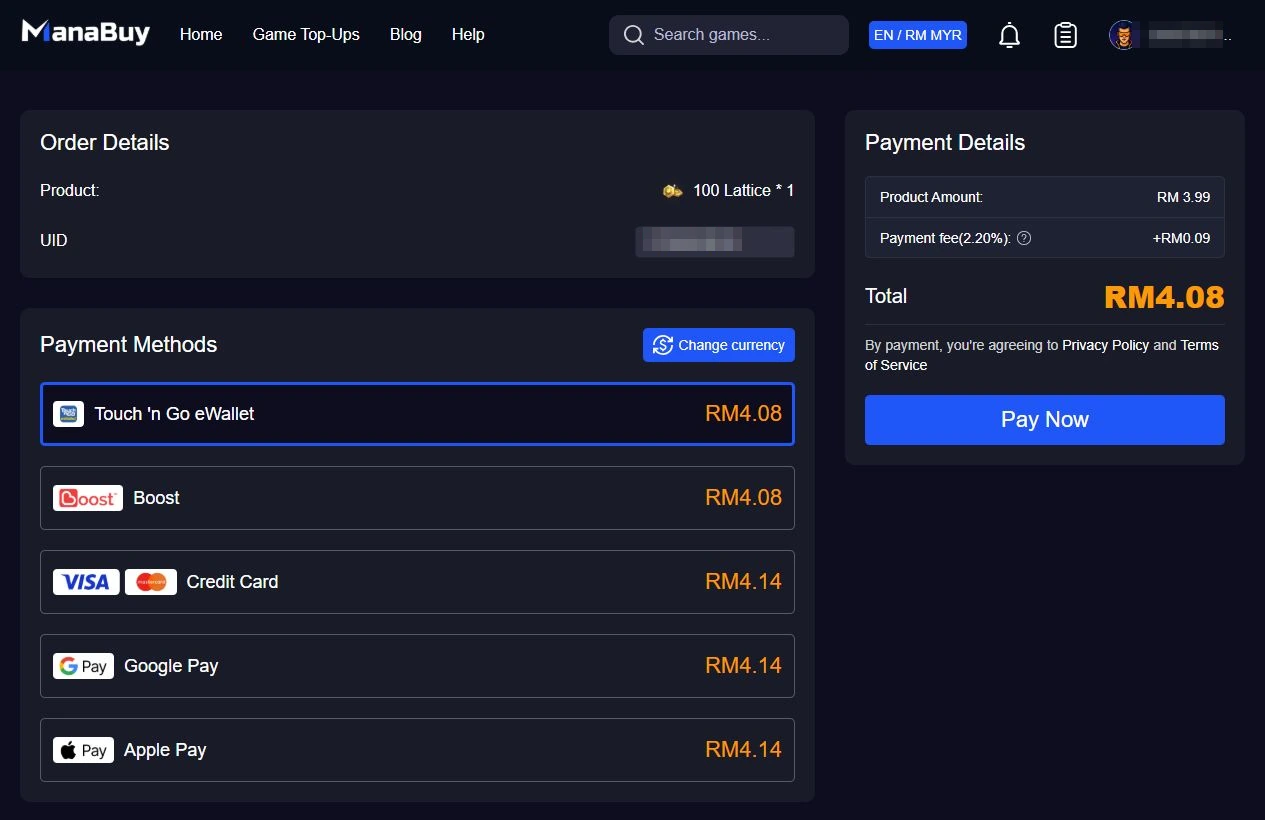
The UID and signed-in account label are covered with pixel mosaic while the full order context remains visible. The package, five methods, fee, final total and payment panel are not cropped away. No payment was submitted.
Which method gives the lowest final total?
Touch 'n Go eWallet and Boost both show a final total of RM4.08 for the sample. Credit Card, Google Pay and Apple Pay each show RM4.14. The difference between the two groups is RM0.06 on this 100 Lattice checkout.
A Malaysia player with a funded Touch 'n Go or Boost wallet can review those two options first because they have the lower displayed fee and total. A player who does not use either eWallet can still complete the same ManaBuy top-up through the displayed card or device-wallet routes, subject to provider approval.
How Malaysia players should compare the live methods
- Keep the product page on the Malaysia route with MYR visible.
- Select one Lattice package so every payment option starts from the same product amount.
- Enter and recheck the Marvel Rivals UID.
- Open checkout and list only the methods actually displayed.
- Record each fee and final total without authorizing a payment.
- Choose the lowest usable final total, not automatically the lowest fee label.
A usable method must be available to the player and capable of completing its own provider verification. A small price difference is valuable only when the selected wallet, card or provider can actually approve the transaction. If two methods have the same final total, convenience and existing account setup can decide between them.
Product price, fee and final total are different fields
The product price is the normal ManaBuy selling price shown on the Lattice card. A payment fee is an additional amount associated with the chosen method. The final total is the complete MYR amount presented for authorization. Reading these three fields separately prevents a player from mistaking the RM3.99 product price for the amount that will be charged.
For example, the 100 Lattice package has a public ManaBuy price of RM3.99. That figure can be used in the package comparison. It cannot be described as the final paid total until a payment method is selected and checkout confirms the complete amount. The same evidence rule applies to the 11680 Lattice package at RM396.24.
How to calculate an all-in package comparison
For Touch 'n Go or Boost, RM4.08 divided by 100 Lattice gives an all-in cost of RM4.08 per 100. For the card, Google Pay or Apple Pay group, RM4.14 divided by 100 gives RM4.14 per 100. The product-only unit cost remains RM3.99 per 100.
Do not multiply these observed fees across all six packages. Checkout rounding can change the MYR fee amount. Select the intended package and use the final total shown for that exact transaction.
What to check before authorization
- The page still shows Malaysia and MYR.
- The selected package name and product amount match the intended Lattice quantity.
- The UID is copied from the correct Marvel Rivals profile.
- The payment method is available and the provider balance covers the final total.
- No previous attempt is pending or already charged.
- The final total is understood before pressing the provider's confirmation button.
If one method fails
First determine whether the provider declined, remained pending or completed an authorization. If there is no charge and no ManaBuy order, correct the problem before one controlled retry. If the provider shows a pending or completed amount, stop changing methods and check ManaBuy order status to avoid a duplicate purchase.
Do not treat a payment failure as evidence that the UID is wrong or delivery failed. Payment, order creation and game delivery are separate stages. The dedicated failure guide maps those stages and explains which evidence to keep for support.
Evidence and privacy rules
A checkout screenshot should preserve the package, payment methods, fees and final totals while applying pixel mosaic directly over the UID and account label. Do not remove the entire account row, because the surrounding label and order context help readers understand the flow. Never expose a password, one-time code, full card number or wallet credential.
How to recheck the payment comparison
Select the same 100 Lattice package, keep MYR visible and compare the five method totals before paying. The product amount should remain separate from the fee and final total. If a method is missing or its total changes, use the value shown in the current checkout instead of relying on an older screenshot.
The practical advantage is transparency: ManaBuy lets the buyer compare the complete amount before authorization. This makes it possible to choose between a lower-total local eWallet and an already configured card or device wallet without submitting several payment attempts.
If the preferred method is unavailable, return to the displayed list and choose one alternative only after confirming that the first attempt created no pending authorization or ManaBuy order.
Why the payment route should follow the Lattice plan
The 100 Lattice checkout makes the two decisions easy to separate. The package determines how much Lattice reaches the Marvel Rivals account. The payment method changes the checkout fee and final MYR total. In this checkout example, the difference between the lowest and highest method totals is RM0.06; changing the package has a much larger effect on both the cash commitment and the amount of Lattice received.
Choose the Lattice package from the intended Battle Pass, store or conversion budget first. Then compare Touch 'n Go eWallet, Boost, Credit Card, Google Pay and Apple Pay for that same package. This keeps ManaBuy's advantage practical: the player can see the public package price, enter one Marvel Rivals UID and compare the complete payable amount before authorization.
FAQ
Which payment methods appeared for Marvel Rivals in Malaysia?
Touch 'n Go eWallet, Boost, Credit Card, Google Pay and Apple Pay appeared in the MYR checkout.
Are payment fees included in the package prices?
No. Product-card prices and method-specific checkout fees are separate fields.
Can I see the total before paying?
Yes. The product page states that the final amount can be confirmed before payment.
Which option was cheapest in the 100 Lattice comparison?
Touch 'n Go eWallet and Boost were both RM4.08, compared with RM4.14 for Credit Card, Google Pay and Apple Pay.
Will ManaBuy ask for my game password?
The normal top-up flow requires the Marvel Rivals UID, not the game password.
Choose a Malaysia payment route for Lattice
- How to Top Up Marvel Rivals Lattice in Malaysia with ManaBuy
- Marvel Rivals Payment Failed on ManaBuy in Malaysia: What to Check
- ManaBuy Marvel Rivals Lattice Prices in Malaysia: MYR Package Guide
- Marvel Rivals store guide: plan a Lattice budget before buying
Compare the final MYR totals before authorizing one payment method.



Copyright © FUTURE OUTLOOK TECHNOLOGY LIMITED.Company Registration No.: 77374965 All rights reserved.UNIT 135,1/F.,143 WAI YIP STREET,KWUN TONG HK