
How to Top Up Marvel Rivals Lattice in Malaysia with ManaBuy

Malaysia players can top up Marvel Rivals Lattice on ManaBuy with one account field: the Marvel Rivals UID. Keep MYR selected, choose the package that matches the intended in-game purchase, verify the UID and compare the final checkout total before payment. No separate server selection or game password is required on the normal product route.
Quick answer: Open the ManaBuy Marvel Rivals page in MYR, select one of six Lattice packages from RM3.99 to RM396.24, copy the UID from the in-game profile, and review the payment method and final total before authorizing. Delivery is usually within minutes, but check the ManaBuy order status instead of treating that timing as a guarantee.
Step 1: confirm the Malaysia route and MYR
Use the Malaysia product URL and verify that the header and package cards show RM. This prevents a buyer from comparing one currency and checking out in another. The first product card should show 100 Lattice at RM3.99, while 2180 Lattice is RM79.26.
Step 2: choose the Lattice package
| Package | ManaBuy price | Displayed official price | Price gap | Cost per 100 | Lattice per RM |
|---|---|---|---|---|---|
 100 Lattice 100 Lattice | RM3.99 | RM4.12 | RM0.13 (3.2%) | RM3.99 | 25.06 |
 500 Lattice 500 Lattice | RM19.81 | RM20.72 | RM0.91 (4.4%) | RM3.96 | 25.24 |
 1000 Lattice 1000 Lattice | RM39.61 | RM41.48 | RM1.87 (4.5%) | RM3.96 | 25.25 |
 2180 Lattice 2180 Lattice | RM79.26 | RM83.00 | RM3.74 (4.5%) | RM3.64 | 27.50 |
 5680 Lattice 5680 Lattice | RM198.08 | RM207.54 | RM9.46 (4.6%) | RM3.49 | 28.68 |
 11680 Lattice 11680 Lattice | RM396.24 | RM415.13 | RM18.89 (4.6%) | RM3.39 | 29.48 |
Start from the remaining Lattice need, not the size of the discount label. The 100, 500 and 1000 packages give tighter budget control. The 2180 package is the first major unit-cost improvement. The 5680 and 11680 packages offer the lowest calculated cost per 100 but require a deliberate larger MYR budget.
Step 3: find the Marvel Rivals UID
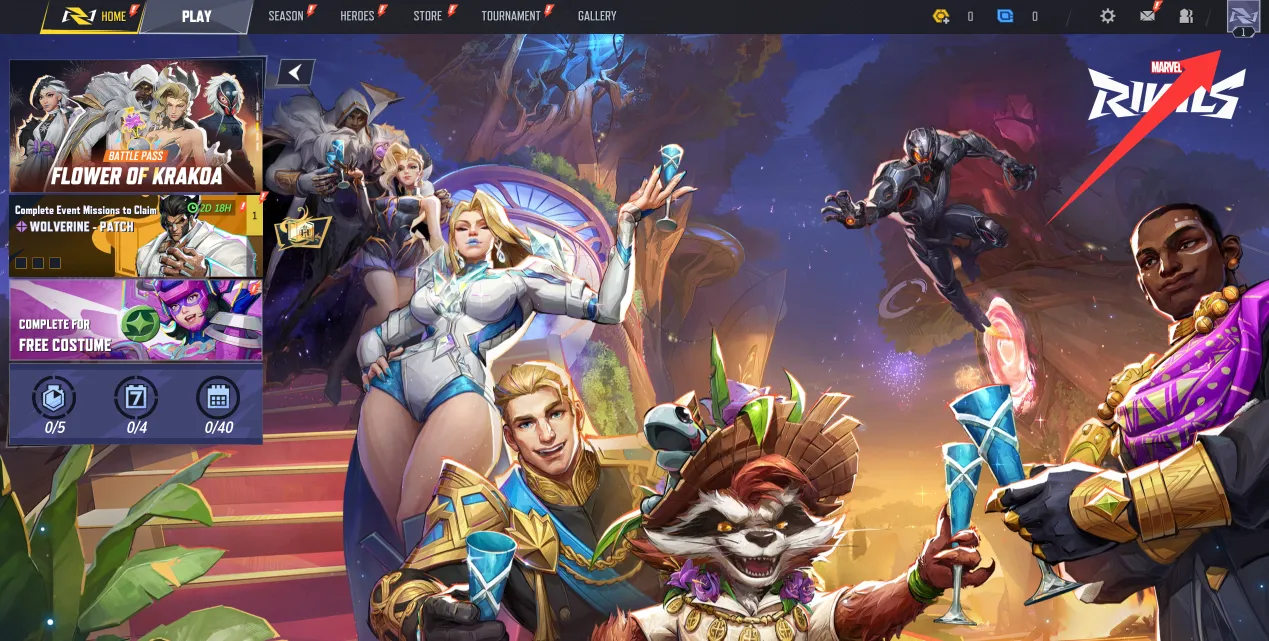
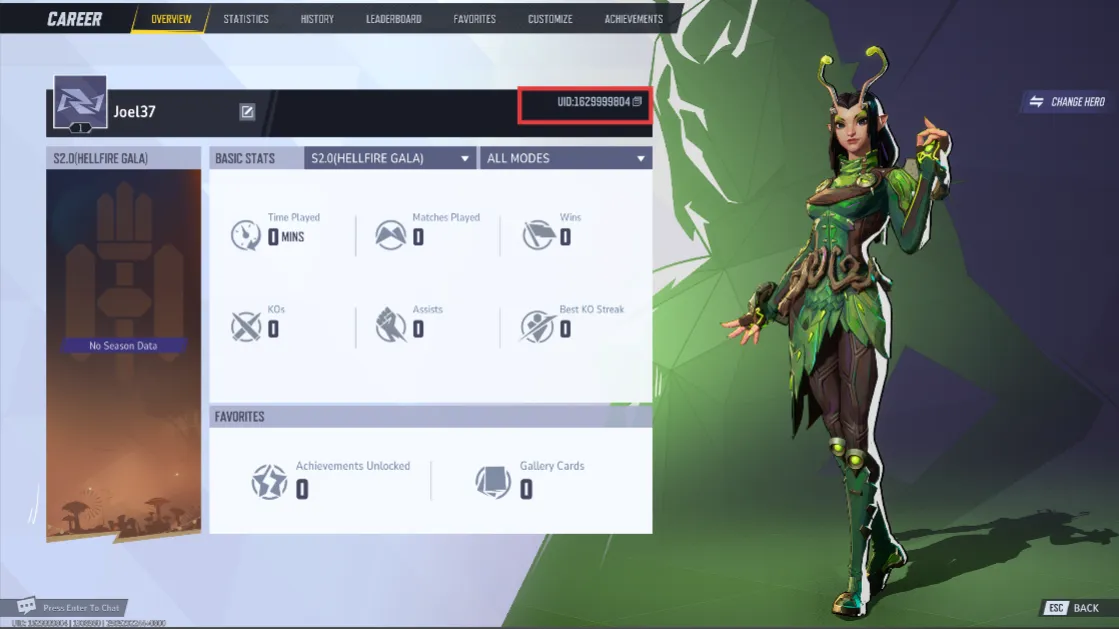
Launch Marvel Rivals and open the profile from the avatar area on the main screen. The first image shows the profile entry point. The UID is displayed on the overview page shown in the second image. Copy the number rather than typing it from memory.
These are universal account-finding steps; they do not need a Malaysia-specific version. The top-up decision remains Malaysia-specific because the package prices, currency and checkout evidence use MYR.
Step 4: enter and verify the UID
Paste the UID into the ManaBuy top-up field and compare it with the in-game profile one more time. The product route does not show a separate server selector. The UID is therefore the primary account-routing field, and every digit matters. Do not use an MLBB User ID, PUBG MOBILE UID or another game's account number.
ManaBuy does not need the Marvel Rivals password for this direct top-up. If a page or message requests the game password, stop and confirm that the browser is on the correct ManaBuy product URL.
Step 5: review payment and final total
After a valid UID allows checkout to open, compare the payment methods displayed for the Malaysia account. Review the product amount, any fee and the final MYR total as separate fields. Do not import payment-method assumptions from another ManaBuy game page because availability and fees can differ.
For the verified 100 Lattice sample, Touch 'n Go eWallet and Boost show RM4.08 final totals; Credit Card, Google Pay and Apple Pay show RM4.14. Use the payment guide for the fee breakdown, then confirm the live final total for the package you actually choose.
Step 6: check order and delivery status
After authorization, look for the ManaBuy order record. If the order is processing, allow that order to resolve instead of submitting a replacement. The product page says Lattice is usually delivered within minutes, but actual processing can depend on payment and order state.
When the order shows complete, refresh Marvel Rivals and verify the receiving profile and Lattice balance. If payment completed but no ManaBuy order exists, keep the non-sensitive provider reference and contact support. If the order is complete but balance is missing, treat it as a delivery issue rather than paying again.
Worked package choices for Malaysia players
| Remaining need | ManaBuy package to start with | MYR price | Reason |
|---|---|---|---|
| Up to 100 | 100 Lattice | RM3.99 | Smallest listed commitment |
| 101 to 500 | 500 Lattice | RM19.81 | Covers a moderate gap without jumping to four figures |
| 501 to 1000 | 1000 Lattice | RM39.61 | Direct fit for a four-figure target |
| 1001 to 2180 | 2180 Lattice | RM79.26 | First major improvement in unit cost |
| 2181 to 5680 | 5680 Lattice | RM198.08 | Large planned balance with stronger efficiency |
| 5681 to 11680 | 11680 Lattice | RM396.24 | Highest listed amount and lowest unit cost |
The table is a starting point based on a remaining need. It does not tell a player to buy more simply because the next package has a lower unit rate. Check the actual Marvel Rivals store cost and current balance first.
Pre-payment checklist
- Malaysia route and MYR are visible.
- The package covers the confirmed Lattice need.
- The UID matches the current in-game profile.
- No separate server field is expected.
- The payment method and final total are understood.
- No earlier order or authorization is pending.
Why the one-field flow is convenient but deserves care
Some top-up products require both an account ID and a server or zone. Marvel Rivals uses one UID on this ManaBuy route, so the process is shorter and easier for Malaysia players. The tradeoff is that a mistyped digit carries more weight. Copy and paste the UID, compare the beginning and ending digits with the profile, and avoid storing the full number in a public image.
The clean path is package, UID, checkout, order and balance. Each stage has one decision: select the MYR package, verify the UID, compare the final total, check the order and confirm the game balance. The sensitive UID and payment approval stay under the player's control.
When to stop the flow
Stop before payment if MYR changes, the package does not match, the UID is rejected or the final total is unclear. Stop after payment if a provider authorization is pending or a ManaBuy order already exists. Continuing past either stop condition can turn a correctable mismatch into a duplicate or misdirected order.
Check the correct Marvel Rivals balance after delivery
Marvel Rivals uses several currency names, but a ManaBuy Lattice top-up should be checked against the gold Lattice balance. The official Marvel Rivals monetization explanation identifies Units as the separate blue currency that can be exchanged from Lattice at a 1:1 ratio, while Chrono Tokens are tied to Battle Pass progress. Looking only at Units or Chrono Tokens can make a successful Lattice delivery appear missing.
After ManaBuy marks the order complete, refresh the receiving profile and check Lattice before converting or spending it. If that balance has not changed, verify the same UID and order number, then use the delivery path in the payment-failed guide instead of creating another order.
FAQ
What information does ManaBuy need?
The Marvel Rivals UID. The normal direct top-up does not require the game password.
Do I select a server?
No separate server selection appears on the product route. The UID identifies the receiving account.
How long does delivery take?
The product page says usually within minutes. Check the order status because this is not an unconditional guarantee.
Can I use the same payment-method data as MLBB?
No. Marvel Rivals methods and fees must be verified in its own MYR checkout.
Why top up through ManaBuy?
The six MYR packages are listed below their displayed official prices, and the buyer can review the final total before payment.
Complete the Marvel Rivals UID top-up carefully
- ManaBuy Marvel Rivals Lattice Prices in Malaysia: MYR Package Guide
- Marvel Rivals Payment Methods and Fees in Malaysia on ManaBuy
- Marvel Rivals Payment Failed on ManaBuy in Malaysia: What to Check
- Marvel Rivals store guide: plan a Lattice budget before buying
Continue only after the package, UID and final MYR total all match.



Copyright © FUTURE OUTLOOK TECHNOLOGY LIMITED.Company Registration No.: 77374965 All rights reserved.UNIT 135,1/F.,143 WAI YIP STREET,KWUN TONG HK