
Identity V Echoes Top-Up Guide: Server, ID, Packages and Delivery

An Identity V Echoes top-up needs two account checks before package choice: the server selected on ManaBuy must match the server where your character exists, and the numeric in-game ID must come from that same profile. Once those fields match, choose an Echoes amount for a confirmed costume, character, accessory, bundle, or other store purchase and keep the order number until delivery is verified.
Identity V top-up starts with the server
Identity V can show different account data when a player changes server or login method. A correct ID paired with the wrong server can be just as risky as a wrong ID. Before opening a payment page, verify the character, collection, and ID on the server that should receive the Echoes.
| Field | Source of truth | Check before payment |
|---|---|---|
| Server | The server currently selected when you enter the game | The intended character and progress are visible there. |
| In-game ID | Personal profile on that server | The full numeric ID matches the ManaBuy form. |
| Echoes target | Current in-game offer or store item | The target price is confirmed and still available. |
| Final total | ManaBuy checkout | The payment method, fee if any, and payable amount are understood. |

Treat server and ID as one receiving address
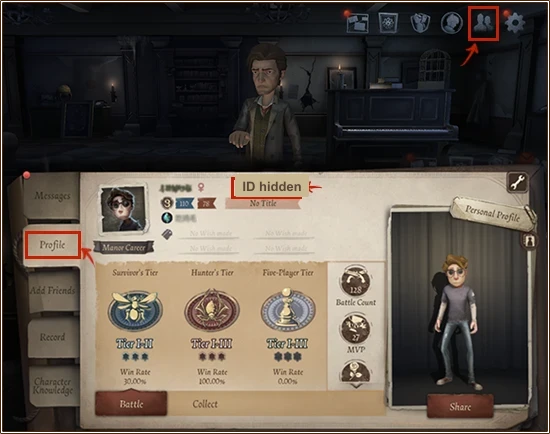
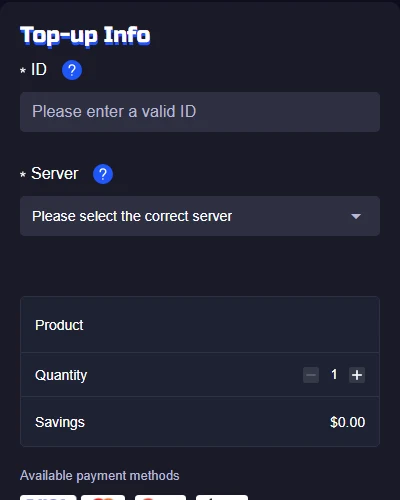
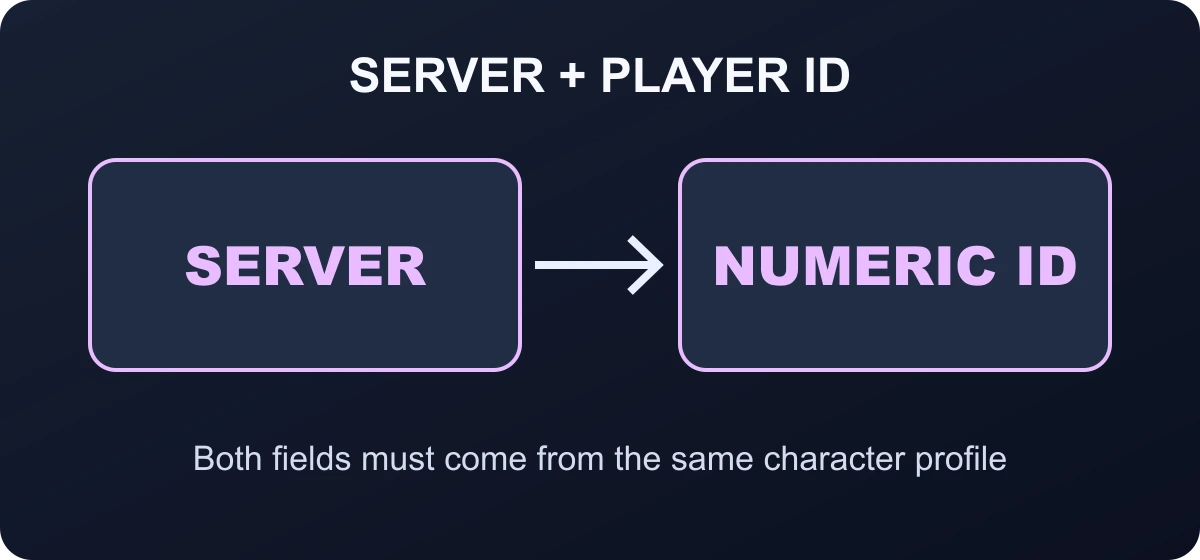
Identity V asks for both the server and the numeric game ID because the ID alone is not a complete delivery address. Choose the server first, then read the ID from the character profile that exists on that server. If you play on more than one region, do not assume the same nickname means the same character record.
How to find the Identity V ID
- Sign in to the server containing the character that should receive the Echoes.
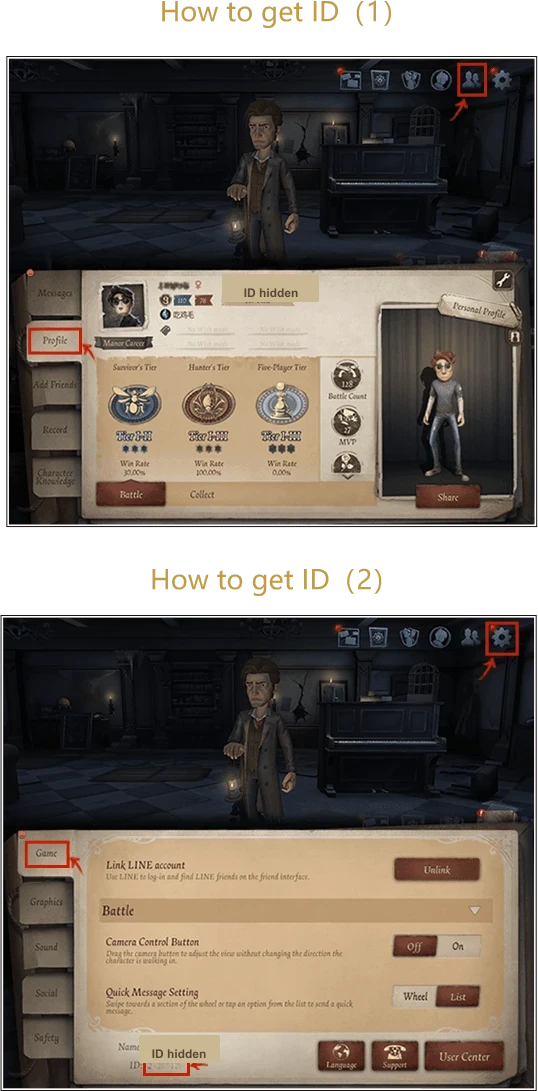
- Open the personal profile from the in-game account interface.
- Copy the numeric ID displayed on the profile. Do not substitute the player name.
- Keep the server visible or note it before leaving the game.
- Paste the ID into ManaBuy and compare several digits from the beginning and end.
Top up your own account or gift a friend without sharing a login
The direct Echoes route can also be used for a friend when the friend supplies the correct server and numeric game ID. Ask for a current screenshot of the profile and keep the exchange private. The payer does not need the recipient's password, email login, social-account code or device access.
Gifting creates one extra risk: the payer cannot visually confirm the destination after delivery. The recipient should verify the server and ID before payment and report the Echo balance after the order completes. Avoid chargebacks on a successfully delivered gift. Community reports describe negative Echo balances when a recharge is later reversed after the currency was spent, so payment disputes should be reserved for a genuine unresolved delivery or payment problem.
How to top up Identity V Echoes on ManaBuy
- Open the Identity V Echoes top-up page.
- Select an Echoes pack after checking the current in-game cost of the intended purchase.
- Choose the server that contains the receiving character.
- Enter the numeric ID copied from that server's profile.
- Review the product, package, quantity, server, ID, payment method, and final total.
- Complete one payment and check the same server when the order finishes.
Echoes, Inspirations, Fragments and Clues are not interchangeable
Echoes are the paid currency used for eligible Shop purchases and recharge activity. Inspirations, Fragments and Clues have their own acquisition routes and item eligibility. An item may show more than one accepted currency, but that does not mean a purchased Echo balance converts freely into every other balance.
Open the exact costume, accessory, furniture or package you want and note the Echo price shown on that item. Official Identity V updates regularly list Shop items with explicit Echo prices and sometimes an alternative currency. Plan against the current in-game listing, not an old event screenshot or a community total from another server.
How many Echoes should you buy?
Echoes can be used for eligible characters, costumes, accessories, bundles, and other offers depending on the current store. The safest plan begins with the in-game price and ends with a spending cap. It does not begin with the largest pack.
| Goal | Package logic | Stop line |
|---|---|---|
| One fixed-price item | Price minus current Echoes balance | Choose the smallest live pack covering the gap. |
| Bundle with several items | Compare the bundle total with buying only the parts you want | Skip the bundle when unwanted items create most of the price. |
| Essence or chance-based reward | Use only a pre-set entertainment budget | Stop at the budget even if the target has not appeared. |
| Future costume | Wait for the final in-game price and availability | Do not build a purchase around leaks or an old rerun cost. |
First-recharge bonuses or temporary in-game offers can be account-specific. Check the recharge screen on the receiving account before assuming that a bonus will apply. A ManaBuy package adds the purchased currency; it does not automatically buy the costume or complete an Essence pull.

Delivery checks if Echoes do not appear
Separate an account mismatch from a payment or order issue. Start with the order instead of making another purchase.
- Check whether a ManaBuy order was created and whether payment succeeded.
- Read the order status: Processing, Completed, Failed, or another state.
- Compare the submitted server and ID with the character profile currently open.
- Restart the game once and check the Echoes balance on the correct server.
- If a completed order is still missing, contact support with the order number, package, server, submitted ID, and a privacy-safe balance screenshot.
Identity V account and payment mistakes
- Selecting a server by country name instead of the server where the character exists.
- Using a player nickname instead of the numeric profile ID.
- Opening another login method and assuming it points to the same profile.
- Buying before checking whether the costume, bundle, or Essence is still available.
- Assuming an account-specific first-recharge bonus applies to every package.
- Sharing the game password, email password, one-time code, or payment security details.
Related Identity V guides
Identity V Echoes top-up FAQ
Do I need both a server and an ID?
Yes. The current ManaBuy flow asks for the server matching the account and the numeric in-game ID shown on that profile.
Can I use my nickname?
No. Use the numeric ID from the personal profile. A display name is not the delivery field.
Do Echoes expire?
The product guidance states that credited Echoes do not expire, but individual store offers and events can have their own end dates.
Does the top-up buy a costume automatically?
No. The order adds Echoes. You still make the item, bundle, or Essence purchase inside Identity V.
What if I chose the wrong server?
Contact support immediately with the order number. A completed delivery to the submitted account-server pair may not be reversible.
What if payment succeeded but Echoes are missing?
Check the order status, server, ID, and current profile first. Do not pay again while the original order is unresolved.
Final recommendation
Open the receiving server first, copy the ID from that profile, and decide what the Echoes are for before choosing a package. The server-ID pair controls delivery; the in-game target and spending cap control whether the purchase makes sense.




Copyright © FUTURE OUTLOOK TECHNOLOGY LIMITED.Company Registration No.: 77374965 All rights reserved.UNIT 135,1/F.,143 WAI YIP STREET,KWUN TONG HK