
How to Top Up Genshin Impact with UID: Server, Payment, and Delivery Checks

Using your Genshin Impact UID for a top-up is simple, but the small details matter. The safest flow is to copy the UID from your in-game profile, choose the matching server on the top-up page, select the exact product you want, and review the submitted UID, server, product, payment method, and contact path before paying. This guide focuses on the practical checkout checks: how to find your UID, how to think about server selection, when to choose Genesis Crystals, Welkin Moon, or Chronal Nexus, and what to do if the order needs support.
Quick answer: To top up Genshin Impact with UID, first copy your UID from the game, then choose the same server on the top-up page before selecting Genesis Crystals, Welkin Moon, or Chronal Nexus. Review the product, UID, server, quantity, payment method, and final amount before paying. If anything looks different from your in-game account, stop and correct it before checkout.
What You Need Before a Genshin Impact Top-Up
Before opening any checkout page, collect three things: the UID from the account that should receive the top-up, the server tied to that account, and the exact product you want. For Genshin Impact, that product choice can be more than a simple crystal amount. Some players want Genesis Crystals for direct paid currency, some want Blessing of the Welkin Moon, and some are checking Chronal Nexus packages on the product page.
The main mistake is treating UID, server, and product as separate guesses. They should be one confirmation chain. The UID tells the top-up system which account to deliver to. The server helps match the region/account lane. The product selection controls what should arrive. If one of those is wrong, the payment can be correct while the delivery target is not.
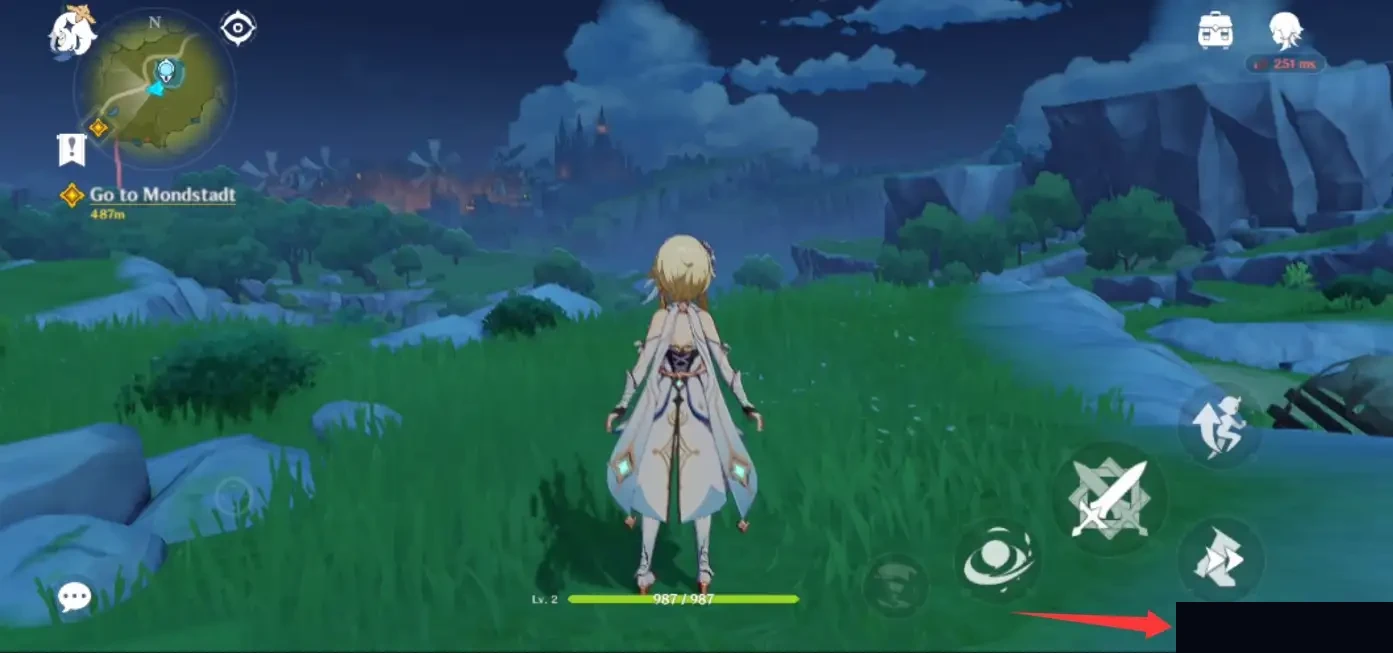
From Genshin Impact.
How to Find and Copy Your Genshin Impact UID
Your UID appears in the Genshin Impact interface, including the lower area of the game screen and your profile/account display. Use the in-game UID as the source of truth. Do not rely on an old chat message, an image sent by a friend, or a copied number from a different HoYoverse game.
Log into the account that should receive the top-up. If you play on more than one account, switch first and verify the character/profile before copying anything.
Copy the full UID as shown. Do not add spaces, hyphens, screenshots of the number, or extra text. A clean number is easier to check at checkout.
Keep the UID and server together in your notes while checking out. If the server changes but the UID stays the same in your clipboard, pause and recheck the account.
How to Choose the Right Server
Server selection is not a cosmetic setting. Choose the server where your Genshin Impact account actually exists. If you usually log in through America, Europe, Asia, or another server option, match that choice on the top-up page. A player can remember the character name but still choose the wrong server if they have moved devices, changed login methods, or played on a friend's account before.
If you are not fully sure, open the game first and check the account/server directly before paying. The product page should be treated as a confirmation screen, not a place to guess.
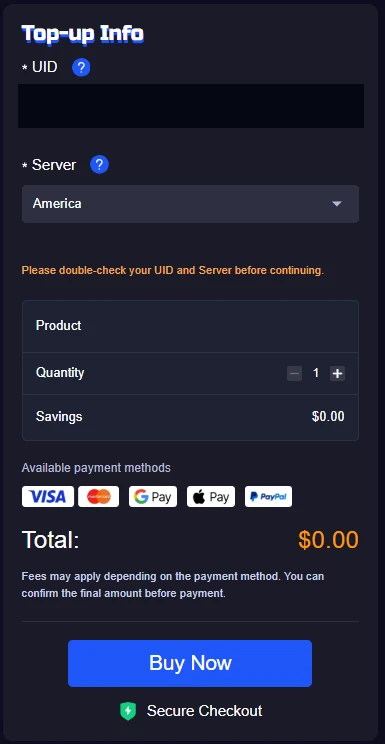
ManaBuy Genshin Impact Top-Up page showing the UID and server fields used before checkout.
Choose Genesis Crystals, Welkin Moon, or Chronal Nexus Carefully
After the UID and server are ready, choose the product type. Do not pick a package only because the image looks familiar. Read the product name and confirm whether it is the paid currency, a membership-style product, or the Chronal Nexus category you intended to buy.



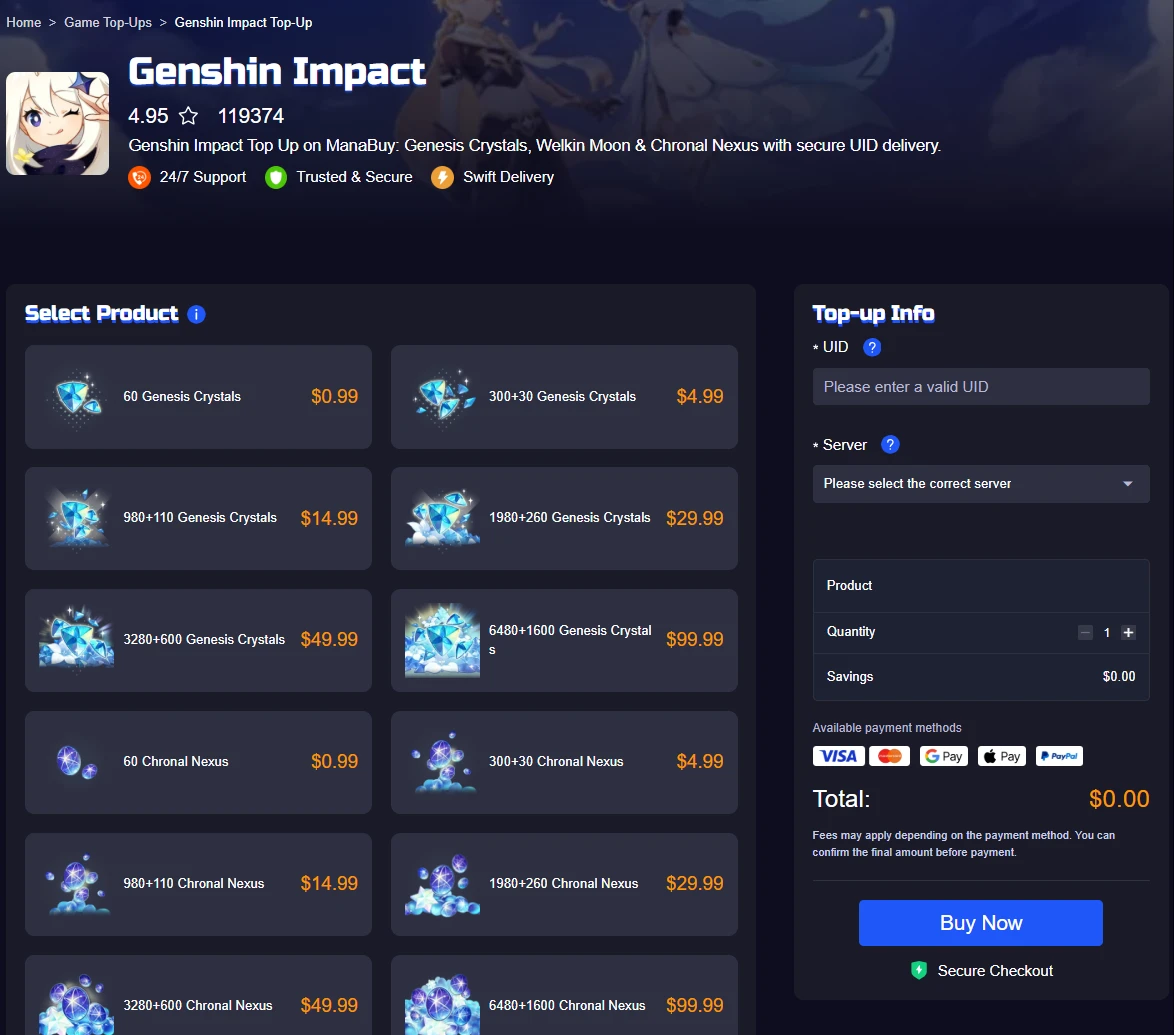
ManaBuy Genshin Impact Top-Up page showing product options beside the UID and server confirmation area.
Genshin UID Top-Up Checklist Before Payment
Most top-up problems are easier to prevent than to solve later. Before paying, slow down for one final scan. This does not need to take long, but it should be deliberate.
| Check | What to confirm | Why it matters |
|---|---|---|
| UID | The number matches the account currently open in Genshin Impact. | A correct payment cannot fix a delivery target typed into the wrong account. |
| Server | The selected server matches where the account is played. | Server mismatch is one of the easiest mistakes to miss during checkout. |
| Product | The selected item is Genesis Crystals, Welkin Moon, or Chronal Nexus as intended. | Similar product images can still represent different purchase types. |
| Quantity | The package count and quantity match your spending plan. | Quantity errors are harder to notice if you only look at the final payment button. |
| Payment method | The method, currency display, fee note, and total are acceptable before paying. | Currency and payment displays can vary by environment and method. |
| Contact path | You know where to find your order record or support path if delivery needs checking. | Support is smoother when you keep the order details and account info together. |
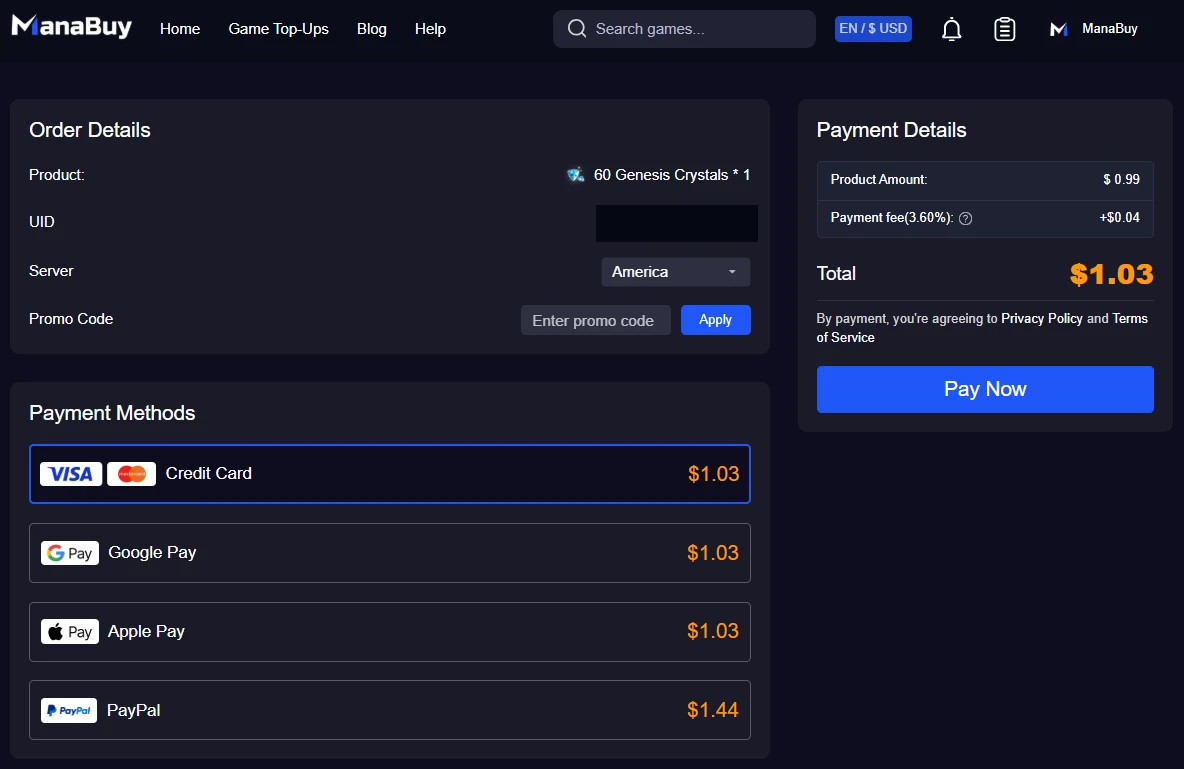
ManaBuy Genshin Impact checkout flow showing the order and payment review area before payment.
How to Gift a Genshin Top-Up Without Guessing
Gift top-ups need extra care because the buyer may not control the receiving account. Ask the recipient for the UID and server directly from their current Genshin Impact account. Do not ask for their game password. Do not use an old UID from chat history if they play multiple accounts. If the gift is meant to be a surprise, the safest compromise is to confirm the UID/server once and avoid discussing the product amount until later.
If the recipient wants Welkin Moon or a specific product category, confirm that product name before checkout. A crystal package and a membership-style product are not interchangeable just because both belong to Genshin Impact.
How to Check Genshin Top-Up History or Delivery Status
After payment, keep the order record, payment method, product name, UID, and server together. If the delivery appears delayed, compare the order details with the account opened in-game before assuming the top-up failed. A mismatch in UID, server, or selected product is more actionable than a vague message like "it did not arrive."
If support is needed, provide the order record and the exact issue: wrong product selected, payment made but not delivered, UID/server typo, or recipient account mismatch. Do not share your Genshin login password in support messages.
Can You Change Genshin Top-Up Currency?
Currency display can depend on the site currency selector, region, payment environment, and checkout method. Treat the final checkout screen as the price source, not an old screenshot or a cached product page. If the currency or total is not what you expected, stop before payment and switch the site currency or payment method only through the normal page controls.
Important: Do not choose a different account server just to chase a different currency display. Server selection should match the receiving Genshin account, while currency and payment display belong to checkout.
What to Do If You Need a Refund or Support
Refund and support situations depend on the payment state, delivery state, and order details. Start by checking whether the order was paid, whether the product was delivered, and whether the submitted UID/server were correct. If the product was delivered to the account details you submitted, the support path may be different from a payment error or an undelivered order.
| Issue | First thing to check | Best next step |
|---|---|---|
| Paid but not delivered | Order status, UID, server, and selected product. | Contact support with the order record and account details submitted at checkout. |
| Wrong UID or server | Whether payment is complete and whether delivery has already started or completed. | Contact support immediately with the correct UID/server and the order record. |
| Wrong product selected | Whether the selected item was Genesis Crystals, Welkin Moon, or Chronal Nexus. | Provide the order record and explain the intended product before making another purchase. |
| Currency or fee surprise | The final payment screen and payment method fee note. | If unpaid, adjust before checkout. If paid, keep the payment record for support review. |

Check Genshin Impact Top-Up Options
Use the product page after confirming your UID, server, and intended product. Review the checkout screen before payment.
Open Genshin Top-UpRelated Genshin Guides
Genshin Impact UID Top-Up FAQ
Where do I find my Genshin Impact UID?
Open Genshin Impact on the account that should receive the top-up and check the UID shown in the game interface or profile area. Copy the number exactly and avoid using an old UID from another device, account, or chat message.
Does ManaBuy need my Genshin password?
No. For a UID-based top-up flow, you should only provide the information requested for delivery, such as UID and server. Do not share your Genshin Impact login password for a top-up order.
What happens if I choose the wrong server?
A wrong server can make the order harder to deliver correctly. If you notice the mistake before paying, correct it first. If you notice after payment, keep the order record and contact support with the correct UID and server as soon as possible.
Can I top up Genshin for a friend?
Yes, but only after confirming the recipient's current UID and server. Do not guess from their character name or old screenshots. Also confirm whether they want Genesis Crystals, Welkin Moon, or another listed product.
Should I choose Genesis Crystals or Welkin Moon?
Choose Genesis Crystals when you want paid currency. Choose Blessing of the Welkin Moon only when that specific product is your goal. If you are unsure, pause and check the product description before payment.
How do I check Genshin top-up history?
Keep your order record and compare it with the product, UID, server, payment method, and delivery status. If something looks wrong, use the support path with the order details instead of making a second purchase immediately.
Bottom Line
The best Genshin Impact UID top-up flow is not complicated: copy the UID from the game, match the server, choose the exact product, review the checkout screen, and keep the order record. Most avoidable problems come from rushing one of those checks. If you treat UID, server, product, and payment review as one chain, the top-up process is much easier to verify and support if anything needs follow-up.



Copyright © FUTURE OUTLOOK TECHNOLOGY LIMITED.Company Registration No.: 77374965 All rights reserved.UNIT 135,1/F.,143 WAI YIP STREET,KWUN TONG HK