
Are Genshin Top-Up Sites Safe? Best Way to Buy Genesis Crystals

Genshin top-up sites can be safe, but only when the checkout flow is clear and does not ask for your game password. Before buying Genesis Crystals, Blessing of the Welkin Moon, or Chronal Nexus, check three things first: the site should use UID-and-server delivery, the product card should match what you want to buy, and the final payment screen should be easy to review before you pay.
ManaBuy's current Genshin Impact top-up page uses UID-and-server delivery and states that no account password or game login is required. That makes it a better fit for players who want a direct top-up flow without sharing sensitive login details.
Safe signal
UID and server are enough for direct delivery. Your game password should stay private.
Main risk
Wrong UID, wrong server, or wrong product choice can send the order away from your intended plan.
Best habit
Open the game first, confirm account details, then review the final checkout screen.

Are Genshin top-up sites safe to use?
Some Genshin top-up sites are designed around direct delivery, while others may ask for too much information or make unclear promises. The first safety question is simple: does the site need your password?
For a normal direct top-up flow, a buyer should not have to hand over the account login. A safer flow asks for the receiving account's UID and server, then sends the selected product to that account after payment.
Before you pay: check the product type, UID, server, and email. Direct top-up orders are tied to the information submitted at checkout, so a small typo can create a real delivery problem.
Safety also depends on your own checkout habits. Do not buy while guessing your server. Do not copy a UID from an old screenshot without checking it in game. Do not choose a Genesis Crystals SKU if you actually meant Blessing of the Welkin Moon.
What makes a Genshin top-up site trustworthy?
A trustworthy Genshin top-up site should reduce account risk and make the purchase easy to audit. If a page hides the delivery method, uses vague package labels, or pushes a discount without explaining the final checkout amount, slow down.
| Safety check | What you want to see | Why it matters |
|---|---|---|
| No password request | UID-and-server delivery, not account login sharing | Your HoYoverse login should stay private. |
| Clear product list | Genesis Crystals, Welkin Moon, or Chronal Nexus shown as separate choices | Different Genshin products serve different spending plans. |
| Server confirmation | A field or selector that matches your in-game server | A correct UID on the wrong server can still cause delivery trouble. |
| Visible payment step | The live checkout displays available payment methods and final amount | Payment options can depend on currency, region, and device environment. |
| Order support path | A way to contact support with an order number | If delivery is delayed, you need a trackable order record. |
Best way to buy Genesis Crystals without account risk
The best way to buy Genesis Crystals is to start from the account details, not the discount. Open Genshin Impact first and confirm the UID shown in game. Then check the server tied to that account.
Only after those two details are clear should you choose a Genesis Crystals package or another product. Genesis Crystals are paid currency, Blessing of the Welkin Moon is a subscription-style item, and Chronal Nexus is a separate product category shown on ManaBuy's page.
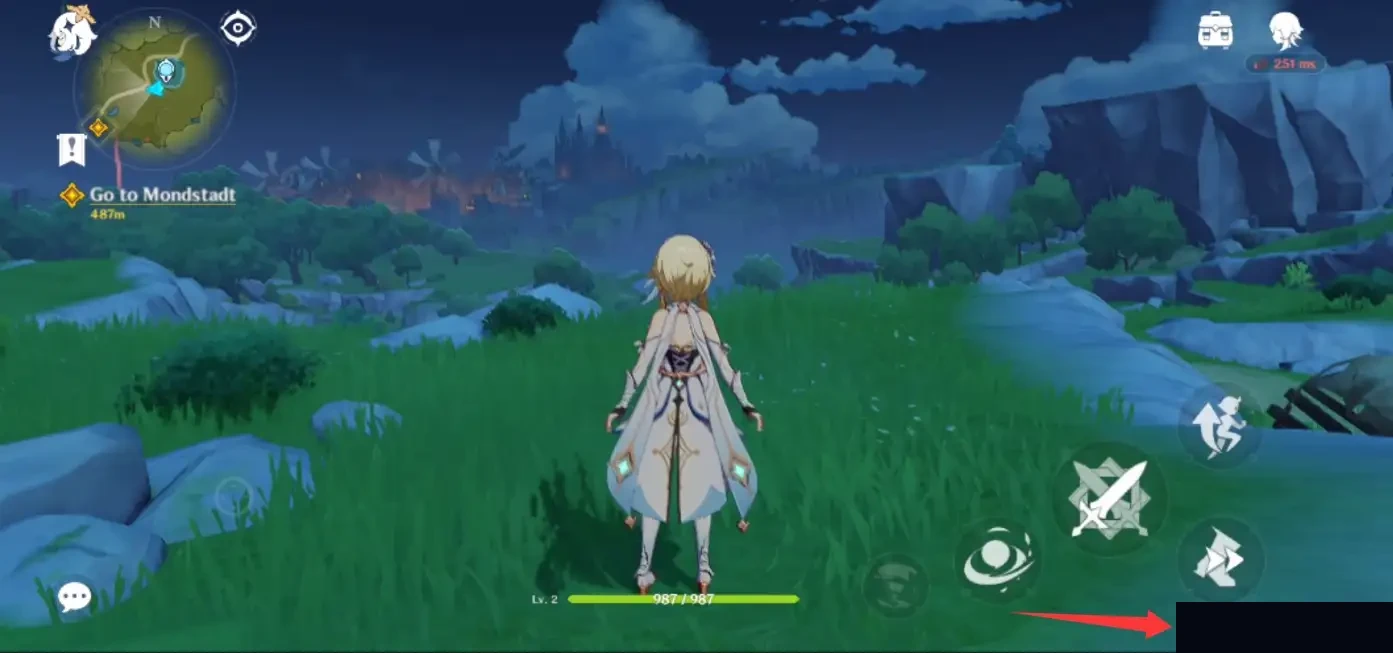
From Genshin Impact.
Open Genshin Impact and check the UID on the account that should receive the purchase.
Select the same server you use in game, such as America, Europe, Asia, or the server option shown on your account.
Pick Genesis Crystals, Welkin Moon, or Chronal Nexus based on what you actually want to receive.
Check product amount, UID, server, email, payment method, and final checkout display.
After payment, open the same account and confirm the balance, pass status, or item result.
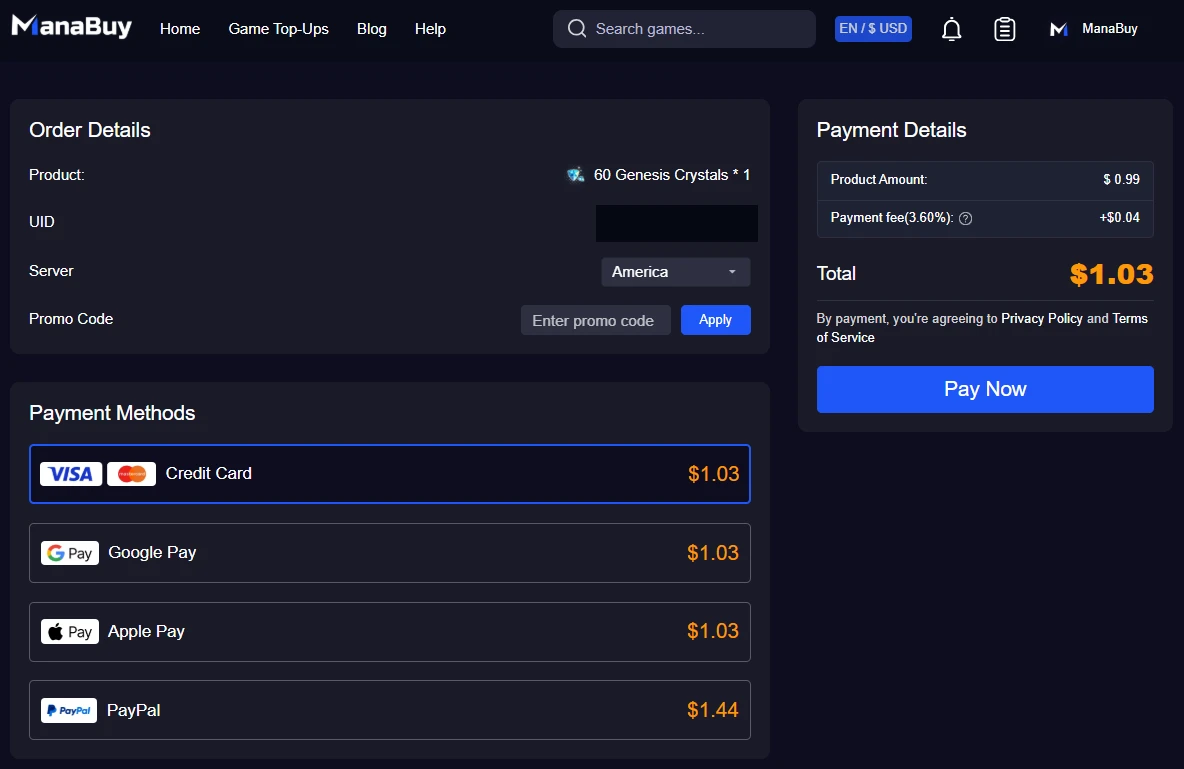
ManaBuy Genshin Impact Top-Up checkout flow showing the review step before payment; use the live checkout screen as the final reference for current payment amounts.
This is why users searching for the best Genshin top-up site should think in terms of process quality. A good page should help you avoid wrong UID, wrong server, wrong product, unclear payment method, and missing order records.
Can you buy cheap Genesis Crystals safely?
Cheap Genesis Crystals are only useful if the offer is clear, current, and tied to a delivery flow you trust. Be careful with pages that lead with extreme discounts but do not explain the product amount, payment method, delivery path, or support limits.
Good discount behavior
The final checkout still shows the product amount, payment method, UID, server, and order path clearly.
Risky discount behavior
The page rushes payment, hides the final amount, asks for login details, or cannot explain delivery support.
The safer way to handle "cheap" searches is to compare the final checkout display, not only the first package card you see. Look at the product amount, any visible bonus amount, payment method availability, fees if shown, and the account information attached to the order.
For Genshin Impact, price should not be the only decision. A slightly cheaper offer is not worth an incorrect server, a missing support path, or a page that asks for login credentials.
Does country or currency matter when buying Genesis Crystals?
Country and currency can affect what a buyer sees at checkout, but they should not be treated as a shortcut to a guaranteed cheaper purchase. Payment methods, supported currencies, and final checkout display may change depending on region, selected currency, device environment, and the payment option shown live.
Use country and currency as checks, not shortcuts
- Check whether your preferred payment method is available.
- Confirm the final amount before payment.
- Make sure the product still matches your Genshin account and server.
- Stay with the clearest checkout route if currency switching creates confusion.
The "best currency" is the one that gives you a clear final payment screen, a supported payment method, and an order you can track. The "best country" is not a magic setting; it should match the checkout options you can actually use safely.
How ManaBuy handles Genshin Impact top-up safety checks
ManaBuy's current Genshin Impact top-up page is built around direct top-up for Genesis Crystals, Blessing of the Welkin Moon, and Chronal Nexus. The page tells players to submit UID and server at checkout and states that no password or account login is required.
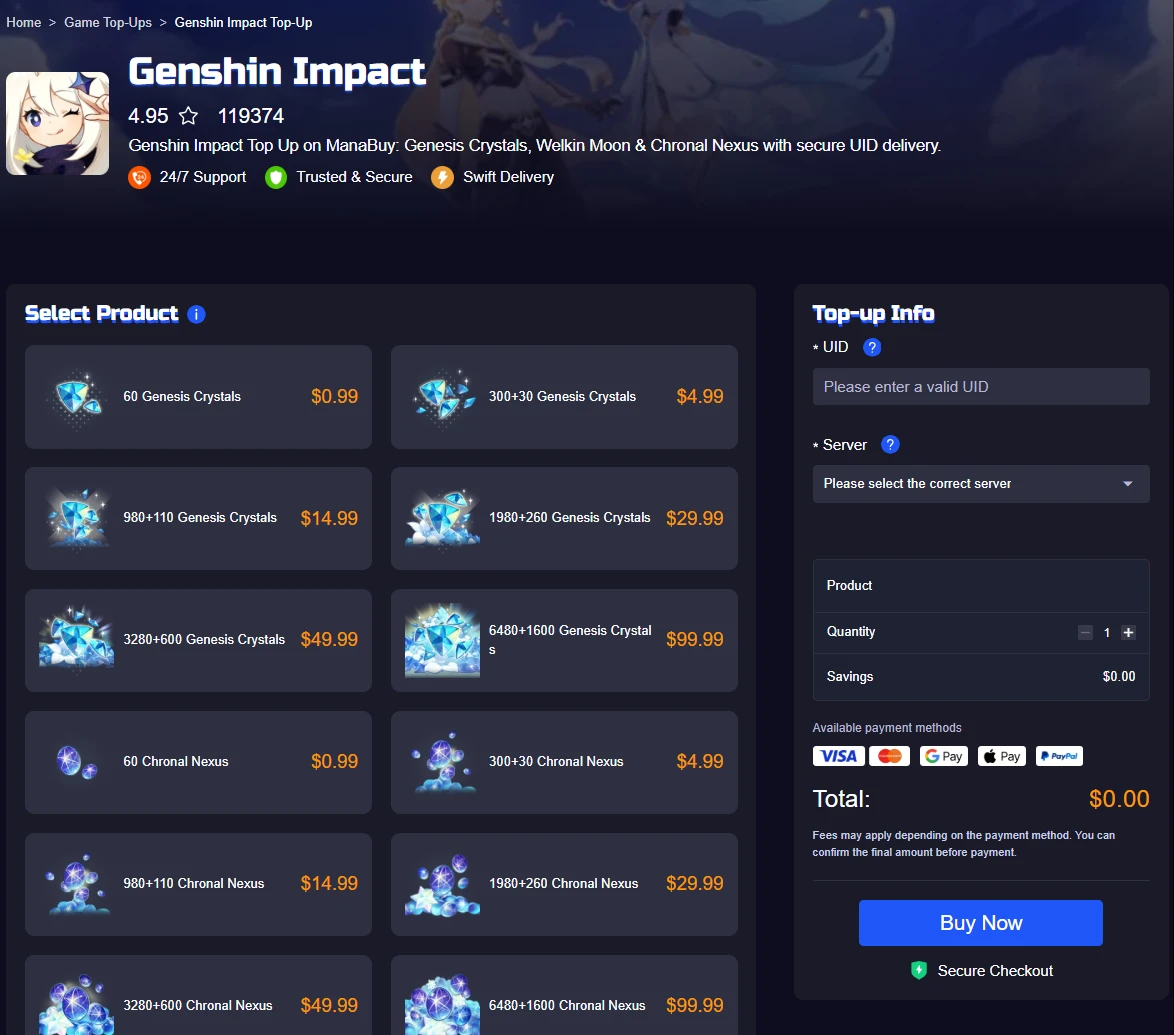
ManaBuy Genshin Impact Top-Up page showing product choice beside the UID and server confirmation area; check the live page before purchase because packages and prices can change.
Genesis Crystals
Paid currency for pulls and shop spending.

Welkin Moon
Daily Primogem plan, not crystals.
Chronal Nexus
Pick this only when it is your target product.
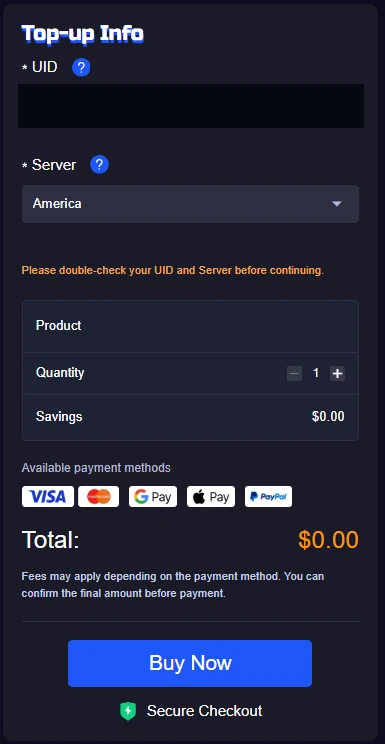
ManaBuy Genshin Impact Top-Up page showing UID, server, product review, payment methods, and Buy Now.
ManaBuy also notes that payment options depend on currency, region, device environment, and the live checkout display. Use the live checkout screen as the final confirmation point rather than an old screenshot, a friend's checkout screen, or a cached price memory.

Genshin Impact Top Up
Check the current Genesis Crystals, Welkin Moon, and Chronal Nexus options, then confirm your UID and server before payment.
Common mistakes before buying Genesis Crystals
Most Genshin top-up problems start before payment. The user is in a hurry, product names look similar, or the UID is copied from memory instead of checked in game.
Wrong server
A correct UID on the wrong server can still create delivery trouble.
Wrong product type
Genesis Crystals, Welkin Moon, and Chronal Nexus should be treated as separate purchase decisions.
No order record
Keep the order number or confirmation details in case support needs to check a delayed result.
When should you avoid a Genshin top-up site?
Avoid a Genshin top-up site if it asks for your HoYoverse password, pushes you to rush payment, hides the final price, or does not show a clear support path.
Also be careful when a page uses vague package names instead of the actual product you want. If you cannot tell whether you are buying Genesis Crystals, Welkin Moon, or another product, the page is not giving you enough information to make a safe purchase.
You should also avoid absolute promises that cannot be proven. "Instant" delivery, "always cheapest," or "works for every region" may sound attractive, but Genshin purchases depend on product availability, payment method, account details, and live checkout conditions.
Genshin Impact Genesis Crystals FAQ
Are Genshin top-up sites safe if they only ask for UID and server?
UID-and-server delivery is safer than sharing your account password, but you should still check the product type, payment screen, order record, and support path before buying.
What is the best way to buy Genesis Crystals?
Confirm your UID and server in game first, choose the correct Genesis Crystals package, review the final checkout details, then keep your order record after payment.
Should I choose Genesis Crystals or Blessing of the Welkin Moon?
Choose Genesis Crystals when you want paid currency. Choose Blessing of the Welkin Moon only when you specifically want that subscription-style product. They are not the same purchase.
Can I buy cheap Genesis Crystals safely?
You can look for better value, but avoid offers that hide the final payment amount, ask for account login details, or do not explain delivery and support. A safe checkout matters more than a dramatic discount.
Does currency change the Genesis Crystals package?
Currency can change the checkout display and payment options, but you should verify the actual product amount shown on the live page before payment. Do not assume one currency is always the best.
What should I do if my Genshin top-up does not appear?
Check the same UID and server you submitted, wait a short time for delivery, then contact support with your order number if the balance, pass status, or item result still does not appear.
Final advice before choosing a Genshin top-up site
The best Genshin top-up site is the one that lets you buy the correct product without giving away your account password, guessing your server, or losing track of the order.
For Genesis Crystals, start with UID and server accuracy. Then check the package, payment method, final checkout display, and support path. If a cheaper offer weakens any of those checks, it is not really the better option.
Use the live product page as your final reference before payment. Product availability, payment methods, and checkout display can change, so the safest habit is to verify the current page, not an old screenshot or a copied price list.


Copyright © FUTURE OUTLOOK TECHNOLOGY LIMITED.Company Registration No.: 77374965 All rights reserved.UNIT 135,1/F.,143 WAI YIP STREET,KWUN TONG HK