
Free Fire Finn Guide: Dash Splash Rush Tempo, Cleanup Plays and Combos

Finn is a tempo pet for close fights. Dash Splash gives the owner and nearby teammates a short movement boost after a nearby knockdown or elimination, which makes it strong for cleanup pushes, trades, and fast repositioning. It is not the pet that wins the first duel; it helps your team snowball after the first crack.
If you are deciding whether to unlock or upgrade Finn, start with the trigger: When any player is knocked down or eliminated within 20m radius, owner and teammates will receive a 4% movement speed boost. Lasts for 5s. Cooldown: 90s. A pet is worth building only when that trigger appears in your real matches often enough to change a fight, a reset, or a rotation.
Use it when
One player confirms the finish only if covered; the other uses speed to cut off the revive path.
Skip Finn if
Overchasing after the speed boost.
How Dash Splash Works in Real Matches
The trigger radius matters. If your squad plays too spread out, only part of the team benefits. Finn works best when teammates are close enough to trade without stacking in the same doorway.
Use the speed to take a better angle, not to chase blindly. The enemy often has a second player waiting for the trade.
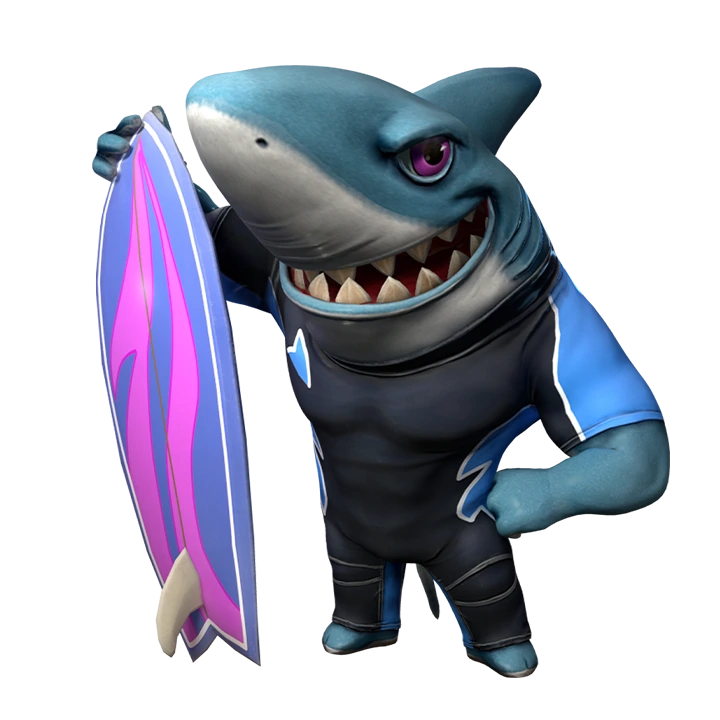

Watch: Free Fire New Finn Pet Ability Full Details. This clip is included so readers can see Finn timing in motion; use the current in-game skill text above for final numbers.
Best Ways to Play Finn in Battle Royale
- In BR, Finn is best for squads that fight together around buildings, hills, or Gloo Wall lanes.
- After a knock, send one player wide with the speed boost while another holds the original angle.
- Do not chase a crawl into open ground if another squad can third-party the sound.
For Finn, start with the moment you usually lose value: rotation, first contact, trade recovery or building entry. Keep the pet only when its trigger changes that exact decision.
How Finn Fits Clash Squad
Finn is a legitimate CS rush pet because rounds are short and knockdowns quickly turn into team collapses. Pair it with a clear call: after the first knock, either flood the side together or use the boost to reset behind stronger cover.
| CS question | Practical answer |
|---|---|
| Does the pet affect the first fight? | Use it aggressively only if the trigger appears before or during the first trade. |
| Does the pet help the second fight? | Cooldown, wall, heal, and rescue pets often win value after the first exchange. |
| Should every CS player use it? | No. The pet should match your role: entry, support, anchor, utility, or rescue cover. |
Best Free Fire Character Pairings for Finn
| Character pairing | Why it works with Finn |
|---|---|
 OscarValiant Dash: Dashes towards the target direction, destroys Gloo Walls in the way, deals damage to and knocks back enemies encountered. OscarValiant Dash: Dashes towards the target direction, destroys Gloo Walls in the way, deals damage to and knocks back enemies encountered. | Oscar opens space with Valiant Dash; Finn helps the squad follow after a knock starts the round swing. |
 TatsuyaRebel Rush: Rushes forward quickly for 0.3s and resets the cooldown by knocking down an enemy within 10s after skill release. Cooldown: 90s. TatsuyaRebel Rush: Rushes forward quickly for 0.3s and resets the cooldown by knocking down an enemy within 10s after skill release. Cooldown: 90s. | Tatsuya already creates chase and escape windows, and Finn adds team speed after the first fight breaks. |
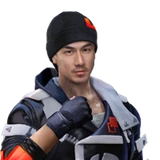 JotaSustained Raids: When using guns, hitting an enemy recovers some HP for the user. JotaSustained Raids: When using guns, hitting an enemy recovers some HP for the user. | Jota rewards gunfight pressure with HP recovery, matching Finn's close-range cleanup identity. |
 KellyDeadly Velocity: Sprint for 4s to activate. When activated, first 1 shot on target inflicts 106% damage. Lasts for 5s. KellyDeadly Velocity: Sprint for 4s to activate. When activated, first 1 shot on target inflicts 106% damage. Lasts for 5s. | Kelly supports fast entry and repositioning, making Finn's short speed window easier to convert. |
Treat Finn as a tool for one phase of the fight. Define that phase before queueing, then review whether the pet created a safer or faster next move.
Weapons, Squad Role and Item Priorities for Finn
Finn is for a close-range pack, not a scattered team. Stay close enough to share Dash Splash without stacking so tightly that one grenade ruins the fight.
| Choice | How to use it with Finn |
|---|---|
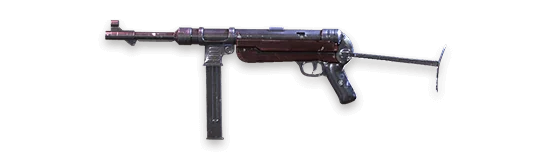 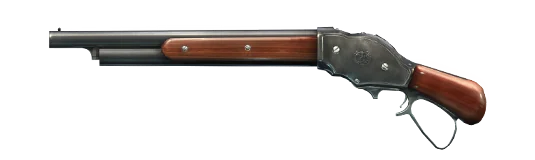 SMG + shotgun SMG + shotgun | Use the speed boost to take the second angle after the first knock. |
| Two Gloo Walls minimum | One wall starts the push; the second protects the cleanup or retreat. |
| Light grenade count | Finn teams move fast, so carry utility that creates a clean entry lane. |
One Practice Drill for Finn
In CS or close BR fights, call 'boost left' or 'boost right' after the first knock. The goal is to stop the squad from sprinting straight through the same doorway. Finn becomes much stronger when speed creates crossfire instead of crowding.
Squad Callouts That Make Finn Useful
Pet value is easier to convert when the squad hears a short call at the right moment. Do not only say the pet name. Say what changed, where the danger is, and what the next action should be. For Finn, these callouts keep Dash Splash connected to the fight instead of becoming background value.
| Callout | Use it when | Team response |
|---|---|---|
| Dash Splash window | First knock in CS | One player confirms the finish only if covered; the other uses speed to cut off the revive path. |
| Skip Finn | Overchasing after the speed boost. | Do not force the pet trigger; rotate, wall, heal, or wait for a cleaner fight. |
| Reset then fight | The pet has created value but the enemy can still trade | Reload, share the call, and move with at least one teammate instead of chasing alone. |
Finn Match Plans You Can Actually Use
| Match situation | Best play |
|---|---|
| First knock in CS | One player confirms the finish only if covered; the other uses speed to cut off the revive path. |
| Shotgun room fight | Do not all sprint through the same door. Use Finn to split left and right. |
| BR third-party | After your team knocks one enemy, use speed to take cover before the third squad arrives. |
How Finn Compares With Similar Pets
| Alternative pet | When it may be better |
|---|---|
| Fang | Fang stabilizes when your teammate is knocked; Finn accelerates when any nearby player is knocked or eliminated. |
| Detective Panda | Panda heals the eliminator; Finn gives movement tempo to nearby teammates. |
| Rockie | Rockie helps active-skill cycles before and during fights; Finn depends on a knock trigger. |
Common Finn Mistakes
- Overchasing after the speed boost.
- Playing too far from teammates to share the value.
- Expecting Finn to help before the first knockdown happens.
Related Free Fire Guides
Free Fire Finn FAQ
Final Pick
Choose Finn if Dash Splash solves a problem you see repeatedly in your Free Fire matches. Build the character combo around that problem, test it in the mode you actually play, and upgrade only after the pet feels useful without forcing awkward decisions. If the trigger feels rare, pick a more direct pet before spending resources.



Copyright © FUTURE OUTLOOK TECHNOLOGY LIMITED.Company Registration No.: 77374965 All rights reserved.UNIT 135,1/F.,143 WAI YIP STREET,KWUN TONG HK