
Delta Force Mobile Best Sensitivity & Aim Assist Settings

The best Delta Force Mobile sensitivity is the one you can repeat under pressure, not the highest number you can control once. A practical Season 12 starting point is Aim Assist On, Auto-Adjust Scope Magnification Off, 147 overall swipe sensitivity, and 157 overall gyroscope sensitivity. Copy the baseline first, then change only the slider connected to the problem you can see.
Best aim assist settings for Delta Force Mobile
Open Settings > Basic > Combat. Keep Aim Assist On and Auto-Adjust Scope Magnification Off. Disable Quick ADS and Fire for both Operations and Warfare so aiming and firing remain separate actions.
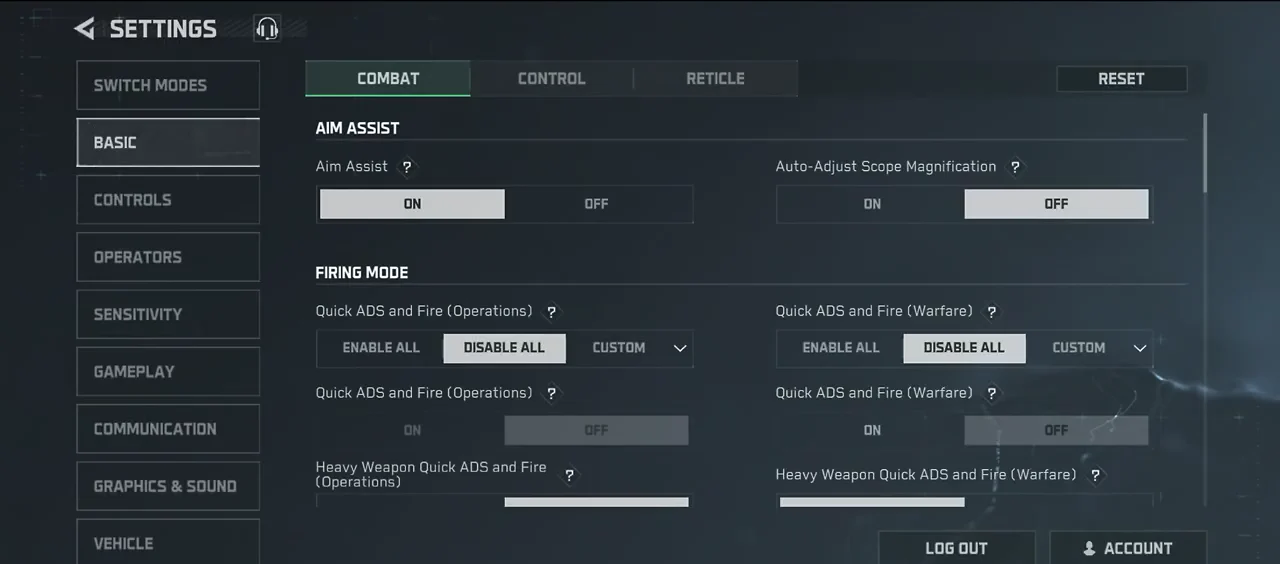
| Setting | Starting choice | Why it works | When to test the other option |
|---|---|---|---|
| Aim Assist | On | Useful while learning touch tracking and for small mid-range corrections. | Test Off if the reticle pulls toward the wrong target in crowded Warfare fights or interferes with deliberate head-level placement. |
| Auto-Adjust Scope Magnification | Off | Keeps your optic behavior predictable while you compare scope-specific values. | Turn it on only if you understand how the automatic zoom behavior changes your fights. |
| Quick ADS and Fire | Disable All | Separates sight activation from the shot, reducing accidental fire while tuning. | Use Custom later if a specific weapon class genuinely benefits from one-action ADS and fire. |
| Gyroscope activation | Always On | Allows micro-corrections before and during ADS. | Start with When ADS if constant camera movement makes you uncomfortable. |
Do not decide from one match. Run the same drill once with both Aim Assist and gyro off, once with gyro only, once with Aim Assist only, and once with both on. The comparison reveals whether the correction comes from your thumb, the sensor, or target pull.
Season 12 swipe sensitivity baseline
Use Accelerated swipe input with Camera Acceleration and Firing Acceleration at 92. Acceleration favors fast turns without forcing every small correction to use a very high base value. If identical swipes produce turns that feel inconsistent, switch to Fixed and rebuild the preset instead of mixing Fixed input with values copied from the accelerated profile.
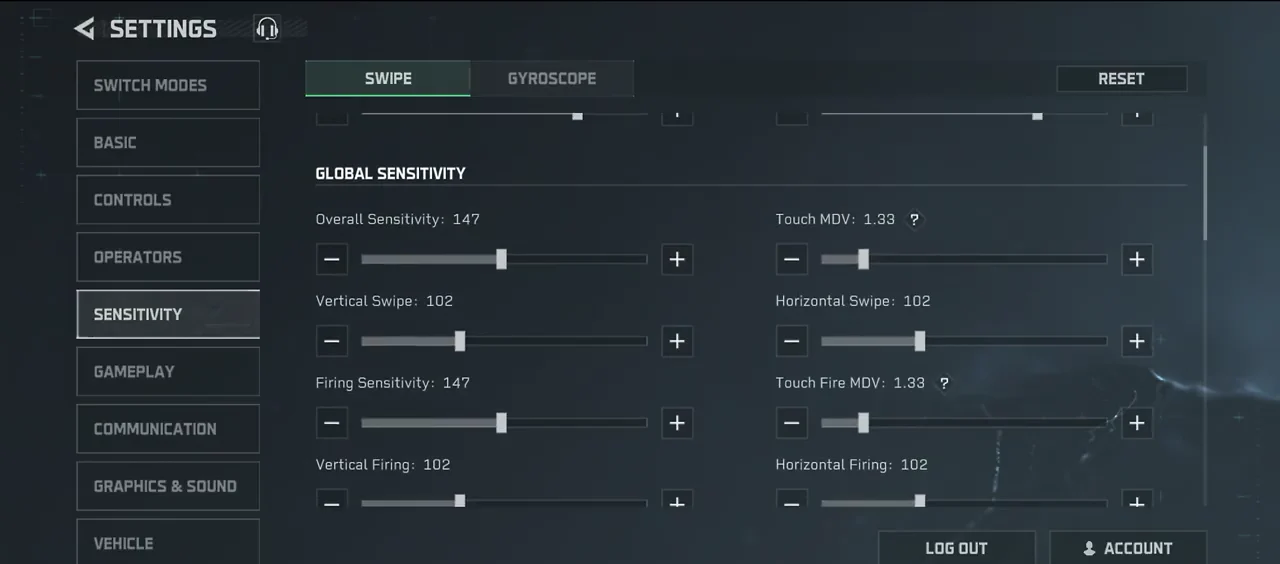
| Swipe control | Camera value | Firing value | Use |
|---|---|---|---|
| Overall sensitivity | 147 | 147 | Base speed before per-scope scaling. |
| Vertical | 102 | 102 | Up/down tracking and thumb recoil pull. |
| Horizontal | 102 | 102 | Target switching and strafe tracking. |
| Touch MDV | 1.33 | 1.33 | Keeps zoom response consistent while you test each optic. |
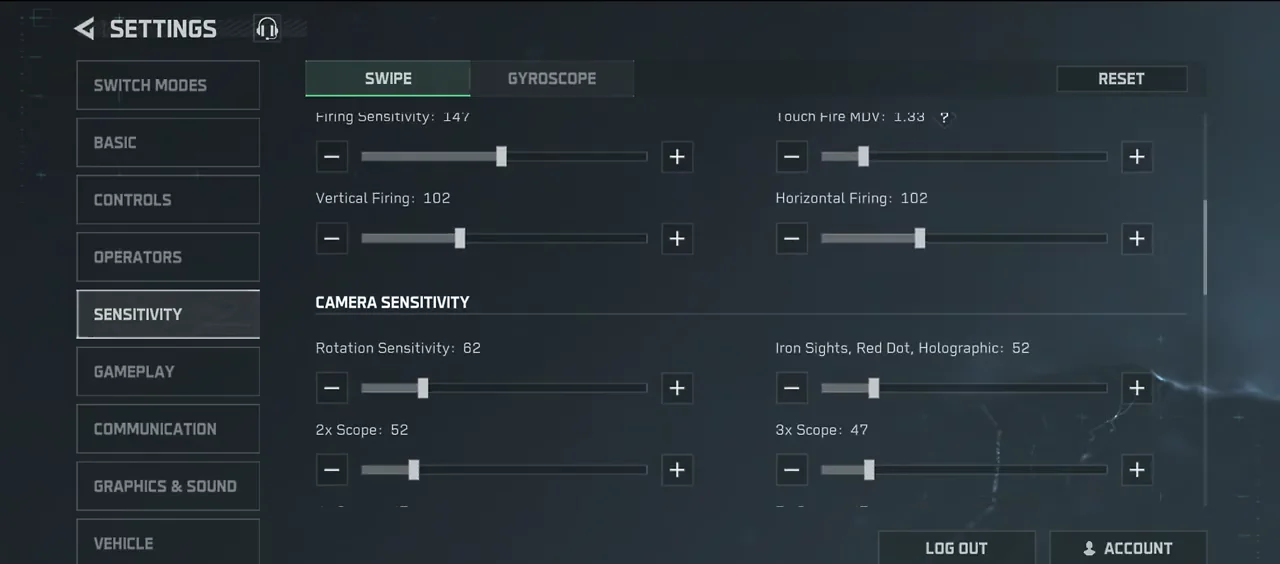
| Optic | Camera sensitivity | Firing sensitivity | First adjustment |
|---|---|---|---|
| Rotation / hip look | 62 | 62 | Change only if 90° and 180° turns are consistently short or long. |
| Iron sights, Red Dot, Holographic | 52 | 52 | Use this for close-range target switching. |
| 2x | 52 | 52 | Keep with the low-zoom group unless 2x tracking overshoots. |
| 3x | 47 | 47 | Test burst tracking at mid range. |
| 4x–12x+ | 47 | 47 | Lower one optic at a time if long-range corrections are too large. |
Gyroscope sensitivity baseline
This gyro profile is intentionally much faster than the thumb profile. It uses 157 overall sensitivity, then raises optic values into the 242–300 range. Treat this as a micro-adjustment and recoil-control layer. If you are new to gyro, begin at roughly half these optic values or enable gyro only while ADS, then move upward after the reticle stops shaking.
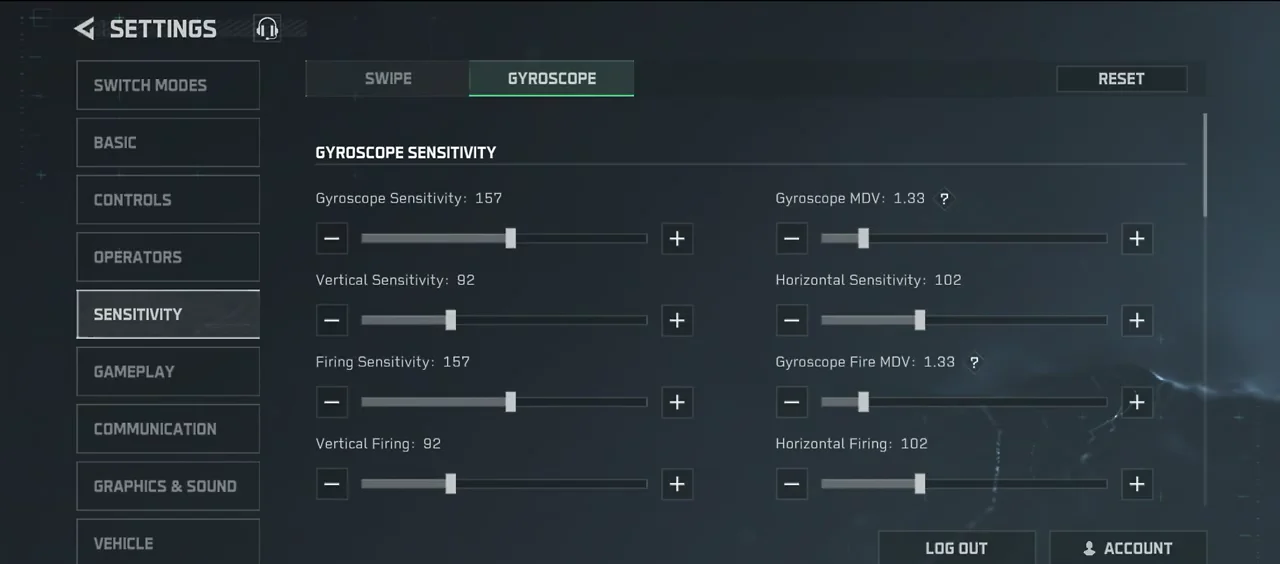
| Gyroscope control | Camera value | Firing value | What to watch |
|---|---|---|---|
| Overall gyro | 157 | 157 | Lower if the reticle shakes while you hold the phone naturally. |
| Vertical | 92 | 92 | Raise slightly only when you cannot counter steady vertical climb. |
| Horizontal | 102 | 102 | Lower if small wrist movement repeatedly crosses the target. |
| Gyroscope MDV | 1.33 | 1.33 | Keep unchanged while comparing scope values. |
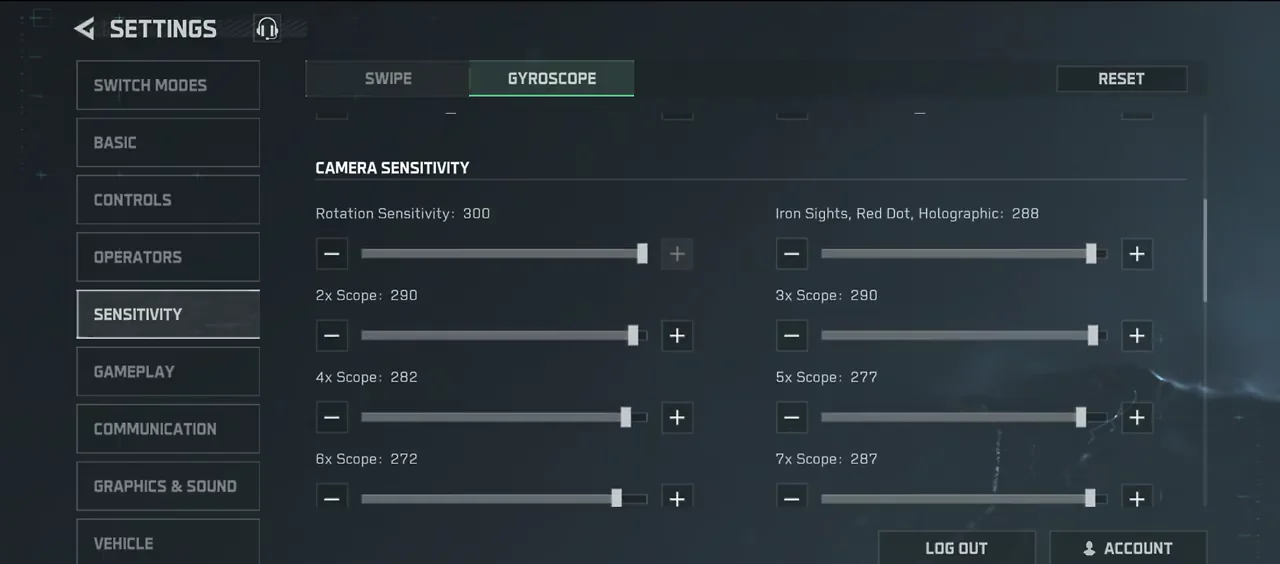
| Optic | Gyro camera | Gyro firing | Adjustment priority |
|---|---|---|---|
| Rotation | 300 | 300 | Do not copy at full value if you are learning gyro. |
| Iron sights, Red Dot, Holographic | 288 | 288 | Close-range tracking and recoil control. |
| 2x | 290 | 290 | Keep only if the reticle remains stable during bursts. |
| 3x | 290 | 290 | High for mid range; reduce before changing every optic. |
| 4x | 282 | 282 | Test on a fixed 40–60 m target. |
| 5x | 277 | 277 | Reduce in 5-point steps if micro-corrections jump. |
| 6x | 272 | 272 | Prioritize single-shot placement over spray control. |
| 7x | 267 | 267 | Use the same test distance for every revision. |
| 8x / 9x | 262 / 257 | 262 / 257 | Lower only the optic that visibly overshoots. |
| 10x / 11x / 12x+ | 252 / 247 / 242 | 252 / 247 / 242 | Validate with small corrections, not full sprays. |
Five-minute sensitivity calibration
- Stabilize performance first. Use the highest frame-rate option your phone can hold without repeated drops. A sensitivity test is unreliable when frame pacing changes between attempts.
- Choose one rifle and one optic. Do not change attachments, weapon, stance and sensitivity at the same time.
- Track at three distances. Use a close moving target, a mid-range strafe and a distant fixed point. Repeat each test three times.
- Change one family. Camera values fix entry and tracking speed; firing values fix movement while shooting; gyro values fix device-tilt correction.
- Keep the change only if it survives a real match. Training-range recoil is not enough; confirm target switching and visibility under pressure.
Which slider fixes your problem?
| Symptom | Change first | Direction | Do not change yet |
|---|---|---|---|
| Crosshair passes a target before firing | Camera value for that optic | Down 5–10 | Firing sensitivity and all other scopes |
| Cannot keep up with a strafing target | Camera horizontal or that optic | Up 5–10 | Vertical firing value |
| Tracking is correct but spray climbs | Firing vertical or gyro firing for that optic | Up 5 | Rotation sensitivity |
| Reticle shakes while ADS | Gyro value for that optic | Down 10 | Aim Assist |
| Same swipe gives different turn distances | Input curve | Test Fixed instead of Accelerated | Per-scope values until the curve is chosen |
| Aim jumps to the wrong enemy in a crowd | Aim Assist comparison | Run an Off test | Do not compensate with extreme sensitivity |
Operations vs Warfare adjustments
Operations: precision first
Keep the baseline, then lower high-magnification camera or gyro values if small corrections reveal too much of your position. Avoid rebuilding the whole profile after one close-range death.
Warfare: target switching first
If you repeatedly stop short while moving between enemies, test a small increase to Rotation, Iron/Red Dot or 2x. Leave 4x+ unchanged until the low-zoom transfer feels correct.
Small phone
Keep buttons separated and test the preset before raising sensitivity. A short physical swipe already covers a large share of the screen.
Large tablet
Do not assume a larger screen needs a larger number. Start with the same preset, then lower the touch values in small steps if the longer physical swipe causes overshoot.
PC players should not copy mobile values
Mobile touch, mobile gyro and mouse input use different control models. On PC, start with raw, predictable mouse input, disable mouse acceleration, keep the native resolution when performance allows, and tune one ADS multiplier around a stable frame rate. The numbered mobile preset above should not be converted directly into mouse sensitivity.
Delta Force Mobile sensitivity questions
Should Aim Assist be on in Delta Force Mobile?
On is the better first test for most touch players. Compare Off if target pull disrupts crowded fights or precise placement. Keep the rest of the preset unchanged during the comparison.
Is gyroscope required?
No. Gyro is useful for micro-corrections and recoil control, but a stable thumb-only profile is better than an uncomfortable high-gyro copy. New users can begin with gyro only while ADS.
Can these settings remove recoil?
No. Sensitivity helps you counter recoil consistently. Weapon recoil pattern, attachments, stance, frame rate and your own input still determine the result.
Is there a sensitivity import code?
These settings use manual values rather than an import code. Enter them manually and avoid copying an untested code from another version or control profile.
Why does the same value feel different on my device?
Screen size, touch sampling, refresh rate, frame stability, grip and input curve change the physical movement behind the number. Use the preset as a baseline, not a guarantee.
When should I retest sensitivity?
Retest after a major input update, a new device, a frame-rate change, a HUD rebuild or a switch between Fixed and Accelerated input.
Related Delta Force guides
Copy the baseline once, then stop chasing complete presets. The fastest route to reliable aim is to identify one visible failure, change the responsible slider, and keep the new value only when it works at three distances and in a real match.




Copyright © FUTURE OUTLOOK TECHNOLOGY LIMITED.Company Registration No.: 77374965 All rights reserved.UNIT 135,1/F.,143 WAI YIP STREET,KWUN TONG HK