
How to Top Up Blood Strike Gold in Malaysia with ManaBuy

Quick answer: To top up Blood Strike Gold in Malaysia, open ManaBuy in MYR, choose one of the six Gold packages, copy the receiving account's UID from Personal Info, select the Blood Strike option in the Server field and review the payment fee and final total. The flow does not require the game password.
What you need before starting
| Required item | Where to get it | Why it matters |
|---|---|---|
| Blood Strike UID | Personal Info in the receiving account | Identifies the account that should receive Gold |
| Server selection | Choose Blood Strike in the ManaBuy Server field | Completes the product's required account route |
| Gold target | Current Mall, draw or pass screen | Prevents buying a package that is too small or unnecessarily large |
| MYR payment method | ManaBuy payment page | Determines the fee and final amount |
You do not need the Blood Strike password, email password or social-login code. If someone asks for those credentials, stop. ManaBuy's public product page is built around UID and server delivery.
How to find the Blood Strike UID
From the Blood Strike lobby, open the profile area in the upper-left corner. The full lobby is useful because it confirms that the buyer is looking at the receiving account, not a remembered number from another profile.
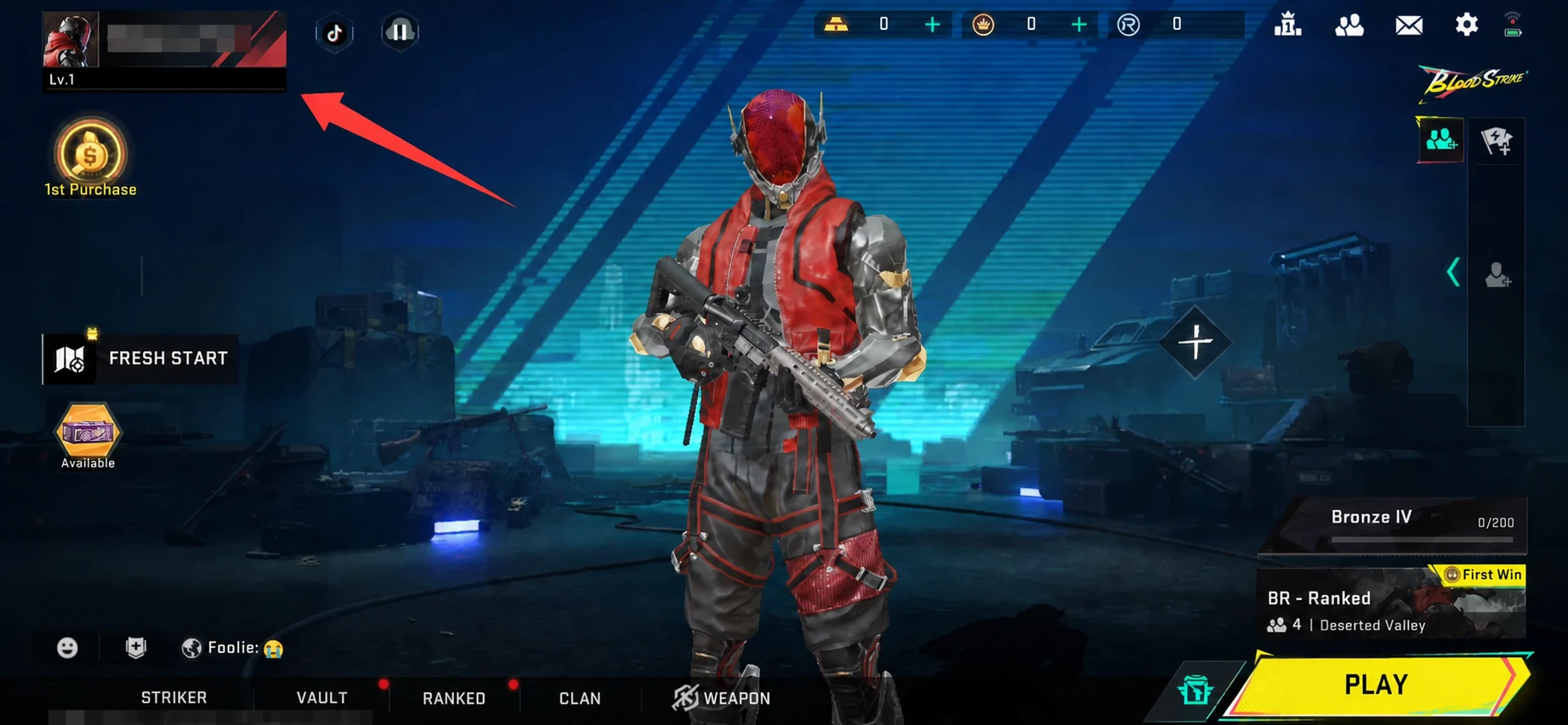
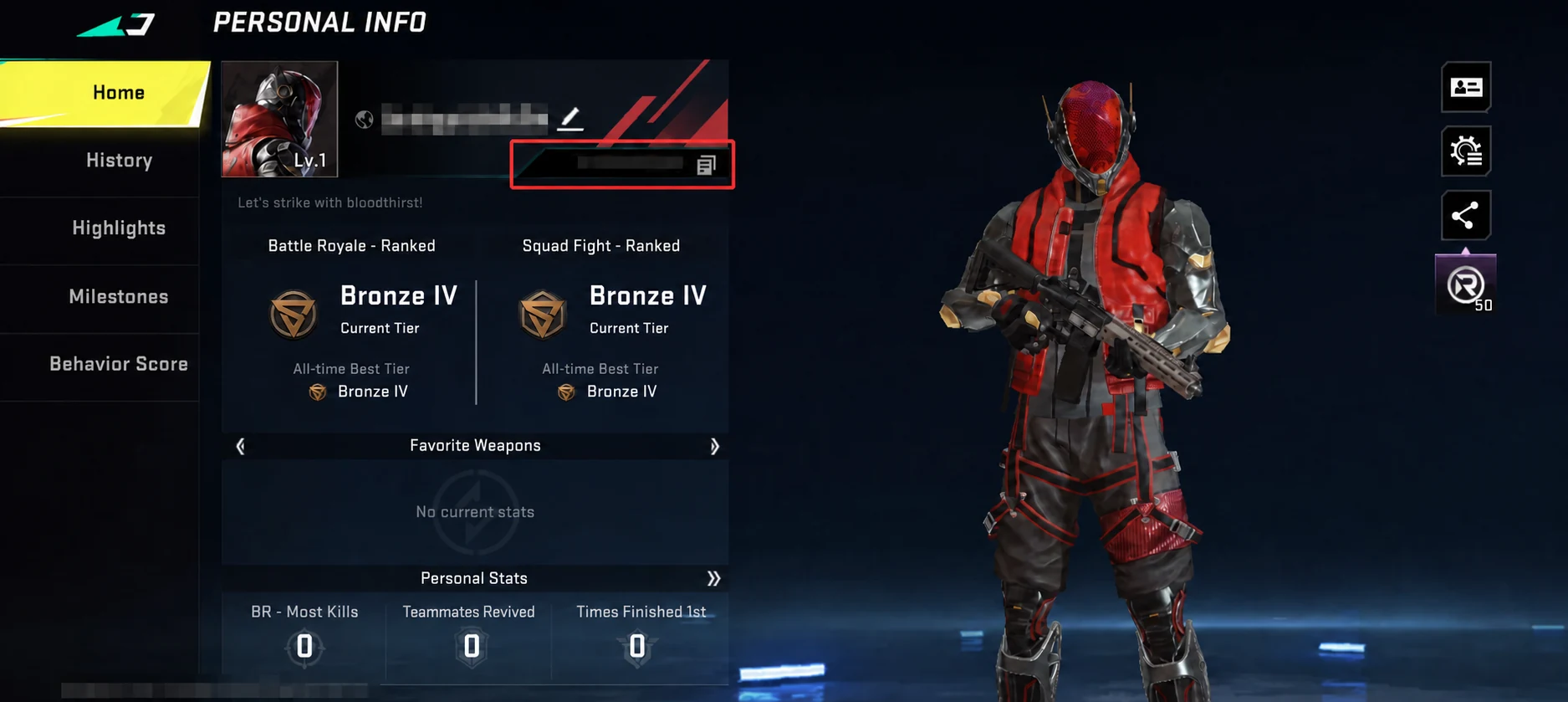
Inside Personal Info, copy the numeric UID shown on the profile card. Use the copy control when available. Do not copy the nickname, rank, clan name or another long identifier from the screen. The privacy-safe example keeps the full interface visible while masking the sample player's name and UID.
How to top up Blood Strike Gold on ManaBuy
- Open the ManaBuy Blood Strike top-up page in MYR.
- Choose the package that covers the account's remaining Gold need.
- Paste the UID copied from the exact receiving account.
- Open the Server field and choose the Blood Strike option shown by ManaBuy.
- Click Buy Now and confirm the order still shows Blood Strike and the intended package.
- Select Touch 'n Go, Boost, card, Google Pay or Apple Pay when available.
- Read the fee and final MYR total, then complete one payment.
Choose the package before entering the UID
| Package | Base Gold | Bonus Gold | Delivered Gold | ManaBuy price | Official price shown | ManaBuy price advantage |
|---|---|---|---|---|---|---|
 100 + 5 Gold 100 + 5 Gold | 100 | 5 | 105 | RM3.24 | RM4.12 | RM0.88 (21.4%) |
 300 + 20 Gold 300 + 20 Gold | 300 | 20 | 320 | RM9.72 | RM12.42 | RM2.70 (21.7%) |
 500 + 40 Gold 500 + 40 Gold | 500 | 40 | 540 | RM16.15 | RM20.72 | RM4.57 (22.1%) |
 1000 + 100 Gold 1000 + 100 Gold | 1,000 | 100 | 1,100 | RM32.39 | RM41.48 | RM9.09 (21.9%) |
 2000 + 260 Gold 2000 + 260 Gold | 2,000 | 260 | 2,260 | RM64.77 | RM83.00 | RM18.23 (22.0%) |
 5000 + 800 Gold 5000 + 800 Gold | 5,000 | 800 | 5,800 | RM161.88 | RM207.54 | RM45.66 (22.0%) |
Use delivered Gold, not only base Gold. For example, 500 + 40 delivers 540. If the account needs 520, this package covers it; 300 + 20 does not. ManaBuy's normal selling price is below the displayed official comparison across the six packages, so the buyer can retain a price advantage without defaulting to the largest option.
Final check before payment
| Checkout field | Correct result | Stop if |
|---|---|---|
| Game | Blood Strike | Another product appears |
| Package | Exact base + bonus Gold selected | The denomination changed |
| UID | Copied from Personal Info | Typed from memory or copied from another account |
| Server | Blood Strike option selected | The field is blank |
| Currency | RM MYR | Another currency appears |
| Payment | Fee and final total understood | The final total is unexpected |
After the order is completed
Return to the same Blood Strike account, refresh the game and check the Gold balance. Keep the ManaBuy order number until the balance is confirmed. If the order is Processing, do not create a duplicate payment. If it is Completed but the correct account has no Gold increase, collect the order number, payment receipt, package name, UID used and a current balance screenshot for support.
Keep the game account consistent across devices
Blood Strike can be played on mobile and PC, but delivery still depends on the UID entered on ManaBuy. Before topping up from a phone while playing on PC, or vice versa, open Personal Info on the active receiving profile and compare the UID. Do not assume two logins with similar nicknames are the same account.
After delivery, check the balance on that same profile. If the account was switched between platform logins, sign back into the UID used for the order before reporting missing Gold. This separates an account-selection problem from a real delivery problem.
Buying for another player
Ask the recipient to send a fresh Personal Info screenshot or use the copy function and send the UID privately. Confirm the package and receiving UID before payment. The recipient never needs to share a password. Any screenshot published or forwarded beyond support should mosaic the nickname, UID and other personal identifiers.
The Server field is required
Blood Strike is the only option shown in the current server selector, but it still needs to be selected. Do not publish a generic UID-only instruction for this product.
Blood Strike Malaysia FAQ
Where is the Blood Strike UID?
Open the profile from the lobby, enter Personal Info and copy the numeric UID shown on the profile card.
Which server should Malaysian players choose?
Choose the Blood Strike option displayed in ManaBuy's Server field. The current product flow does not list a separate Malaysia server.
Can I use a nickname instead of the UID?
No. Copy the numeric UID from Personal Info; a nickname is not the receiving identifier used by this flow.
How fast is delivery?
ManaBuy states that Blood Strike Gold is usually credited within minutes, often faster. Maintenance, payment review or order processing can extend the wait.
What if Gold is not received?
Check the order status, receiving UID, server selection and current account balance, then contact ManaBuy support with the order evidence.
Continue with Blood Strike on ManaBuy
- ManaBuy Blood Strike Gold Prices in Malaysia
- Blood Strike Payment Methods and Fees in Malaysia on ManaBuy
- Blood Strike Payment Failed or Gold Not Received in Malaysia
- Blood Strike Beginner Guide: BR Basics and Match Flow
- Blood Strike Advanced Guide: Tactical Support, Shop and Missions
- Blood Strike Best Weapons Guide for BR and Squad Fight
Ready to check Blood Strike Gold in MYR?
Open the ManaBuy Blood Strike page, choose the package that matches the receiving account, enter the UID, select the Blood Strike server option and compare the final MYR total before payment. ManaBuy does not need the game password.




Copyright © FUTURE OUTLOOK TECHNOLOGY LIMITED.Company Registration No.: 77374965 All rights reserved.UNIT 135,1/F.,143 WAI YIP STREET,KWUN TONG HK