
Blood Strike PC and Mobile Guide: Link Steam Without Losing Your Main Progress

Reviewed September 29, 2026 · Based on the official Blood Strike linking guide and Steam Account Linking FAQ.
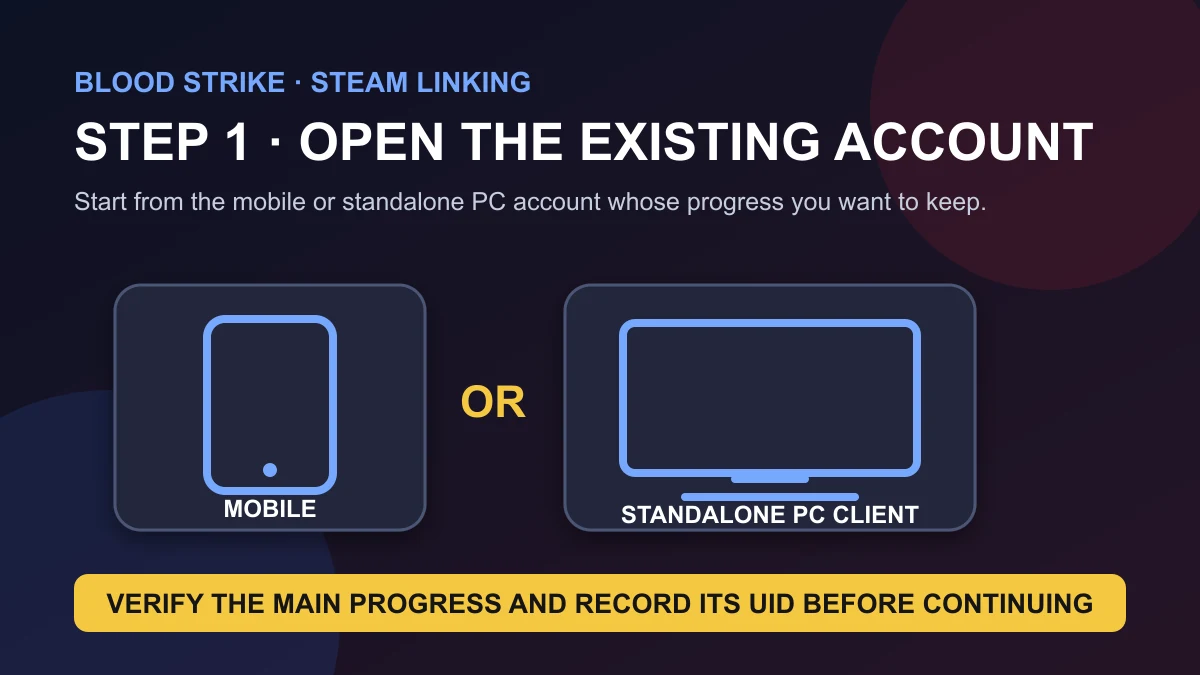
Blood Strike can be played on mobile and PC, but moving an existing account to Steam is not the same as simply downloading the game and pressing Play. The order matters. If you already have progress on the mobile or standalone PC client, link that existing game account to Steam before you launch Blood Strike through Steam for the first time.
This guide explains the difference between your platform login, Blood Strike account, UID and game version; shows the official Steam-linking path; and gives you a short verification routine before you play or add Gold. The goal is simple: keep one main account, one set of progress and one correct UID across the devices you use.
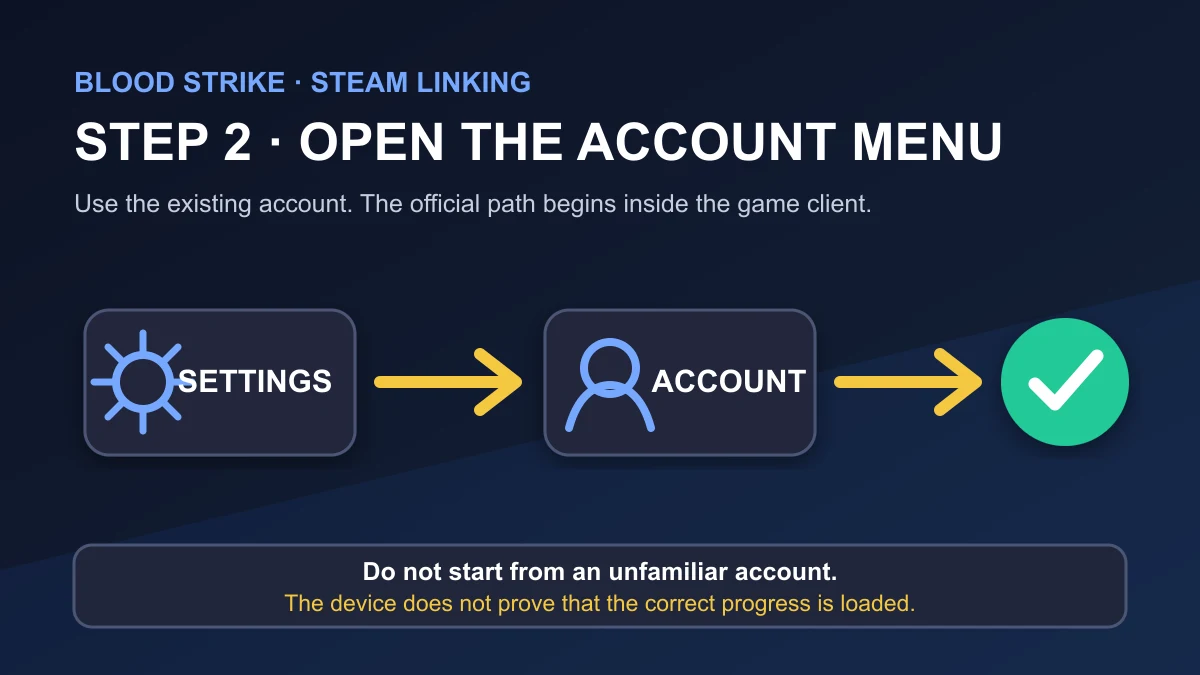
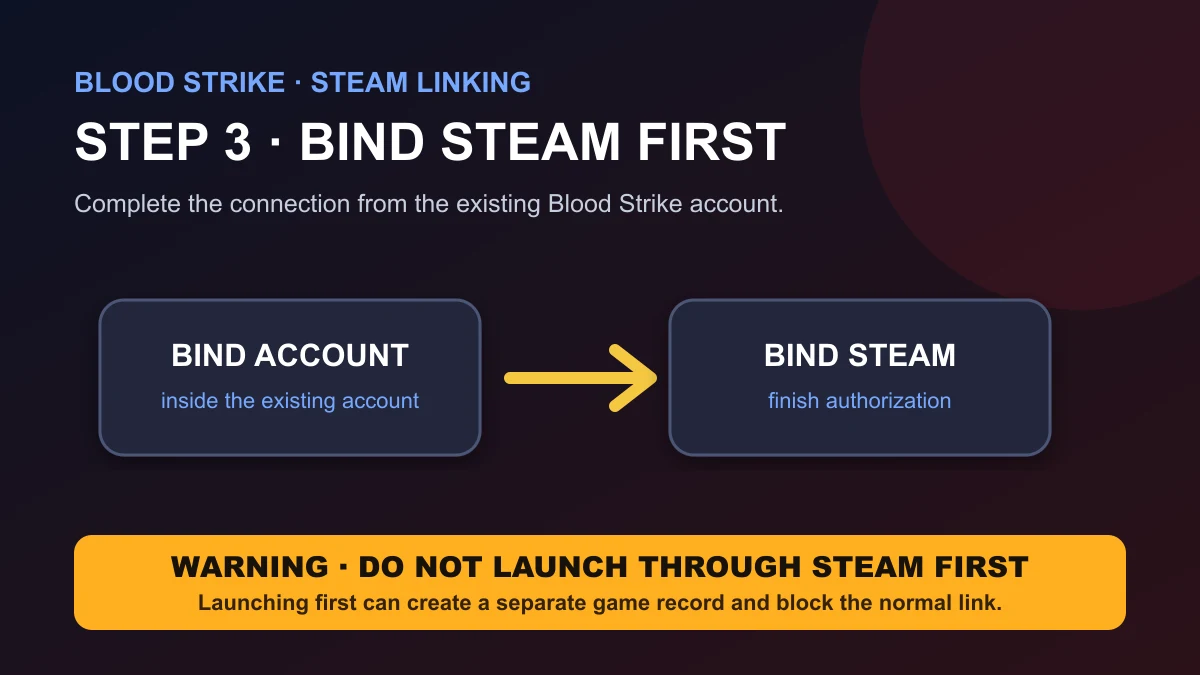
Quick answer: If you already have Blood Strike progress on mobile or the standalone PC client and have never opened the game through Steam, sign in to that existing account and use Settings → Account → Bind Account → Bind Steam before the first Steam launch. If you already opened Blood Strike through Steam without linking, stop there and contact official Blood Strike support; the official guidance says that Steam account cannot then be linked to the existing main account through the normal binding flow.
Is Blood Strike Available on PC and Mobile?
Yes. Blood Strike is available on mobile and PC, and the official website provides a dedicated guide for connecting an existing account to Steam. This lets players use mobile controls away from a desk and continue from PC when the account is linked correctly.
The important point is that “available on both platforms” does not automatically mean every login you create will point to the same progress. Shared progress depends on entering the same existing game account or linking Steam correctly. A fresh Steam launch is not a safe substitute for the binding step.
Mobile
Start here when the main progress was created on a phone or tablet. Confirm the UID before binding Steam.
Standalone PC client
Existing PC players can bind Steam from the same in-game Account menu after confirming the main account.
Steam
Use Steam for the existing progress only after binding it from the current mobile or PC account.
Understand the Four Identifiers Before You Link or Top Up
Many account mistakes happen because “platform,” “login,” “UID” and “version” are treated as the same thing. They are related, but each answers a different question.
| Term | What it identifies | Why it matters |
|---|---|---|
| Platform | Where you run the game, such as mobile, the standalone PC client or Steam. | Changing platform does not by itself prove that you entered the same game account. |
| Login or bound account | The sign-in method connected to your game progress. | The wrong login can open a separate account even on the same device. |
| Blood Strike UID | The numeric identifier for the receiving game account. | ManaBuy uses the UID to route a Global-version Gold top-up to the intended account. |
| Game version | The regional build and account environment. | ManaBuy's Blood Strike product supports the Global version only. |
The Steam Linking Warning You Should Read First
Blood Strike's official account-linking guide gives one instruction more important than every later step: bind Steam from your existing PC or mobile client before launching the game through Steam.
The same official guide states that if you have already entered Blood Strike through Steam without linking your main account, that Steam account cannot then be linked to the existing main game account. In that situation, do not keep experimenting with additional logins or purchases. Contact Blood Strike's official customer support and describe exactly which account was opened first.
Choose the Correct Route for Your Starting Situation
The right next step depends on whether you already have progress outside Steam and whether Steam has been used to enter Blood Strike before. Use this table before pressing any binding or login button.
| Your current situation | What the official guidance means | Safest next action |
|---|---|---|
| You have a mobile or standalone PC main account, and Steam has never launched Blood Strike. | This is the normal linking path. | Open the existing account first and bind Steam from its Account menu. |
| You already launched Blood Strike through Steam before linking. | That Steam account may already have a separate game record and cannot be connected to the existing main account through the normal flow. | Do not test more logins or make a purchase. Contact official Blood Strike support. |
| You started on Steam and do not have an older mobile or PC main account to preserve. | The official Steam FAQ says an unlinked Steam account does not lose its content simply because it is not linked to another account. | Continue using the Steam account normally unless you have a separate reason to link it. |
| Your Steam account is already linked to the intended main account. | The official FAQ says progress is shared when you log into different platforms with the linked account. | Compare the UID and progress on each platform before playing or topping up. |
| You linked accounts but now want to keep both records or unlink them. | This is an account-recovery decision, not a normal self-service linking step. | Contact official Blood Strike support before changing anything else. |
How to Link Your Existing Blood Strike Account to Steam
The following order comes from the official Blood Strike Steam-linking guide. Button names may be translated in your client, but the menu path should follow the same structure.
Check that the lobby, progression and inventory belong to the main account you want to keep. Do not start from Steam.
Enter the in-game Settings menu from the existing account.
The official screenshots place the Account control in the upper-right area of the Settings menu.
Follow the Steam authorization flow and finish the connection.
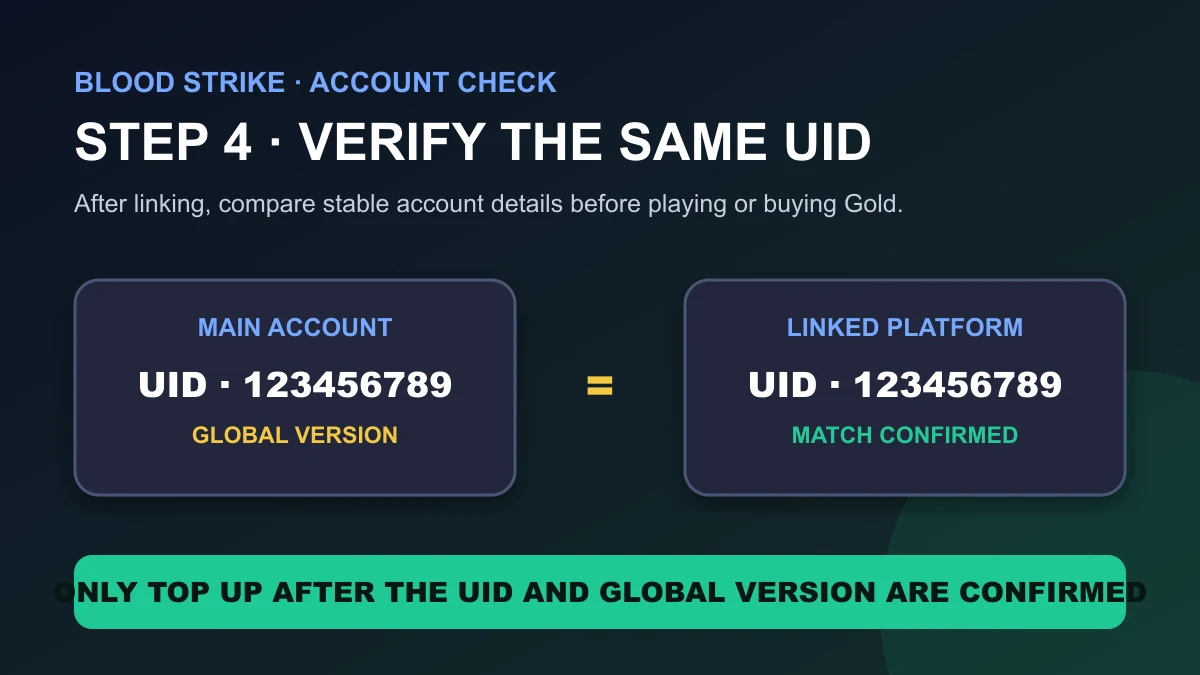
Before adding Gold, reopen Personal Info and compare the UID with the number you previously recorded.
How to Verify You Opened the Same Account
A successful login should be checked through stable account details, not only through a familiar lobby background or one equipped skin. Before changing devices, take a private record of the UID shown in Personal Info. After linking and entering through Steam, compare the UID again.
| Check | What you want to see | If it does not match |
|---|---|---|
| UID | The exact same numeric UID as the main account. | Stop before making a purchase and return to the original client or official support. |
| Account progress | The expected level, unlocked content and progression history. | Treat the session as a different account until the mismatch is resolved. |
| Bound-account status | Steam appears as connected in the account-binding area. | Do not assume that merely opening Steam completed the link. |
| Game version | The same Global-version account you intend to use. | Do not place a ManaBuy order for a non-Global account. |
This short check is especially valuable when several people use the same computer or when a player has experimented with more than one login method. It is faster to verify the UID before a match or purchase than to untangle two separate accounts afterward.
What Does Blood Strike Confirm Is Shared?
The official Steam Account Linking FAQ confirms that, after the accounts are linked, progress is shared when the linked account is used on PC, Steam and mobile. That is the strongest safe wording. The notice does not provide an item-by-item list of every balance, inbox entry or temporary event state, so this guide does not invent one. If something specific looks different after login, compare the UID first and then use official support rather than assuming that two accounts have merged.
Does Blood Strike Support Cross-Platform Play?
Blood Strike has supported matchmaking between mobile and PC players. An official August 2024 update added the option for mobile users to play with PC players in several modes. Mode availability, prompts and matchmaking rules can change with later updates, so the current mode-selection screen in your client should be treated as the final source for what is available today.
Cross-platform matchmaking and shared progress solve different problems:
- Cross-platform matchmaking determines whether players on different device types can enter the same matchmaking environment.
- Shared account progress depends on entering the same correctly linked game account.
- Gold delivery depends on using the correct receiving UID on a supported Global-version account.
A player can therefore have cross-platform play available while still opening the wrong progress through an unlinked login. That is why account verification comes before graphics, controls or purchases.
PC or Mobile: Which Version Should You Use?
There is no universal winner. Mobile is more portable and supports touch-based layouts, while PC suits players who prefer mouse-and-keyboard input and a fixed setup. Device performance and the input method you already control reliably matter more than a generic platform ranking.
Keep each platform's control settings separate. A mobile sensitivity or touch layout should not be copied as though it were equivalent to PC mouse settings. Link the account first, then tune controls independently on each device.
Troubleshoot Blood Strike Steam Linking and Progress Problems
The useful question is not only “Did the link button work?” It is “Which account record is open now, and what happened before it was opened?” Use the symptom and next-step table below instead of repeating the binding process blindly.
| What you see | Likely meaning | What to do next |
|---|---|---|
| Steam opens a new or unfamiliar account. | Steam may have been launched before it was bound to the existing account, or a different account record is active. | Do not top up that account. Record both UIDs and contact official support. |
| The UID on Steam differs from the UID on mobile or the standalone PC client. | You are not looking at the same receiving account, even if some visual details seem familiar. | Return to the known main account and resolve the login mismatch before playing or paying. |
| Steam shows as linked, but progress does not match. | This is no longer a normal “how to bind” question; it is a synchronization or account-record issue. | Capture the UIDs and the bound-account screen, then contact official support. |
| You want to undo the link or preserve two existing account records. | The official FAQ directs players to customer service for unlinking and account handling. | Do not expect two progressed accounts to merge automatically. Ask support before taking further action. |
| Your Steam-only account is not linked, but it still opens normally. | This is consistent with the official FAQ: an unlinked Steam account can continue to retain and use its own content. | Keep using that account unless you specifically need help connecting another record. |
What Not to Do While the Account Is Uncertain
- Do not repeatedly bind and unbind different logins while trying to discover which account is correct.
- Do not assume that two existing progress records will be merged.
- Do not use a Gold purchase as an account test. A completed top-up to the entered UID cannot be moved to another account.
- Do not confuse platform with version: mobile, standalone PC and Steam describe where you play, while Global describes the version supported by ManaBuy.
How Blood Strike Gold Top-Up Works Across PC and Mobile
ManaBuy can top up a supported Blood Strike Global account whether you normally use that account on mobile or PC/Steam. The delivery match is the account's UID, not the device used to open the game. That makes the pre-order check straightforward:
Use the device where you can confidently identify the main progress.
Do not replace the numeric UID with another account detail.
ManaBuy's Blood Strike product is for Global-version accounts only.
Payment methods, fees and the final amount are shown during the ManaBuy checkout flow.
Open the linked Global account on mobile or PC/Steam and verify the Gold balance.
Related Blood Strike Guides
Blood Strike PC and Mobile FAQ
Can I use the same Blood Strike account on mobile and PC?
Yes, provided you enter the same existing game account. For Steam, follow the official binding process from the current mobile or standalone PC client before the first Steam launch.
How do I link my Blood Strike account to Steam?
Sign in to the existing account on mobile or the standalone PC client, then open Settings, select Account, choose Bind Account and select Bind Steam. Complete the link before launching Blood Strike through Steam.
What happens if I launch Blood Strike on Steam before linking?
The official Blood Strike guide warns that the Steam account used to enter the game first cannot then be linked to the existing main game account. Contact official Blood Strike support instead of creating more logins or making a purchase on an uncertain account.
Will an unlinked Steam account lose its Blood Strike content?
No. The official Steam Account Linking FAQ says players who only use Steam can continue logging in normally without losing the content of that Steam account. Linking is needed when you want Steam to open an existing PC or mobile main account.
Does progress sync after Blood Strike accounts are linked?
Yes. Blood Strike's official Steam FAQ says progress is shared when you log into PC, Steam and mobile with the linked account. Compare the UID after linking to make sure the intended account is open.
Can I unlink Steam or keep two existing Blood Strike accounts?
Do not assume that two progressed accounts will merge or that unlinking is a normal self-service step. The official FAQ directs players who want to keep both records or unlink accounts to Blood Strike customer service.
Is Blood Strike cross-platform between PC and mobile?
Blood Strike has supported mobile-to-PC matchmaking, although the modes and prompts available can change. Check the current in-game mode-selection screen for the latest matchmaking options.
Can ManaBuy top up a Blood Strike account used on PC or Steam?
Yes, when it is a supported Global-version account and the order uses the correct Blood Strike UID. The device used to play does not replace the UID check.
Does ManaBuy support every Blood Strike version?
No. The Blood Strike product on ManaBuy supports the Global version only. Do not place an order for an account from another game version.
What should I verify before buying Blood Strike Gold?
Open the receiving Global account, copy its numeric UID, confirm the intended Gold package, and review the payment method, any fee and the final checkout total before paying.
Fact-check basis: Blood Strike's official website, its Steam-linking guide, the official Steam Account Linking FAQ, official update notices covering mobile/PC matchmaking and platform-specific controls, and ManaBuy's confirmed Global-version delivery rules. Account menus and matchmaking options may change after a game update, so the current client and official support remain authoritative for account recovery.




Copyright © FUTURE OUTLOOK TECHNOLOGY LIMITED.Company Registration No.: 77374965 All rights reserved.UNIT 135,1/F.,143 WAI YIP STREET,KWUN TONG HK