

Buy Cheap PUBG MOBILE UC – Fast UID Top Up for the International Server


Select Product










Top-up Instructions
Buy cheap PUBG MOBILE UC on ManaBuy with a fast, UID-based direct top-up for the PUBG MOBILE International Server. Only your PUBG MOBILE UID is required for delivery; your game account password is not. Most successful orders are credited within seconds to 3 minutes, although some orders may take longer.
PUBG MOBILE UC Top-up Information
| Applicable Platform | Android and iOS |
|---|---|
| Applicable Server | PUBG MOBILE International Server |
| Top-up Method | Direct top-up to the PUBG MOBILE account linked to the UID |
| Required Information | PUBG MOBILE UID only; no game account password |
| Delivery Time | Most successful orders: within seconds to 3 minutes; some orders may take longer |
Available payment methods for your selected currency are shown on the product page. The final amount payable is displayed at checkout when you select a payment method.
PUBG MOBILE UID and Delivery Rules
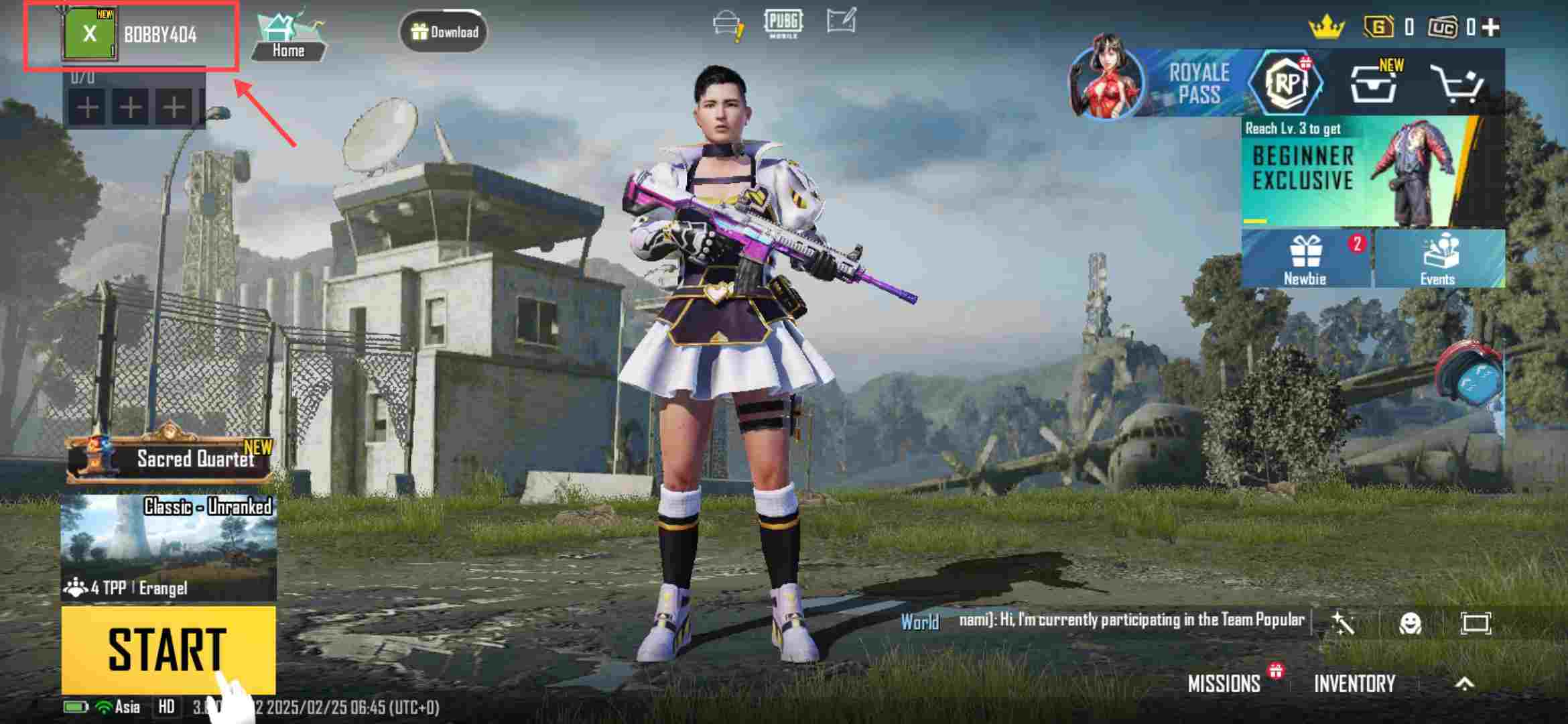
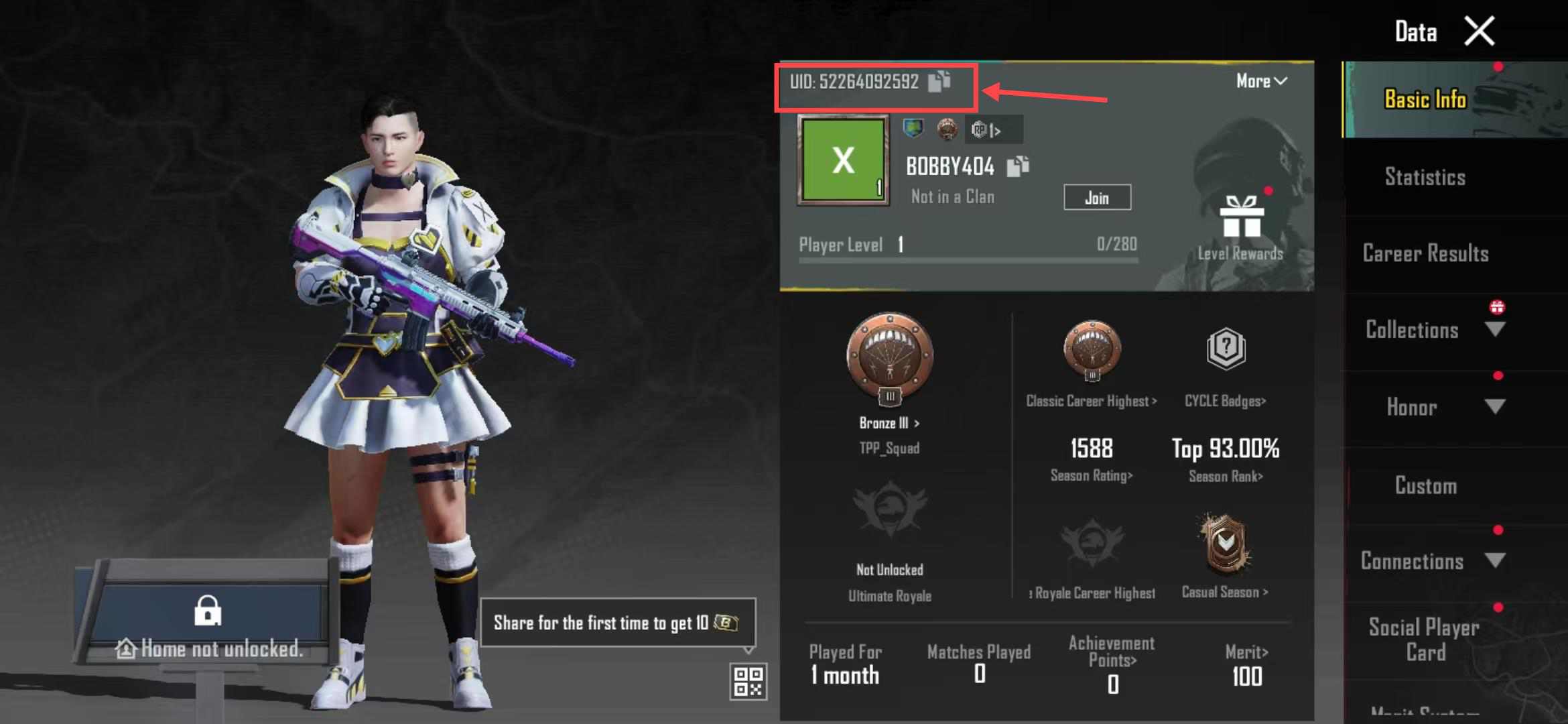
Copy your UID from your PUBG MOBILE player profile and check it carefully before paying. If an incorrect but valid UID is entered and the UC is successfully delivered to another account, the order cannot be refunded or reversed, and the UC cannot be recovered.
If the UID is invalid or the account is not on the supported server, the top-up will fail and the payment will be returned to the original payment method. The time required for the returned amount to appear depends on the payment provider or card issuer.
Top-up Guide
How to Top Up PUBG MOBILE UC on ManaBuy
Follow these steps to buy PUBG MOBILE UC on ManaBuy using your UID.
How to Find Your PUBG MOBILE UID
Product Description
About PUBG MOBILE
PUBG MOBILE, also known as PUBGM, is a free-to-play battle royale shooter for Android and iOS. In Classic mode, up to 100 players parachute onto a map, collect weapons, armor, supplies, and vehicles, and fight through a shrinking play zone for the last-player-or-team-standing “Winner Winner Chicken Dinner.”
Players can compete in solo, duo, or squad matches and switch to faster modes such as Team Deathmatch. Different maps and modes reward different approaches, from careful rotations and survival planning to close-range team fights.
New seasons, Royale Pass content, themed events, and collaborations regularly give players new rewards to pursue. Many premium rewards and event draws require UC. When they need more UC, players can buy cheap PUBG MOBILE UC on ManaBuy before unlocking a Royale Pass, joining a limited-time draw, or purchasing an in-game item they want.
PUBG MOBILE is separate from PUBG: BATTLEGROUNDS on PC and console. The UC top-up service on this page is specifically for the PUBG MOBILE International Server. For current events, patch notes, UC planning, and purchasing advice, visit the PUBG MOBILE Hub on ManaBuy.
What Is PUBG MOBILE UC?
UC stands for Unknown Cash, the main paid virtual currency in PUBG MOBILE. It is different from currencies and rewards earned through regular gameplay and is used for premium content that displays a UC price in the in-game shop, Royale Pass screen, or selected event pages.
ManaBuy provides direct PUBG MOBILE UC top-up using the UID linked to the receiving game account. You only need to enter the PUBG MOBILE UID; your game account password is not required. After a successful order, the UC is credited directly to the account linked to that UID.
What Can You Buy With PUBG MOBILE UC?
PUBG MOBILE UC can be used for premium content such as Royale Pass options and additional pass ranks, character outfits, weapon skins and finishes, and vehicle skins. These purchases let players customize how their character, equipment, and vehicles appear in matches and in the lobby.
Depending on what is currently available in the game, UC may also be used for emotes, voice packs, parachutes, backpacks, helmet finishes, crates, Lucky Spins, bundles, and limited-time event draws. Availability, draw rules, and UC prices can change between seasons, events, and accounts.
Before topping up, check the current UC price of the Royale Pass, draw, bundle, or item you want. Then compare that requirement with your existing balance and choose the ManaBuy UC package that most closely covers the amount you still need.
Why Buy PUBG MOBILE UC on ManaBuy?
When buying PUBG MOBILE UC, players usually compare price, delivery speed, required account information, available payment methods, and access to support. ManaBuy brings those details together in a direct UC top-up flow for the PUBG MOBILE International Server.
- Cheap PUBG MOBILE UC packages. Each product card shows the UC included, including bonus UC where available, together with the current selling price and original price, making package value easier to compare before checkout.
- Fast, UID-based direct top-up. Delivery uses the PUBG MOBILE UID entered for the order, so the game account password is not required.
- Payment choices for the selected currency. The product page shows the available payment-method icons. The final amount payable is shown at checkout after a payment method is selected.
- 24/7 live human support. Real customer service staff are available around the clock to respond when assistance is needed.
Together, cheap UC package pricing, direct UID delivery, currency-based payment choices, and 24/7 live assistance make ManaBuy a practical option for International Server players preparing for a Royale Pass, draw, event, or cosmetic purchase in PUBG MOBILE.
FAQ
How Much UC Do I Need for the PUBG MOBILE Royale Pass?
Is It Safe to Buy PUBG MOBILE UC on ManaBuy?
Which PUBG MOBILE Server Does This UC Top-up Support?
What Payment Methods Can I Use for PUBG MOBILE UC?
How Long Does PUBG MOBILE UC Delivery Take?
What Happens If I Enter the Wrong PUBG MOBILE UID?
What Should I Do If My PUBG MOBILE UC Has Not Arrived?
Can I Top Up PUBG MOBILE UC for a Friend?
User Reviews
View All


Media Coverage


Related Articles

PUBG MOBILE 2026 Events and Skins Tracker

PUBG MOBILE Halloween PDP Guide: Sets, Lucky Spin, and UC Stop Lines
Trending Deals





Copyright © FUTURE OUTLOOK TECHNOLOGY LIMITED.Company Registration No.: 77374965 All rights reserved.UNIT 135,1/F.,143 WAI YIP STREET,KWUN TONG HK