
EN / $ USD


Love and Deepspace
4.94
14647
Top up Love and Deepspace on ManaBuy with great discounts and enjoy quick, secure processing.



Select Product
ManaBuy Premium · Extra 3% off

Companionship Pack
$18.20
$18.99
With Premium: $17.65

Aurum Pass (30 Days)
$4.70
$4.99
With Premium: $4.56

60 Crystals
$0.94
$0.99
With Premium: $0.91

300 Crystals
$4.70
$4.99
With Premium: $4.56

450 Crystals
$6.52
$6.99
With Premium: $6.32

980 Crystals
$14.10
$14.99
With Premium: $13.68

1980 Crystals
$27.20
$29.99
With Premium: $26.38

3280 Crystals
$46.80
$49.99
With Premium: $45.40

6480 Crystals
$94.80
$99.99
With Premium: $91.96
Top-up Instructions
Love and Deepspace: Select a product, enter the required account information exactly as shown in the game, and verify it before payment. No game password is required.
Love and Deepspace Top-up Information
Applicable Platform
Supported mobile version on Android and iOS
Applicable Server / Account
Select the same server used by the game account
Delivery Time
Usually within a few minutes after successful payment; peak periods, maintenance, or verification may cause delays
Required Information
UID + Server
Top-up Result
After completion, the selected product is credited to the game account linked to the submitted information. Log in and check the balance or entitlement.
Supported Payments and Currencies
Available methods depend on checkout currency, region, device, and the options displayed on the live checkout page.
Top-up Guide
How to Find Your Love and Deepspace ID?
1. Log in to the game of the corresponding server using your account.
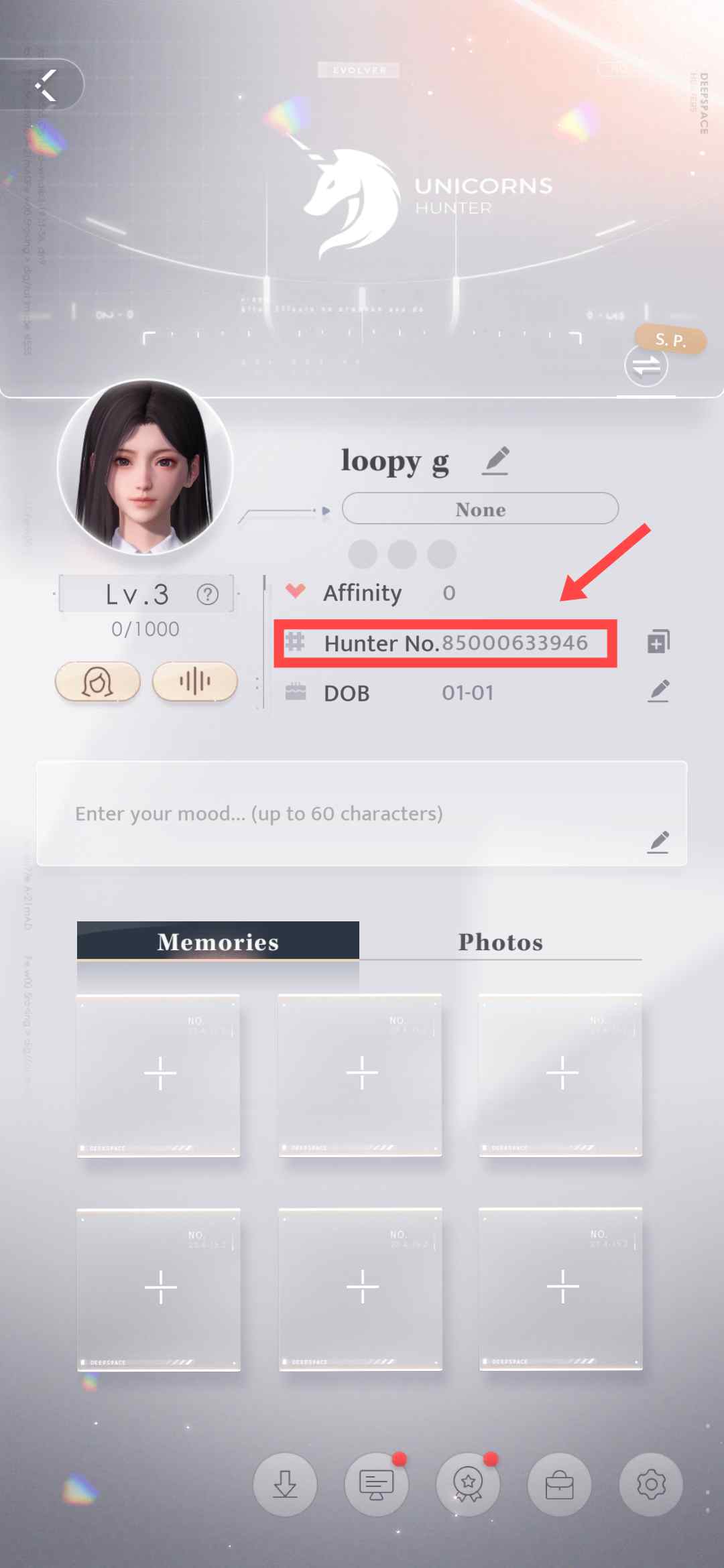
2. Click the top left corner to open your player profile.
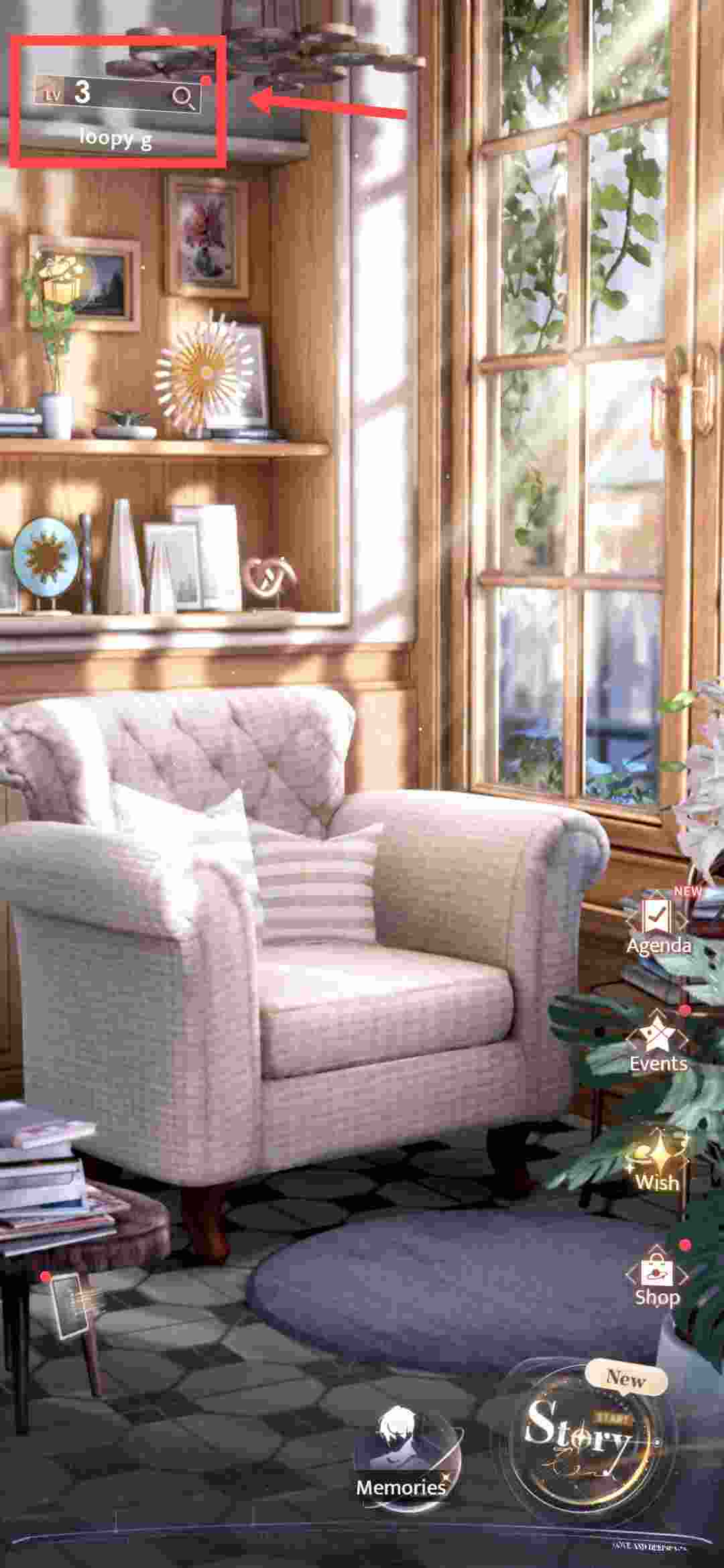
3. Your ID will be displayed on the profile screen.
How to Top UP Love and Deepspace on ManaBuy?
Step 1
Log in to your ManaBuy account and select your language and currency to ensure it is compatible with your region.
Step 2
Enter the Love and Deepspace top-up interface.
Step 3
Choose the product of Love and Deepspace you want to buy.
Step 4
Enter your Love and Deepspace ID.
Step 5
Click the "Buy Now" button to proceed with payment.
Step 6
Please wait a moment after the payment is completed. The purchased product will be added to your Love and Deepspace account.
Product Description
About Love and Deepspace
Love and Deepspace is an immersive interactive love game that incorporates elements of science fiction and adventure, presenting a dramatic love story. The game offers multiple modes: Story mode deepens your relationship with the male protagonist; Dating mode lets you experience romantic moments in various scenes; Interactive mode reveals the male protagonist’s emotional shifts; and Dress-up mode allows you to customize the heroine’s appearance. This blend of modes enriches the game’s love narrative.
What are Love and Deepspace Crystals?
Crystals are a premium currency in Love and Deepspace. They are mainly obtained through purchases and can be used to buy rare items, unlock features, and upgrade equipment.
What are Companionship Pack?
Companionship Pack is a premium battle pass for Love and Deepspace.
What are Aurum Pass?
Aurum Pass is a monthly pass for Love and Deepspace.
Why Top Up Love and Deepspace Diamonds on ManaBuy?
ManaBuy ensures quick and dependable Love and Deepspace Diamond recharges, processing your payment swiftly for immediate results. Enjoy 24/7 customer service, a variety of secure payment options, and instant support whenever you need assistance.
How to Download Love and Deepspace?
Love and Deepspace is available on both Android and iOS. Based on your device, choose the corresponding app store to download the game. Tap the buttons below to get it from Google Play or the App Store.


FAQ
How Can I Track My Purchase History for Love and Deepspace on ManaBuy?
Once logged into your ManaBuy account, you can easily view your purchase history and track all transactions related to Love and Deepspace.
What Should I Do if My Love and Deepspace Purchase Isn’t Processed?
If your purchase has not been processed, please contact ManaBuy customer support via live chat or email. Provide your order number, and our team will assist you in resolving the issue as quickly as possible.
Can I Get Any Discounts or Promotions for Love and Deepspace Purchases?
Yes, ManaBuy frequently offers exclusive discounts and promotions for Love and Deepspace purchases. Keep an eye on our platform for seasonal sales and limited-time offers to make the most of your top-ups!
How Can I Purchase In-Game Currency or Products for Love and Deepspace on ManaBuy?
To purchase in-game currency or products for Love and Deepspace, simply visit the ManaBuy platform, search for Love and Deepspace, select the desired amount of currency or item, and proceed with payment. You can choose from a variety of secure payment methods, including credit cards, PayPal, and other e-wallet options.
User Reviews
View All4.9
3272 Reviews
5
4
3
2
1
Newest
Most helpful

chrisgopixel
Oct 14, 2026
Purchased:
Aurum Pass (30 Days)
this time, Worth it, a smooth finish, overall
0 people found this review helpful
Helpful (0)

niko162
Oct 14, 2026
Purchased:
1980 Crystals
A fair deal, a clean checkout, pretty easy. I could see what was happening at every step.
0 people found this review helpful
Helpful (0)

leoplumok
Oct 14, 2026
Purchased:
980 Crystals
Quick credit, right after checkout, nothing odd. The whole thing was simple to follow on mobile.
0 people found this review helpful
Helpful (0)

zoemapleplays
Oct 13, 2026
Purchased:
980 Crystals
Quick confirmation, nice and direct, all clear. The full process was clear from start to finish. That is all I needed from it.
0 people found this review helpful
Helpful (0)

calmnatedesk
Oct 13, 2026
Purchased:
Aurum Pass (30 Days)
Quick turnaround, before I reopened it, overall!
0 people found this review helpful
Helpful (0)
Show More
Related Articles
View All
Love and Deepspace Diamond Priority Guide
Mar 27, 2026
This guide explains the best Diamond spending priorities in Love and Deepspace, helping players save more efficiently for limited Wish Pools, event goals, and future favorite banners.
Love and Deepspace Caleb Ghosts' Final March Guide
Mar 27, 2026
Love and Deepspace has launched Caleb’s limited 5-Star rate-up Wish Pool Ghosts' Final March, featuring the Solar-Slot Memory pair Caleb: Nether Yearning and Caleb: Nether Parting. This guide explains the banner rules, 150-Wish guarantee path, Companion unlock value, and how players should plan their resources more efficiently.




About ManaBuy

Copyright © FUTURE OUTLOOK TECHNOLOGY LIMITED.Company Registration No.: 77374965 All rights reserved.UNIT 135,1/F.,143 WAI YIP STREET,KWUN TONG HK