

Chamet Diamonds Top Up with Fast Delivery



Select Product








Top-up Instructions
Top up Diamonds for Chamet by entering only the account's ID. No password, verification code, or account login is required.
Service details
This is a direct Chamet recharge. Choose a Diamonds package, paste the correct ID, and complete payment. The purchased balance is delivered to the account linked to that ID after the order is processed.
Important checks before payment
- Copy the ID directly from the Chamet app; do not enter a nickname, phone number, email, or invitation code.
- Confirm every digit and the selected Diamonds package before paying.
- Available payment methods and regional eligibility are determined by the live checkout page.
- Keep the order number until the balance is visible in the app.
After your order
Open Chamet and refresh the wallet or recharge balance. If the Diamonds do not appear after the order is marked complete, verify that the submitted ID matches the account and contact ManaBuy support with the order number. Do not place a duplicate order while the first order is still processing.
Top-up Guide
Follow these steps to recharge Diamonds safely. You remain in control of your Chamet account because ManaBuy does not ask for your password or one-time code.
Top-up steps
How to find your Chamet ID
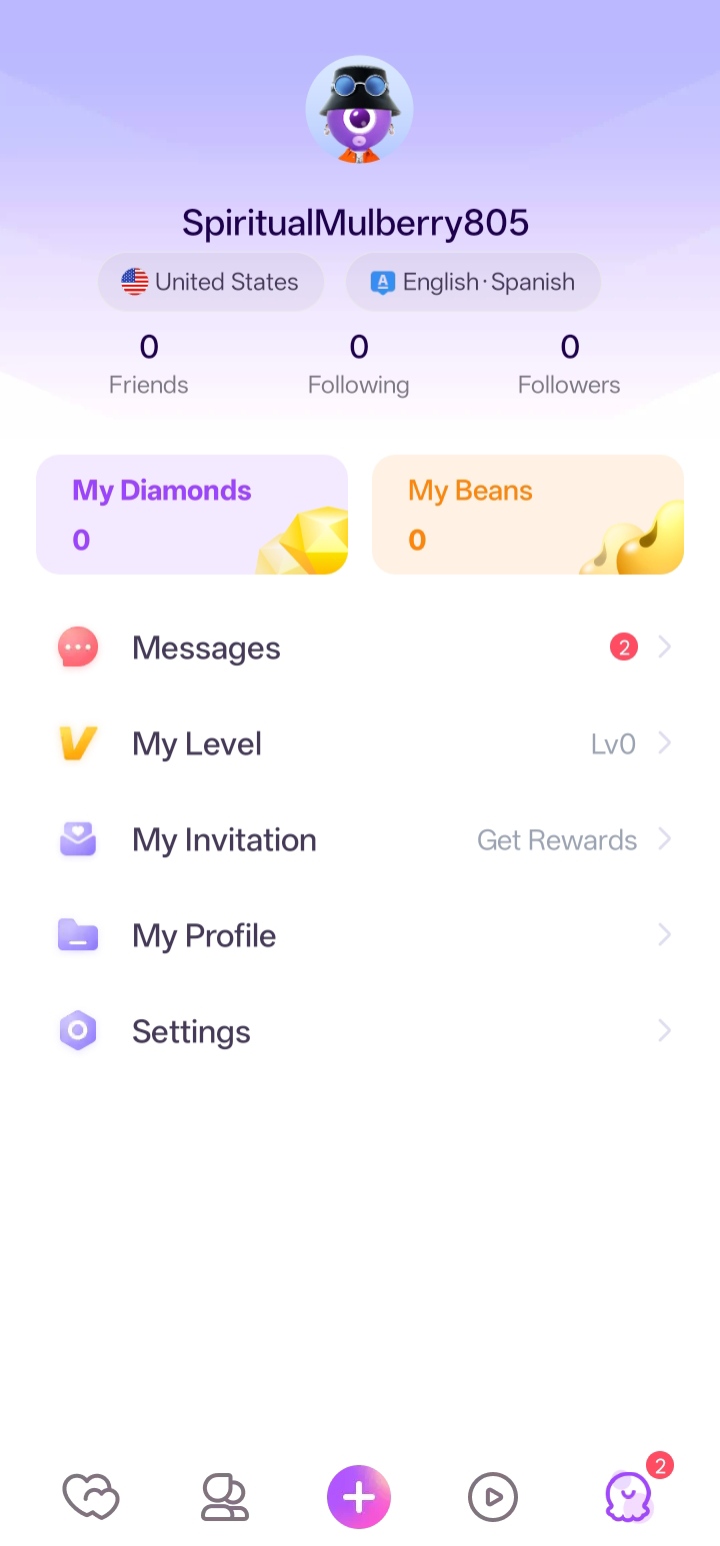
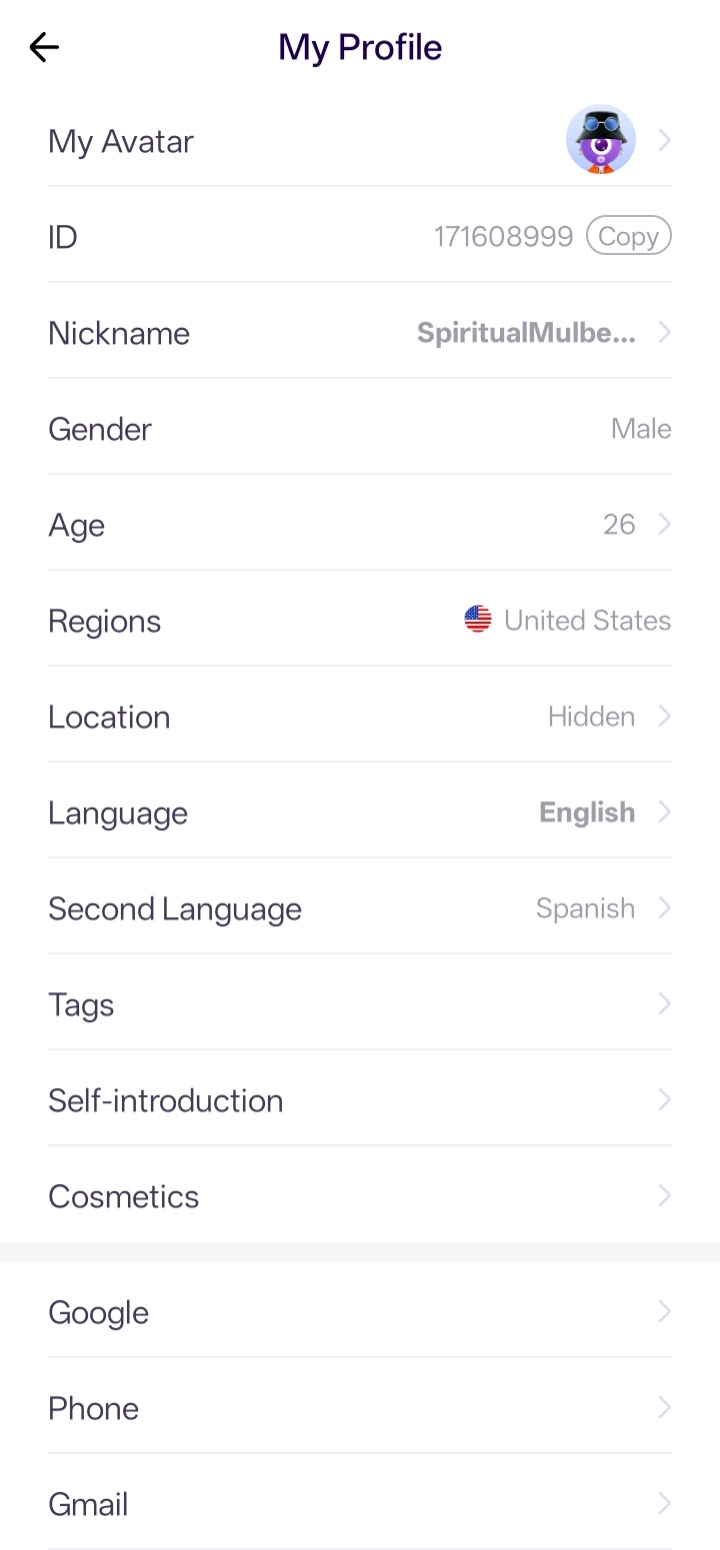
Use the ID shown in the Chamet profile, not the display name. A completed Diamonds recharge sent to the wrong valid ID may not be reversible.
If the balance has not updated
- Refresh or reopen Chamet and check the Diamonds balance again.
- Check the ManaBuy order status and compare the submitted ID with the app profile.
- If the order is complete but the balance is unchanged, contact ManaBuy support with the order number and a screenshot of the profile ID.
Product Description
About Chamet
Chamet is a social live-video and voice-chat app for meeting people, joining party rooms, watching streams, and taking part in interactive entertainment.
Its rooms and live features include social conversations, virtual gifts, profile effects, and other activities made available in the app.
What are Diamonds?
Diamonds are the paid virtual balance used inside Chamet. They are credited to the ID submitted with the order and can be spent only on features made available by the app.
What can you use Diamonds for?
- Send virtual gifts to creators, hosts, or friends.
- Use eligible paid interactions in live video or party rooms.
- Access available profile medals, visual effects, or room privileges.
- Join eligible games, events, or activities that use Diamonds.
Why top up on ManaBuy?
- Direct recharge with only the Chamet ID—no password or OTP required.
- Clear package selection and order records for your Diamonds purchase.
- Multiple payment options may be available; the live checkout page is the final reference.
- Support can trace an order using its ManaBuy order number.
Download Chamet
Install or update Chamet from an official app store before looking up the account ID. Store availability can vary by country or device.

Recharge responsibly
Diamonds are virtual items and are not cash. Review the package, ID, and total before payment, and purchase only an amount you intend to use.
FAQ
What information is required for Chamet top-up?
How will the Chamet top-up be delivered?
What if I entered the wrong ID?
Which payment methods can I use?
Can I top up Chamet for someone else?
User Reviews
View All


Trending Deals





Copyright © FUTURE OUTLOOK TECHNOLOGY LIMITED.Company Registration No.: 77374965 All rights reserved.UNIT 135,1/F.,143 WAI YIP STREET,KWUN TONG HK