
Wuthering Waves Lunites Top Up Guide for Beginners

For new Wuthering Waves players, Lunites are one of the first paid resources you may need to understand. They are mainly connected to in-game purchases, resource preparation, packs, and long-term account planning. If you are preparing for a favorite Resonator, saving for future weapons, or checking shop items, learning how Wuthering Waves Lunites top up works can help you avoid simple but costly mistakes.
This beginner-friendly guide explains what Lunites are in Wuthering Waves, what to check before buying, how to choose the right Lunites package, and how to complete a Wuthering Waves top up on ManaBuy more smoothly.
What Are Lunites in Wuthering Waves?
Lunites are a paid in-game currency in Wuthering Waves. Players usually use Lunites for paid content related to the in-game store, resource exchange, packs, or other purchase options. Unlike free resources earned through gameplay, Lunites are normally obtained through top-up.
For beginners, the key point is simple: before you buy Lunites, make sure you understand what you want to use them for and how much you actually need. This helps you avoid buying the wrong package or spending more than planned.
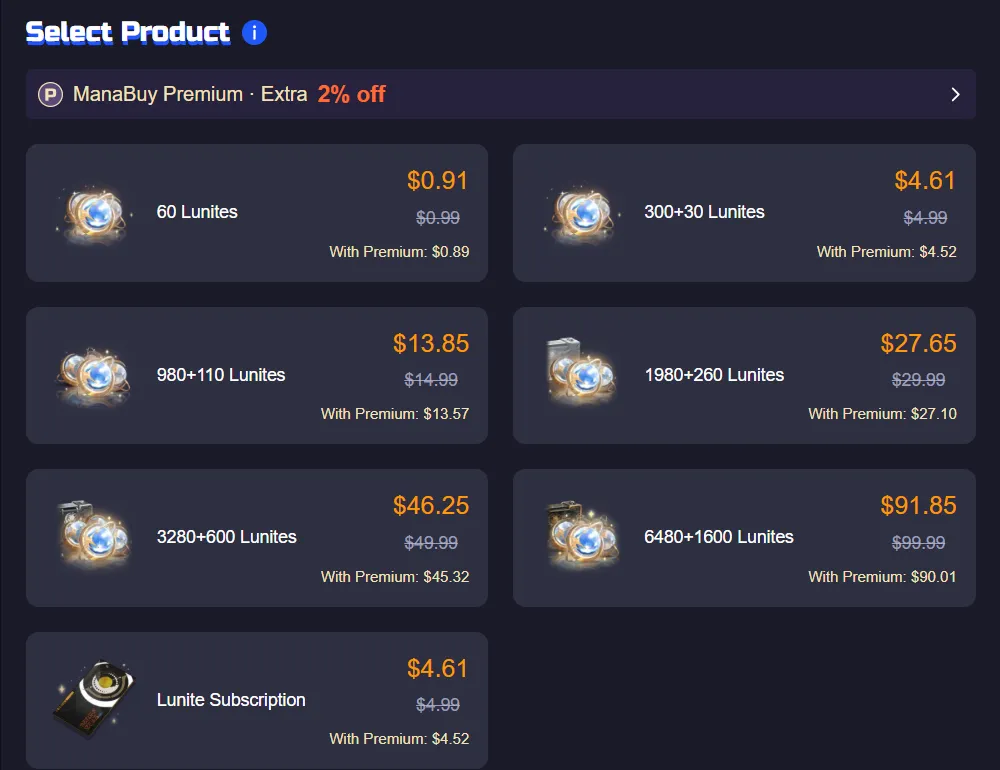
What Can You Use Lunites For?
Plan for Characters and Weapons
Many players buy Lunites to prepare for future characters, weapons, or banner plans. When a new character is released, a rerun returns, or you want to focus your resources on a specific target, planning your Lunites in advance is usually better than topping up at the last minute.
Prepare for Packs and Shop Items
Lunites may also be used for in-game shop items, packs, or other paid content. Since available items can change by version or event period, it is better to check the item you want first, then decide whether a Lunites top up is necessary.
Manage Your Spending More Clearly
A common beginner mistake is buying Lunites immediately after seeing something attractive in the game. A better approach is to check your target, estimate the amount you may need, and choose a package that fits your budget. This makes your Wuthering Waves top up more controlled and easier to plan.
What to Check Before Topping Up Wuthering Waves Lunites
Check Your Account Information
Before placing an order, make sure you provide the account details required on the top-up page. Depending on the top-up method, this may include your UID, server, character information, or other details used to identify your account. Always double-check the information before submitting the order, because incorrect account details may cause delays.
Select the Correct Server or Region
Your server or region information is very important. If you select the wrong server, the order may not be processed smoothly and may require support assistance. Beginners should not rely on memory alone. It is safer to open the game, check your account details directly, and then fill in the top-up form.
Choose the Right Lunites Pack
When choosing a Lunites package, do not only look at the largest option or the lowest price. Smaller packages are useful for players who are trying the process for the first time or only need a small amount of resources. If you already have a clear long-term plan, a larger package may be more suitable.
Confirm Your Payment Method
Before checkout, confirm that your payment method is available and working properly. Payment failure, incomplete payment information, or network issues may affect the order process. After payment, keep your order details so you can check the order status or contact support if needed.
How to Top Up Wuthering Waves Lunites on ManaBuy
Step 1: Open the Wuthering Waves Top Up Page
Go to the Wuthering Waves top up page on ManaBuy and make sure the page matches the game and product you want to buy. Avoid using unclear links or pages that do not match the product, as choosing the wrong item may cause unnecessary problems.
Step 2: Choose a Lunites Package
Select a Lunites package based on your budget and in-game plan. If this is your first time buying Lunites, starting with a smaller package can help you become familiar with the process before making a larger purchase.
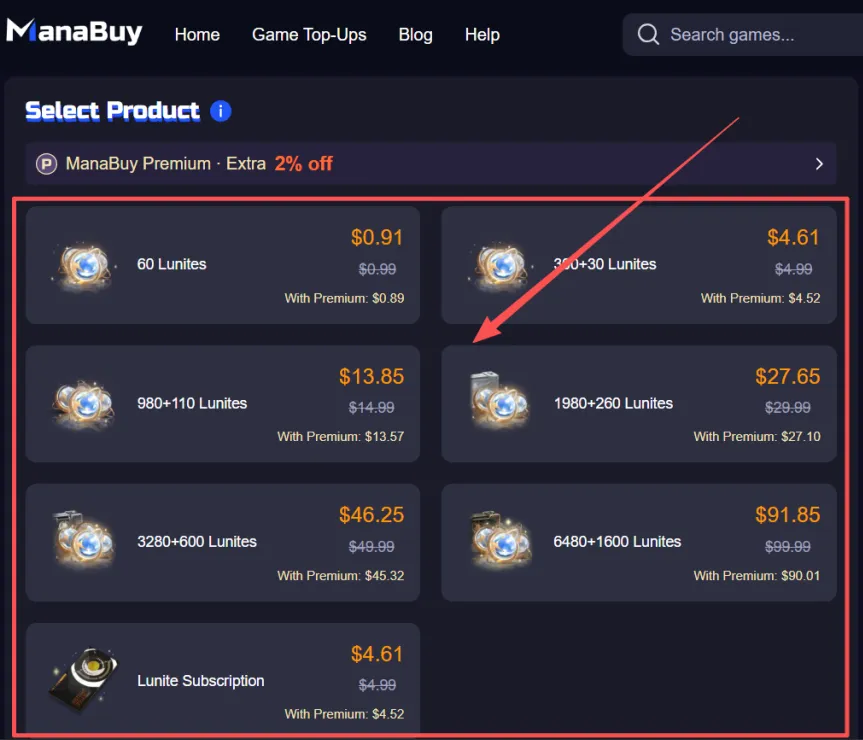
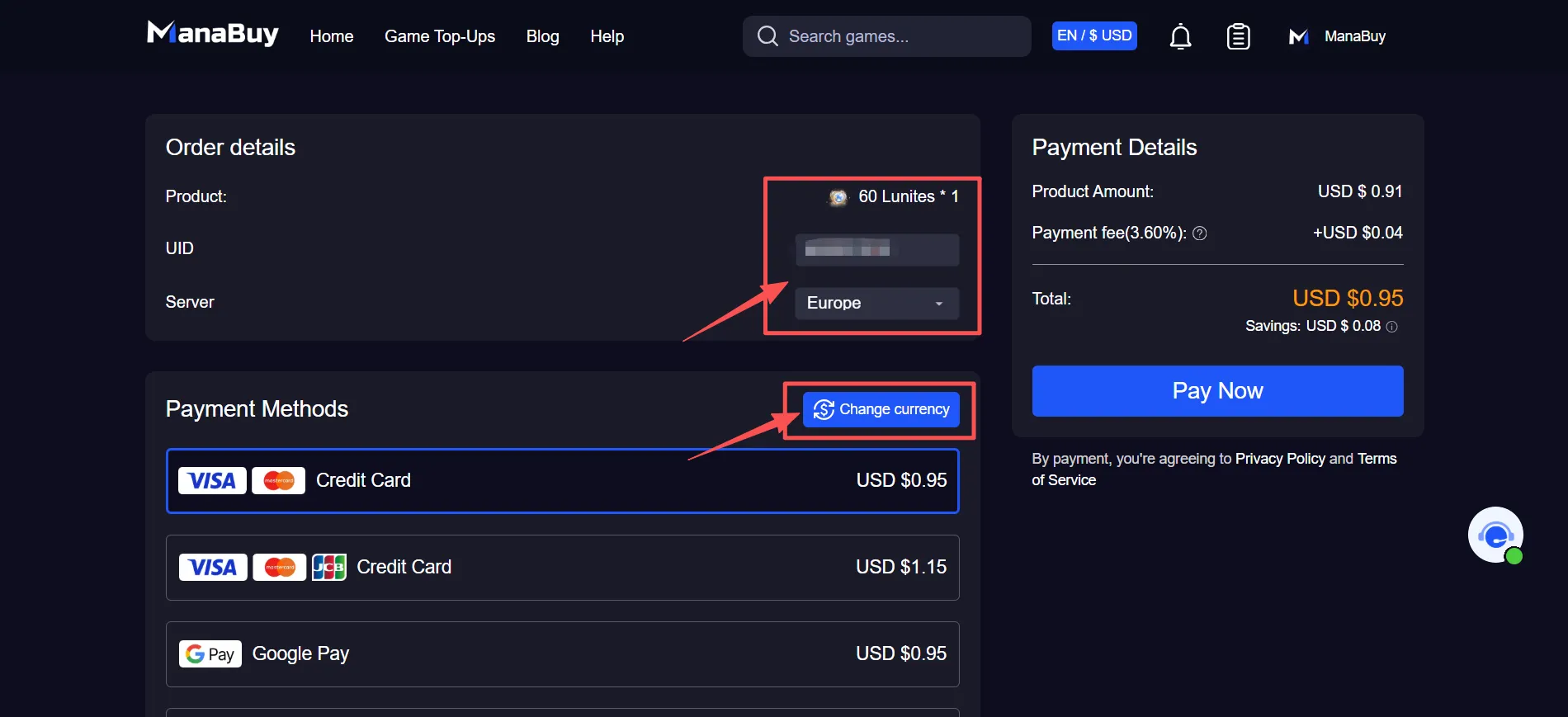
Step 3: Enter the Required Account Details
Follow the page instructions and enter the required account information. Pay special attention to your account details, server information, and selected Lunites package. Do not check only one part of the order and ignore the rest.
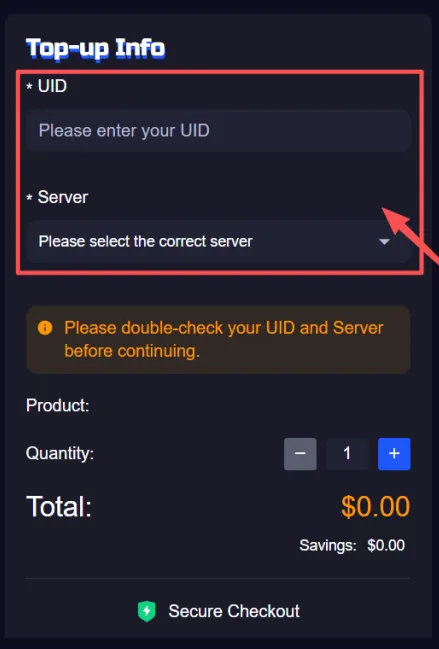
Step 4: Complete the Payment
After confirming that all details are correct, complete the payment with one of the available payment methods. Once the order is submitted, it will be processed according to the information you provided.
Step 5: Check Your Game Account
After the top-up is completed, return to the game and check whether the Lunites have arrived. If your balance does not update after some time, check your order status first and then contact ManaBuy support with your order information.
How Long Does Wuthering Waves Lunites Top Up Take?
The top-up time may be affected by several factors, including whether your account information is correct, whether the payment was completed successfully, server status, and order volume. If all details are accurate, the order is usually easier to process. If the UID, server, or other account information is incorrect, delays may happen.
For beginners, the best way to reduce waiting time is not to place repeated orders, but to check all details carefully before payment. This includes the selected package, account information, server or region, and payment status.
Common Mistakes Beginners Should Avoid
If this is your first time completing a Wuthering Waves top up, try to avoid these common mistakes:
- Placing an order without checking your account information;
- Selecting the wrong server or region;
- Buying a package without reading the package details;
- Submitting repeated orders shortly after payment;
- Forgetting to save your order information;
- Confusing Lunites with free in-game resources;
- Using unclear or unreliable top-up channels.
Is ManaBuy a Good Choice for Wuthering Waves Lunites Top Up?
If you want a clearer way to complete a Wuthering Waves Lunites top up, ManaBuy can be a convenient option. Players can choose a package on the page, enter the required account details, and complete the order with supported payment methods.
For beginners, the most important things are a simple process, easy-to-compare prices, accessible order information, and support when something goes wrong. ManaBuy’s top-up page is designed to be straightforward, making it suitable for new players who want a more direct purchase flow.
Wuthering Waves Lunites Top Up FAQ
What are Lunites in Wuthering Waves?
Lunites are a paid in-game currency in Wuthering Waves. They are usually connected to in-game purchases, resource exchange, packs, or other paid content.
What is Wuthering Waves Lunites top up?
Wuthering Waves Lunites top up means buying Lunites for your Wuthering Waves account through a supported top-up page. Players usually need to choose a package, provide the required account details, and complete payment.
Do beginners need to buy Lunites?
Not necessarily. Beginners can play the game first and then decide whether to buy Lunites based on their character, weapon, pack, or resource needs.
What should I check before buying Lunites?
Before placing an order, check your account information, server or region, selected package, and payment method. If any of these details are wrong, the order may be delayed.
Can I start with a small Lunites pack?
Yes. A small Lunites pack is suitable for players who are trying the top-up process for the first time or only need a small amount of resources.
Why is my Wuthering Waves top up delayed?
Common reasons include incorrect account details, wrong server selection, delayed payment confirmation, server issues, or high order volume. If your Lunites do not arrive after some time, contact customer support with your order information.
Is Wuthering Waves Lunites top up cheaper on ManaBuy?
ManaBuy displays the available packages and current prices on the product page. Players can compare different options before placing an order and choose the package that best fits their budget.
Can I top up Wuthering Waves without knowing my account details?
No. You should always check the account details required by the top-up page before placing an order. Missing or incorrect information may delay the order or require support assistance.
Final Thoughts
For Wuthering Waves beginners, Lunites top up is not difficult, but checking the details before payment is very important. By confirming your account information, server, package, and payment method in advance, you can reduce the chance of delays or order issues.
If you are planning to buy Lunites, first decide what you want to use them for, then choose a package that matches your goal. This makes it easier to prepare for characters, weapons, packs, or future content while keeping your spending under control.





Copyright © FUTURE OUTLOOK TECHNOLOGY LIMITED.Company Registration No.: 77374965 All rights reserved.UNIT 135,1/F.,143 WAI YIP STREET,KWUN TONG HK