
What Payment Methods Can You Use to Buy PUBG MOBILE UC on ManaBuy?

Many players are not sure which payment method they should choose when topping up PUBG MOBILE UC on ManaBuy. Some users prefer to pay directly with a bank card, while others more often use PayPal, Apple Pay, or Google Pay. In some regions, users rely more on local e-wallets or local payment methods.
In this article, ManaBuy will explain this in detail so that players can buy PUBG MOBILE UC more safely and conveniently.
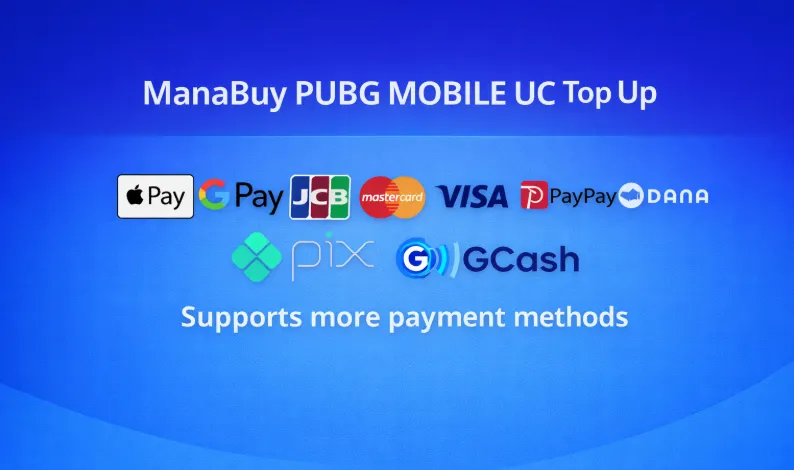
What Payment Methods Can Be Used for PUBG MOBILE Top Up?
ManaBuy’s payment methods for PUBG MOBILE top up can generally be divided into three categories: international bank card payments, digital wallet payments, and localized payment methods.
International Bank Card Payments
For many PUBG MOBILE players, bank cards are still the most direct and common top-up method. Common bank card payment options usually include Visa and Mastercard, and in some checkout environments you may also see JCB.
The advantage of this method is very straightforward. Most international users are already used to paying directly with a bank card when shopping online, without needing to switch to another wallet app or rely on a specific local payment platform. If you care more about a simple and direct process, bank card payment is usually a stable choice.
Digital Wallet Payments
Besides bank cards, many PUBG MOBILE players also prefer to complete payment using digital wallets. Depending on the currency and device environment, the checkout page may display options such as PayPal, Apple Pay, and Google Pay.
For many users, the advantage of digital wallets is that the payment process is faster and better suited to mobile habits. Especially for users who have already linked their payment details on their phone or browser, these methods are often the preferred choice when buying PUBG MOBILE UC.
Localized Payment Methods
In many markets, the payment tools users rely on most are not international bank cards, but local payment solutions. Because of this, ManaBuy also matches localized payment methods based on different currencies and regions.
For example, users in Brazil may see Pix, users in Indonesia may see DANA or OVO, users in the Philippines may see GCash, users in South Korea may see Kakao Pay, NAVER Pay, or Samsung Pay, and users in Japan may see PayPay.
Payment Methods That May Appear for PUBG MOBILE Top Up Under Different Currencies
For PUBG MOBILE players, it is very important to understand that currency can affect available payment methods. In many cases, the final payment options you can use are determined not only by your country or region, but also by the currency you actually select at checkout.
Here are some easier-to-understand examples:
USD
If you check out in USD, the payment methods commonly shown may include Visa, Mastercard, JCB, Google Pay, and Apple Pay.
This combination is generally more suitable for international users, especially players who are used to paying directly with bank cards or major digital wallets.
EUR
If you check out in EUR, in addition to Visa, Mastercard, JCB, Google Pay, and Apple Pay, you may also see payment methods such as BANCOMAT Pay and iDEAL, which are more aligned with payment habits in Europe.
JPY
If you check out in JPY, in addition to Visa, Mastercard, JCB, Google Pay, and Apple Pay, you are also more likely to see PayPay.
For users in Japan, this payment environment usually feels more natural.
BRL
If you check out in BRL, you may see Pix, Visa, Mastercard, and JCB.
Among these, Pix is often a core payment option for users in Brazil.
IDR
If you check out in IDR, you may see DANA, OVO, Visa, Mastercard, and JCB.
This setup is more consistent with the daily payment habits of users in Indonesia.
PHP
If you check out in PHP, you may see GCash, BPI, Billease, Visa, Mastercard, and JCB.
For the Philippines market, local payment methods are usually very important.
KRW
If you check out in KRW, you are more likely to see Samsung Pay, Kakao Pay, NAVER Pay, Visa, Mastercard, and JCB.
These methods are more in line with the payment preferences of users in South Korea.
It is important to note that this does not mean every PUBG MOBILE player will always see these payment methods. It means that under the corresponding currency and market, these options are more likely to appear.
How to Check Which Payment Methods You Can Use for PUBG MOBILE Top Up
If you want to know exactly which payment methods are available when buying PUBG MOBILE UC on ManaBuy, the most direct way is to check during the checkout process.
Step 1
Go to ManaBuy first and select the language and checkout currency you want to use.
Step 2
Open the PUBG MOBILE top up page and choose the UC amount you want to buy.
Step 3
Fill in the correct top-up information as required on the page, then continue to the payment page.
Step 4
On the payment page, you can directly view the payment options currently shown by the system.
If you want to try different payment methods, you can also switch currencies and check whether other payment options appear.
Step 5
After confirming the payment method, complete the payment and wait for the order to be processed.
If you encounter problems such as payment failure, missing payment methods, or abnormal order status, you can also contact ManaBuy customer support for help.
Is It Safe to Pay for PUBG MOBILE UC on ManaBuy?
For many first-time users, payment safety is also a very important concern.
The payment methods supported by ManaBuy are not unfamiliar or hard-to-recognize niche channels. They include Visa, Mastercard, PayPal, Apple Pay, Google Pay, as well as many widely used local payment methods in different regions.
This means users can more easily complete payment using payment tools they are already familiar with when buying PUBG MOBILE UC. For most players, this makes the entire payment process clearer and easier to understand.
FAQ
What payment methods are supported for buying PUBG MOBILE UC on ManaBuy?
In general, the available methods may include Visa, Mastercard, JCB, PayPal, Apple Pay, Google Pay, and some local payment methods.
However, which options are actually displayed still depends on the currency you choose, your region, and the current checkout environment.
Why do I see different payment methods than other users?
Because ManaBuy’s payment methods are displayed dynamically based on each user’s currency, region, and checkout conditions, different PUBG MOBILE players may see different payment options.
Can I use local payment methods for PUBG MOBILE top up?
Yes. If your region and selected currency support it, you can choose a local payment method available in your market.
What should I do if my payment fails?
You can first check whether you selected the correct currency, whether the payment page loaded properly, and whether your bank card, wallet, or network environment has any restrictions. If the problem still continues, you can contact ManaBuy customer support for further help.
Can I view more payment methods by switching currencies?
Yes. Since different currencies may match different payment methods, the options displayed on the payment page may also change after you switch the checkout currency.
Conclusion
For PUBG MOBILE players, the payment methods shown during top up are not fixed. They are adjusted dynamically based on currency, region, and checkout environment. Because of this, different users may see different payment methods when buying PUBG MOBILE UC on ManaBuy.
If you want to top up PUBG MOBILE UC, it is best to first decide which currency suits you, then go to the checkout page and check the payment methods currently available in real time. This will make it easier to complete your PUBG MOBILE top up.


Copyright © FUTURE OUTLOOK TECHNOLOGY LIMITED.Company Registration No.: 77374965 All rights reserved.UNIT 135,1/F.,143 WAI YIP STREET,KWUN TONG HK