
Likee Diamonds Guide: How to Use, Find ID, and Top Up Safely

Likee Diamonds are the paid in-app currency used inside Likee for live gifts, creator support, and selected interactive features. If you are new to Likee, the safest way to approach Diamonds is simple: understand what they are for, confirm your Likee ID before checkout, choose a package that matches your budget, and keep your order details until the recharge is complete.
This guide was last reviewed on June 2, 2026. It is written as an evergreen beginner guide rather than a one-time 2025 news post, so the focus is on steps that remain useful whenever you need to top up Likee Diamonds. Package availability, payment methods, promotions, and delivery timing can still vary by region and checkout environment, so always confirm the final details on the product page before payment.
If your first question is whether Likee still fits your 2026 short-video habits, read our current Likee vs TikTok guide first. This page focuses on the practical Diamond, Likee ID, and checkout steps once you decide to use the app.
Quick answer: Likee Diamonds are mainly used for virtual gifts and live-stream interactions. Before buying, open Likee, copy your Likee ID exactly, select the Diamond package on the Likee top-up page, complete secure checkout, then check your Likee account after the order is processed. You do not need to share your Likee password for a normal ID-based top-up.
What Are Likee Diamonds?
Likee is a short-video and live-streaming app where creators post videos, use effects, and interact with viewers. Diamonds are Likee's paid currency. Viewers commonly use Diamonds to send virtual gifts to creators during live broadcasts or to join paid interaction features when those features are available in the app.
For beginners, the important point is that Diamonds are not the same as likes, followers, or normal engagement. Diamonds are purchased with real money, so they should be treated as a budgeted entertainment expense. Decide how many Diamonds you actually need before checkout instead of topping up only because a promotion looks attractive.
What Can You Use Likee Diamonds For?
Diamond use can vary by region, app version, and current Likee feature set, but most users buy Diamonds for creator support and live-stream gifts. If you mostly watch videos casually, you may not need Diamonds at all. If you regularly join lives, support a favorite creator, or want to participate in paid interactions, a small package may be enough to start.
How to Find Your Likee ID Before Top-Up
Your Likee ID is the key account detail for a direct top-up. A wrong ID can delay the order or send the Diamonds to the wrong account, so do this step carefully before payment.
- Open the Likee app and log in to the account you want to recharge.
- Tap the profile area in the lower-right corner.
- Find your Likee ID on the profile screen.
- Copy or type the ID exactly as shown. Check every digit before checkout.
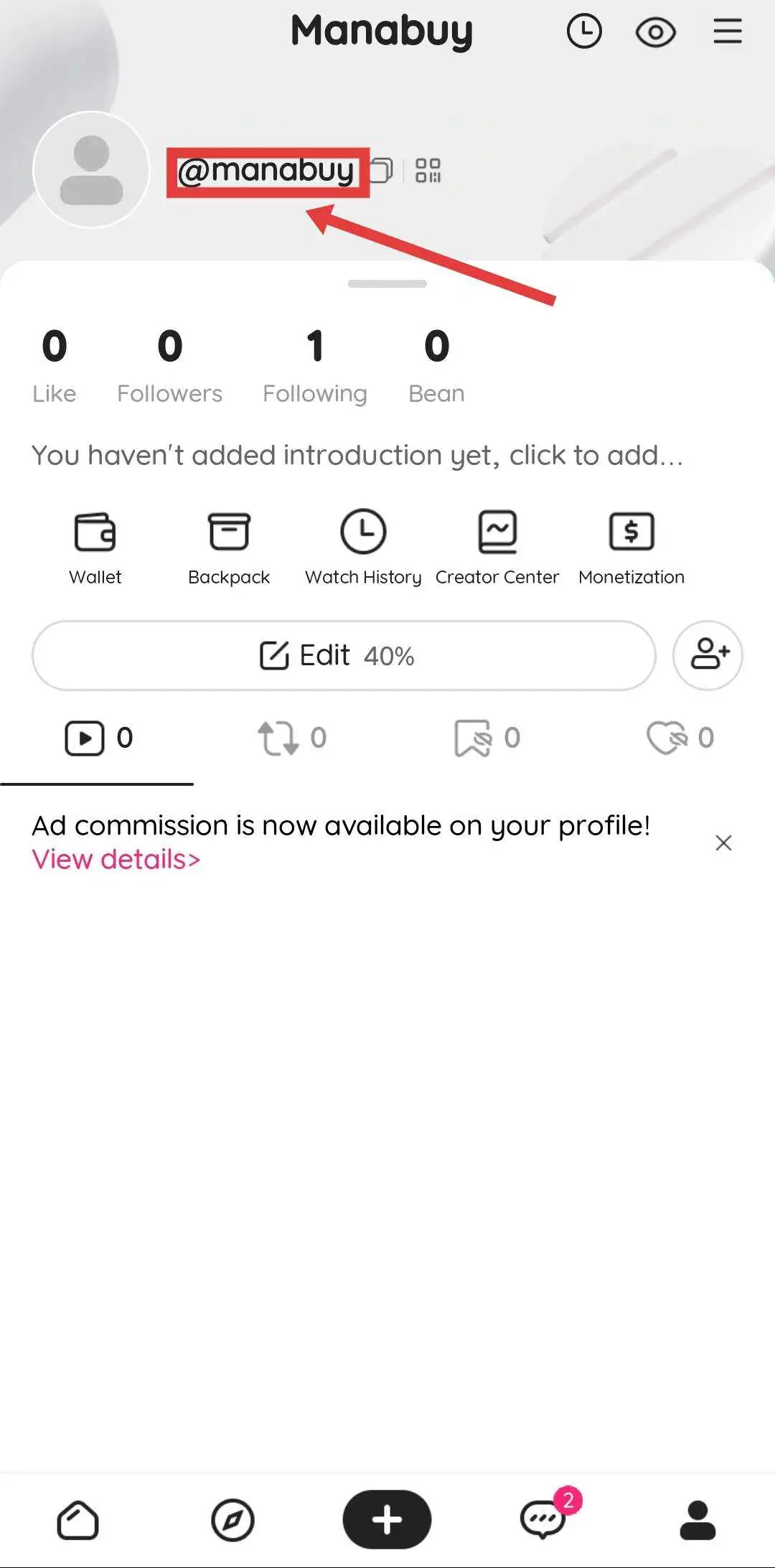
Important: Do not submit your Likee password in an article checkout flow or to anyone claiming to help with a normal Diamond recharge. For ID-based top-up, the account ID requested at checkout is the information that matters.
Likee App Recharge vs ManaBuy Top-Up
Some users recharge inside the app, while others prefer a product page where packages, payment methods, and order records are easier to review before purchase. The right choice depends on your region, checkout options, and whether the package you want is available.
How to Top Up Likee Diamonds on ManaBuy
Use the product page when you already know the Likee account you want to recharge and have checked the ID. The process is designed to be straightforward, but the checkout details still deserve a final review.

Go to the ManaBuy Likee product page and make sure the page name and product icon match Likee before selecting a package.
Compare package size, final price, and any visible promotion. Avoid buying a larger package unless you already know how you plan to use the Diamonds.
Paste or type the Likee ID exactly as it appears in your profile. Recheck the digits before moving to payment.
Pick an available payment method, confirm the final amount, and keep your order number until the recharge shows in your Likee account.
Beginner Checklist Before You Pay
Most Likee top-up problems come from rushing checkout. Use this short checklist before paying:
- Confirm you are logged into the correct Likee account before copying the ID.
- Check that the Diamond package matches the amount you actually want.
- Review the final price and currency before payment.
- Do not share your Likee password for a normal Diamond recharge.
- Keep the order number and payment confirmation until delivery is confirmed.
- If delivery looks delayed, check order status first, then contact support with the order number.
Common Likee Top-Up Mistakes to Avoid
The biggest mistake is entering the wrong Likee ID. Even one incorrect digit can make the order difficult to resolve. The second mistake is buying more Diamonds than you need. For a beginner, a smaller test package is often a better first choice than a large package.
Another common mistake is assuming every payment method or promotion is available everywhere. Checkout options can depend on your selected currency, region, device, and payment environment. Treat the checkout page as the final source for package and payment details.
Likee Diamonds FAQ
What are Likee Diamonds used for?
Likee Diamonds are mainly used for live gifts and creator interactions inside Likee. Available uses can vary by app version and region, so check the Likee app before buying if you need Diamonds for a specific feature.
Where do I find my Likee ID?
Open Likee, go to your profile, and look for the account ID shown on the profile page. Copy it exactly before checkout. If you are buying for another account, ask the recipient to confirm the ID directly.
Do I need to give my Likee password?
No. A normal ID-based Likee Diamond top-up should not require your Likee login password. Use only the account information requested at checkout and avoid sharing sensitive login details.
How long does a Likee top-up take?
Many orders are processed quickly after payment, but exact timing can depend on network, payment, and system conditions. If your Diamonds do not appear after the order is marked complete, keep your order number and contact support.
Can I top up Likee Diamonds for someone else?
You can usually recharge another account if you enter that person's correct Likee ID. Because delivery follows the submitted ID, confirm the ID carefully before payment.
Related ManaBuy Links
- Likee Diamonds Top-Up on ManaBuy
- Is Likee Still Popular in 2026? Likee vs TikTok Guide
- Likee vs TikTok Popularity Snapshot (2025)
- ManaBuy Help Center
Final Thoughts
Likee Diamonds are useful when you actively join live streams or support creators, but they are still paid currency. For a safer beginner experience, learn what Diamonds do, find your Likee ID correctly, start with a package that fits your budget, and keep the order record until delivery is confirmed. That makes the article useful beyond a single year and keeps the top-up decision practical instead of rushed.



Copyright © FUTURE OUTLOOK TECHNOLOGY LIMITED.Company Registration No.: 77374965 All rights reserved.UNIT 135,1/F.,143 WAI YIP STREET,KWUN TONG HK