
Magic Chess: Go Go Diamonds Guide: User ID, Zone ID and Pack Choice

A Magic Chess: Go Go Diamond top-up is routed by two numbers: the User ID and the Zone ID shown on the receiving profile. Copy both from the same account, choose the smallest Diamond pack that covers a confirmed in-game purchase, and review the final checkout total before paying. You do not need to share the game password.
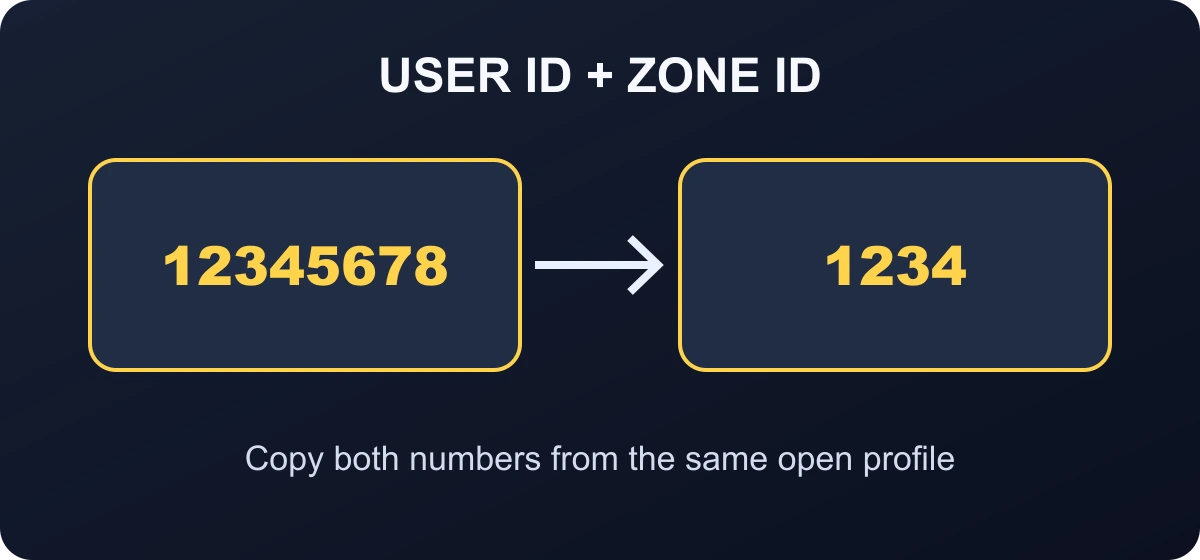
12345678 (1234) as User ID 12345678 and Zone ID 1234. A correct pair matters more than a nickname because it determines which account receives the Diamonds.What you need before a Magic Chess: Go Go top-up
| Check | Where to confirm it | Why it matters |
|---|---|---|
| User ID | Profile or Basic Info screen | Identifies the player account. |
| Zone ID | The number shown with the User ID | Routes the top-up to the correct account zone. |
| Diamond target | Current in-game item, pass, draw, or cosmetic screen | Stops you from buying a pack that is too small or leaving an unnecessary balance. |
| Payment total | ManaBuy checkout after a payment method is selected | Shows any applicable fee and the final amount before authorization. |

Confirm the standalone Magic Chess: Go Go account first
Magic Chess: Go Go is presented as its own game experience, so start from the profile that will actually receive the Diamonds. Do not copy an ID from a different game profile just because the nickname or connected social account looks familiar. Open the receiving profile, keep it on screen, and use that page as the source of truth while filling the checkout form.
How to find the User ID and Zone ID
- Open the receiving account. Do not rely on a number saved from another profile or an old screenshot.
- Tap the avatar in the upper-left corner. Open the profile or Basic Info page.
- Read the full ID pair. The account normally presents the User ID together with the Zone ID, often in a format similar to
UserID (ZoneID). - Separate the two numbers. Enter the digits before the brackets into User ID and the digits inside the brackets into Zone ID.
- Compare the pair once more before payment. Check every digit against the open game profile instead of typing from memory.
How to top up Magic Chess: Go Go Diamonds on ManaBuy
- Open the Magic Chess: Go Go top-up page and confirm the game name and icon.
- Choose a Diamond pack based on a real remaining need, not only the largest discount label.
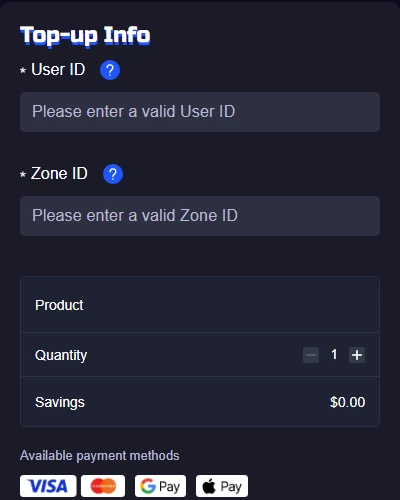
- Enter the User ID and Zone ID copied from the same profile.
- Review the selected product, quantity, account fields, payment method, any fee, and the final total.
- Complete one payment and keep the order number until the Diamonds appear on the receiving account.
Fixed Diamonds or a pass: choose by the reward you actually want
A fixed Diamond pack is easier to compare when the in-game item has a known price and you need the balance immediately. A pass-style product can be better only when you understand its claim schedule and expect to log in often enough to collect the rewards. Do not count future daily claims as if they were already available for a purchase today.
Before choosing, write down three numbers: your current balance, the in-game price, and the amount available immediately from the selected product. If the item is time-limited, leave room for payment and delivery time instead of placing the order at the final minute.
Choose a Diamond pack by remaining need
Package quantities and bonuses can change, so use the live ManaBuy product cards at checkout. A durable way to choose is to subtract your current Diamond balance from the price of the confirmed in-game purchase, then select the smallest pack that covers the shortfall.
| Your situation | Better starting point | Why |
|---|---|---|
| Small shortfall | Smallest pack that covers the gap | Keeps unused paid currency low. |
| One confirmed cosmetic or pass | Match the exact in-game price minus current balance | Connects the purchase to one planned use. |
| Two confirmed purchases | Compare one combined pack with two smaller packs | A larger pack only makes sense when both purchases are already decided. |
| Random draw without a hard stop | Pause and set a maximum spend first | A bigger balance does not guarantee the target reward. |
The product page may show base Diamonds plus bonus Diamonds. Count the delivered total printed on the selected card, but do not add an old promotion, a different store's bonus, or an account-specific first-purchase offer unless the live checkout explicitly includes it.

What a Diamond purchase can and cannot solve
Players often search for a top-up before they have opened the exact in-game screen that created the need. Do that check first. Diamonds can support eligible paid items, commander or board cosmetics, draw activity and pass-style products, but a recharge does not guarantee a random reward and it does not automatically unlock every reward shown on an event page.
For a direct item, compare the displayed Diamond price with the balance already on the account. For a draw, set a maximum number of attempts before buying. For a pass, separate the immediate purchase benefit from rewards that require daily claims or progression. A chest or themed reward may belong to a scheduled product rather than a one-time Diamond pack.
First-purchase labels can also be amount-specific or account-specific. If the live checkout and the receiving account do not both show the bonus you expect, plan with the base delivered amount only. That gives you a usable budget even when an old promotion has ended.
What to check after payment
Open the same account whose User ID and Zone ID were entered. Refresh the lobby or restart the game once, then check the Diamond balance. If the order is still processing, do not place a second order simply because the balance has not changed yet.
- No order record: keep the payment time and non-sensitive provider reference, then contact support.
- Order processing: monitor the existing order and avoid duplicate payment.
- Order completed, balance unchanged: compare the submitted User ID and Zone ID with the open profile, restart once, and send the order number to support.
- Wrong account details: contact support immediately. A successful direct delivery may not be reversible.
Common Magic Chess: Go Go top-up mistakes
- Putting the Zone ID in the User ID field or entering the full bracketed pair into one field.
- Using a nickname instead of the numeric User ID.
- Copying the User ID from one account and the Zone ID from another.
- Buying a large package before checking the in-game price of the intended item.
- Paying again while the first authorization or order is unresolved.
- Sharing passwords or verification codes that are not needed for a direct top-up.
Magic Chess: Go Go Diamond top-up FAQ
Where is the Magic Chess: Go Go User ID?
Tap the profile avatar in the upper-left corner and open the profile or Basic Info screen. Use the numeric account ID shown there.
What is the Zone ID?
It is the second number displayed with the User ID, often inside brackets. Enter it in the separate Zone ID field.
Do I need to share my password?
No. The ManaBuy direct top-up flow uses the User ID and Zone ID. Do not share a game password, email password, OTP, or social-login code.
How many Diamonds should I buy?
Check the price of the intended in-game purchase, subtract your current balance, and choose the smallest live pack that covers the difference.
Why have my Diamonds not appeared?
Check the order status first, then verify the submitted ID pair against the open account. Restart once and contact support with the order number if a completed order is still missing.
Can I top up a friend's account?
Yes, if you have the friend's current User ID and Zone ID and confirm the pair privately before payment. The friend never needs to share a password.
Final checklist
Use the current profile as the source of truth, split the User ID and Zone ID into the correct fields, and buy only against a confirmed Diamond need. One accurate order is safer than using a nickname, guessing the Zone ID, or repeating payment while the first order is unresolved.



Copyright © FUTURE OUTLOOK TECHNOLOGY LIMITED.Company Registration No.: 77374965 All rights reserved.UNIT 135,1/F.,143 WAI YIP STREET,KWUN TONG HK