
How to Top Up Last War: Survival in Malaysia with ManaBuy

Quick answer: To top up Last War: Survival in Malaysia, identify the exact in-game pack, switch ManaBuy to MYR, submit Email Account, Server ID, Character Nickname, UID and the pack screenshot through Login Top-Up, then read the final fee and total before authorising.
Step 1: identify the exact offer
If it is an Any Pack, keep the USD-based face-value label such as 0.99, 4.99 or 19.99; these numbers are pack names, not MYR prices. For a pass, fund or event bundle, use the full visible name.
Step 2: open ManaBuy in MYR
Find the matching public SKU, compare its selling price with the displayed official price and check that the screenshot shows the same product.
Step 3: submit the requested fields
ManaBuy requests Email Account, Server ID, Character Nickname, UID and Screenshot of gift pack. Use only the secured order form.
Step 4: pay once and preserve the trail
Select a live method, read the fee and final MYR total, authorise once and save the order number and receipt.
Step 5: verify delivery
Keep the account out of the session while processing. When complete, check the shop, mailbox, pass page, fund milestone or event page.
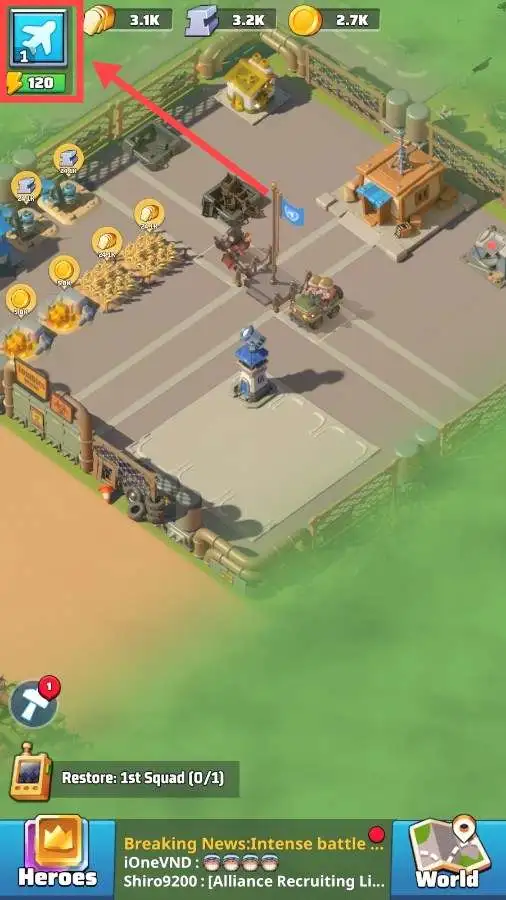
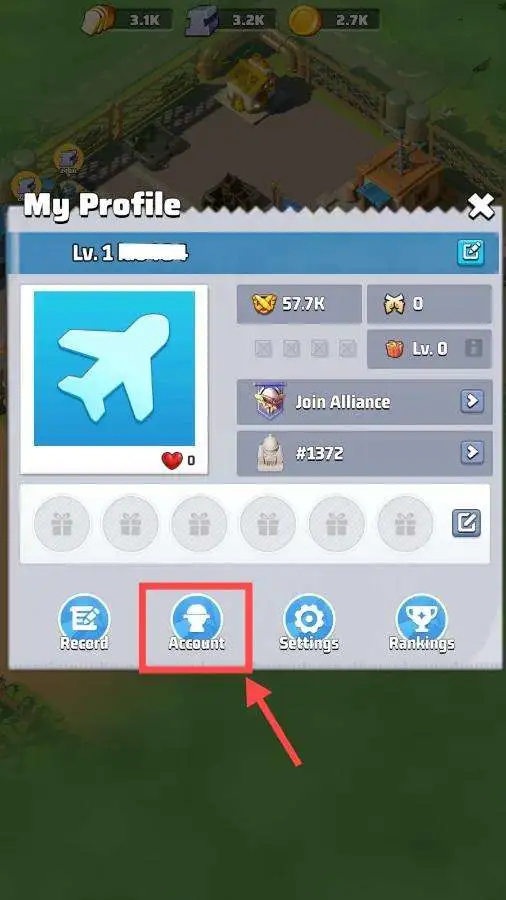
Find the account fields
Use the avatar and Account screens to confirm UID, Character Nickname and Server ID. These example screens contain no customer data.
After delivery
Check the purchased product, then review account security and change the password if required.
Keep the purchase decision auditable
Before you authorise a Last War order, keep the selected pack label, public ManaBuy selling price, displayed official comparison, payment method, visible fee and final MYR total in one private record. This makes it easier to explain a delayed or mismatched order and prevents a rotating event offer from being confused with another pack. The public article explains the decision path; the secured order form carries the account-specific fields. Never move those fields into a public comment, screenshot or shared document.
Use the account shop as the source for the reward contents. A standard pack, pass, fund or event bundle can change with account progress, server conditions or the active event. If the visible title no longer matches the public SKU, pause and ask support rather than ordering a substitute. This small check protects both the MYR budget and the delivery target.
After completion, check the relevant in-game screen and keep the receipt until the reward is confirmed. If you share an example for troubleshooting, mosaic every account and payment identifier while leaving the full UI context visible.
For Malaysian players, the sequence is straightforward: identify the offer, compare public MYR prices, verify the account fields, read the checkout total, and keep one order trail until delivery is confirmed. That sequence is more reliable than relying on a generic list of game currencies.
Keep the Login Top-Up handoff controlled
Last War is not a simple UID-only recharge on this route. The account email, Server ID, Character Nickname, UID and exact pack screenshot give ManaBuy enough context to open the intended account-side offer. Submit those details only through the secured order form and never reproduce them in a public article.
Before payment, compare the account screen with the order fields and compare the screenshot with the public SKU. During processing, do not log in or start another order unless support instructs you to. When the status is Completed, check the shop, mailbox, pass page, fund milestone or event screen that matches the product type.
This is the practical benefit of ManaBuy for Malaysian players: the public page makes the price and pack label clear, while the secured flow carries the account-specific context needed for a rotating offer.
Continue with Kingshot on ManaBuy
- ManaBuy Last War: Survival Pack Prices in Malaysia
- Last War: Survival Payment Methods in Malaysia on ManaBuy
- Last War: Survival Payment or Login Top-Up Failed in Malaysia
Ready to check Kingshot in MYR?
Open the product page, match the exact pack or price tier, prepare the secured Login Top-Up fields and read the final total before payment.



Copyright © FUTURE OUTLOOK TECHNOLOGY LIMITED.Company Registration No.: 77374965 All rights reserved.UNIT 135,1/F.,143 WAI YIP STREET,KWUN TONG HK