
Kingshot Top Up Guide: How to Match a Pack Screenshot

Reviewed on November 16, 2026 · Always use the pack currently shown on your own Kingshot account as the final reference.
A Kingshot login top-up purchases the pack you choose on the submitted game account. Because offers can rotate and two packs can share a similar price tier, a clear in-game screenshot is part of the product match—not a decorative attachment.
Quick answer: choose the matching Kingshot product on ManaBuy, complete payment, then submit the login email, password, Player ID, Character Name and a current screenshot of the exact pack. Do not log in while the order is being processed, and monitor ManaBuy onsite chat. With complete information, delivery is usually completed within 15 minutes; exceptional cases can take longer.
Why Kingshot top up uses a pack screenshot
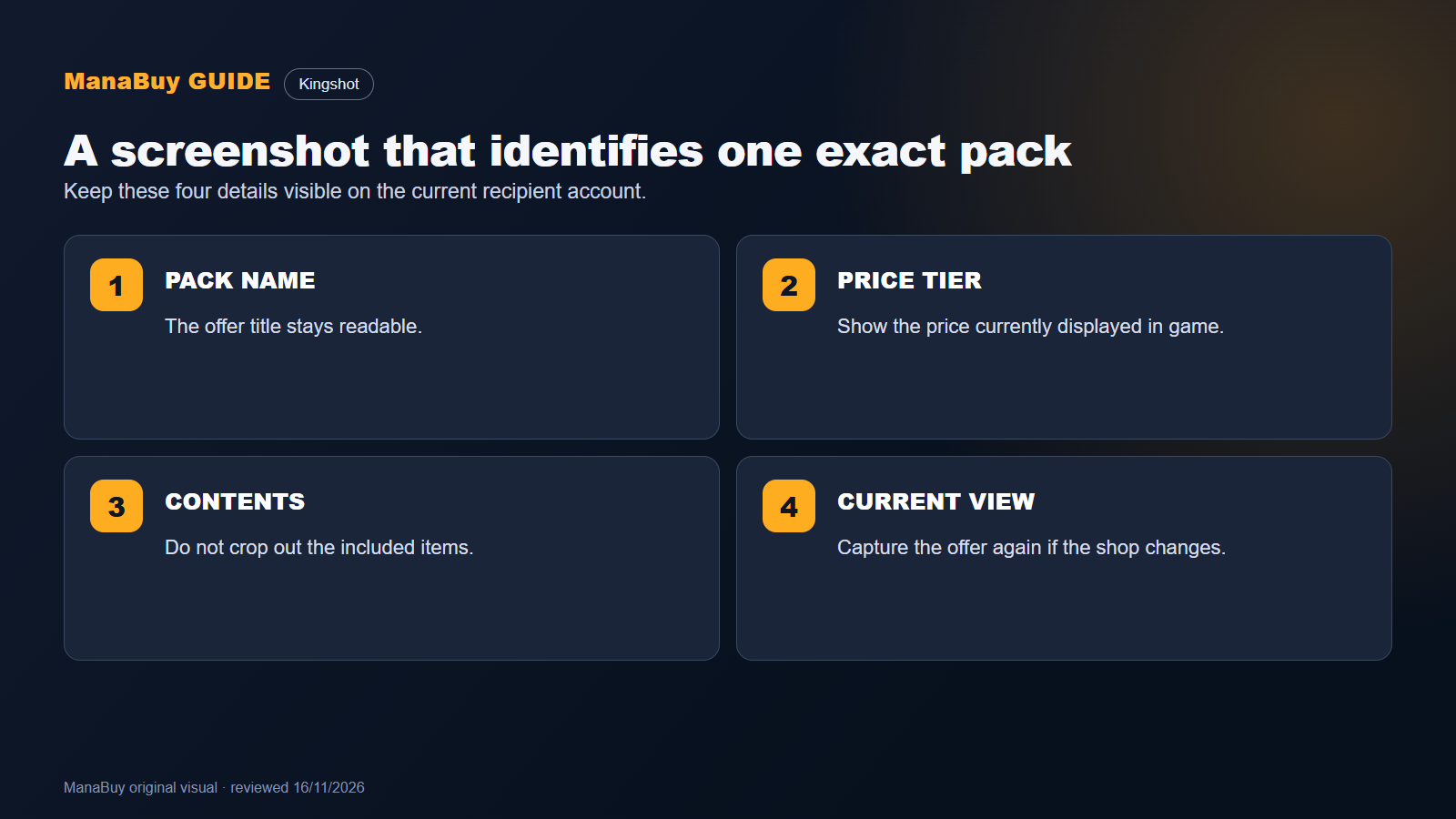
Kingshot can show named packs, price-tier offers and limited-time deals. Their availability and contents may change with events, account progress or game updates. A screenshot lets the purchase team match three details at the same time: the pack name, the displayed price tier and the included contents.
This also prevents a common misunderstanding: ManaBuy does not add prepaid store balance for you to spend later. You select a Kingshot product first, and the matching in-game offer is purchased on the submitted account.

What the screenshot must show
Pack identity
Keep the pack name or offer title visible so it can be distinguished from another deal.
Displayed price tier
Include the price shown by the game; do not rely on an old image or a different account.
Pack contents
Show the included items clearly enough to confirm that this is the intended product.
Current account view
Use a fresh screenshot from the recipient account because offers can differ by progress or event.
Account information required for login top up
The order form requires the login email, password, Player ID, Character Name and the pack screenshot. Each item serves a different purpose: the login details provide account access, the profile details identify the recipient, and the screenshot identifies the product.
| Required item | Where to verify it | Why it matters |
|---|---|---|
| Login email and password | The login method linked to the Kingshot account | Allows the selected pack to be purchased on the correct account |
| Player ID | Player profile | Provides a numeric account reference |
| Character Name | Player profile | Helps cross-check the recipient shown in the order |
| Pack screenshot | The current in-game offer page | Confirms the exact pack, tier and contents |
How to find the Kingshot Player ID and Character Name
Open Kingshot, tap the profile avatar and use the information shown on the player profile. Copy the Player ID exactly and keep the Character Name unchanged, including spacing or symbols. Do not replace the numeric Player ID with the visible name.

How to choose the matching Kingshot product
Start from what is displayed in your game, not from a remembered package list. If ManaBuy shows a price-tier product, match it to the price tier of the desired in-game offer. If it shows a named pack, confirm that the name matches. For a combined option, read the current product card before deciding what it covers.
Kingshot login top-up process on ManaBuy
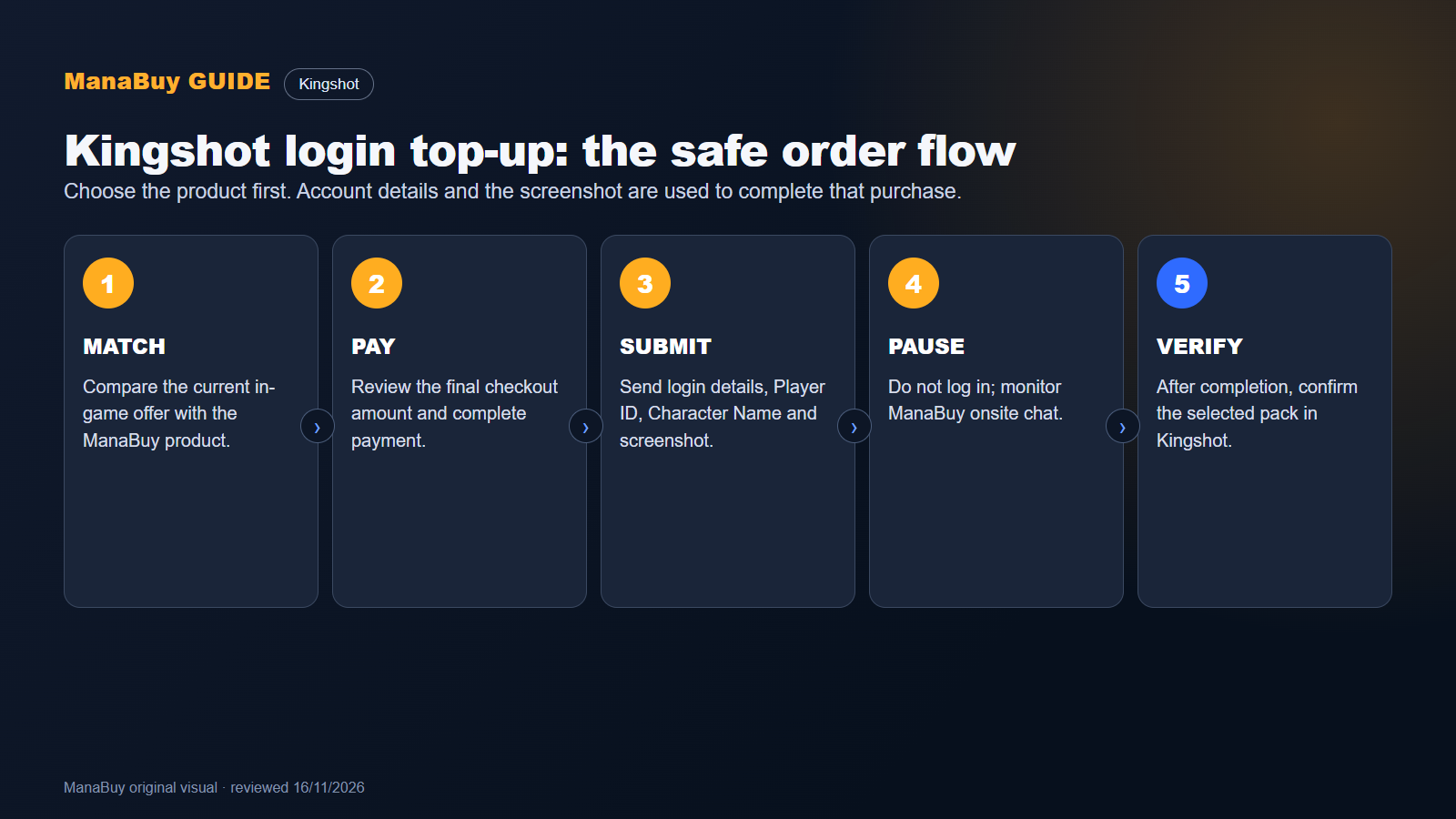
Review the products currently available on ManaBuy.
Compare it with the offer visible on your own game account.
Use the amount shown at checkout as the payment reference.
Enter every required field accurately and upload a clear current image.
Support will contact you there if the information cannot be used or needs confirmation.
Return after the order is completed and verify the selected pack on the submitted account.
Delivery time and onsite-chat checks
With successful payment and complete information, Kingshot login top-up is usually completed within 15 minutes. Exceptional cases can take longer. Incorrect login details, an inaccessible linked account or an unclear screenshot can stop processing until the information is corrected.
Keep the ManaBuy page available and monitor onsite chat while the order is being handled. That is where customer service contacts you if a login detail is wrong or another confirmation is required.
Refund and completed-delivery boundaries
If ManaBuy cannot complete the purchase, the payment is refunded to the original payment method. Once a virtual product has been purchased successfully on the submitted Kingshot account, it cannot be refunded, transferred or recovered. Check the account and screenshot before payment.
Common mistakes to avoid
- Uploading the shop home screen instead of the exact pack page.
- Cropping out the pack name, price tier or contents.
- Using an old screenshot after the offer has changed.
- Entering Character Name in place of the numeric Player ID.
- Logging in to Kingshot while the order is being processed.
- Ignoring onsite chat when support needs corrected information.
Kingshot top up questions
Can I top up with only the Player ID?
No. This product uses login top-up and also requires the linked login information, Character Name and a screenshot of the exact pack.
Why does ManaBuy need a screenshot?
It identifies the current offer by name, displayed price tier and contents so the selected product can be matched correctly.
How recent should the screenshot be?
Use the offer currently displayed on the recipient account. Do not rely on an image saved before the shop or event changed.
Can I keep playing during processing?
Do not log in to Kingshot while the order is being handled because simultaneous access can interrupt the login top-up.
How long does Kingshot top up take?
It is usually completed within 15 minutes after successful payment and submission of all required information. Exceptional cases can take longer.
What happens if my login information is wrong?
Monitor ManaBuy onsite chat. Customer service will contact you there when the details cannot be used or need confirmation.
Buy the Kingshot pack shown on your account
Open the current offer in Kingshot, prepare one clear screenshot and copy the profile information before ordering. Then use the Kingshot top-up page on ManaBuy to select the matching product and submit the order without relying on an outdated package list.
View current Kingshot packs




Copyright © FUTURE OUTLOOK TECHNOLOGY LIMITED.Company Registration No.: 77374965 All rights reserved.UNIT 135,1/F.,143 WAI YIP STREET,KWUN TONG HK