
How to Top Up Kingshot in Malaysia with ManaBuy

Quick answer: To top up Kingshot in Malaysia, select the exact ManaBuy pack or pack label, capture the in-game offer, then submit the requested Email Account, Password, Player ID, Character Name and pack screenshot through the secured Login Top-Up order flow. Confirm the MYR total before payment and do not log in while the order is processing.
What ManaBuy Login Top-Up does for Kingshot
Kingshot is a pack-driven game. Some offers are tied to kingdom age, account progress or a live event, so the order cannot rely on a generic Gems number. ManaBuy's Login Top-Up route uses the requested account flow to purchase the selected in-game item, then logs out after the order is completed. This makes the pack screenshot and exact pack label part of the delivery instructions.
Step 1: identify the exact offer
Open the Kingshot shop and note the pack title, pack label and visible contents. Decide whether it is an Any 4.99-9.99 Pack, Construction & March Queues, Hero Rally, Fishing Guild Pro & Master, Daily Deals or another named offer. Take a clear screenshot that shows the useful context but hides any unrelated personal information.
Step 2: open ManaBuy in MYR
Open the clean ManaBuy Kingshot page, switch to MYR and locate the matching public SKU. Compare the normal selling price with the displayed official price on the card. A Premium price or account coupon may be conditional, so do not use it as the universal price in your own budget.
Step 3: prepare the five requested fields
The public product instructions request Email Account, Password, Player ID, Character Name and a screenshot of the pack. Enter each field exactly as it belongs to the receiving Kingshot account. Use the secured order form only. Never paste these details into a blog comment, chat room or public image.
Step 4: pay once and preserve the order trail
Choose a payment method displayed for the live checkout, read the fee and final MYR total, and authorise only when the SKU and account fields match. Save the ManaBuy order number and provider receipt. Do not open a second order while the first is Processing.
Step 5: wait for completion and check the account
Do not log in to Kingshot while the order is being processed if the order instructions ask you to keep the session clear. When ManaBuy marks the order complete, sign in and check the balance, the relevant pack reward and the in-game mailbox. If a limited offer has a separate claim button, follow the game's own claim instruction.
Security after delivery
Change the password after the transaction, especially if the account uses a reusable Google or Facebook credential. Enable two-factor authentication where available. If you need support, send the unmasked order evidence privately and mosaic the Email Account, Player ID, nickname, order number and payment identifiers in any public copy.
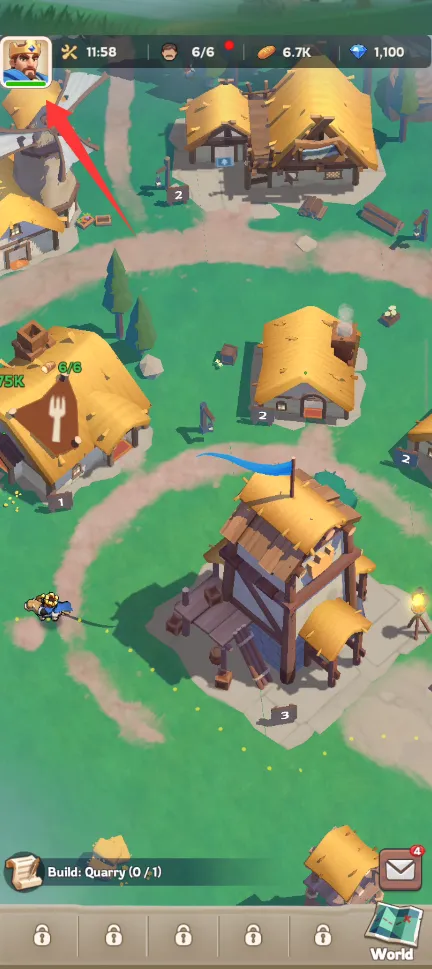
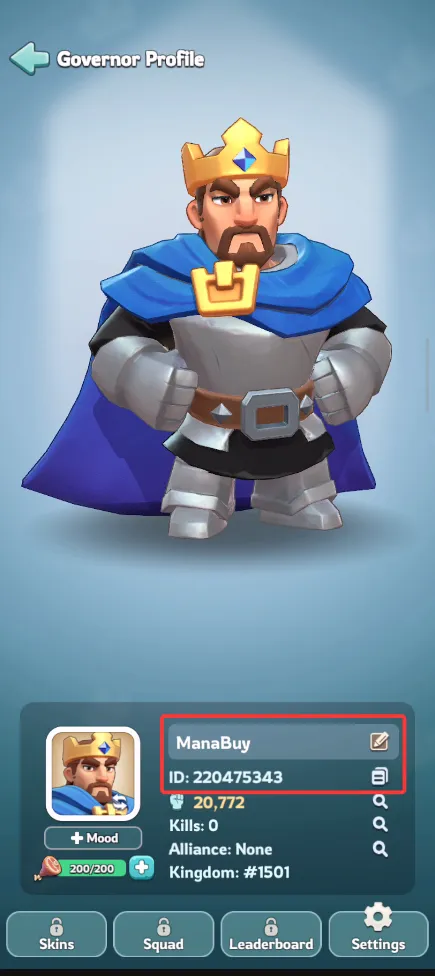
For the visual checks, the ManaBuy product instructions show the profile menu and Player ID route. Use those screens to verify the receiving account before you place the order, but do not expose the account's number or nickname in a public article. The purpose of the screenshot is to identify the correct field and pack, not to publish a player's identity.
Keep the pack screenshot accurate
The screenshot is the bridge between a rotating Kingshot offer and the ManaBuy SKU. It should show the title or pack label clearly without exposing account credentials or personal data.
Keep the account handoff controlled
Login Top-Up is different from a Player-ID-only recharge. ManaBuy needs enough information to enter the correct Kingshot account and find the intended pack, but that information should travel only through the secured order form. A public article can explain the fields; it must never reproduce a real player's email, password, Player ID, nickname or order number.
Before submitting, compare the character name and Player ID with the account profile, then compare the pack title and pack label with the screenshot. If the account is on a different kingdom or the offer is event-limited, mention that in the private order note. Do not rely on an old screenshot or a remembered Gem amount.
During processing, avoid changing the password or logging into the game unless support asks you to. A simultaneous login can interrupt the handoff or make it unclear which account was active. When the order is complete, verify the reward, then rotate the password and review two-factor authentication.
This controlled route is the practical reason to use ManaBuy for Kingshot in Malaysia: the public card establishes the price and tier, while the secured order flow carries the account-specific context required for a rotating pack.
Continue with Kingshot on ManaBuy
- ManaBuy Kingshot Pack Prices in Malaysia
- Kingshot Payment Methods in Malaysia on ManaBuy
- Kingshot Payment or Login Top-Up Failed in Malaysia
Ready to check Kingshot in MYR?
Open the product page, match the exact pack or pack label, prepare the secured Login Top-Up fields and read the final total before payment.



Copyright © FUTURE OUTLOOK TECHNOLOGY LIMITED.Company Registration No.: 77374965 All rights reserved.UNIT 135,1/F.,143 WAI YIP STREET,KWUN TONG HK