
How to Top Up NIKKE in Malaysia with ManaBuy

ManaBuy's NIKKE route for Malaysia is an ID top-up. The buyer chooses a product in MYR, enters the numeric NIKKE Player ID, selects the server attached to that account and reviews the payment total. No game password is required. The server step is essential: being in Malaysia does not automatically mean the NIKKE account is on SEA.
Quick answer: Open the NIKKE profile and copy the Player ID. Check whether the account is on KR, JP, Global, SEA or NA. On ManaBuy, keep MYR selected, choose the exact Gem pack, Monthly Pass or resource set, enter those two account fields, pay once and wait for the order to reach Completed. Then reopen the game and check the screen that matches the purchased product.
What Malaysian NIKKE players need before top-up
| Required item | Where it comes from | Why it matters |
|---|---|---|
| NIKKE Player ID | In-game profile opened from the avatar | Identifies the receiving account |
| Server | The region used by the account: KR, JP, Global, SEA or NA | Routes the order to the correct account environment |
| Product choice | ManaBuy NIKKE MYR product list | Defines whether delivery is Gems, Monthly Pass or a resource set |
| Final MYR total | ManaBuy payment page | Includes the selected provider fee before payment |
Do not prepare a password, email login or verification code for this route. If anyone asks for unrelated credentials outside the order flow, stop. The normal ManaBuy form needs only the Player ID and the selected server.
How to find the NIKKE Player ID
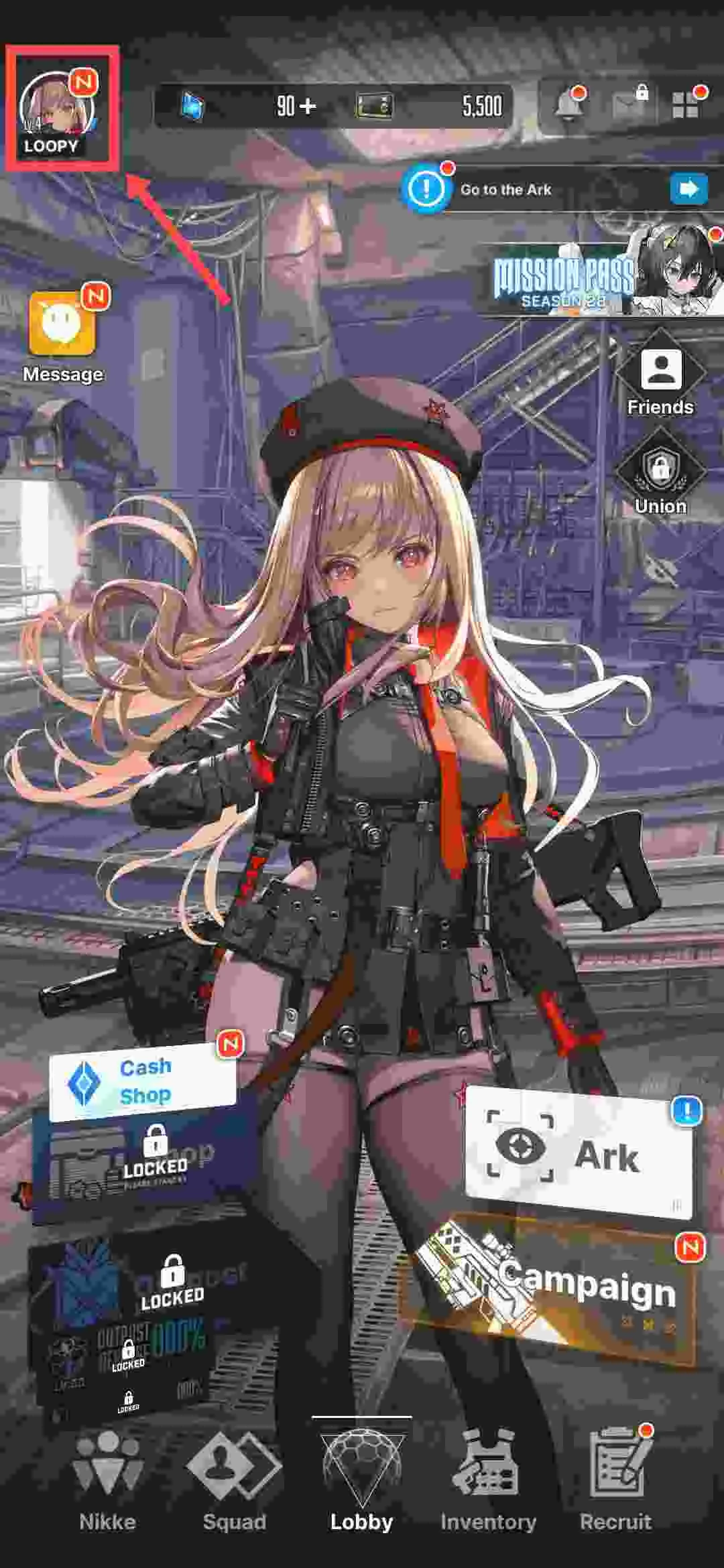
- Log in to the NIKKE account that should receive the purchase.
- Tap the avatar in the top-left corner of the lobby.
- Open the profile information panel.
- Copy the numeric Player ID exactly.
- Confirm the account server before leaving the game.
Malaysia does not decide the NIKKE server
A Malaysian player may use SEA, but another account can be on Global, JP, KR or NA. Select the server shown by the receiving account, not the buyer's physical location.
Step-by-step ManaBuy NIKKE top-up
- Open the ManaBuy NIKKE Malaysia page and confirm that the currency is MYR.
- Choose a direct Gem pack, Monthly Pass or the exact resource set required by the account.
- Enter the Player ID copied from the profile.
- Select KR, JP, Global, SEA or NA to match the account.
- Read the confirmation reminder and recheck both fields.
- Click Buy Now and compare the available payment methods.
- Confirm the product amount, provider fee and final MYR total.
- Authorize one payment and keep the order number.
- Wait for Completed, then reopen NIKKE and check the relevant item location.
This workflow keeps the ManaBuy price advantage connected to the intended account. A lower selling price cannot compensate for an incorrect Player ID or server, so the account check belongs before payment, not after.
How to choose the right NIKKE product
Use direct Gem packs when the account needs a known Gem balance. Use Monthly Pass only when the account will collect its daily value across the 30-day period. Use a resource set when the listed equipment, skill, Core Dust, console or manufacturer materials match a current bottleneck.
ManaBuy shows the selling price and official price on the same product card. Compare those fields for the exact item, then review the payment fee at checkout. Premium and coupons may improve the result further, but the normal selling price already provides the baseline comparison used in this cluster.
Where to check delivery after Completed
| Purchased product | First place to check | Common false alarm |
|---|---|---|
| Direct Gem pack | Gem balance after relogging | Looking at an old session without refreshing |
| Monthly Pass | Pass/shop state and immediate Paid Gem grant | Expecting all time-based rewards to appear at once |
| Resource set | Shop claim flow, inventory, mail or the relevant progression material screen | Checking only the Gem balance and overlooking delivered materials |
The product page says delivery is typically within minutes, often faster, but the order state is more useful than a stopwatch. If the order is Processing, keep the same order and wait. If it is Completed, relog and inspect the correct destination for the purchased product.
First-top-up eligibility check
NIKKE first-top-up treatment follows the receiving character and server history. It is not created by using a new ManaBuy login or a new payment card. If the character has recharged through another platform, the first-purchase benefit may already be used.
Confirm the account's displayed eligibility before depending on a doubled amount. The ManaBuy package name remains the normal baseline, and the public selling-price advantage does not require the conditional bonus.
If something looks wrong before payment
Stop if the server is uncertain, the Player ID has missing digits, the selected product is not the intended one or the final currency is not MYR. Return to the product page and correct the same order flow. Do not pay first and ask support to move the delivery later.
If the payment page is correct but a method is unavailable, compare another live method and its final fee. Do not open several parallel orders with the same account details.
FAQ
Do Malaysian players always choose SEA?
No. Choose the server attached to the account; Malaysia location alone does not determine it.
Does ManaBuy need my NIKKE password?
No. The ID top-up form asks for Player ID and Server.
Can I top up on PC, Android or iOS accounts?
The public product page lists Android, PC and iOS as applicable platforms.
Where do I find Player ID?
Open the avatar from the top-left of the lobby and read the numeric ID from the profile.
What should I do after the order is Completed?
Relog and check the destination that matches the product: Gem balance, pass/shop state or the relevant item/material area.
Continue your NIKKE account plan
- ManaBuy NIKKE Prices in Malaysia: Gems, Pass and Sets in MYR
- NIKKE Payment Methods and Fees in Malaysia on ManaBuy
- NIKKE Payment Failed or Top-Up Not Received in Malaysia
- NIKKE resource planning and Gem priorities
- NIKKE Burst team progression
- NIKKE event reward priorities
Ready to check the ManaBuy MYR options?
Open the Malaysia product route, choose the NIKKE product that matches the account goal, and compare the final payment total before authorizing payment. Enter only the Player ID and server shown on the receiving account.



Copyright © FUTURE OUTLOOK TECHNOLOGY LIMITED.Company Registration No.: 77374965 All rights reserved.UNIT 135,1/F.,143 WAI YIP STREET,KWUN TONG HK