
Quick answer: A different V-Bucks balance does not always mean the purchase is missing. Most supported platforms use Fortnite Shared Wallet, but V-Bucks purchased on Nintendo Switch stay separate. Launch Fortnite on the platform used for the purchase, confirm the Epic Account ID, restart once and check transaction history. For a ManaBuy order, keep those identity checks connected to the existing tracked order instead of paying twice.
Fortnite can show different V-Bucks totals on devices linked to the same Epic Games account. The reason depends on how the V-Bucks were obtained, which platform processed the purchase and whether that platform participates in Shared Wallet. Cosmetics bought with V-Bucks are a different question: Epic says purchased items remain available across platforms linked to the same Epic account.
This guide focuses on durable wallet and support checks. V-Bucks package sizes, prices, discounts, payment methods and regional offers can change, so use the live game, official store, seller page and final checkout for the purchase you are making.
How Fortnite Shared Wallet works
Epic describes Shared Wallet as a way for certain purchased V-Bucks to appear across multiple devices. Its current support examples group PC, PlayStation, Xbox and Android together. Nintendo Switch is the main exception: V-Bucks purchased on Switch are not shared with other platforms, and V-Bucks purchased elsewhere do not appear in the Switch balance.
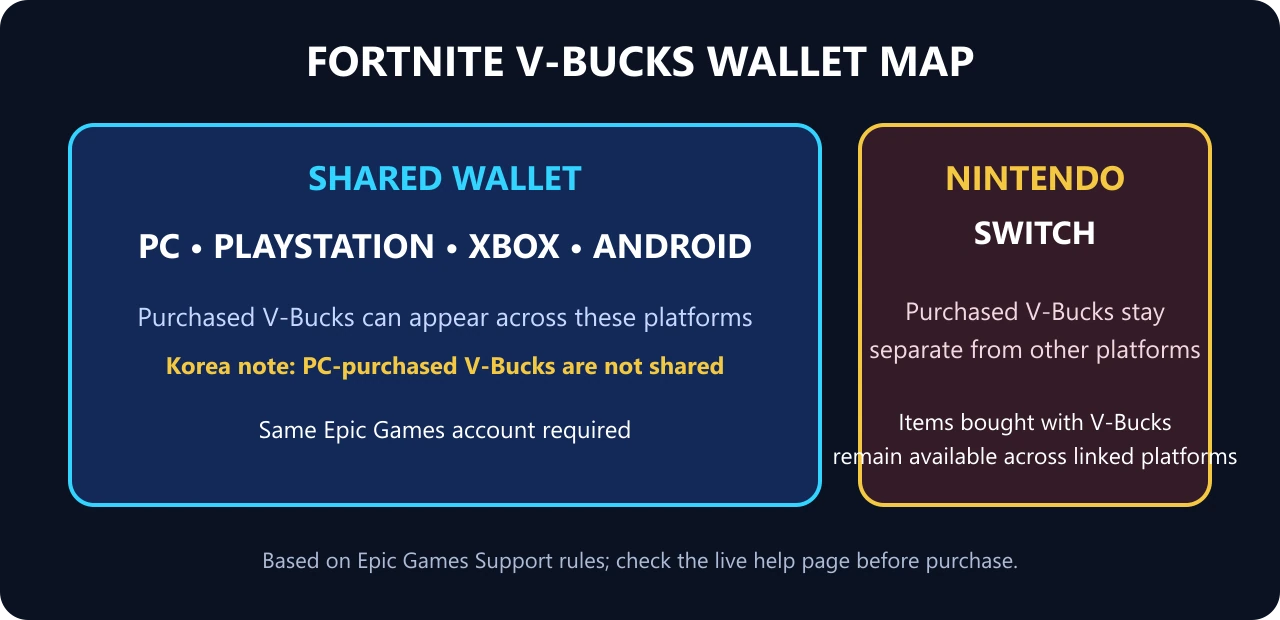
The map summarizes Epic’s current support rules; it is an editorial diagram, not a game or checkout screenshot.
There is also a regional exception. Epic says that for players in Korea, V-Bucks purchased on PC are not shared with other platforms. Because wallet behavior can change, recheck the live Epic help article when a purchase depends on cross-platform use.
| V-Bucks source | Where the balance appears | Important exception |
|---|---|---|
| Purchased on PC, PlayStation, Xbox or Android | Normally appears across Shared Wallet platforms linked to the same Epic account. | Nintendo Switch does not show that purchased balance. For players in Korea, PC-purchased V-Bucks are not shared. |
| Purchased on Nintendo Switch | Appears on Nintendo Switch. | It does not transfer into the balance shown on PC, PlayStation, Xbox or Android. |
| Earned through Fortnite Passes, Quest Packs or Save the World | Epic says earned V-Bucks are shared across platforms. | Check the current support page if the earning source or product terms change. |
| Items bought with V-Bucks | Available across platforms connected to the same Epic Games account. | The item can be shared even when the purchased V-Bucks balance itself is platform-restricted. |
Why the balance can look different on two devices
Start by separating balance visibility from account ownership. A Switch player may be signed into the correct Epic account and still see a different purchased balance because Nintendo does not participate in Shared Wallet. A player on another platform may instead be using a different Epic account, or may not have launched the platform that processed the purchase.
Check how the V-Bucks were obtained.
Purchased V-Bucks can follow platform-wallet rules. Earned V-Bucks and items bought with V-Bucks follow different sharing rules. A total alone does not identify which portion is locked to a platform.
Epic’s examples show how the totals can diverge. A purchase on PC can appear on PC, PlayStation, Xbox and Android while Switch shows zero purchased V-Bucks. A purchase on Switch can produce the reverse. Earned V-Bucks can still appear across platforms, which is why two balances may differ by only the purchased portion.
Activate the purchase on the platform that processed it
Epic’s missing-purchase guidance says purchased V-Bucks are added when you sign in to Fortnite on the same platform where the purchase was made. A PlayStation purchase, for example, requires launching Fortnite on a PlayStation console. The same-platform sign-in is a delivery check, not a transfer to another Epic account.
- Identify the purchase route. Was it Epic Games Store, PlayStation, Xbox, Nintendo, a redeemed card or another seller?
- Launch the original platform. Sign in to Fortnite on the platform that processed the purchase.
- Confirm the Epic identity. Match the Epic Account ID to the in-game profile intended to receive the purchase.
- Restart Fortnite once. This refreshes the displayed V-Bucks balance.
- Check the correct wallet. Remember the Nintendo and Korea-PC exceptions before expecting the same number everywhere.
Confirm the correct Epic Games account
Epic recommends comparing the Epic Account ID with the in-game profile when V-Bucks are missing. Display names can change and similar names can be confusing; the account ID is the stronger identity check. If separate console profiles are linked to different Epic accounts, a purchase can be valid but appear on the account you did not intend.
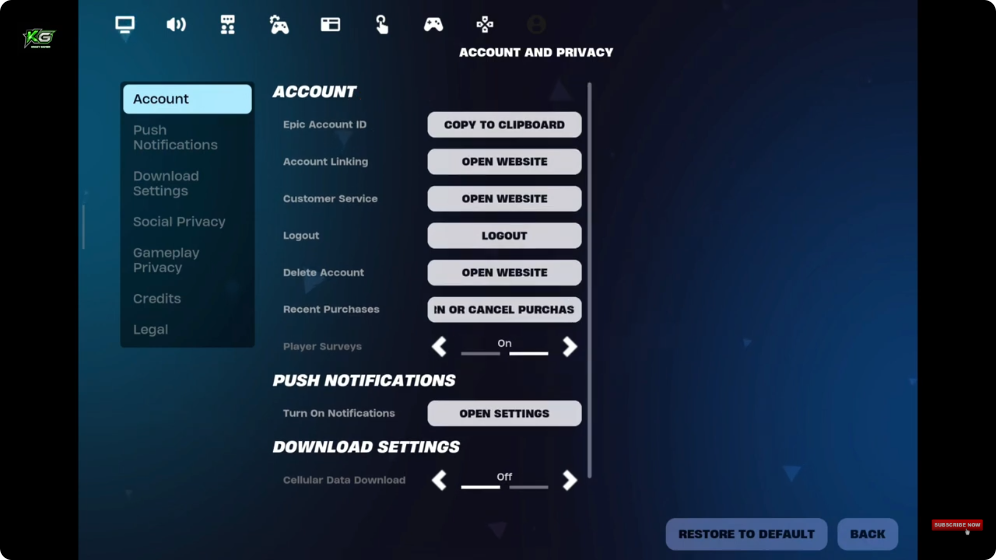
In Fortnite, open Settings, choose the Account and Privacy tab, then use the Epic Account ID row. Interface frame from Krazy Gamer’s 2026 account ID tutorial at 0:46.
Do not unlink and relink platform accounts as a first troubleshooting step. Account linking has restrictions, and changing links can create more confusion. Verify the existing account and contact the responsible support team before making structural account changes.
Use transaction history before paying again
Epic’s troubleshooting flow says to check transaction history. If there is no completed purchase record, the transaction may not have gone through; check with the bank or payment provider before trying again. If the purchase exists, keep the order number, amount, date, platform and Epic Account ID.
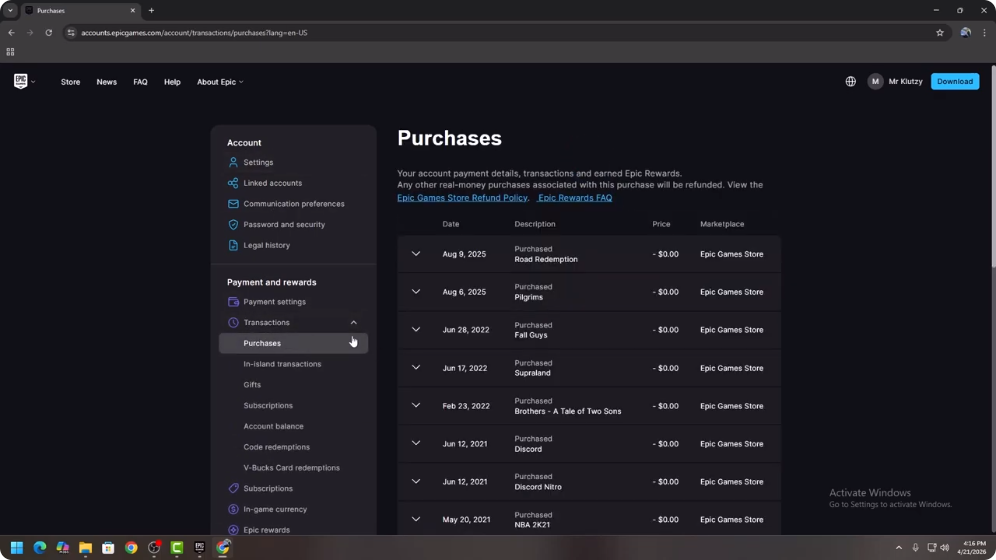
The Epic account site places Purchases under Transactions and lists each record by date, description, price and marketplace. Interface frame from DiziSight’s 2026 purchase-history tutorial at 0:34.
| What you see | Likely next check | Support route |
|---|---|---|
| No charge and no transaction record | The purchase probably did not complete. Check the bank or payment provider before retrying. | Payment provider or the store where checkout was attempted. |
| Completed transaction, no V-Bucks on original platform | Restart Fortnite, confirm the Epic Account ID and verify the exact store account used. | Epic for Epic Games Store purchases; the relevant console platform for PlayStation, Xbox or Nintendo purchases. |
| V-Bucks appear on one platform but not Switch | Check Shared Wallet rules. Purchased V-Bucks outside Switch do not appear on Switch. | No duplicate purchase; use the balance where it is available or follow Epic’s official guidance. |
| ManaBuy order still processing | Check the existing order and requested account fields. | ManaBuy order support; do not place a duplicate order. |
Who should handle a missing V-Bucks purchase?
The store that processed the transaction determines the support path. Epic says PlayStation, Xbox and Nintendo purchases should be investigated by the relevant platform support team because Epic cannot process refunds or investigate those platform purchases. Epic Games Store purchases can be submitted to Epic Support with the order number, amount and platform.
For a ManaBuy purchase, start with the existing ManaBuy order. The order number, submitted Epic Account ID and current status give support a clean record to investigate. A bank can confirm whether payment settled, but the order page is the useful first stop when delivery is still processing or the visible wallet needs checking.
Why players use ManaBuy for Fortnite V-Bucks
ManaBuy keeps the purchase workflow in one place: current supported options are shown on the live product page, required account fields are listed before delivery, and the checkout creates a trackable order. If verification or help is needed, the player can continue from that order record instead of rebuilding the purchase history from separate messages.
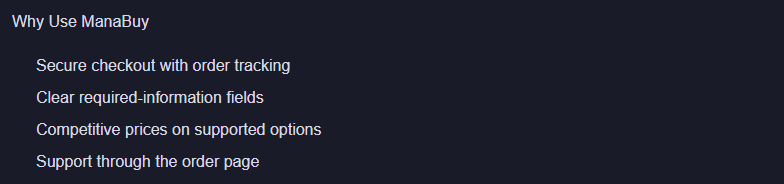
The current ManaBuy Fortnite page highlights order tracking, clear required fields, competitive supported-option prices and help through the order page.
What ManaBuy login top-up currently requires
The live ManaBuy Fortnite product page currently labels the method as Login Top-up. After payment, it requests the login method, account, password, character name and Epic Account ID. It says processing can depend on complete information, login approval or a verification code, and asks the player not to enter Fortnite while the order is being handled.
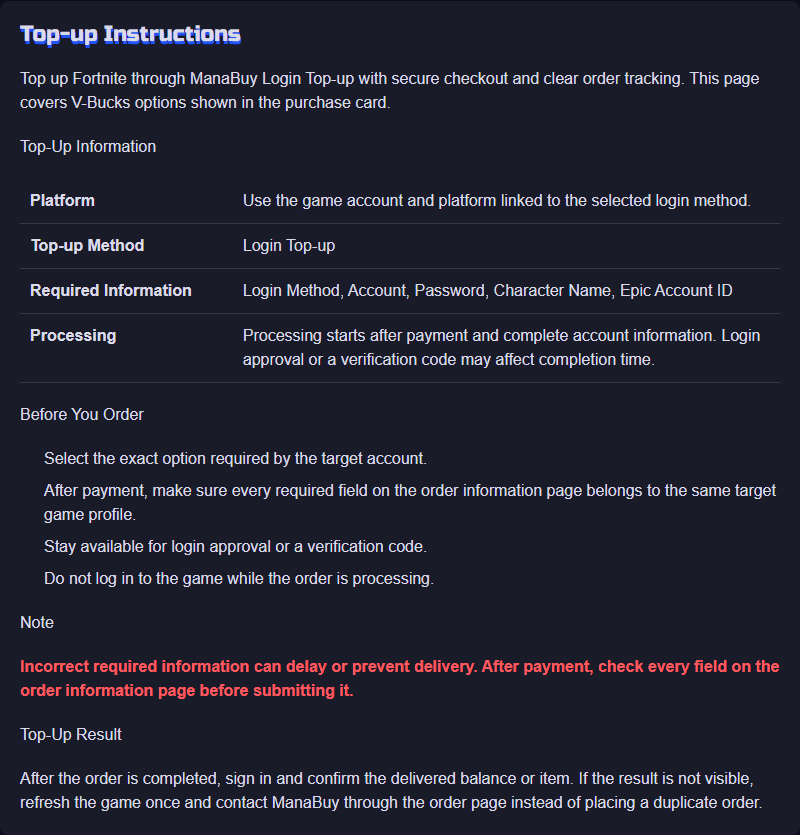
Current ManaBuy instructions show the exact Fortnite fields, processing conditions and before-order checks.
Avoid duplicate purchases and unsafe fixes
- Do not buy again before checking transaction history. A completed order may only need same-platform activation or a wallet check.
- Do not expect Switch to mirror another platform’s purchased balance. That difference is an official wallet rule, not proof of failed delivery.
- Do not send credentials in public messages. Use only the support channel attached to the responsible store or order.
- Do not unlink accounts casually. Confirm the Epic Account ID and contact support before changing platform links.

Related Fortnite and payment guides
Fortnite V-Bucks FAQ
Why are my V-Bucks different on Switch and PlayStation?
Purchased V-Bucks on Nintendo Switch are not shared with other platforms, and purchased V-Bucks from other platforms do not appear on Switch. Earned V-Bucks and purchased items follow different sharing rules.
Which platforms use Fortnite Shared Wallet?
Epic’s current examples group PC, PlayStation, Xbox and Android. Nintendo Switch is separate. Epic also notes that PC-purchased V-Bucks are not shared for players in Korea.
Do I need to launch Fortnite on the platform where I bought V-Bucks?
Yes. Epic says purchased V-Bucks are added when you sign in on the same platform that processed the purchase. Then check Shared Wallet rules for visibility on other devices.
Can I transfer V-Bucks to another Epic account?
No. Epic says direct V-Bucks purchases cannot be gifted to another account. Confirm the Epic Account ID before paying.
What should I do if V-Bucks are still missing?
Restart Fortnite, launch the original platform, confirm the Epic Account ID, check Shared Wallet rules and review transaction history. Then contact the store or platform that processed the payment.
Why use ManaBuy for Fortnite V-Bucks?
ManaBuy lists the required Fortnite account fields clearly, shows current supported options, provides order tracking and connects help to the order page. That keeps payment, delivery and support evidence in one traceable workflow.
Sources and further help
- ManaBuy: current Fortnite top-up options and instructions
- Epic Games Support: Why don’t all of my V-Bucks transfer across platforms?
- Epic Games Support: Why have I not received my V-Bucks after purchase?
- Epic Games Support: What content is shared between my platforms?
- Epic Games Support: Fortnite gift card and account-balance purchases
- Krazy Gamer: Epic Account ID interface at 0:46
- DiziSight: Epic Games Purchases interface at 0:34
Wallet rules, packages, prices and purchase routes can change. Recheck the live Epic support page, account and checkout before every transaction.