
BLEACH: Soul Resonance Nuverse Version and UID Top-Up Guide

BLEACH: Soul Resonance is available through different publishers, but a top-up made for one version cannot be assumed to work with another. Before you buy Spirit Coins or an in-game package, confirm that you use the supported Nuverse version and copy the UID from the account that should receive the purchase.
Quick answer: ManaBuy supports the Nuverse version of BLEACH: Soul Resonance. Check for Nuverse Pte. Ltd. on the App Store, Nuverse Games on Google Play, or Nuverse branding on the login screen. Then copy the receiving account's UID, choose a Spirit Coin amount or a currently available package, and pay at checkout. No game password or separate server selection is required.
Three Checks to Make Before You Top Up
1. Confirm the version
The store listing or login screen should show Nuverse. A UID from another published version cannot be used for this ManaBuy product.
2. Copy the correct UID
Open the receiving account's player profile and copy the UID exactly. Do not substitute a nickname or another visible number.
3. Choose the actual item
Decide whether you need flexible Spirit Coins or a named package that is currently shown for sale. Do not rely on an old package list or expired promotion.
How to Confirm the Nuverse Version
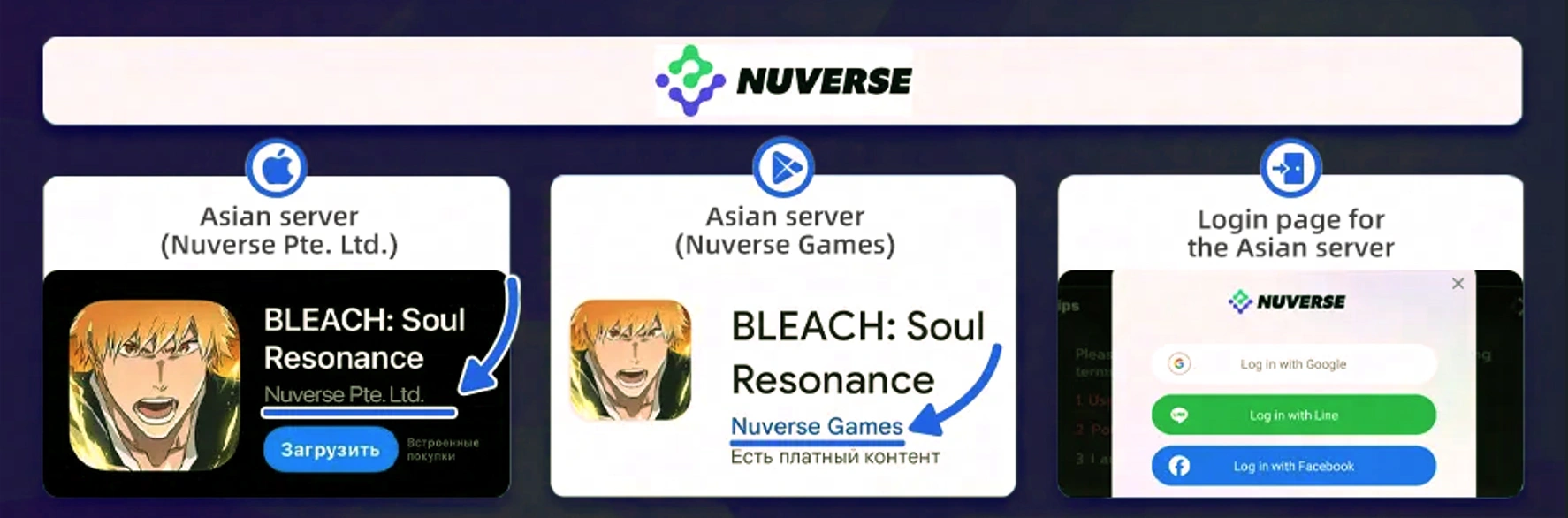
The publisher name is a more reliable check than the language you play in or the country where you are currently located. Use one of the three checks below before entering your UID.
| Where to check | What the supported version shows | What to do if it does not match |
|---|---|---|
| Apple App Store | Provider: Nuverse Pte. Ltd. | Do not place the order through this product. |
| Google Play | Developer: Nuverse Games | Do not assume a different publisher's UID is compatible. |
| Game login screen | Nuverse branding is displayed | Recheck the store listing or game client before paying. |
Game version is not an extra server field
In this guide, version means the game client and publisher you use. It is checked before the order because ManaBuy supports the Nuverse release. This is different from an order form that asks you to choose a server after entering an account ID. The BLEACH: Soul Resonance product page does not add that second step: once you have confirmed the Nuverse version, the account information field you complete is the UID.
How to Find Your BLEACH: Soul Resonance UID
The UID is shown inside the player profile. Copy it from the account that should receive the Spirit Coins or package.
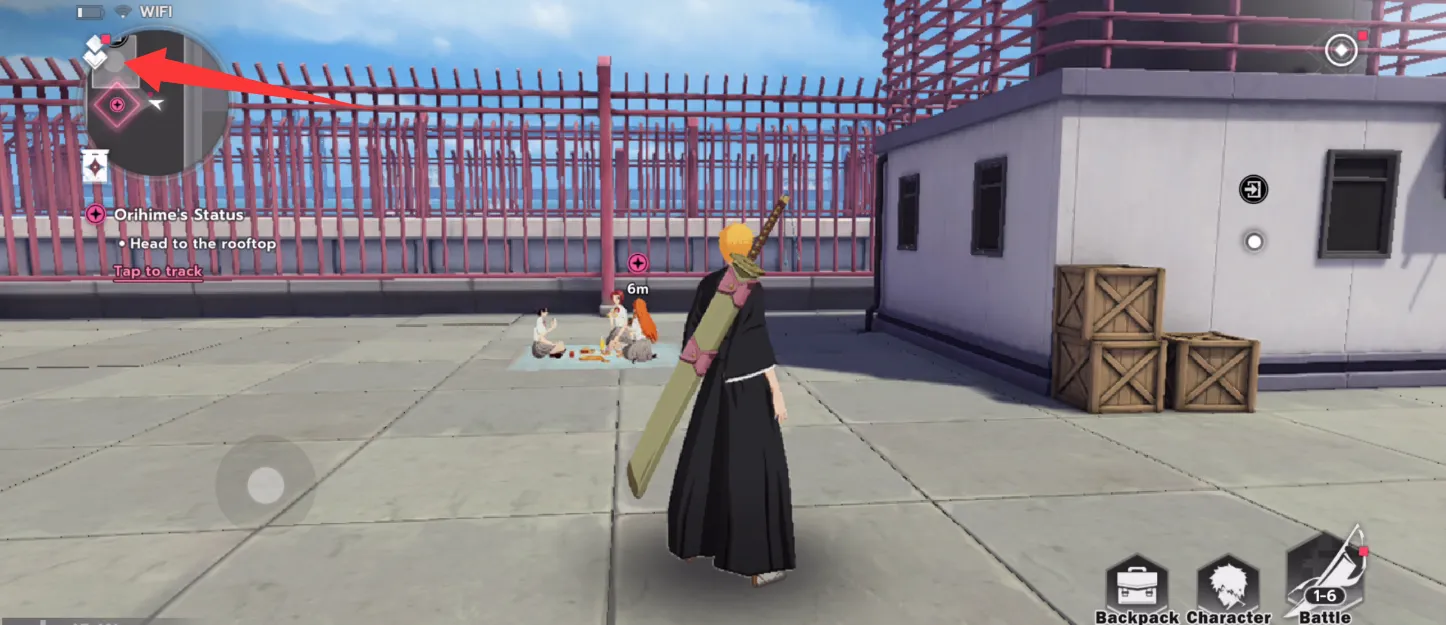
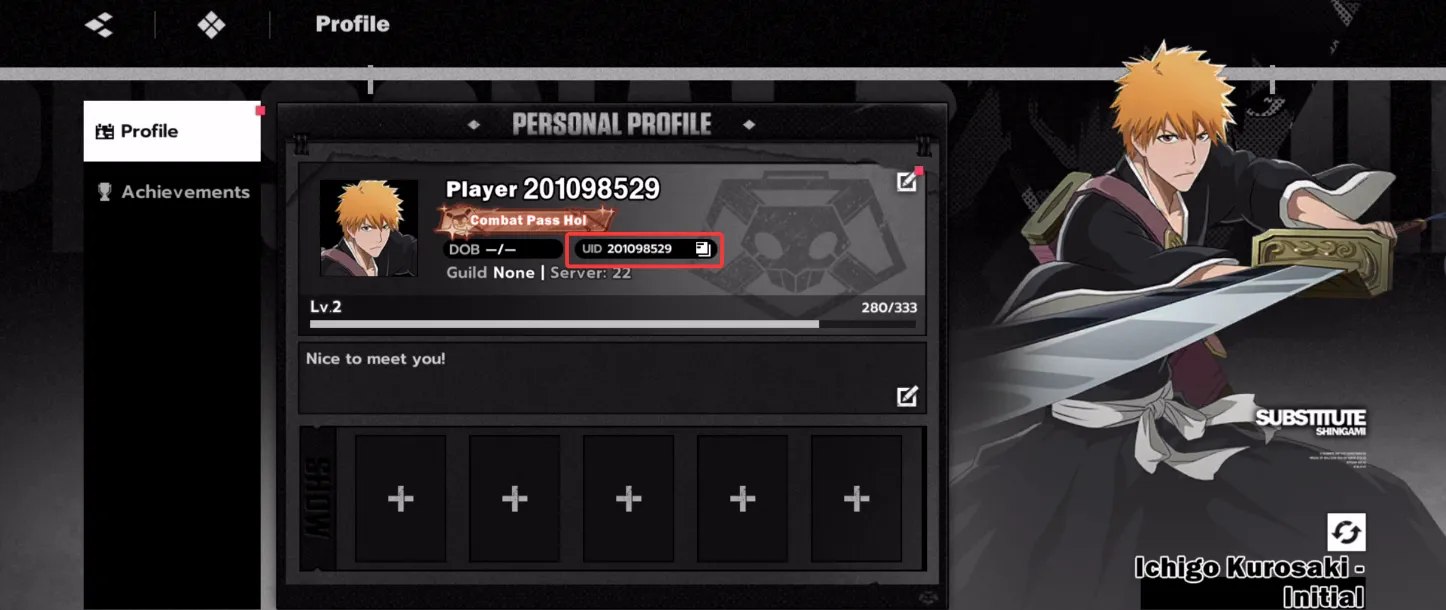
Check every digit before paying. The UID determines which game account receives the virtual item, so a valid UID belonging to someone else can send the purchase to the wrong account.
What Information Does ManaBuy Require?
| Information | Required? | Why it matters |
|---|---|---|
| BLEACH: Soul Resonance UID | Yes | Identifies the Nuverse game account that receives the item. |
| Game account password | No | ManaBuy's direct top-up flow does not require your login password. |
| Separate server selection | No | This product uses the UID field only; there is no extra server field to complete. |
| Checkout payment | Yes | You select a specific item and pay for that order at checkout; you are not loading a separate prepaid game balance on ManaBuy. |
Spirit Coins or a Named Package: Which Should You Choose?
ManaBuy may show both Spirit Coin amounts and named in-game packages. The right choice depends on what the receiving account currently needs, not on which card looks largest.
| Product type | Choose it when | Check before paying |
|---|---|---|
| Spirit Coins | You want paid currency that can be used for eligible options in the supported Nuverse client. | Open the game first and compare the amount you need with your current balance and the current in-game price. |
| Named package | The package shown on ManaBuy matches an offer or benefit you currently want. | Confirm the exact package name and whether your account can still purchase or receive it. |
| Monthly or limited offer | You have checked the current account status and the offer is still available. | Do not assume an expired, already-used or account-limited offer will remain eligible. |
Because the product list can change, this guide does not lock you into a fixed number of packs. Use the current ManaBuy product cards and the current in-game offer as the final reference.
How to Choose an Amount Without Guessing
Start with the content you actually want in the game. Open its current offer or exchange screen, note the amount required, and compare it with the paid-currency balance already on the receiving account. The difference is the useful amount to cover.
- Check the current in-game requirement. Event prices, exchange options and package availability can change, so use the live client rather than an older guide or screenshot.
- Check the receiving account's balance. If the account already has part of the required amount, calculate only the remaining shortfall.
- Compare the current ManaBuy options. Choose a Spirit Coin amount that covers the shortfall, or choose a named package when that exact package is the item you intend to receive.
- Review account limits. Monthly, limited or one-time offers may depend on previous purchases or current eligibility. A lower displayed price is not useful if the receiving account cannot accept that offer.
- Check the checkout total. The amount payable is the total shown before payment. Payment choices and currency conversion depend on the live checkout.
This approach is more reliable than choosing the largest option by default. It also keeps the purchase tied to a specific in-game goal while leaving room for future product-list changes.
How to Top Up on ManaBuy
Use the ManaBuy BLEACH: Soul Resonance top-up page and choose the language and payment currency you prefer.
Choose the specific product you want to purchase. Review its current name and price rather than relying on an older screenshot or list.
Paste the UID copied from the in-game profile and check the digits again.
Payment methods depend on the selected currency and the options currently displayed at checkout. Confirm the final amount before completing payment.
After the order is completed, reopen the game and check the relevant balance or package status on the receiving account.
Delivery, Failed Orders and Wrong-UID Orders
Normal delivery
Orders are usually delivered within seconds after successful payment. Exceptional cases can take longer.
Top-up failure
If the order cannot be delivered, the payment is returned to the original payment method. The time needed to appear depends on the payment provider or card issuer.
Successful delivery to a wrong UID
If an incorrect but valid UID receives the item, the delivered virtual item cannot be refunded, reversed, transferred or recovered.
If a completed order has not appeared
- Reopen the game and check the balance or package status on the same account whose UID you entered.
- Confirm that the order status is completed and that the client is the supported Nuverse version.
- Compare the UID in your order with the UID shown in the receiving account's profile.
- If the completed order still has not arrived, contact ManaBuy support and provide the order number and the UID used for the order.
BLEACH: Soul Resonance Top-Up FAQ
How do I know whether I have the Nuverse version?
Check the store listing or login screen. The supported App Store version lists Nuverse Pte. Ltd.; the supported Google Play version lists Nuverse Games; the login screen can also display Nuverse branding.
Can I top up a non-Nuverse version on this page?
No. This ManaBuy product supports the Nuverse version only. If your publisher or login branding is different, do not submit that UID through this product.
Do I need to choose a server after entering my UID?
No. The order form for this product requires the BLEACH: Soul Resonance UID only. There is no separate server field.
Does ManaBuy need my game password?
No. This is a UID-based direct top-up. Never enter your BLEACH: Soul Resonance login password into the UID field.
Should I buy Spirit Coins or a package?
Choose Spirit Coins when you want flexible paid currency. Choose a named package only when it matches the current offer or benefit you want and your account is eligible to receive it.
How long does delivery take?
Delivery usually completes within seconds after successful payment, although exceptional cases may take longer. Reopen the game and check the receiving account after the order is completed.
Can a successful top-up be moved from the wrong account?
No. Once a valid UID has received the virtual item, it cannot be refunded, reversed, transferred or recovered. Copy the UID from the receiving account and verify every digit before paying.
Related BLEACH: Soul Resonance Help
For current product choices and prices, use the BLEACH: Soul Resonance top-up page. More game guides and purchase help will be collected in the ManaBuy BLEACH: Soul Resonance guide hub.
Verification sources: Nuverse version identifiers were checked against the Nuverse Google Play listing and Singapore App Store listing. Product eligibility, order fields, delivery wording and refund boundaries follow the current ManaBuy product flow.



Copyright © FUTURE OUTLOOK TECHNOLOGY LIMITED.Company Registration No.: 77374965 All rights reserved.UNIT 135,1/F.,143 WAI YIP STREET,KWUN TONG HK