
Arena Breakout Bonds Top-Up Guide: Player ID, Mobile Route and Pack Choice

Arena Breakout mobile top-ups use the numeric Player ID from the receiving profile. They do not use a separate server field and they do not apply to Arena Breakout: Infinite on PC. Confirm the mobile product, copy the Player ID from the account that should receive the order, and check whether you are buying Bonds, a Battle Pass, or a case item because delivery can appear in different places.
Mobile Arena Breakout and Arena Breakout: Infinite are different products

Bonds and Koen solve different problems
Bonds are the premium balance used for eligible paid products, while Koen is the core in-game economy used around gear and market activity. An official Arena Breakout event can list both Bonds and Koen as separate rewards, which is a useful reminder that they are not the same balance. Do not buy Bonds because a loadout or market item displays a Koen price.
What to check before buying Arena Breakout Bonds
| Check | Where to confirm it | Why it matters |
|---|---|---|
| Mobile account | Android or iOS game client | The page is not for Arena Breakout: Infinite. |
| Player ID | Lobby avatar → Personal Info | Routes the order to the intended mobile profile. |
| Product type | ManaBuy product card | Bonds, passes, and case products have different delivery results. |
| Final payment total | Checkout after selecting a method | Confirms the payable amount before authorization. |
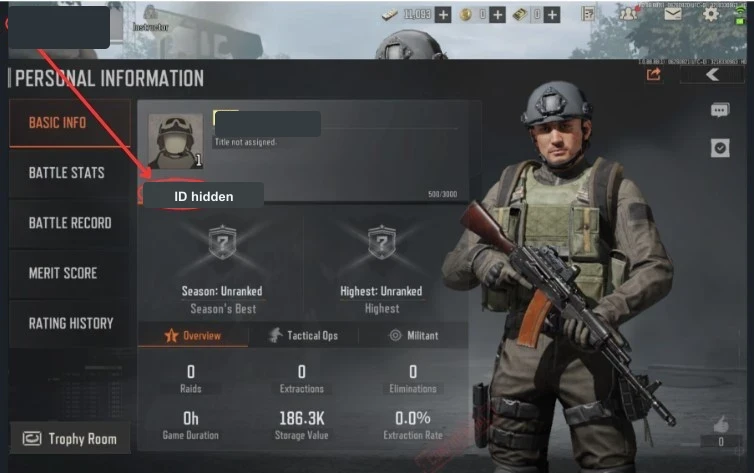
How to find the Arena Breakout Player ID
- Open the mobile account that should receive the order.
- Tap the avatar in the upper-left area of the lobby.
- Open Personal Info and copy the numeric Player ID.
- Paste that number into the ManaBuy field. Do not use a nickname, clan name, login email, or an Infinite account ID.
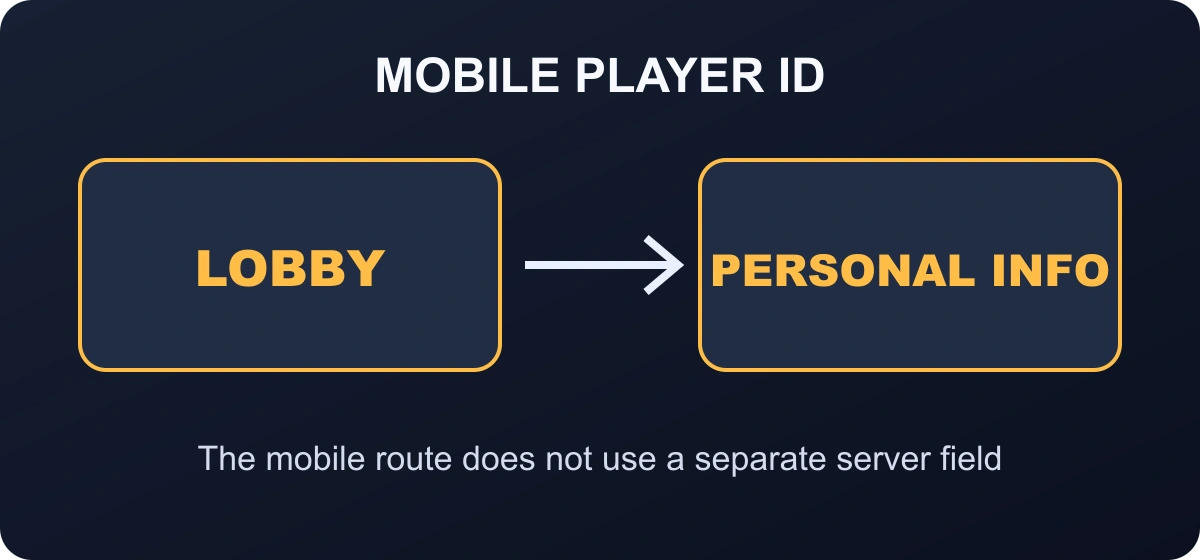
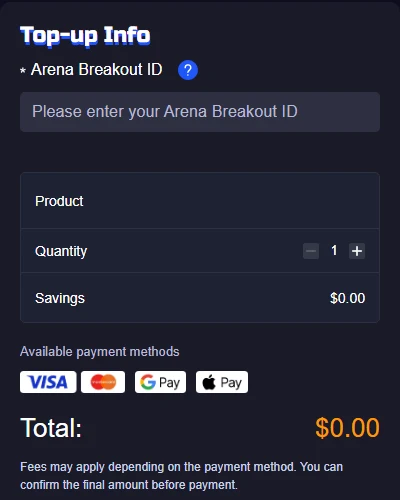
The form asks for an Arena Breakout ID, not a password and not a character nickname. Keep Personal Info open while entering it. If you have also played Arena Breakout: Infinite, verify that the number comes from the mobile account before paying.
How to top up Arena Breakout on ManaBuy
- Open the Arena Breakout mobile top-up page.
- Select a Bonds pack, Battle Pass, or case product after checking the exact in-game need.
- Enter the numeric Player ID copied from Personal Info. No separate server selection is required.
- Review the game name, product, quantity, Player ID, payment method, and final total.
- Complete one payment and keep the order number until the correct balance, pass, or mailbox item appears.
Use the Mobile interface as the visual cross-check

The game art and season name can change, but the receiving product still needs to match Arena Breakout Mobile. If a search result, store card or guide says “Infinite,” leave that route and return to the Mobile product page. The two games can share tactical themes while using different account identifiers and product systems.
Inside Mobile, open Personal Info from the avatar and copy the numeric ID. Then compare the live product card with the destination you intend to use: Bonds balance, Battle Pass, case privilege or another named product. This two-screen check—Personal Info plus the intended product screen—prevents most wrong-client and wrong-destination mistakes.
Budget around a specific use. For a fixed Shop item, subtract any Bonds already owned. For a pass, check the remaining season time and progress requirements. For recurring privileges, confirm the active period on the product card rather than assuming a second purchase will stack in the way you expect.
Choose the right Arena Breakout product
| Product | Where to check after delivery | Before you buy |
|---|---|---|
| Bonds pack | Bonds balance | Subtract your current balance from the confirmed store or pass price. |
| Advanced Battle Pass | Pass status and in-game mail | Check the remaining season time and whether another pass tier is already active. |
| Premium Battle Pass | Pass status and in-game mail | The current product guidance says Advanced and Premium are normally mutually exclusive on this route during a season. |
| Case item | In-game mail and case privileges | Confirm duration and whether a similar case benefit is already active. |
Unit value matters only after the product matches your goal. A larger Bonds pack can reduce the unit cost, but it is not a better purchase when most of the balance has no defined use. A pass can offer broader progression value, but only if enough season time remains. A 30-day case product is useful only when you will play during the covered period.

Check the destination that matches the product
A balance product and an item-style product do not always appear in the same place. After payment, reopen Arena Breakout Mobile on the receiving account and check the location named on the selected product card: the Bonds balance for Bonds, the pass screen for a pass, and the in-game mailbox or relevant inventory for a delivered item. Restart once if the account was already open during delivery.
If the order is still marked processing, wait on that order instead of paying again. If it is completed, compare the submitted Arena Breakout ID with Personal Info, save the order number, and capture the expected destination screen. That evidence lets support distinguish a delayed refresh from an order sent to the wrong account.
What to do if the order is completed but nothing appears
- Open the same mobile profile whose Player ID was submitted.
- For Bonds, check the balance. For a pass or case, check in-game mail and the related feature page.
- Restart the client once if the account has not refreshed.
- Compare the order product and Player ID with the current account.
- Contact ManaBuy support with the order number and a privacy-safe screenshot if the completed product is still missing.
For Malaysia pricing and payment details, the existing Arena Breakout Malaysia top-up guide owns that regional checkout intent. This guide stays focused on the global mobile account route.
Common Arena Breakout top-up mistakes
- Using the mobile product for Arena Breakout: Infinite.
- Entering a nickname instead of the numeric Player ID.
- Buying a Battle Pass without checking which tier is already active.
- Looking only at the Bonds balance when a case or pass may arrive in mail.
- Choosing a large package only because its unit cost is lower.
- Paying again while the first order is processing.
Arena Breakout Bonds top-up FAQ
Does Arena Breakout top-up need a server?
No. The current mobile route uses the numeric Player ID and does not ask for a separate server selection.
Can I use an Arena Breakout: Infinite account?
No. Infinite is a separate PC product. Use the mobile route only for the Android or iOS account shown on the product page.
Where do case products arrive?
The current product guidance says case and Battle Pass products are usually sent through in-game mail, so check the mailbox as well as the relevant feature page.
Can I buy Advanced and Premium Battle Pass together?
The current product guidance says only one can normally be purchased through this route during a season. Check the active pass before ordering.
What if I entered the wrong Player ID?
Contact support immediately. A direct order that has already delivered to the submitted ID usually cannot be reversed.
Can I top up a friend's mobile account?
Yes, by placing a separate order with the friend's correct Player ID. Confirm the number privately and never request the friend's password.
Final recommendation
Confirm mobile versus Infinite first, copy the Player ID from Personal Info, and match the product type to where it will appear after delivery. Bonds, passes, and case items solve different needs; check the correct balance or mailbox before deciding that an order is missing.



Copyright © FUTURE OUTLOOK TECHNOLOGY LIMITED.Company Registration No.: 77374965 All rights reserved.UNIT 135,1/F.,143 WAI YIP STREET,KWUN TONG HK